Best Of
Re: Some Amex accounts are not being discovered
Hello @Myles,
I was able to get this issue reported to our product team. They will take over from here and start to work on a resolution. I will be sure to follow up with any status updates we receive going forward for this issue here.
Thank you for your patience!
-Coach Jon
CTP-15280

Re: Amex 401 error
Thank you…I'm aware of that post. My point is that 4 weeks of silence for an integral component of a paid product isn't acceptable. Some kind of update ought to be forthcoming. I was hoping to prompt one ;-)
 jason2
Re: Mobile App: Income & Expense Report: Add a grand total for each category for the timeframe selected
@ChefKeith, thanks for the reply!
I apologize for the confusion — when referring to what SRC54 mentioned, I meant having Interval options like the Web App allows, not using the Spending Report:
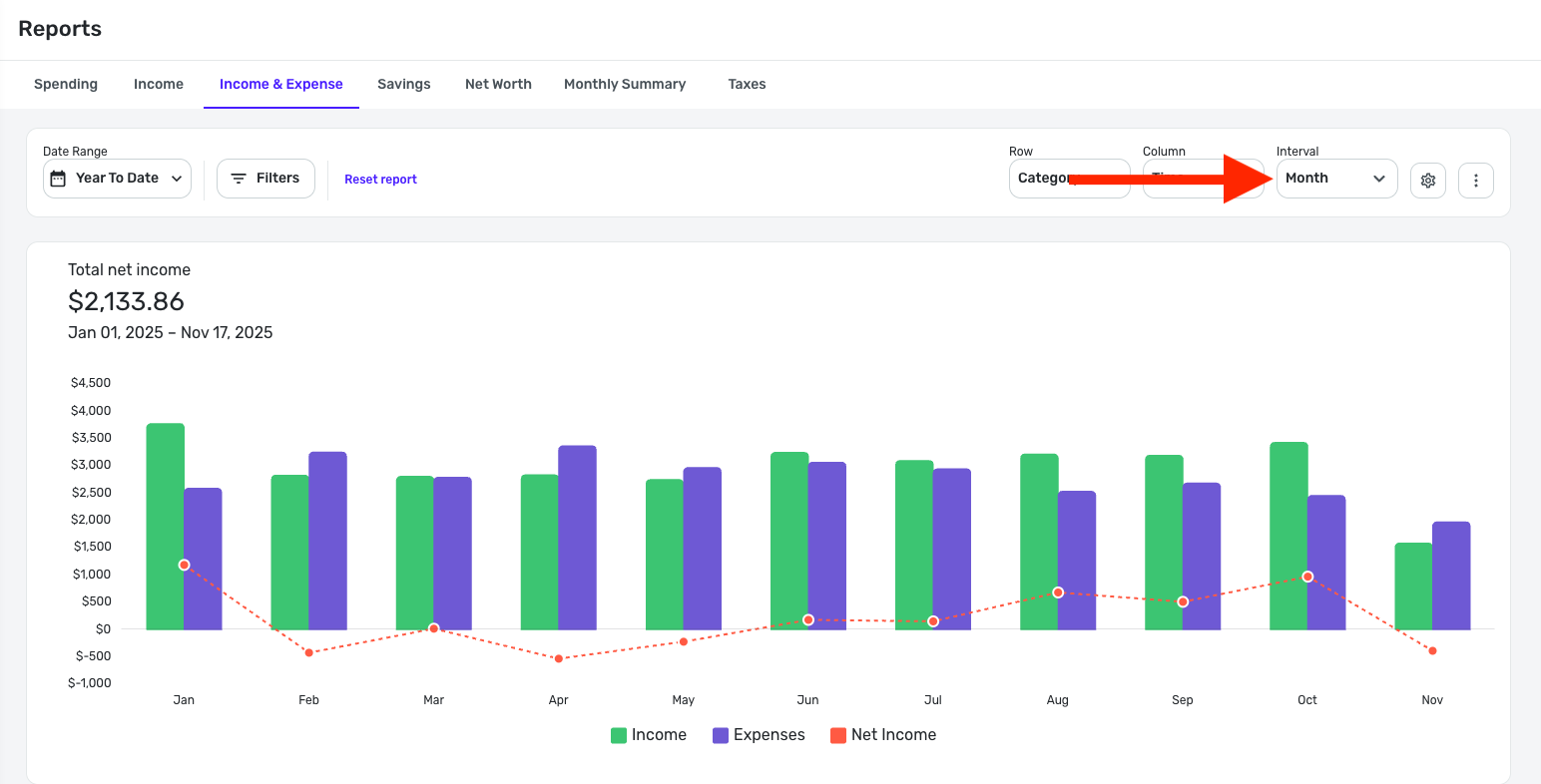
Otherwise, I'm afraid I'm not seeing any differences between the Web and Mobile Apps when using the Income & Expense Report. Both have a graph that shows Income, Expenses, and Net Income, with a 'Total net income' at the top. I can scroll down on both to see the totals for each individual month. On the Mobile App, I can click into a month to see the category drilldown, which the Web App shows on the main screen. I can click into any of the categories in both locations to view and edit the transactions.
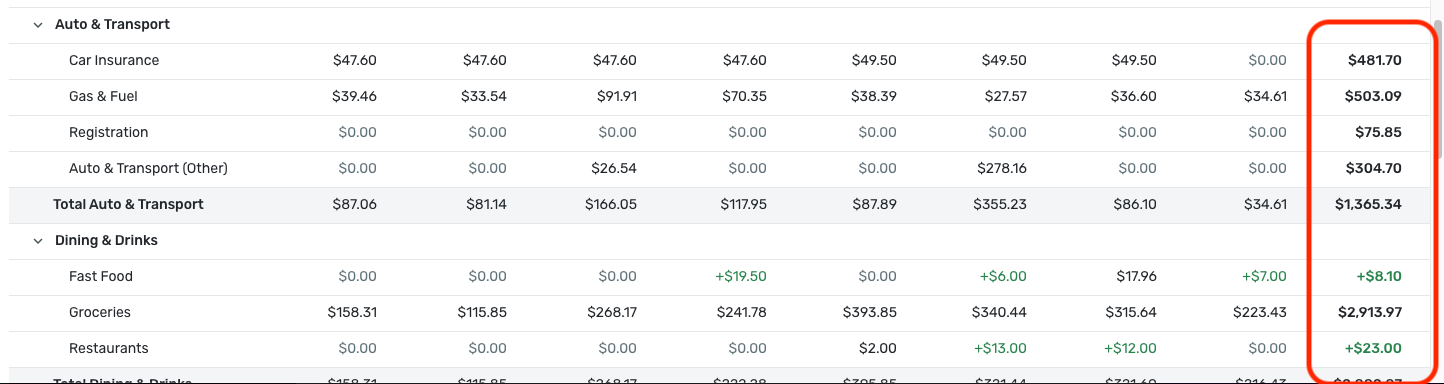
I guess there is one difference I'm seeing — the Web App has the grand total for each category for the time period selected, and I'm not seeing this on the Mobile App anywhere. Is this the "Total" you're referring to?
Let us know!

Getting Setup for 2026 - A Just for Fun Post
For 2026, I am going to give rollover feature in Planned Spend another…. spin.
Over the weekend I did some analysis of my non-monthly and thus excluded from the Spending Plan expenses in preparation for my 2026 budgeting and Spending Plan update.
I sorted out all my annual fixed expenses and my annual or non-monthly planned expenses to update how much I need to set aside monthly to cover these costs, both fixed and flexible.
In the process, I decided to add all these expenses to my Spending Plan as Planned Spend expenses creating a number of Planned Spend buckets with rollover switched on. I tried this back when rollover was first added to Planned Spend for a few of these expenses for a few months and reverted back to the Savings Goal workaround. The main reason for sticking with the SG workaround was because of the ability to see in the accounts list what part of my cash balances were designated for future expenses - this is not possible with the rollover funds in the same way.
My new setup:
I started with some minor changes and reordering of my category list to accommodate the new Planned Spend buckets I would need to add.
I added the new buckets to Planned Spend with the appropriate expense categories attached. All of my new buckets have some to-date funding set aside for future spending in existing Savings Goals and in specific bank accounts. I added the currently available for each expense to the newly created bucket as "Opening rollover" and the Target amount is naturally 1/12 of what is needed for the coming year. (I know this is November and I'm talking about 2026 expenses, but these are all "rolling targets." For example, I paid my auto insurance premium in September, and it will come due again 9/26 so that I am already two months into the 12 months savings cycle, etc.)
Once the new buckets were added to QS, my "left this month" went negative. To "fix" this, I ended the Savings Goals associated to these non-monthly expenses which eliminated the monthly contributions restoring those contribution amounts to my available for the month returning my Spending Plan to a positive cash flow for the month.
Next issue: QS sorts Planned Spend buckets alphabetically jumbling my monthly and nonmonthly Planned Spend buckets together. To sort them, I added a "prefix" to each bucket - "M" for monthly and "NM" for non-monthly/annual/semi-annual.
Example:
- M - Groceries & Household
- NM - Home & Auto Insurance
This did two things: it sorted my non-rollover my rollover buckets into separate groups, and it forced my non-rollover buckets to the top half of the list and my rollover buckets to the bottom half of the list.
Now, back to the "problem" that kept me from sticking with the Planned Spend rollover feature last year - where is the money? I transfer funds from my checking account monthly into 3 separate savings accounts. Each savings account holds the funds for specific non-monthly expenses. I will continue to make these transfers which combined, covers all these expenses and I will make payments for these expenses out of those accounts when they come due. I know that the funds in these savings accounts are designated funds and are NOT available to spend on anything else and this is the essence of what a Savings Goal does virtually.
In some instances (i.e. property tax, annual insurance premiums) the payments are made directly out of these accounts and once completed, the transaction is categorized appropriately and accounted for in my Spending Plan using the excess rolled over funds for that bucket (I hope).
In other instances, the expense will be paid for via a credit card, and I will need to make a payment from the appropriate savings account to the credit card to cover that/those expenses when they are incurred.
I know how I think this new arrangement will pan out, but I have no idea if it will pan out as I expect. Time will tell.
 DannyB
Re: New York Life showing balance of $0 on IndexFlex Variable Annuity account (edited)
@LJMR, those screenshots are perfect — thank you!
I have filed a ticket for this issue and will post back here with updates.
CTP-15271
Computershare FDP-192
Computershare has been returning FDP-192 error for months now. Is this ever going to be fixed? [removed competitor mention] and Mint (RIP) never have/had issue with Computershare. Why does it take so long to resolve this? Why are we paying for a service that can't do this basic function for a very popular banking platform?