Best Of
Re: Wells Fargo FDP-1022 (Simplifi Version 4.67.0)
I have performed the steps as provided by @Coach Kristina and the accounts have been re-linked and downloaded the transactions. If I experience the same problem, then I will follow what has been provided by @DannyB to get a clean connection again with Wells Fargo. Thank you both.

Re: Wells Fargo FDP-1022 (Simplifi Version 4.67.0)
Hello @Dick_Davis,
Thank you for letting us know you're seeing this issue. Based on your description, it sounds like this issue is happening with accounts that were previously connected and working. If that is correct, then to troubleshoot the problem, please make the problem accounts manual (for instructions, click here), then add the accounts (for instructions, click here), and link them to the correct account names in Quicken Simplifi (for instructions, click here).
Please let me know how it goes!

Re: New Member - Greetings :)
Thank you both so much! That was very insightful and helpful!
Re: Wells Fargo FDP-1022 (Simplifi Version 4.67.0)
I'm a Wells Fargo customer and haven't experience any connection issues during the period you describe.
One step I would add to what @Coach Kristina outlines above, is to delete your Quicken connection from the banks side. Sign into Wells Fargo click on the account icon top right of page, select "Manage access" and then select "Manage connected app." Click on the "+" next to Quicken and then click "Remove."
This will give you a completely fresh connection when you reconnect to Wells Fargo from QS.
 DannyB

Re: Coastal Federal CU accounts won’t update - FDP-106 error (edited)
I got the system to work today!
Re: Persistent Filters & Views in Reports: Share your feedback here!
Thank you for these updates. I use Spending and Income reports to help track my budget. Changing the reports every time was starting to make me grumble. I even sent this in as a suggestion. Thanks for listening. I'm a happier camper now. Thank you!
 JAW
JAW
Re: New Member - Greetings :)
Welcome to Quicken Simplifi. I hope you will enjoy the app and our community. You mentioned the Spending Plan, which is the unique feature to Simplifi, which doesn't use old style budgeting like Quicken Classic, which is supported on another community.
There are myriad ways you can handle these quarterly shopping trips. The simplest way would be to create a Recurring Reminder in the Bills Section of the Spending Plan naming it Sam's Club, entering the amount you expect to spend, say $250. You can categorize it as Supplies or Household Goods or whatever category you use.
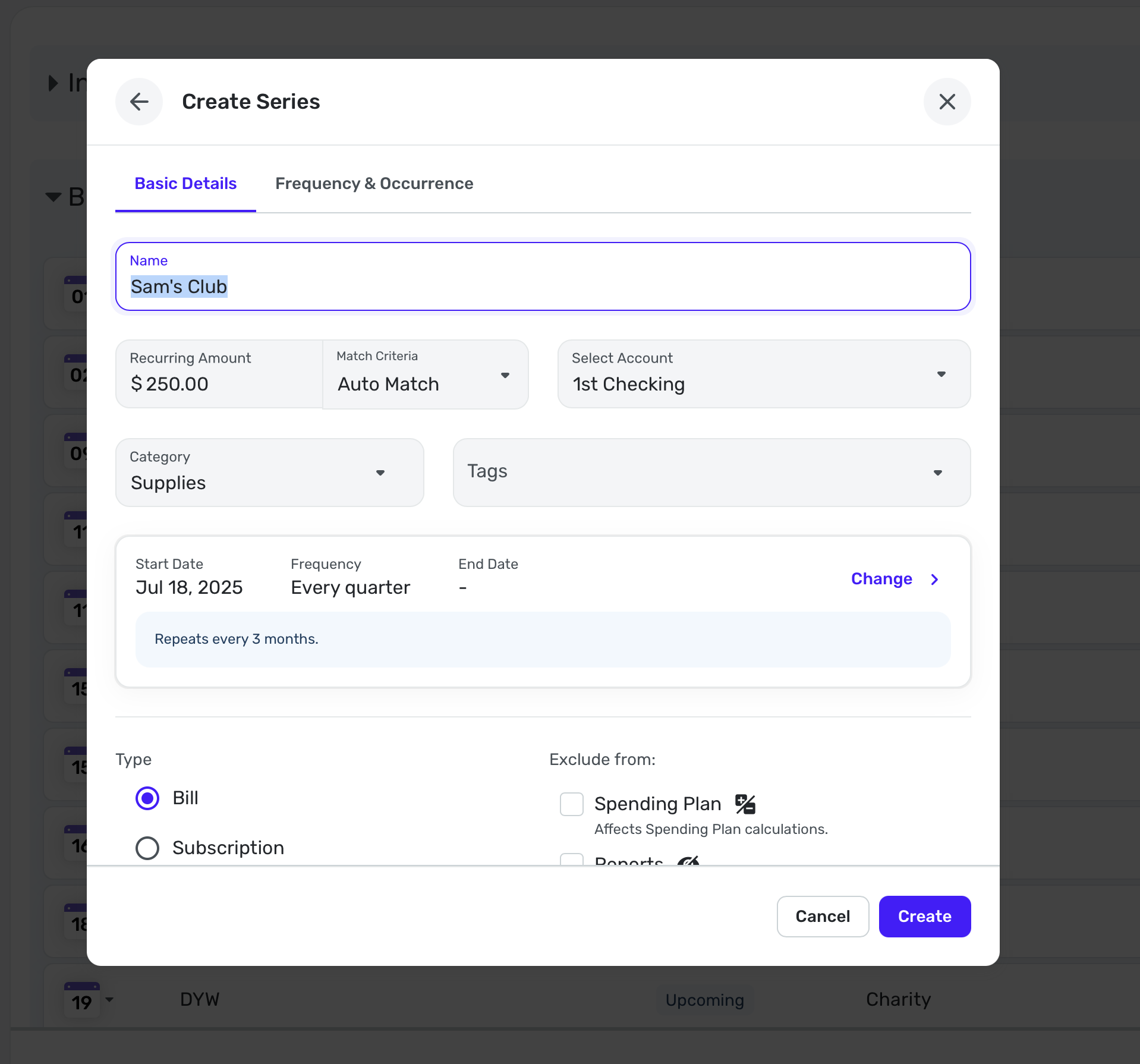
You can create this reminder from an actual transaction if you already have one or you can do it manually as I have above.
Then every 3 months (or whatever interval you need), you can know that this is already "budgeted" in your Spending Plan. Then when the transaction comes in from your bank or credit card, Simplifi will link them (if not, you can link them manually).
Anyhow, this is one way you could do it. Other users will likely give you their suggestions. Enjoy!
 SRC54
SRC54
Re: What is the status 2/19/25: Date Picker Starting on Monday Instead of Sunday in Quicken Simplifi Web
It is Sunday for some calendars in the app, but Monday on the date picker. For those of us who are visual, we see the grid rather than the headers and assume, for instance, that the middle of the calendar is Wednesday. I am selecting incorrect days as a result. If the app were to follow the default set on the computer, or provide the option for the user to set the date in Settings, that would remedy the situation.
Thank you.
Re: Ability to add Planned Spending Items to our Projected Cash Flow [edited] (4 Merged Votes)
@DannyB - Question on Point 3
I see bills and subscriptions coming out of my projected cash flow. It comes out of whatever account is linked to it on the date the bill is due.
For example I have a small account I use for a couple subscriptions mostly annual. Here I have my Apple One subscription coming out and it shows as projected cash flow depletion. This is true for Bills & Subs as I have my Water Bill showing the same way in another account. So I think the non-monthly expenses would show properly in the "month" the cash is disbursed. I set up an annual bill it will put the cash in the month the annual bill is scheduled.

I think then the idea of "setting aside" money is more important since you don't have negative cash flow you just have reserved balance. Therefore if the "Rollover feature being discussed" helps then the following may not be important but right now I think Savings Goals are "Cash Reserves" and thus should not be negative cash flow but an earmark on the existing cash that you will need it in the future. The Annual bill would let you see when the cash is truly leaving the bank.
I wish we could link the Annual bill to a savings goal as a sort of "Virtual Account" so it would balance the spending plan that month.
Also, I think the term "Savings Goal" can throw people off of the power of their functionality. I did a different post that if we could have them as multiple types. Like "Savings Goals" and "Non-Recurring Planned" that would help delineate between aspirational and required but still set money aside in the account on the "Accounts" panel on the left hand side of simplify that you see on the "Dashboard" and "Transactions" screens.
On another note:
I roll 90% of my spending through a credit card so I would actually want to tie my planned spending to a credit card and have it project cash outflow on the day the payment comes every month. I would prefer I can link the bill to a credit card and setup a payment date that all the bills will be paid on but I use a recurring bill called CC Repayment for Soending Plan that is a Transfer from CC to Main Checking. (I have not found the way yet!)
I would like to be able to see a way to project the depletion of a spending goal but would prefer to have the "Rollover" functionality completed first to see how that is implemented to know how that impacts spending goals. Then figure out that since essentially contributing to a savings goal "sets aside" the funds in the account so you don't go sub-zero if you contribute on time.
