Best Of
Re: Enhanced Reports: Share your feedback here!
This has to do with the difference in the way we create these reports. The Spending and Income reports are currently Detail reports, meaning they are focused on transaction data. The overtime graph requires Summary data with columnar values per month, so we actually don't have the data to draw the overtime chart. The solution is to add an option for you to change the Spending and Income reports into a Summary report so you can then get an overtime chart. We're working on the Summary report, but it isn't quite ready yet.
The bottom line is we'll be adding an overtime chart soon, but first, we need to ship the summary report for Spending and Income.
Re: Amount Matching: "Limited Range" option not matching correctly (edited)
Hello @DryHeat,
Thanks for the reply and the requested screenshot. We should be able to escalate the issue you are having with the Limited Range Amount Matching option. Please supply your web browser, operating system, and their respective versions.
Please also supply logs for us when you can.
- Log in to the Quicken Simplifi Web App.
- Select Profile from the left-hand navigation bar.
- With the Profile menu open, hold down the Option key for Mac or the Alt key for Windows, and then click Send Feedback.
- Leave all boxes checked, add a brief description of the issue, and then click Send.
-Coach Jon

Re: Amount Matching: "Limited Range" option not matching correctly (edited)
In addition to the example you provided above, can you provide a screenshot showing the transaction that was improperly matched, as well as the transaction that it should have been matched to?
Below is the transaction that was improperly matched to my credit card payment recurring series. It has been corrected to undo that match. (I provided you with an image of the series in my previous post.)
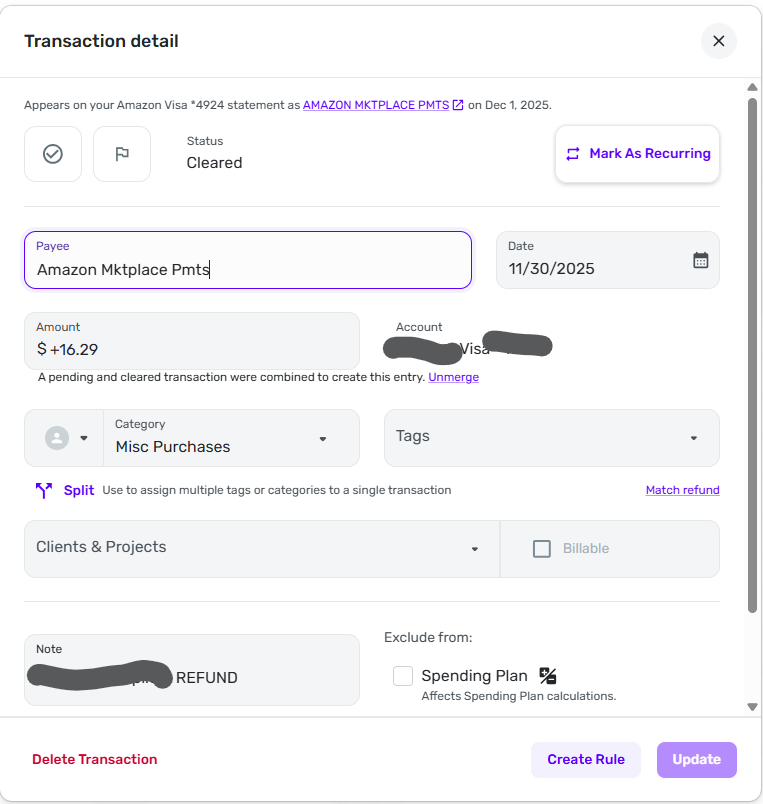
The transaction should not have been matched to any transaction at all. It was an individual Amazon return/refund and was not supposed to match any existing Simplifi series or refund. It should have just come in as a normal credit card transaction.
(Note: my initial post regarding Auto Match also involved an Amazon return/refund that should not have matched anything. It seems like Simplifi leans toward matching transactions with a positive sign with my upcoming credit card payment.)
 DryHeat
Re: How do I show third level categories transactions in [planned spend]?
It was the recurring series. As soon as I deleted the series all the transactions that had been in the series showed up in the spend plan correctly. So no more use of series for me…..I'll handle them one at a time as they download.
 PatD
PatD
Re: How do I show third level categories transactions in [planned spend]?
Yes - I did make sure that check boxes were clear. Thank you.
PatD
Re: Amount Matching: "Limited Range" option not matching correctly (edited)
The Amount Matching feature was added to accommodate for situations like this, where "auto match" has not worked well. We can work on getting a bug report filed for specific examples where one of the Amount Matching options isn't working properly. In your case, Limited Range seems to be having an issue, as reported here.
In addition to the example you provided above, can you provide a screenshot showing the transaction that was improperly matched, as well as the transaction that it should have been matched to? If you do not have the information at this time, can you supply those examples when/if the issue occurs again? You may feel free to DM this information as well! Thank you!
-Coach Jon

Re: Enhanced Reports: Share your feedback here!
Hi DannyB thanks for the feedback. This is exactly why we're allowing people to turn on the new reports early so we can hear your feedback. Currently, the columns are auto-sized to fill up the entire screen and really only the first column has an unlimited variable width is why on big screens the first column is huge making it hard to read across the report. One idea we're kicking around is to auto-size the width of each column so that we accommodate the longest text, but probably cap it at some width so a single item doesn't make that one column really wide. This would also left justify the report content. Anyway, we are working on changing the column widths.
Re: Enhanced Reports: Share your feedback here!
Clicking on Top Spending Categories should go to a drill-down of the categories. I'll write up that bug. Thanks for letting us know.
Re: [ONGOING] 11/18/25: CIBC Bank USA returning FDP-163 error
ONGOING 12/02/25
This Alert is still listed as ongoing and there is currently no ETA on a resolution, though we are continuing to investigate the issue. We will be sure to post back when an update or resolution becomes available, so please bookmark this Alert to receive those notices when they occur.
We appreciate everyone's patience!