Best Of
Re: Certain transactions always come auto flagged as "exclude from spending plan" (edited)
Thanks for the clarification. This change should have been rolled out together with the new spending plan. Having income not in a series or auto matched to a series excluded makes the spending plan less useful without the rest of the changes rolled out. I will keep monitoring the transactions and including non recurring income back in the spending plan as needed.
 UrsulaA
[ONGOING] 07/09/25: Fidelity Inv & Retirement - Persistent 324 Reconnect Error
We are currently seeing an issue with Fidelity Inv & Retirement, where users are receiving a 324 error and being asked to reconnect their Fidelity accounts daily in Quicken Simplifi. This is a known issue that we are working to resolve as quickly as possible. We currently have no ETA to provide on when a resolution can be expected, but will post updates as soon as we do.
In the meantime, users should be able to connect to the Finicity instance while this issue is being worked on by making your existing accounts under Fidelity Inv & Retirement manual, and then re-linking the accounts under the "Fidelity Investments" instance in Quicken Simplifi.
The instructions to do this are:
- Make all of the accounts with the bank manual by following the steps here.
- Once you see the account(s) listed in the Manual Accounts section under Settings > Accounts, go back through the Add Account flow to reconnect to the bank under the "Fidelity Investments" instance.
- Carefully link the account(s) found to your existing Quicken Simplifi account(s) by following the steps here.
If you would like to be automatically notified of any updates regarding this issue, please "bookmark" this Alert by clicking the bookmark ribbon in the upper right corner.
CTP-13694

Re: Watchlist "This Month - Spent so far" amount should include only actual spending [EDITED]
Your description of the calculation method matches what I outlined in my previous post. We are on the same page on that.
What remains is that I think the method is very misleading. The discussion you linked covers part of the problem and the one below covers another:
At least I know I'm not alone on this one.😉
 DryHeat
Re: Watchlist "This Month - Spent so far" amount should include only actual spending [EDITED]
This projected spending concept is not an easy problem to solve because it will vary greatly depending on the type of spending. It seems that it is only considering a linear approach to spending spread evenly throughout the month. This would work decently for those categories that are very regular like gas and groceries. For expenses that occur infrequently or are irregular amounts, the projection will be fairly meaningless. However, even today my grocery watchlist is likely low because of the distribution of trips to the store this month. It will likely be in line with my monthly average however, is showing lower by $200-300
I think displaying the monthly average is useful information and perhaps showing the difference between spent so far and the monthly average would be a more valuable piece of information than a linear projection.
I agree that the nomenclature of Spent so far is typically understood as transactions that have occur to date. I think removing the reminders amounts from the spent so far and addjng a "With Reminders" number would be useful to clarify the difference.
 egal
egal
Re: Persistent Filters & Views in Reports: Share your feedback here!
I agree with @SRC54, it really would make sense if there was a way to at least toggle the ability to only include full months in the recent 3, 6, 12 months filters.
If this gets added (plus a way to show a live average income/expense over the time period/category selected) it would be a nice win!
brad08
Transaction Download - Transaction Detail Not Descriptive Enough
Is there any way to ensure that the transaction description is near-identical to what transaction descriptions would be on the bank statement?
I've noticed that ever since I've imported my transactions from Mint and started using Quicken Simplifi going forward, the transactions aren't as descriptive as they used to be, heck, the transactions now seem to be very generic descriptions of its counterparts when pulling it up against the bank statement. Mint transaction downloads had a lot of details, almost near-identical to what shows up on the bank statement, but now, the transaction details aren't very helpful at all.
Not sure if it's the way I've linked my accounts or if there's a setting somewhere but without this visibility, it sort of defeats the purpose of the tool in my opinion.
Spoopie
Re: Transaction Download - Transaction Detail Not Descriptive Enough
I fully agree with this. I disagree with the assertion that Simplifi is "simplifying" the payee info. What is the goal of simplification? To me the goal is to save time and make it less confusing. When I have a dozen Venmo transactions to different businesses or individuals, they ALL show up with a payee of "Venmo" - no futher detail. I have to click into each transaction, look at the detail header at the top, and make a note of who this is for.
How is this designed to simplify anything? If the full detail were there, I just look at my transaction screen and I'm done. However with the way this is designed I have to click each transaction, then make a note for each transaction, then show the Notes column on my transaction screen. This is but one example. I am on my second day of using this service and finding this to be a problem all over the place with how payees are simplified.
This needs to change, or perhaps Simplifi isn't for me.
chris-tx
Re: Certain transactions always come auto flagged as "exclude from spending plan" (edited)
Hello everyone! @UrsulaA @nrp06 @DannyB,
We did verify with our product team, and they confirmed this was a recent, intentional change, and that all non-recurring income will automatically be set to exclude from the Spending Plan by default. We are working on a redesign for the Spending Plan, and this new design will have a setting so users can decide the default exclusion settings for non-recurring income.
-Coach Jon
Re: Reports: Add "All Time" range and "By Year" display option for annual comparison in all reports
QS team, Thanks for recently adding the Recent 12 months. It's helpful to see 12 months worth of spending.
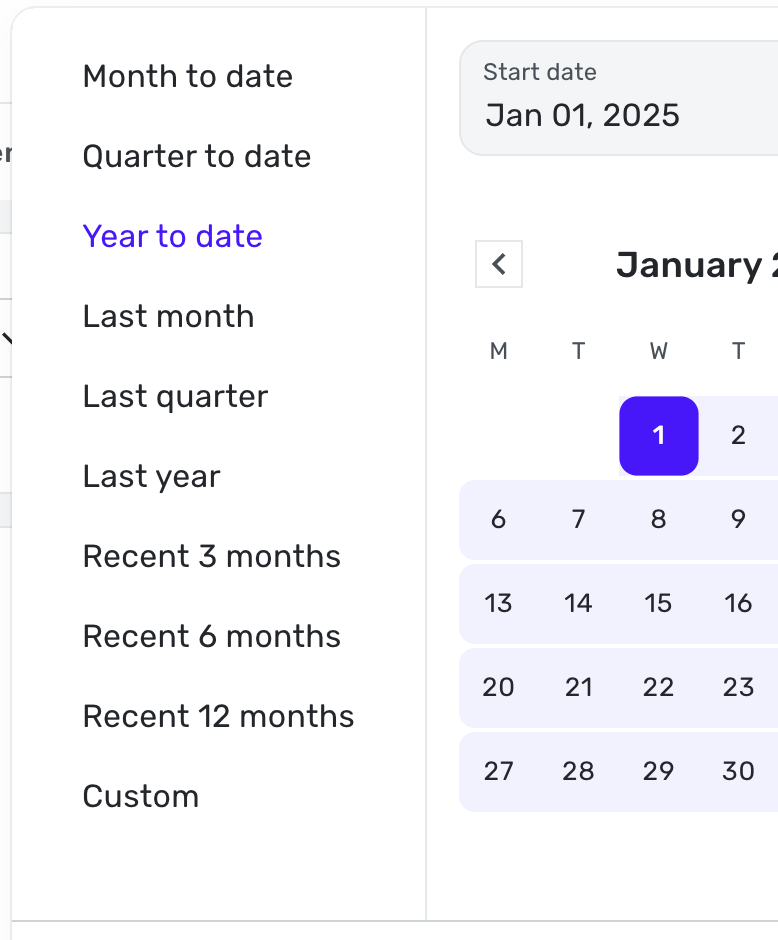
I would like to see "All Time" added here as well. Here's an example:
- I want to see what my car is costing over the course of time, per year or a large interval.
- I want to see how my insurance costs have increased on an annual basis
- I want to see how how much I spend on vacation each year
But here is a problem that will need to be addressed at the same time when viewing long periods of time. I selected about 3 years worth of time via Custom, then selected "Over Time".
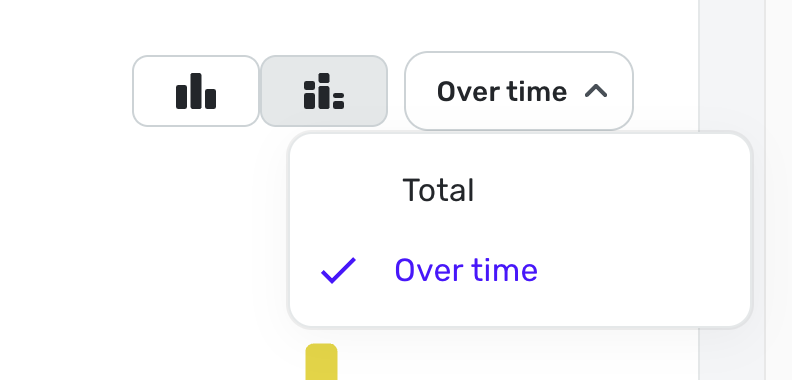
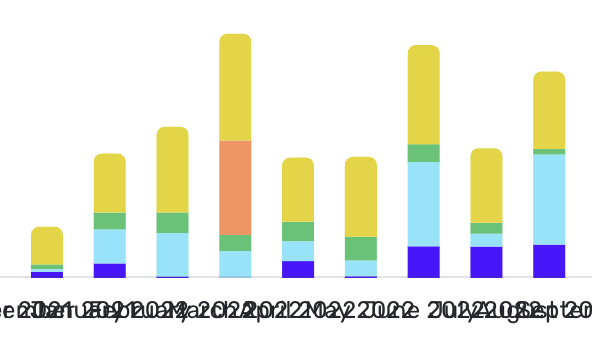
Quicken continues to show each month vs showing a larger range, like quarters or years. The SW will need to adjust the view based on duration and available screen width.
For me, adding All Time AND to see the spend Over Time would be a complete solution. Of course the normal All Time pie chart should be part of the report.
Max1223
Re: Integrate Document/Receipt Scanners to add Attachments to Transactions (edited)
Yes. A Scan Document option would be appreciated.
trguy71