Best Of
Re: Chase Cards not syncing [transactions] pre-2025 with Simplifi
Hello @tryingtosimplifi,
Thank you for reaching out with this question. In addition to the information @SRC54 provided, if these Chase accounts have been connected long enough that there should be information from 2024, there is one setting you can check.
In the account register, right below the words "Transaction Activity", there is a line that says "Showing Transactions Since (year)". If you hover your mouse cursor over that line, a gear icon will appear.
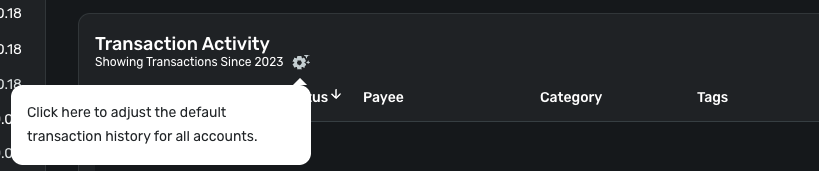
Clicking on that gear icon will bring up a Transaction History Settings menu.
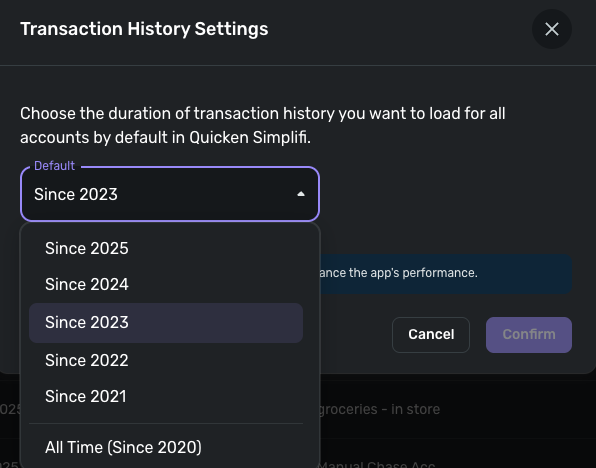
Chose how much history you want visible in your register, then click Confirm. If you have transactions from that timeframe, adjusting this setting should make them visible.
I hope this helps!

Re: Coastal Federal CU accounts won’t update - FDP-106 error (edited)
My system is also working again - Thanks.
 DSD
DSD
Re: Wells Fargo FDP-1022 (Simplifi Version 4.67.0)
I have performed the steps as provided by @Coach Kristina and the accounts have been re-linked and downloaded the transactions. If I experience the same problem, then I will follow what has been provided by @DannyB to get a clean connection again with Wells Fargo. Thank you both.

Re: Wells Fargo FDP-1022 (Simplifi Version 4.67.0)
Hello @Dick_Davis,
Thank you for letting us know you're seeing this issue. Based on your description, it sounds like this issue is happening with accounts that were previously connected and working. If that is correct, then to troubleshoot the problem, please make the problem accounts manual (for instructions, click here), then add the accounts (for instructions, click here), and link them to the correct account names in Quicken Simplifi (for instructions, click here).
Please let me know how it goes!
Re: New Member - Greetings :)
Thank you both so much! That was very insightful and helpful!
Re: Wells Fargo FDP-1022 (Simplifi Version 4.67.0)
I'm a Wells Fargo customer and haven't experience any connection issues during the period you describe.
One step I would add to what @Coach Kristina outlines above, is to delete your Quicken connection from the banks side. Sign into Wells Fargo click on the account icon top right of page, select "Manage access" and then select "Manage connected app." Click on the "+" next to Quicken and then click "Remove."
This will give you a completely fresh connection when you reconnect to Wells Fargo from QS.
 DannyB

Re: Coastal Federal CU accounts won’t update - FDP-106 error (edited)
I got the system to work today!
Re: Persistent Filters & Views in Reports: Share your feedback here!
Thank you for these updates. I use Spending and Income reports to help track my budget. Changing the reports every time was starting to make me grumble. I even sent this in as a suggestion. Thanks for listening. I'm a happier camper now. Thank you!
JAW
Re: New Member - Greetings :)
Welcome to Quicken Simplifi. I hope you will enjoy the app and our community. You mentioned the Spending Plan, which is the unique feature to Simplifi, which doesn't use old style budgeting like Quicken Classic, which is supported on another community.
There are myriad ways you can handle these quarterly shopping trips. The simplest way would be to create a Recurring Reminder in the Bills Section of the Spending Plan naming it Sam's Club, entering the amount you expect to spend, say $250. You can categorize it as Supplies or Household Goods or whatever category you use.
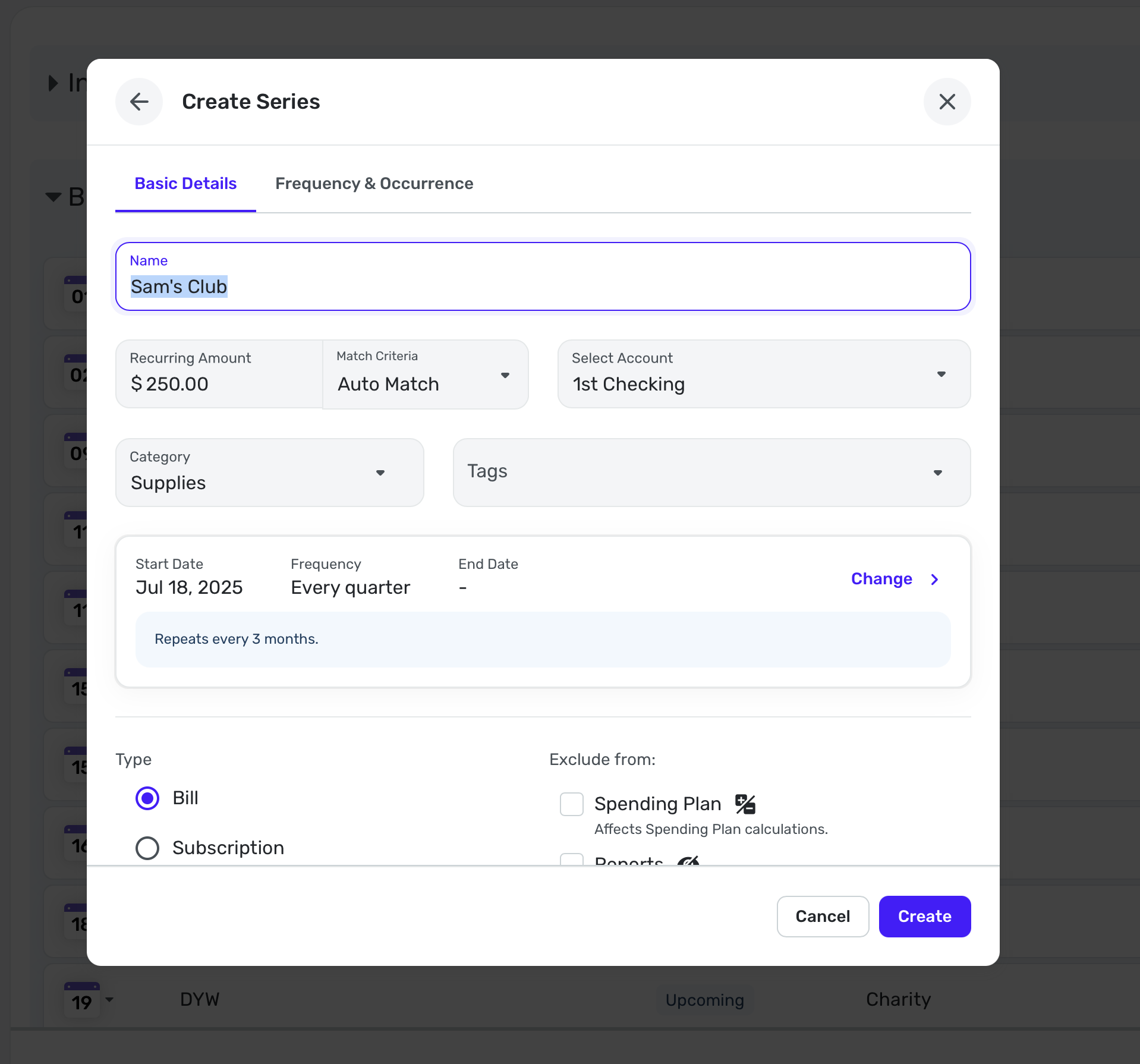
You can create this reminder from an actual transaction if you already have one or you can do it manually as I have above.
Then every 3 months (or whatever interval you need), you can know that this is already "budgeted" in your Spending Plan. Then when the transaction comes in from your bank or credit card, Simplifi will link them (if not, you can link them manually).
Anyhow, this is one way you could do it. Other users will likely give you their suggestions. Enjoy!
 SRC54
SRC54