Best Of
Re: Ability to filter reviewed/unreviewed and uncategorized transactions easily (edited)
+1 to add a quick button to easily filter out unreviewed transactions!! PLEASE!!
Now, switching accounts would reset filters and I have to repeat so many clicks to get unreviewed items. :(
 QMO
QMO
Re: Elevations Credit Union sync outage - to.100/FDP-101 error (edited)
I am chiming in to say that I too am experiencing this issue. I reached out to Elevations and they advised that they have determined that Elevation's system is not the cause of the disconnect. They have already replicated the issue and provided Quicken with the details needed to correct it.
mllocy
Re: Known error showing Robinhood as not working.
@FutureEye, thanks for letting us know!
The Other Known Online Banking Issues Alert has been updated to remove Robinhood. 🙂

Re: Customize Dashboard: Share your feedback here!
The new Dashboard layout is awful! I'm completely onboard with the customization tools that have been offered, but the fact that the Accounts section now fills an entire full-width screen while blocking the at-a-glance functionality that was offered by the previous Dashboard screen is a major downgrade. The old sidebar display of the Accounts list was abundantly adequate to identify linked accounts and balances, while still enabling me to see other tiles in a overall gestalt.
Please offer us the option of returning to the older display. At the very least, I would prefer to be able to include the Accounts tile in the customizable list, so that I can move it to where it's less obstructive to a one-screen perusal of my overall financial picture.
Candidly, this "update" has me shopping for a different budgeting/financial management app.
BIA
Re: Mileage Tracker for QBP: Share your feedback here!
@Iva, I have merged your post with the official feedback thread for Mileage Tracker.
At this time, the Purpose and Vehicle options when logging miles are not customizable. Our product team will review the feedback and use cases left in this thread, however!
Thanks for sharing your feedback!
Re: Add State Nebraska Bank and Trust
@Krick, thanks for posting your bank request to the Community!
I have converted this into a Discussion for now, as it looks like this bank is already available in Quicken Simplifi under "The State National Bank & Trust". I found this bank option by searching the URL you provided.
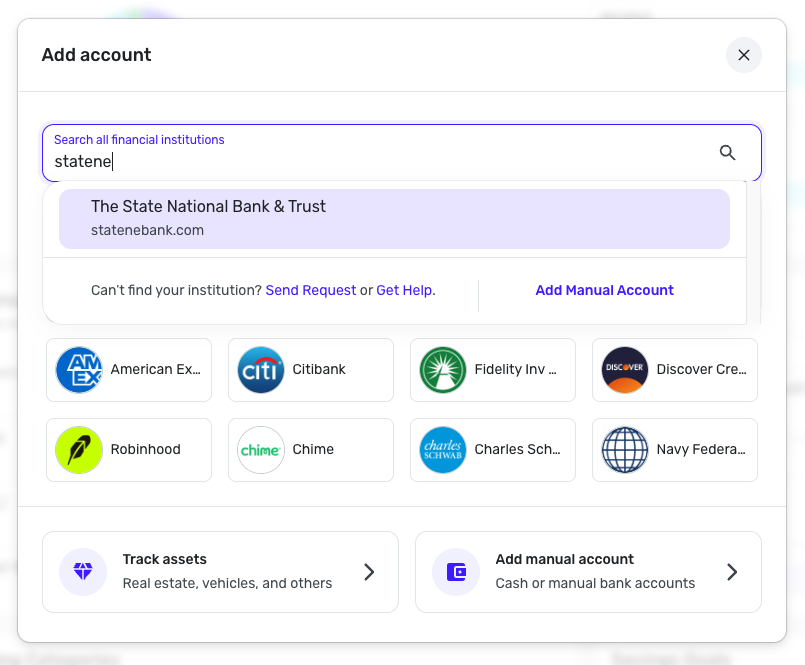
Please let us know if this works for your account!
Re: Investment Transaction Duplications (edited)
Thanks… So far, so good. Haven't noticed any for a while.
neon45
Re: CIT account showing wrong balance (edited)
Thanks, good suggestion for a temp fix. That wasn't the issue as all transactions including opening balance were there. But to your point kind of irrelevant, simply entered a manual transaction to right the ship and move on till the sync is restored is the easy pragmatic approach.
Re: Please add Mazda Financing
Another +1 for adding. It's a rebranding of Toyota Financial, which is already in the list of connections, so hopefully the integration is on the easier side.
kollock