Best Of
Re: Ability to sync Amazon/Major Retailer/Big Box order details [edited] (1 Merged Vote)
[removed] has this ability. Would be great to have it here.
 FS1
FS1
Re: Ability to sync Amazon/Major Retailer/Big Box order details [edited] (1 Merged Vote)
+1 Very interested in Simplifi getting connected with bigbox stores and online retailers to pull in their transactions.
Re: Ability to sync Amazon/Major Retailer/Big Box order details [edited] (1 Merged Vote)
[Removed - 3rd party software] does it… and has a nicer way of (automatically) showing transactions and categories. Come on Simplifi… spend some time and money on this. And add a copy feature. And when you split transactions the ability to make some a transfer and not include in reports (like mortgage… interest (reportable) and mortgage payoff (not an expense but transfer to lower the mortgage principal).
Leousnl
Amazon refunds are being treated as credit card payments (edited)
I had this issue the day before yesterday, and have now had it a second time yesterday as well. It's very frustrating, and causing a real mess in my accounts.
The main issue seems to stem from the system classifying an Amazon refund as a credit card payment. Here's the transactions in question:
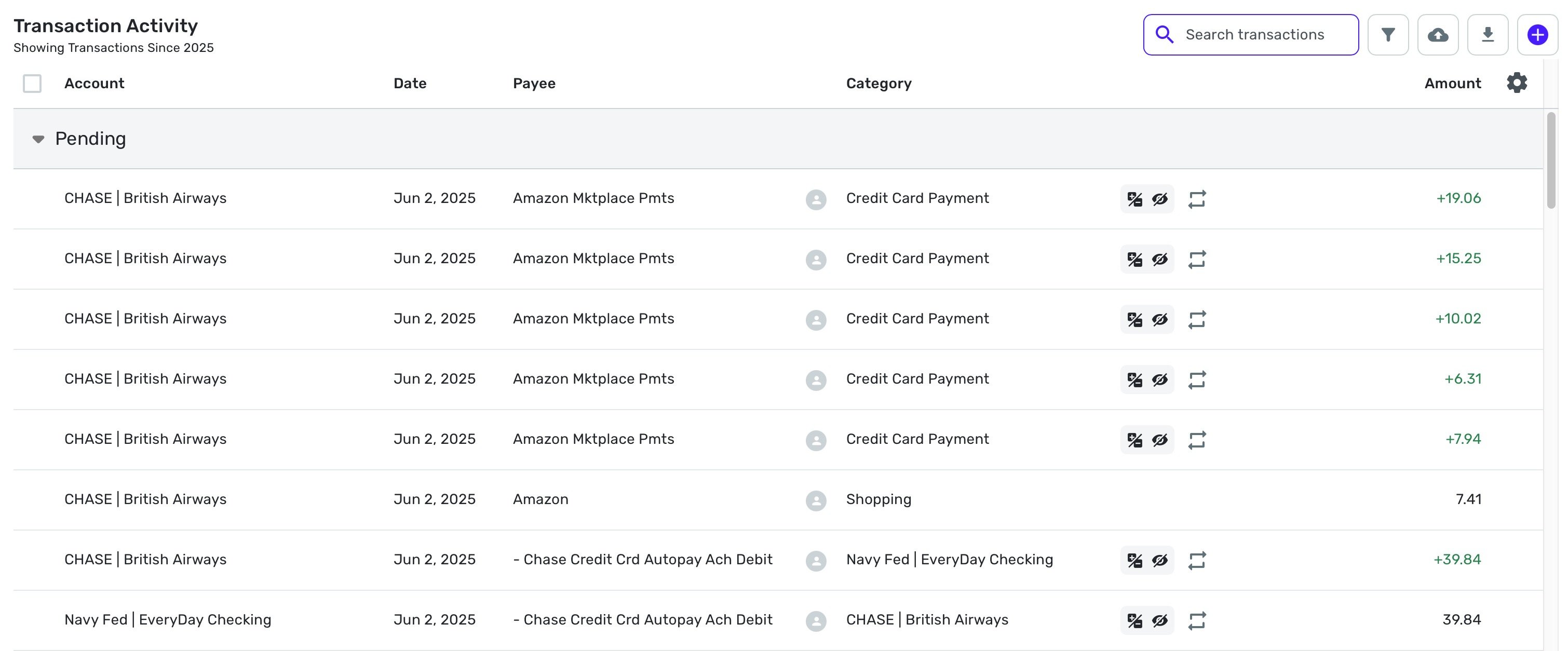
If you go into any one of the refund transactions, this is what you see:
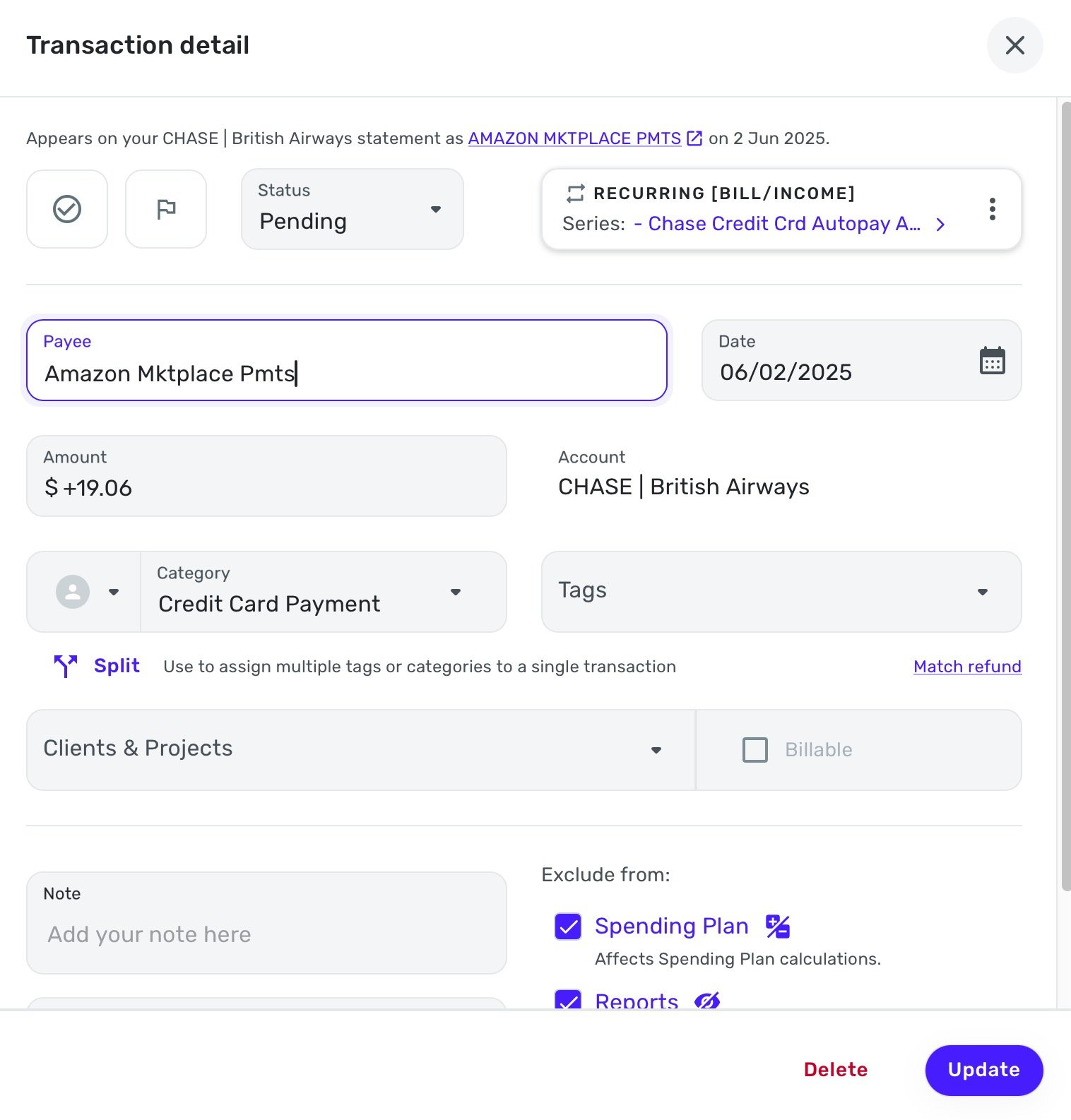
As you can see, it clearly states the transaction comes from Amazon, but the system has categorized it as a CC payment. And more frustratingly, has assigned it to the recurring CC bill payment that I had setup. This is despite the fact that the refund amount is vastly different to the expected payment amount on the recurring CC bill as setup.
I have checked and I have no rules setup that say Amazon refund payments like this should be classed as CC bill payments.
I assume there might be a rule I could create to stop this from happening, but not sure exactly what that should be, since not all the Amazon refunds are going to be the same category?
More strange/worrying/frustratingly, is the transaction above purporting to be from my Navy Fed account (for $39.84) which the system has hallucinated. No transaction exists on my Navy Fed account, and nor would I expect it to, as this is a refund coming in from Amazon, not a transfer from my Navy Fed to CC as a bill payment.
This is the exact same thing that happened to me the day before yesterday, with another hallucinated transaction attributed to my Navy Fed account for another Amazon refund, that was also mistaken as a CC bill payment.
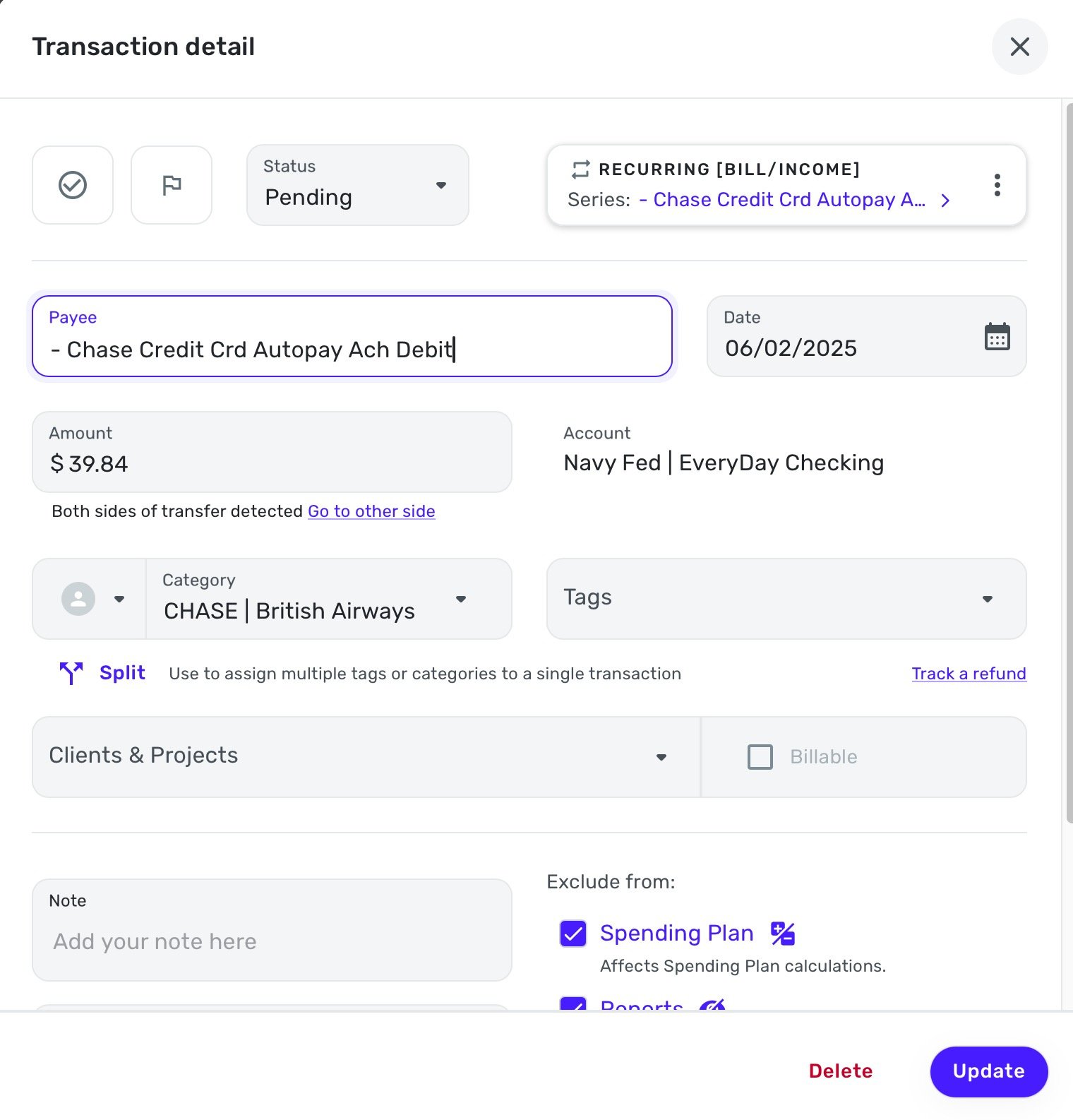
I can manually resolve this issue for the transactions that exists(as I had to the day before yesterday), but how do I stop this from happening in the future?
It's particularly frustrating that the Amazon refunds are being classed as my CC bill payments, as this then removes that upcoming recurring payment for this month, and I have to go back and add it in again.
It's also hugely frustrating/confusing that the Navy Fed transactions are being hallucinated in this way, and makes trusting the software very difficult. This should not be an option for the system to invent transactions that do not exists. I literally just want it to pull in and record real transactions from my accounts, nothing more. This hallucination/invention is adding additional confusion and complexity that is making the software less reliable and more difficult to deal with.
Please advise how I might stop this from occurring in the future, and how I can setup my recurring CC Bill so that it is correct, and don't keep getting improperly assigned.
Thanks!

Re: Bills and Income missing
Hello @LVance,
Thanks for the additional replies. At this point, there is unfortunately not much we can do here to restore the deleted recurring series. I would suggest recreating them at this time; however, we also have a new related alert where users are missing newly created reminders from within the Bills & Income tab and the Spending Plan.
I would advise waiting until the issue above has been resolved before recreating the new series, and in the meantime, following the alert for updates, as we will be posting status updates there as we receive them.
I apologize for not having a better solution.
-Coach Jon

Re: New Recurring Transactions not showing up in the Spending Plan (edited)
Thank you! I will just keep as a planned spending until this is resolved.
Re: A warm welcome to our newest Superuser!
@DryHeat - there you go, and thanks for all your help you have provided me.

Re: "Service is currently unavailable" icon next to accounts (edited)
Hello everyone,
After checking with my product team, I have verified that this icon is added when a financial institution is experiencing issues within Quicken Simplifi. When there is no longer a reported issue for the financial institution in question, our product team removes the icon.
If your bank is updating normally within the program, you can ignore the icon for the most part. I hope this information helps!
-Coach Jon
Re: Bills and Income missing
I hope the coaches or product team will be able to help you recover the missing Reminders.
QS provides some limited download capabilities for historical transactions, but none (that I am aware of) for the important user-entered information that goes into the Recurring Reminders. Maybe it should.
In the meantime, your report spurred me to take some protective action. I took multiple screenshots of my list of Recurring Reminders. (Like you, I have around 50 reminders). I combined those screenshots into a PDF so that, if this happens to me, I will at least have some clue as to what is missing.
 DryHeat
Re: "Service is currently unavailable" icon next to accounts (edited)
"If you reset the connection for the account, does the cloud icon disappear or remain?"
There turned out to be no need to reset. The cloud icon disappeared on its own. All seems normal now.
QS won't try to update again for a few hours. I'll let you know if the problem recurs.
DryHeat