Best Of
Re: Spending Plan Redesign: Share your feedback here!
New Spending Plan went live for me so I am testing it this morning. Very pastel (I'll say no more concerning the pale colors). Overall, I like the new organization.
Comments:
I wish we could sort Bills, then Subscriptions and then Transfers seeing each list one after the other instead of just showing all Bills or Just Bills, just subscriptions, just transfers. I am sure I will get used to it, and it is more logical to combine them this way.
I still don't like using the verb spend as a noun when a perfectly good noun, spending already exists. Planned Spending and Unplanned Spending would be clearer and better usage too.
Question:
I have noticed that the new Spending Plan automatically includes split transactions that include spending and/or income with transfers splits. Is this new or did I just miss it before? I haven't had any of those lately. But again, it makes sense to include those transfers since you would want to have the spending and income accounted for.
 SRC54
SRC54
Re: T. Rowe Price Retirement Plans - FDP-102 Error
I just tried as well and finally connecting successfully
 CJM
CJM
New Feature Alert: Spending Plan Redesign!
We’ve listened to your feedback and made some exciting updates to the Spending Plan! While the core functionality remains the same, we’ve given the design a fresh new look and improved some key features to make managing your finances easier than ever.
What's New?
- Improved navigation and breakdown: Bills and Savings Goals have been separated from Income, making it easier to see how you're spending without the extra clicks.
- A bill is a bill: Your regular Bills, Subscriptions, and Transfers now all live in the Bills section. Don't worry — you can still filter by bill type if you need to.
- No more transaction hide-and-seek: We've made it easier to include or exclude transactions. Each bucket now displays two groups — Included and Excluded — so you can quickly see what's being counted and what's not.
- No more surprise income in your plan: We've heard your feedback — non-recurring income, like Venmo payments, are now excluded from your Spending Plan by default, so you can review it first. Want to include it automatically? Just use the three-dot menu in the 'Excluded this month' section to set your preference.
Things to Note:
- Planned Spending is now called Planned Spend, and you can sort expenses by Name or Amount.
- Other Spending has been renamed to Other Spend.
- Custom amounts for Subscriptions and Transfers from the old design have been cleared. If you had a custom amount for Bills, it’s been carried over, but you may need to adjust it to fit the new combined sections.
We hope these changes make your Spending Plan experience even better! As always, we’re here to help if you have any questions or need assistance. Our official feedback thread is the place to go!
Happy budgeting!

Re: Unable to Edit Existing Series
Can close this one, as I found in other posts here that zooming out would allow the update button to show.
kilo23
Re: Ability to automatically include non-recurring income in the Spending Plan (edited)
@MishaM, thanks for posting your suggestion to the Community!
All you have to do to automatically include non-recurring income in the Spending Plan is navigate to Spending Plan > Income, go to the 'Excluded this month' section, and click the three dots at the end of it. Next, select the option for "automatically include".
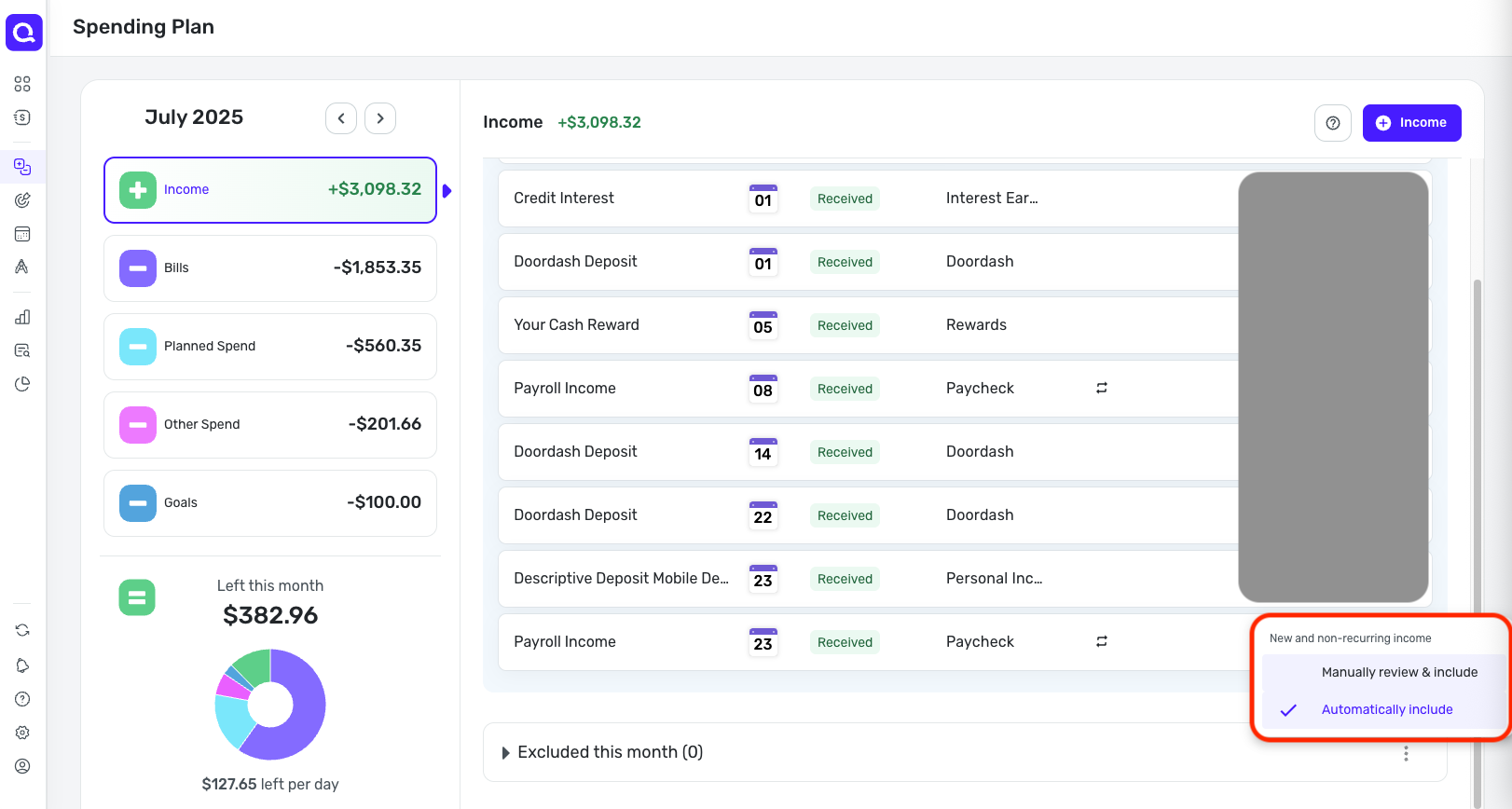
I hope this helps!
Web Release 4.68.0
Hello everyone!
Here are the issues and features we were able to tackle with the 4.68.0 Web Release, released July 23rd:
- FIXED: Unable to add certain Fidelity holdings to a manual investment account.
- FIXED: The 'Income' Dashboard tile is missing the date range text.
- FIXED: Minor visual inconsistencies and bugs.
- UPDATED: QBP: The primary business should always appear first in the Accounts List when the default setting is used.
- UPDATED: QBP: Other minor enhancements.
To be automatically notified of new product updates, please be sure to follow the Updates from the Product Team category by clicking "Follow" at the very top of the page.
Thank you!
Re: Mobile App: Ability to sort and filter the Transaction Activity in Reports (edited)
I use this a lot on desktop and would find it helpful on mobile too. I sort the dollar amount in many of the different areas: Transactions, Reports, watchlists.
Max1223
Re: [ONGOING] 6/18/25: TIAA returning FDP-102 and FDP-106 errors
ONGOING 7/2/25
This Alert is still listed as ongoing and there is currently no ETA on a resolution, though we are continuing to investigate the issue. We will be sure to post back when an update or resolution becomes available, so please bookmark this Alert to receive those notices when they occur.
We appreciate everyone's patience!
Re: How to include cash balance in a manual investment account
Thanks Steve… I'm going to try out different work-arounds to see what works best as a kludge. Most likely I'll set up a manual 'broker' cash/checking/savings account and use that to record all my cash transfers, and that way the cash will be reflected in the balances. Then I'll use the actual manual broker account to only record investment transactions. It won't truely reflect the account balance, but maybe by netting out the two it might equal the true balance. Don't know… just have to try.
Also, I up-voted this idea:
https://community.simplifimoney.com/discussion/8830/allow-investment-transactions-to-impact-manual-investment-account-balances-portfolio-value-edited
Norm6257