Best Of
Re: Getting Setup for 2026 - A Just for Fun Post
I think the main difference between us is that I often refer to past Spending Plans to see how I did and to help reset my expectations for future Spending Plans. I know I could get similar information from Reports, but I do most of my financial work in Spending Plan so it's easier for me to compare apples to apples.
This works for me because I don't actually "do" anything with the "Left at end of month" funds — meaning I don't put it in a different account or contribute it to a SG or anything like that. Instead, I just look back over the months in Spending Plan to see how much excess (or occassional loss) I had.
 DryHeat
Re: USAA - Missing Transactions (edited)
I had this same problem, as described in the thread linked below. But it only affected certain types of transactions in my checking account (see first post). And then it resolved itself. No clue why.
Is Simplifi not downloading any transactions from USAA for you? Or just certain kinds?
Are some of them showing up later (like mine)? Or are they never showing up?
DryHeat
Re: Implement Passkeys (edited)
@RobWilk Yep, apparently they made changes in the latest MacOS. They work with Google services for example. I need to set up more to see how this is going.
 SRC54
SRC54
Re: Some transactions included in download/export are not visible in the account transaction list
I understand it is disconcerting. I spent a good amount of time my first month with Simplifi fixing all of those splits in my checking account.
SRC54
Re: Gobble Up Some Gratitude!
I am thankful for this community, coaches, and users who help us use Simplifi to accomplish our goals.
Thankful for my partner and teenage daughters.
Thankful for being able to search for opportunities. I am looking for a new full time job now.
 UrsulaA
Re: Editing Transaction in Investment account
Hello @Mark54,
Thanks for reaching out! If you would like to edit a transaction in an investment account to a transaction without a Security, you can change the Action field for the transaction to Payment/Deposit. This will allow you to set the category to what you need it to be.
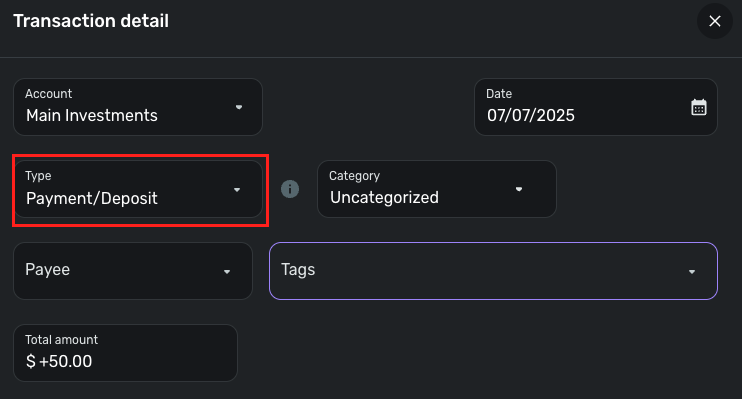
-Coach Jon

Re: How to use completed savings goals
Hi @Mike B
As pointed out above, you will need to exclude your gift expenses from the Spending Plan since the actual funds have already been "expended" via your monthly contributions. This can be a little awkward trying to keep those expenses separate.
You might want to try setting up a Planned Spend bucket with rollover activated for your 2026 annual gifting expenses. Just make sure your unused monthly target amount gets stashed somewhere so it remains available when needed.
 DannyB
Re: Getting Setup for 2026 - A Just for Fun Post
@DannyB — A few questions about your new setup…
—When you "ended" the Savings Goals, did you just withdraw the money? (It seems like you would, as those funds are now represented by the Opening Rollover amounts.)
—When you "ended" the Savings Goals, did you delete them or just leave them in the list of completed SGs? (When I deleted some SGs, it fouled up my previous monthly Spending Plans by erasing the contributions.)
BTW, I did something similar a couple of months ago because SGs just weren't working for me. I kept a couple of SGs that are annual and close to completion and I will let them die a natural death. And, sort of like you, I prefixed my new non-monthly rollover Expense Series with a "z1" "z2" and so on to order them at the bottom of the list.
DryHeat