Best Of
Re: Add a button or option to "collapse all accounts" in the Accounts List
This would be a great addition to managing the appearance of the Accounts list along with enhancing the ability to quickly locate a particular account. Ideally, in addition to this ability it would be great for QS to remember my selection of expanded and collapsed states for my various account categories in the list.
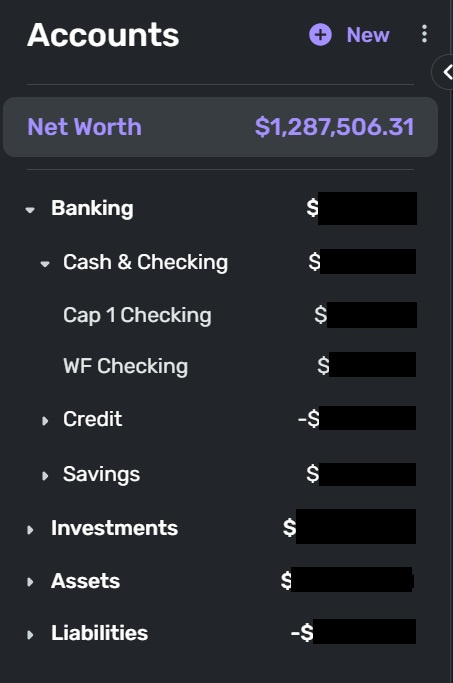
This is how I would like my Accounts list to appear every time I open QS without having to collapse categories every time I log on (which I don't do since I don't want to take the time to do it).
Currently the Accounts list is fully expanded showing all account categories along with all accounts.
- This presents a cluttered, distracting look to the Dashboard and Transaction landing pages.
- This makes looking for a particular account more difficult than I think it should be especially since the Account types appear in the same font and font size as the actual accounts. When you add account update frequency icons the effect is one long list with little to guide a searching eye to the desired account.
A collapsed or partially collapsed list presents a cleaner look and feel to the Dashboard and Transaction landing pages.
- All the data I need is shown - totals for each account type category.
- I can expand one account type category if needed.
- This would make looking for a particular account much easier since I would be scanning only one category that is clearly showing.
 DannyB
Re: Ability to adjust column widths in account registers [edited] (11 Merged Votes)
This ability is "coming soon" as noted in the original post… hang in there.
DannyB
Mobile Release 5.41.0
Hello everyone!
Here are the issues and features we were able to tackle with the 5.41.0 Mobile Release, released October 8th:
- FIXED: The bottom of Investment Transactions cannot be scrolled to on Android.
- FIXED: When FaceID authentication fails, the FaceID icon on the Authentication screen appears not to be tappable.
- FIXED: The “Unlock with device passcode to open the app” text overflows off-screen on iOS.
- FIXED: Blank screen after tapping “Cancel” on passcode prompt; force-quit required.
- FIXED: Investments widget showing an incorrect value for daily change on iOS.
- FIXED: The back gesture doesn’t navigate back when adding an account from Settings on Android.
- FIXED: Loop when clicking "Create later" during the Watchlist Getting Started flow.
- FIXED: Searching for a Parent Category does not discover Level 3 Categories.
- FIXED: The menu doesn't close after selecting an exclusion setting for a Recurring Series in the Spending Plan.
- FIXED: Error when applying payments to invoices.
- FIXED: The Income & Expense Report has the accounting method options for basic subscribers.
- FIXED: Quotes aren't being requested when adding a manual holding.
- FIXED: Various errors and crashes.
- FIXED: QBP: Stripe accounts can be reset, leading to broken flows.
- FIXED: QBP: After entering and then deleting the start location when logging miles, the app still treats the start location text box as if it contains text.
- FIXED: QBP: Split transactions not shown after filtering by Clients.
- UPDATED: Replaced “New score found” with “New score available” on the Credit Score Dashboard card.
- UPDATED: QBP: Minor changes/enhancements made to Estimates.
- UPDATED: QBP: Removed client contact information from Invoices, Estimates, and Credit Memos.
- ADDED: Advanced Transaction Rules (Limited Early Access).
To be automatically notified of new product updates, please be sure to follow the Updates from the Product Team category by clicking "Follow" at the very top of the page.
Thank you!

Web Release 4.79.0
Hello everyone!
Here are the issues and features we were able to tackle with the 4.79.0 Web Release, released October 8th:
- FIXED: Using "Reset Reports" doesn't stick in certain reports.
- FIXED: Endless loop and error message when clicking on different reports.
- FIXED: The Income & Expense Report graph disappears when resetting the report to default views.
- FIXED: QBP: After entering and then deleting the start location when logging miles, the app still treats the start location text box as if it contains text.
- FIXED: QBP: Split transactions not shown after filtering by Clients.
- FIXED: QBP: Styling differences between the Profit & Loss Report and the Income & Expense Report.
- FIXED: QBP: On the filing details form in Tax Planner, the Additional Deductions field is auto-focused and shows $0 instead of the actual amount.
- FIXED: QBP: Limit item descriptions to 512 characters in Invoices/Estimates.
- UPDATED: The design of the Notifications menu.
- UPDATED: Changed the location for creating a Transaction Rule from a transaction.
- ADDED: Advanced Transaction Rules (Limited Early Access).
To be automatically notified of new product updates, please be sure to follow the Updates from the Product Team category by clicking "Follow" at the very top of the page.
Thank you!
Re: American Express (Cannot Add New Credit Card Account) - FDP-401 [edited]
Coach Kevin answered this one for me: the parent user of a shared account must apparently add new accounts, not the shared access user. Many thanks to Kevin!
 Mysterio
Re: Simplifi triggers email from Apple? "You requested your purchase details" (through American Express)
@Coach Natalie, thanks for asking. No, I don’t have any digital receipt links saved in Simplifi in any way. I didn’t even know about them until I started getting the emails from Apple. At this point I can’t see how it could be related to Simplifi if Amex never sends the links as part of the Accounts & Transactions API response.
khad
Re: Is deleting transaction history permanent? (edited)
Hello @lynchbro,
Thank you for reaching out! To clarify, what method are you using to fill in these transactions? Are you downloading from the financial institution, importing a CSV file, or using some other method? If you are importing using a CSV file, you may need to slightly change the CSV file name, so that Quicken Simplifi will let you import it again.
I look forward to your response!

Re: Is deleting transaction history permanent? (edited)
It's important to note that your current account balance and the projected balance chart at the top of your check register is not affected by the presence of any particular past transaction. Yes, Simplifi relies on future transactions to keep an accurate future balance chart. However, if one or two past transactions get deleted by accident, it's not the end of the world; unlike with Quicken Classic.
Personally, I love this about Simplifi!
 Flopbot
Re: Add support for Investor360
I also would like investor360 added to the list of financial institutions to connect to. If we don’t add back the investor360 connection (which was previously supported) I’ll have no option but to go with another service
Need the ability to print reports (edited)
Need the ability to print reports and especially taxes. would be thrilled to see this feature available