Best Of
Re: Mileage Tracker for QBP: Share your feedback here!
Love the mileage tracking feature. It would make it much more usable if the following features were added:
- Customize the vehicle drop down so I can list specific vehicles rather than just choose from "Primary" or "Secondary" vehicles.
- Customize the Purpose drop down so I can add / modify the trip purpose to more suit my needs.
- Clone or duplicate an existing entry, or add a "trip template", so that for trips I make on a regular basis, I don't have to enter all the details from scratch every time.
Thank you for adding the feature!
 blaporte
Re: Calendar: Integration with iCal for upcoming items (edited)
Hello All,
The Community Support Team reviews long-standing Idea posts for relevancy and current interest. This Idea seems to have fallen stagnant and we would like to gauge the current level of interest in this request.
If you would like to see this Idea implemented, please add your vote and a comment explaining how this request would be beneficial for you. More details on voting for Idea posts can be found in our FAQ here.
Thank you,
Quicken Simplifi Community Support Team

Re: Manual Vehicle asset value changed to negative value
I changed the date of the opening balance transaction and the balance showed up. Now if it will just stay positive.
Baby steps …
MikeZ
Web Release 4.80.0
Hello everyone!
Here are the issues and features we were able to tackle with the 4.80.0 Web Release, released October 15th:
- FIXED: Clearing notifications is not syncing across devices.
- FIXED: User's Planned Spending values are inaccurate.
- FIXED: Error when switching between various reports.
- FIXED: Various errors and crashes.
- FIXED: QBP: Hide the 'Apply Refund' option when there are no paid invoices.
- UPDATED: QBP: Minor enhancements made to the Tax Planner.
To be automatically notified of new product updates, please be sure to follow the Updates from the Product Team category by clicking "Follow" at the very top of the page.
Thank you!
Re: Gemini account not linking credit card
@Coach Jon I would also like to report that I am having the exact same issue as of 10/3. I just tried linking it today and my experience is exactly the same as the other people that have already posted. The "bank" is all through Gemini's website under this URL, if it helps.
creditcard.exchange.gemini.com
With the increased demand for crypto reward credit cards, you will see more institutions that might have this issue. It is important that this is figured out. Manual transactions, is only a workaround and is too tedious to do long term.
Re: Gemini account not linking credit card
Hi there @Coach Jon - Thanks for following up on my post!
To answer your questions - Yes, I was able to successfully connect Gemini to my Quicken Simplifi account but the credit card account data is not getting pulled over. When linking this account as @Kegeraider noted above the URL I'm directed to is "exchange" specific but Gemini uses this same account info/login info for the crypto exchange and the credit card interchangeably (And the same URL / iOS app).
I'm also posting screenshots below, when linking this account (Second screenshot) there isn't an option provided to select different sub accounts within Gemini's product suite, this is just primary account access but the prompt directly mentions access to both exchange account and credit card accounts depending on each users product enrollment.
When connected the only account that shows up in my accounts screen for Simplifi is the exchange, however I can confirm that there is weekly/daily activity on my credit card portion of the account as well. Seems like there could be some additional back-end / integration that needs to get worked out to have this fixed possibly!
Thanks much!
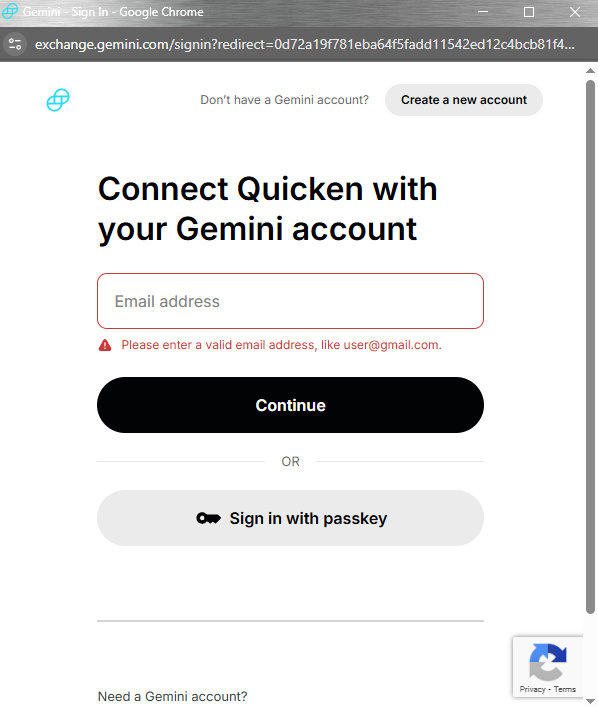
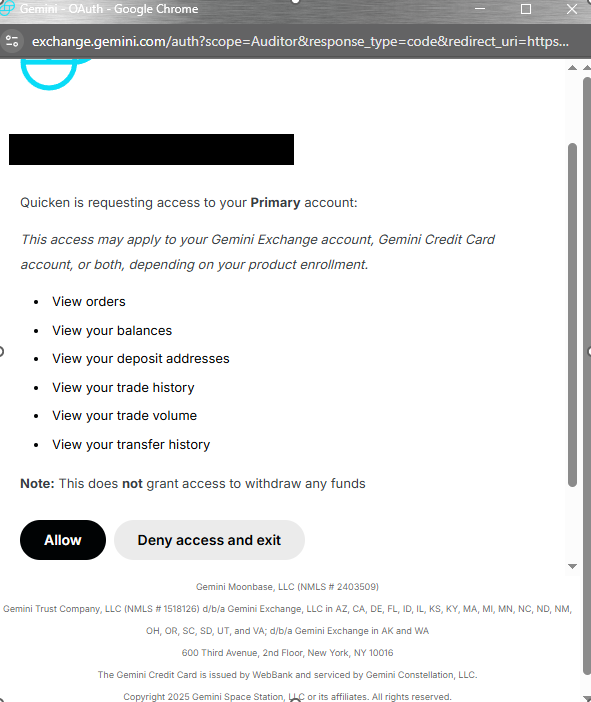 GF-2025
Re: Which Payee name does Simplifi use when matching a transaction to a recurring series?
However, the questions I asked were part of the standard troubleshooting process,
I get that. That's why I went ahead and answered them even though — if Rules don't impact matching — they seemed a bit irrelevant. Let me know if my answers weren't sufficient.
By "the payee you see", I mean in the Payee field of the transaction, as displayed [in transaction edit form]
Ok. In general, that could be any of the three names (original, Quicken, rule). In this case it is the name applied by a renaming Rule ("CpEnergy Entex Gas"). The original and Quicken names don't include the word "Gas". But I will take your advice about "exact match" and rename the series "CpEnergy Entex Gas."
Of course, I can revise that if more information becomes available in the next 30 days.
 DryHeat
Re: Which Payee name does Simplifi use when matching a transaction to a recurring series?
@DryHeat, thanks for the reply!
To clarify, has this recurring series ever matched to the transaction properly, or has it never worked since first creating it? I don't think transaction rules would impact the matching of transactions to recurring reminders, even with payee names being changed via rules, but if this recurring series has ever matched properly in the past, I'm wondering if you had transaction rules set up at that time for this particular item, and if it was perhaps before the recent upgrade outlined here.
I agree that the payee in the recurring series is a pretty close match to the payee of the transaction. And it doesn't sound like the amount is causing the issue, since you've tried different Amount Matching options. Just to test things, I would recommend changing the payee of the recurring series to be an exact match to the payee you see for the transactions themselves, or even just to remove the "Ent ACH" part, to see if that fixes things the next time around.
Let us know how things go!
Re: Error When Connecting to Vanguard (QCS-0400-6)
Hello @sandglass,
Thank you for reaching out! From our side, it looks like you may be using an instance that is no longer supported for Vanguard. I would check if the other Vanguard instances available within Quicken Simplifi work for you.
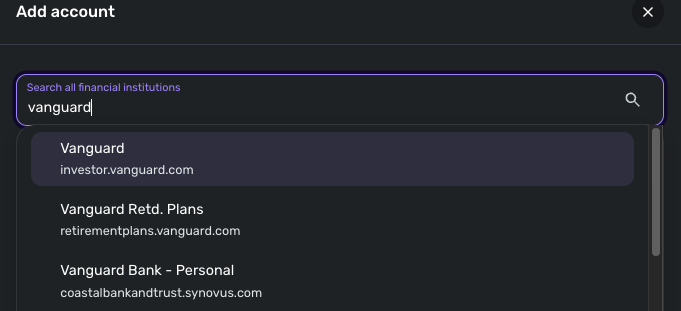
Let us know how that goes!
-Coach Jon
