Best Of
Re: How to match up both sides of recurring transfers in the Spending Plan Transfers submenu?
Apparently, they have to have the same date to match up. You could try changing the dates. The problem, of course, is that they get credited/debited to one account (the one you initiated the transfer with) one day and the other one, the next day, or possibly several days if it's over a weekend.
I guess we could ask to have the arrow anyhow regardless of the date. That would be clearer.
 SRC54
SRC54
Re: Bill Connect for Credit Cards: Share your feedback here!
@RobWilk, I would recommend waiting a full billing cycle to see if things even out for you. Let us know how it goes!
@SRC54, Chase, along with many other credit card companies, is not supported as a connected Biller via Bill Connect. This lack of connectivity is part of the reason we came out with this Bill Connect for Credit Cards feature, where the credit card reminders can be updated using the aggregated account balance instead.

Re: Remember Expanded/Collapsed Settings, Make Layout Changes Permanent (edited)
@Coach Natalie any updates on this?
I think khad, one of the earliest commentors put it perfectly, "I'd love to see state preserved everywhere in the UI."
Here's just one example of this that drives me insane when working with Simplifi. By default, when you click on the Transactions tab, the three most recent months are expanded. Now, if you collapse them to work on one specific month and do anything to filter transactions or Search for Transactions, the months get uncollapsed again. So infuriating!
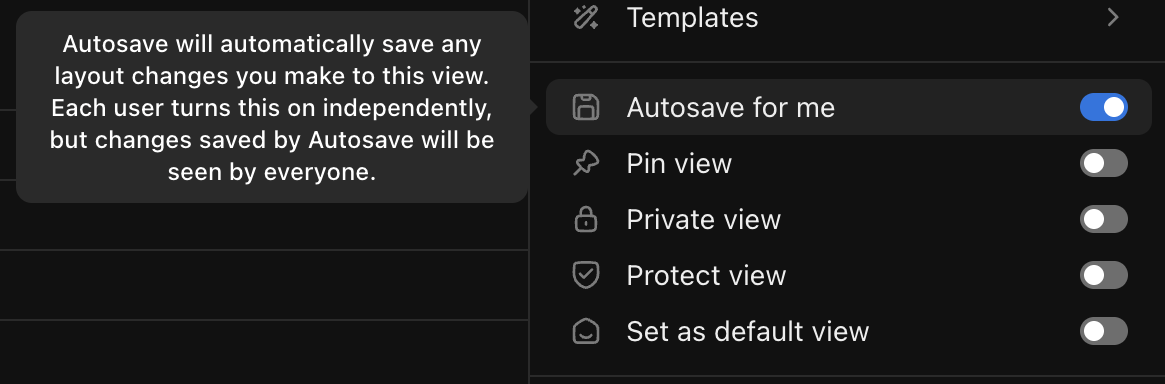
User-specified states should be saved everywhere in the UI to the greatest extent possible. Apps like ClickUp (which I love) even go so far as to make whether or not to persist views/states/layouts an option that the user can opt in or out of:
Re: Add OneFinance/OnePay to Supported Banks (edited)
Has this been resolved? If not, I will have to cancel in my 30-day grace period. This bank has been around for quite some time and linkable via Plaid and multiple other solutions so I'm curious what is so difficult about this request?
 wdydttm
Web Release 4.67.0
Hello everyone!
Here are the issues and features we were able to tackle with the 4.67.0 Web Release, released July 16th:
- FIXED: Incorrect banner displayed when future-dated income transactions exist in the Spending Plan Income bucket.
- FIXED: Clicking news items on the Investments page does not redirect to the external source.
- FIXED: Long account names are not truncated in the 'Saved so far' dropdown in Savings Goals.
- FIXED: The Watchlist calculated amount for 'This Month' does not match the actual amount.
- FIXED: Refund Reminders have incorrect three-dot menu options.
- FIXED: The Add Account modal is incorrect when adding a Zillow account.
- FIXED: The 'OK' button is not visible in the "reminder created" dialog until hovering over it.
- FIXED: Various errors and crashes.
- FIXED: QBP: Dropdown text not displaying properly on smaller screens in Client details.
- UPDATED: The +Account button in the Accounts List has been changed to "+New".
- UPDATED: QBP: The primary business should always appear first in the usage drop-down menus.
- UPDATED: QBP: Other minor enhancements.
To be automatically notified of new product updates, please be sure to follow the Updates from the Product Team category by clicking "Follow" at the very top of the page.
Thank you!
Re: How does the Spending Plan adjust changing/adjusting rollover amounts mid month?
First, a disclaimer, I don't have any Planned Spending categories with rollover activated.
As far as I understand the "rollover" funds are not included in the Available to spend in the current month but instead are reserved funds from previous months. In my experience of experimenting with rollover, these funds seem to be handled along the lines of the funds in a Savings Goal and when used or dipped into, are not actually added back into the current month's available to spend and are only available as extra funds for the designated expense. If this is true, the only way I can think of to tap into rollover reserves in one bucket would be to assign some of the expenses in the overspent Planned Spending bucket to the Planned Spending bucket with available rollover funds.
You can move funds between Planned Spending buckets by reducing the current month's amount for one Planned Spending Bucket and increasing the amount for another Planned Spending bucket thus staying within your limits. If you have a money available in the current month you can increase the amount for an overspent Planned Spending bucket and leave everything else in Planned Spending as is.
 DannyB
Re: Bill Connect for Credit Cards: Share your feedback here!
I just enabled the feature, the amount is larger than current balance and is likely the statement balance. Will monitor.
 RobWilk
Annoying reminder to install app for Simplifi
I keep getting these annoying reminders every minute to install Simplifi app every now and then even though I selected "don't remind me again".
msit
Re: Planned Spending Categories - % Month Remaining
Your suggestion is very similar to what is discussed her. It has a lot of votes.
 DryHeat
Re: T. Rowe Price Retirement Plans - FDP-102 Error
Having the same issue here…again. Quicken, this feels like an every other week issue with you all. You gotta get this sorted out.
srings