Best Of
Re: Spending report broken down by tag, duplicates transaction totals
Ok, I figured it out. For some reason, I had a couple of transactions that stayed in the pending state even after they had cleared. So there was a duplicate transaction, one was cleared, and the other was pending. That explains why the report was showing what we thought were duplicates based on the tags.
Any idea what would cause a transaction to stay pending even when the transaction gets cleared? We likely added the tags and marked it as Reviewed while it was still pending. Maybe that was it.

I appreciate the help Steve!
 edsdls
Re: How long should a bank connection to be down? FirstBank of Colorado is now near 4wks.
I sent Coach Natalie a message asking for clarification on my message on why it was disruptive and asking if there was somewhere to discuss getting a refund. I'm not trying to be disruptive.
lwagner
Re: Pending false Payment to Apple Card
I deleted the record and every thing seems fine with this issue. Thanks
 N4KHQ
N4KHQ
Re: How long should a bank connection to be down? FirstBank of Colorado is now near 4wks.
For me it's been 34 days. [removed - no soliciting] There was a question last week about whether or not we might get some refund for this month plus of downtime, but it looks like that comment was removed for some reason. I'm at a complete loss at this point but given how often I use and rely upon Simplify, disruptive is putting it mildly.
Re: Enhanced Reports: Share your feedback here!
Bgz, great suggestion. Part of the overhaul of our reports is to unify the functionality across both web and mobile. The presentation will be different, but mobile will have the full flexibility to display and define reports with rows and columns like on web. We are now building the mobile-first presentation of that data. Stay tuned.
US Bank IRA and Brokerage accounts don't appear in list of accounts to add (edited)
When I attempt to connect my US Bank investment accounts to Simplifi, they do not appear in the list of accounts to connect to Simplifi.
On the other hand, when I use [removed] through Finicity to connect, all my accounts appear.
I see some (prior) posts about this with no resolution or escalation — will Simplifi address this or should I plan to switch platforms?
itsjafer
Re: Why are Zelle payments automatically classified as Transfers when they are payments?
@EL1234 I wonder if an automatic rule was made earlier in your transactions that caused this. There was a time (or still?) when if you renamed a transaction it might suggest or make a renaming rule. I would check your existing rules for anything that says 'zelle'.
I use Zelle (receive payments from others) and don't have this problem. It may be that I use Chase which may label the transactions differently, or maybe like i said you might have a rule set up that i do not.
Go to settings→rules and search 'zelle' to see if there are any.
 RobWilk
Re: Enhanced Reports: Share your feedback here!
This has to do with the difference in the way we create these reports. The Spending and Income reports are currently Detail reports, meaning they are focused on transaction data. The overtime graph requires Summary data with columnar values per month, so we actually don't have the data to draw the overtime chart. The solution is to add an option for you to change the Spending and Income reports into a Summary report so you can then get an overtime chart. We're working on the Summary report, but it isn't quite ready yet.
The bottom line is we'll be adding an overtime chart soon, but first, we need to ship the summary report for Spending and Income.
Re: Amount Matching: "Limited Range" option not matching correctly (edited)
Hello @DryHeat,
Thanks for the reply and the requested screenshot. We should be able to escalate the issue you are having with the Limited Range Amount Matching option. Please supply your web browser, operating system, and their respective versions.
Please also supply logs for us when you can.
- Log in to the Quicken Simplifi Web App.
- Select Profile from the left-hand navigation bar.
- With the Profile menu open, hold down the Option key for Mac or the Alt key for Windows, and then click Send Feedback.
- Leave all boxes checked, add a brief description of the issue, and then click Send.
-Coach Jon

Re: Amount Matching: "Limited Range" option not matching correctly (edited)
In addition to the example you provided above, can you provide a screenshot showing the transaction that was improperly matched, as well as the transaction that it should have been matched to?
Below is the transaction that was improperly matched to my credit card payment recurring series. It has been corrected to undo that match. (I provided you with an image of the series in my previous post.)
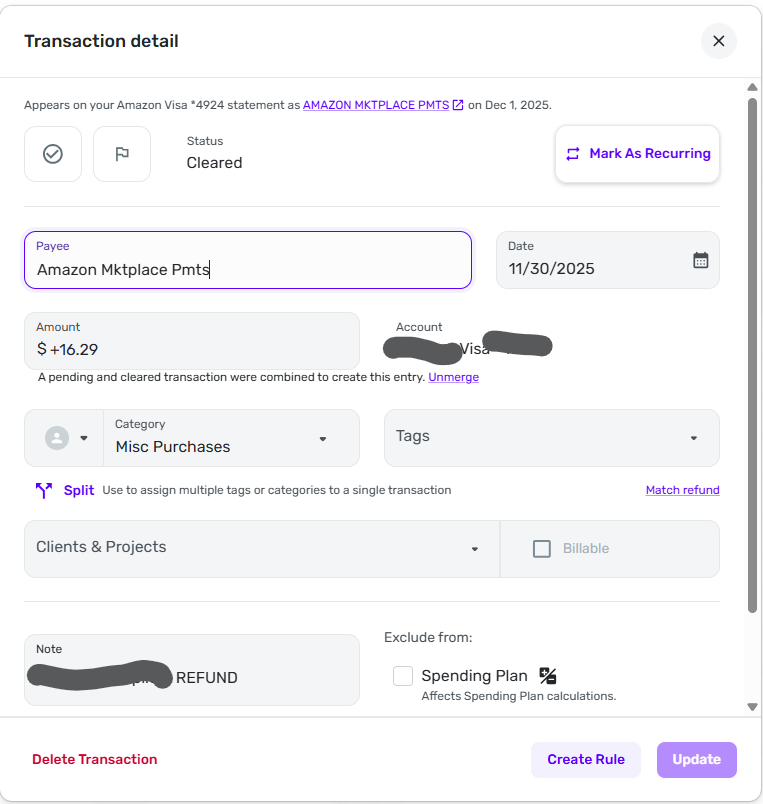
The transaction should not have been matched to any transaction at all. It was an individual Amazon return/refund and was not supposed to match any existing Simplifi series or refund. It should have just come in as a normal credit card transaction.
(Note: my initial post regarding Auto Match also involved an Amazon return/refund that should not have matched anything. It seems like Simplifi leans toward matching transactions with a positive sign with my upcoming credit card payment.)
 DryHeat