Best Of
Re: Net worth chart does not reflect opening balance - how to resolve? (edited)
This question comes up so often, it makes me wonder if Simplifi should simplify the solution by making it more intuitive/easy/obvious when looking at the Net Worth graph.
 EL1234
Re: Net worth chart does not reflect opening balance - how to resolve? (edited)
@phaworth I also had this issue with my mortgage company, what I did was download from Simplifi a net worth report for that account with a row for each day, then added rows for all the missing days with the correct balance, and then uploaded it to the account balance. I don't remember the exact steps. I do remember that I had to modify one of the column headers from the downloaded file before uploading, to match the sample / template file that Simplifi gave.
EL1234
Re: Recurring Transaction Matching Issue
I will try to play around with Exact Amount since I always know and edit my bill ahead of time once I know the amount
CROforce
Re: Enhanced Transaction List Toolbar: Share your feedback here!
@EL1234 thanks so much for the thoughtful feedback.
We were already thinking about the mouse moving with filters and moving to have one ui for filtering. We'll have a look at your other detailed suggestions too as we work on refinements. We have a couple more enhancements in the works too.
I really appreciate your time in sharing this!
Re: FNBO Direct Won't Update - Care Code: FDP-193
thanks! I’ll try these steps tomorrow when I’m back home on my computer and will let you know how it goes. Thanks again!
Ann
Ann2020
Re: Enhanced Transaction List Toolbar: Share your feedback here!
I've been using this for a couple of days and am ready to share some feedback.
Overall, great job! I love that I can easily see unreviewed transactions. The other two quick filters aren't so useful to me but I see how they could be for others. I like that the import and export buttons are harder to access because those are rarely used and contributed to visual clutter.
Now for some suggestions about the aesthetics of the new UI:
- I think the quick filters should be vertically aligned with the buttons on the other side (search, date, filter, three dots, and new). I see that when the browser is narrower (mobile devices), the quick filters are below the other buttons and that's great but on a wide computer screen I think they should be aligned.
- I wish the buttons on the right side were a little taller, like they used to be. They are harder to click on now.
- When clicking the Search icon to expand the box, it bumps the quick filters down a drop, which is a little awkward. (I think if the buttons were taller per my previous bullet, that would fix this as well.)
- The search box (once expanded) is huge and it's a little annoying to need to move my focus to the other side of the screen from where I clicked, in order to see what I'm typing. I don't think it needs to be that much bigger than it used to be when it started out expanded.
- It bothers me that when choosing a quick filter, if I want to click again to undo it, I need to move the mouse. Moving the count and sum of the filtered transactions either to the right of the quick filter buttons, or (even better IMO) up onto the same line as "Transactions Since 202x" would fix that. It also seems that when clicking a quick filter, those buttons get nudged down a fraction of an inch, but I can't say for sure.
- This might still be in the works… I'm still hoping that you will combine column filters with filters that are set via the Filter button at the top. So if I click the there dots on the category or tag column (let's say) and set a filter, it should show up if I click Filter at the top, and vice versa if clicking on a column to set more filters. To go along with this we'd need to see filters for more columns (amount etc) in the Filter window. Same goes if I set a date filter in the column header, it should show up in the Date window at the top.
Thank you for your commitment to ongoing improvements and for considering my feedback!
EL1234
Re: TastyTrade - Tastyworks connectivity - FDP-101 (edited)
@Coach Jon , TastyWorks (TastyTrade) is working for me now. I originally wasn't able to connect at all. Now I'm connected and can see my balance.
AsyncC
Re: TastyTrade - Tastyworks connectivity - FDP-101 (edited)
Hello @AsyncC,
The debug session would not be with me, but with our engineering team. We can see about adding you to the ticket if you are experiencing the same issue. First, I would have you try the following steps to see if they work in resolving the issue for you:
- Make all of the accounts with the bank manual by following the steps here.
- Once you see the account(s) listed in the Manual Accounts section under Settings > Accounts, go back through the Add Account flow to reconnect to the bank.
- If the connection is successful, carefully link the account(s) found to your existing Quicken Simplifi account(s) by following the steps here.
If the issue continues, please let us know how long you have been experiencing this error and provide a screenshot of the Accounts Summary page from the bank's website that is wide enough to show the full page URL. This is the landing page after signing in, and typically lists all accounts and balances. You will want to take this from a web browser and not a mobile browser, as well as redact any private info such as account numbers.
You will also need to submit your logs via the 'Send Feedback' option:
- Log in to the Quicken Simplifi Web App.
- Select the Profile icon in the upper-right corner of the screen.
- With the Profile menu open, hold down the Option key (Mac) or the Alt key (Windows), and then click Send Feedback.
- Leave all boxes checked, add a brief description of the issue, and then click Send.
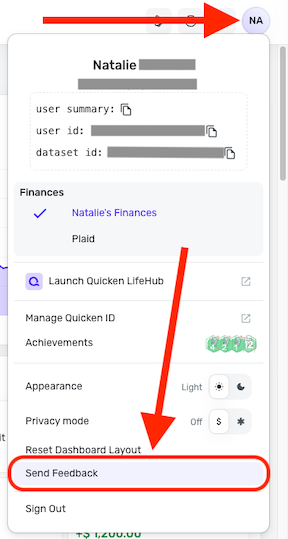
Finally, we will need the following information:
- Confirm that the email address and phone number listed on your Quicken Simplifi Account are your best contact information.
- Provide your general availability over the next few weeks, and please also include your time zone with this.
Feel free to DM any of this information to me if you prefer!

Re: Enhanced Transaction List Toolbar: Share your feedback here!
I got the enhancement this morning. I was able to see that I had a lot of unreviewed transactions mostly from Apple Savings that I had to reimport recently. So I took care of that.
The refinements are nice. Thanks. Seem to work as designed. I usually keep my register set to all transactions all dates.
 SRC54
SRC54
Re: Enhanced Transaction List Toolbar: Share your feedback here!
Overall, I quite like it! Having the ability to quickly filter for history is nice. And, having the uncategorized button front and center is excellent. Hiding the less common actions such as import and export makes sense. Personally, I haven't made use of the "review" option because I check the app several times every day, so everything is always reviewed. However, I do make use of the exclusions status. I think there is room on that line to allow for more items such as exclusions, tags, and notes to be available immediately but then collapse away with a narrower screen. The collapsible search bar works well.