Best Of
Re: Split transactions for income the same each month
I'm afraid that you cannot. Recurring transactions still do not support splits. So we are forced each month to split them and then link them to the recurring income (if it hadn't already but it's iffy since the income amount and the net amount will be different). There is a request for this feature and it has a lot of votes. It has been submitted for review.
Edit: By the way I learned a trick in the Spending Plan to get Withholdings (the Insurance and/or Federal Tax) in the subscriptions list, which is to link the deposit to the subscription reminder rather than the income reminder. The income will then show in income and taxes and insurance will show in subscriptions.
The drawback is that you will have to do this manually and then delete the income reminder since it was superseded by the subscription link.
 SRC54
SRC54

Re: Bill Connect for Credit Cards: Share your feedback here!
Thanks for the reply. It sounds like you provided the product team with a full smorgasbord of the issues raised in this long thread, and that's a good thing.
I really like this feature. I hope they are able to work out the kinks. Until they do, I am cutting it off account-by-account at the first sign of trouble. In it's current state, it takes more time than it saves.
 DryHeat
Re: How to track a large bill paid from savings without blowing my budget (edited)
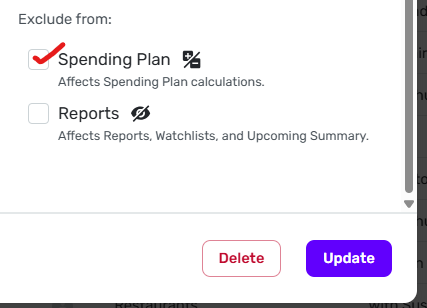
If you don't want this bill reflected in the Spending Plan, edit the transaction and check the Spending Plan box under "Exclude from:" down in the right-hand bottom corner.
 DryHeat
Re: Bill Connect for Credit Cards: Share your feedback here!
After a month of testing, my reminders are still not updating properly with this feature. My next upcoming reminder shows that it's closed, and it's using the default amount for the series. This bill is definitely not closed yet! And then I see that the following reminder is the one being updated, but I have no idea where the amount is coming from.
I filed a ticket to outline this behavior to our product team. I also called out some of the comments from this thread where users have reported the same type of behavior. I will let you all know if we need any additional info or examples!

Re: Notes field is cropped short when inline editing
@Coach Jon — GOOD NEWS!
I reported this problem with the transaction register through another channel and it appears the product team has addressed it. In ver. 4.72.0 a wider-than-default Notes field now uses the entire available space for editing.
So, rather than seeing this truncated text as we did before:

We now see the full text while editing:

Very glad to see this!
DryHeat
Re: Bill Connect for Credit Cards: Share your feedback here!
@DryHeat, thanks for the information!
I filed a ticket with what I am seeing and shared the comments from this thread describing what other users are experiencing. I started testing on my end about a month ago, as previously mentioned in this thread:
I hope this helps to clarify!
Re: Venmo "income" transactions excluded from spending plan
This is extremely helpful, thank you! I did not realize that “non-recurring income” included all net positive transactions, including those categorized outside of Personal Income and its subcategories.
Re: Venmo "income" transactions excluded from spending plan
Hello @bellassaije,
I understand your situation now, thank you. With the new Spending Plan redesign comes a change in how Income works in the Spending Plan. The Income section shows the total income you expect to have for the month. This is calculated with your recurring income transaction series. Non-recurring income will be excluded from the Spending Plan by default. If you want to include non-recurring income in your Spending Plan, you can follow the instructions in our support article here:
I hope this helps!
-Coach Jon
