Venmo "income" transactions excluded from spending plan

I noticed today that all my recent Venmo transactions where someone else paid me were being excluded from the spending plan. This was for Venmo transactions from before the FDP-106 error started happening for Venmo accounts.
I did not intend for all of these transactions to be excluded. I think I may have accidentally done this while walking through the new update — I remember being prompted to exclude certain kinds of transactions from recurring income (though I don't remember being asked about excluding them from the spending plan entirely).
Is there something that changed recently that could have led to all my positive Venmo transactions being excluded from the spending plan?
Comments
-
Hello @bellassaije,
Thanks for reaching out! Can you please let us know how these transactions are categorized? Additionally, if you could provide a screenshot, that would be helpful in understanding your situation!
-Coach Jon
-Coach Jon
0 -
Thanks for your reply @Coach Jon. They are categorized in different categories depending on what the payment was for, including categories like Dining and Drinks and Groceries. What they have in common is that they are payments made from someone else to me in Venmo.
I’ll attach some screenshots with transaction descriptions redacted.
0 -
Hello @bellassaije,
I understand your situation now, thank you. With the new Spending Plan redesign comes a change in how Income works in the Spending Plan. The Income section shows the total income you expect to have for the month. This is calculated with your recurring income transaction series. Non-recurring income will be excluded from the Spending Plan by default. If you want to include non-recurring income in your Spending Plan, you can follow the instructions in our support article here:
I hope this helps!
-Coach Jon
-Coach Jon
1 -
This is extremely helpful, thank you! I did not realize that “non-recurring income” included all net positive transactions, including those categorized outside of Personal Income and its subcategories.
1 -
It’s also possible those transactions were originally automatically categorized as Personal Income and I recategorized them.
0 -
I understand what @Coach Jon is saying above about non-recurring Income transactions, but it doesn't look like the transactions you illustrated are actually Income transactions.
Your transactions all have Expense categories (although they are positive rather than negative). So they should show up in your Spending Plan wherever those categories normally show up.
I created a test transaction much like yours — an expense that is positive rather than negative — like this:
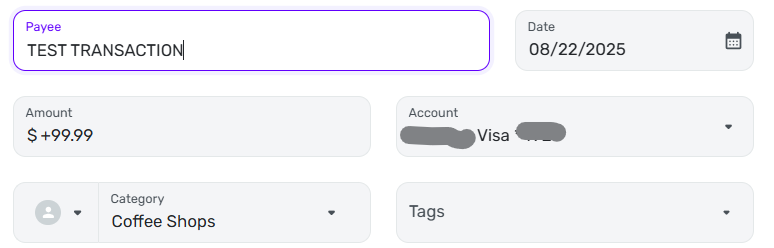
When I checked the register for the "Dining Out" expense series in my Spending Plan, the transaction shows up as expected.

So if I am mirroring your situation correctly it does look like you have a problem.
DryHeat
-Quicken Classic (1990-2020), CountAbout (2021-2024), Simplifi (2025-…)0 -
@DryHeat Helpful example, thanks! I think I’ll keep an eye out to see if this happens again once the Venmo account connection is restored. It does seem to be specific to my Venmo account transactions so maybe I have something configured wrong there.
0 -
I didn't refresh my screen before writing my previous response, so I didn't see your statement that:
It’s also possible those transactions were originally automatically categorized as Personal Income and I recategorized them.
I think you've figured out the most likely explanation for what happened. If they were originally auto-categorized as Personal Income, they would have also been auto-marked excluded from Spending Plan. Your changing the Category would not have changed that. You will have to manually un-mark them when you recategorize.
FWIW, QS is supposedly working on an upgrade to the Rules system that would allow you to automatically recategorize Venmo transactions with a positive amount to some generic Expense category in the first place. But it's not here yet and there is no timeline.
DryHeat
-Quicken Classic (1990-2020), CountAbout (2021-2024), Simplifi (2025-…)0 -
That feature sounds like exactly what I need. Appreciate your specificity here!
1




