Report export no longer showing parent category for subcategories (edited)
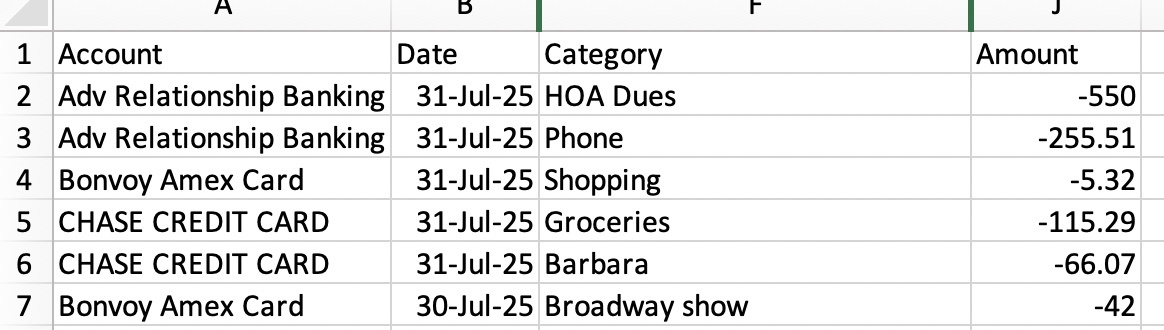
Hi. Every month I run a spending report and then export it into a CSV file. I then filter on the category column to review my spending by category AND subcategories. This month, to my surprise, the "Category" column is just showing the subcategory (whereas previously it showed category:subcategory). The latter is what I need. Is this still available? Is there a setting I need to configure?
Comments
-
Hello @Pilierp,
Thanks for reaching out! I think we will need more information here. Are you stating your report only shows subcategories? Or is it showing categories, and for transactions with subcategories, it only shows those? If you can provide screenshots that show the issue, that would also be helpful.
-Coach Jon
0 -
Hi. The report is just showing the subcategory. Last month the report showed the category and subcategory separated by a colon. See the 2 screenshots - the first one is my July spending and in the Category column it is actually just showing the subcategory; the 2nd screenshot is from the previous month and you can see it shows the category and subcategory in the Category column. The latter is what I need.
0 -
Here's a bit more, when I run an export from the Transactions page, the Category shows the main and sub titles.
When I run the report from the Reports section, it only shows the SUB Category.
I too would want the Reports to show Category and Subcategory.
This would be critical in the CSV to able to sort a column by category. Without the main category, you can't tell what was in "Shopping" for instance.
1 -
I'm having exactly the same issue. Last month it worked correctly - this month it doesn't. Note following example.
0 -
Hello everyone,
Thank you for all the information provided! We did get this issue reported to our product team and will be sure to follow up here with any status updates going forward.
-Coach Jon
SIMPL-28515
0 -
When I asked about this problem again today I was sent the following email from a Quicken Coach:
Hi there,
I'm afraid that Simplifi doesn't export files in that format anymore showing category/subcategory in the same field.
You can rename your categories to include the category + the subcategory in the same name, e.g. Travel-entertainment.
If you do need further assistance, don't hesitate to reach out.
Have a lovely rest of your day, and stay safe!😄CoachQuicken
0 -
Thank you for the reply @PK Millen,
There is an open ticket for the issue, SIMPL-28515.
What method did you use when reaching out about the problem? Does the email you received provide any ticket number or reference number?
Thank you!
-Coach Kristina
0 -
I received an email as follows while working in the system:
Welcome to Simplifi 😄 I’m Coach Alex I’ll be happy to help you today.
Coach
Quicken
I think part of the problem may be that I have two separate accounts with Quicken Simplifi one for my record keeping and the other for my daughter's record keeping. The email I received must have been from a coach that was not aware of the open ticket - not sure I was either but in any case I am now and will reference it in any further inquiries. What is very strange is that I received a request day before yesterday to see if the problem had been corrected and when I tested it yesterday, it worked just fine but today it was back to the same issue. Here is the request I received:
Hi Kristen!
I hope you are great.
Regarding the import of your CSV file, can you please try again to import he CSV on Simplifi and let me know if you are still seeing only the sub categories instead of the main Category.
I look forward to your response!
Quicken Simplifi Support.
1 -
In the past the category field on CSV extract from the report screen would include both category and subcategory field values separated by a colon. Now it only includes the subcategory. I talked to Coach Kevin who opened ticket 11899626. He gave me a workaround to download the CSV from the transaction page by using filters to exclude the income categories. This is a cumbersome workaround. Are there any plans to go back to the old way or split the category and subcategory fields into separate columns? He said that there was no way for me to get notified when the problem is fixed and game me a link to come back and keep checking to see if a new product release includes a fix. IMHO, this is poor customer service. I shouldn't have to keep checking back to see when a problem is fixed.
Please advise.
Thank you.
0 -
@mlhaynes02, thanks for reaching out to the Community!
I have merged your post here with the ongoing discussion for this issue. The issue has been escalated, so you can follow along here for updates moving forward.
I hope this helps!
-Coach Natalie
1 -
I have read the correspondence related to
Exporting transactions from reports no longer includes parent categories (edited)It is now closed, but it appears that users having this problem only found it corrected on Aug. 8 in web release 4.20.0. This is Aug. 12 and my report still shows only the sub-category, or the major category if there is no sub-category. Why have some users reported this problem solved but it is still a problem for me?
0 -
On close examination, it appears the problems addressed in web update 4.20.0 were in July and August of 2024. I am having this problem in August of 2025!
0 -
@William Meese, thanks for reaching out to the Community!
I have merged your post here with the ongoing discussion for this issue. The issue has been escalated, so you can follow along here for updates moving forward.
I hope this helps!
-Coach Natalie
0 -
It seems that after the new web update, we have lost the parent categories in data downloads. Only the sub-categories are listed. It used to download "Shopping: Clothing", and now it only downloads "Clothing". This happened once before and was fixed, but it's happened again. The parent categories are very important for a complete summary of expenses.
0 -
Hello everyone,
Our product team is aware of this known issue, and we have created an alert you can follow for updates while we work on a resolution.
We will be sure to post any status updates there going forward. Thank you for your patience!
-Coach Jon
0 -
In the new web update, both main and sub categories are downloading correctly (again). That's great, but all split transactions still only download the subcategory and not the main category.
1 -
Echoing above comment - need to be consistent and show category:sub-category. Working now except for split transactions. Can't figure out why this is so hard to get corrected since you just need to go back to how it used to work (correctly).
0 -
Hello @lwyman and @PK Millen,
Thanks for letting us know! I would have you create a new post for the separate issue you're reporting, so that we can keep this one on track and on topic going forward.
-Coach Jon
0 -
This problem with the categories in reports is still a serious problem. Another commenter earlier noted that the proper category info appeared in transaction listings, and I observed that to be the case, but more recently it appears the transaction listing now has the same problem as reports - it does not list both Main and Sub categories. Are you going backwards?? I'm having to create an external Excel routine to get the Main and Sub categories displayed in reports of downloaded data. PLEASE fix this.
0 -
Just echoing William's post above, this would appear to be such a similar problem to correct and, as noted by many it worked correctly for months, so hard to understand why this isn't getting the priority it warrants. It's a very simple fix.
0 -
Hello @William Meese and @PK Millen,
The separate post for the new issue can be found here:
We will want to direct the discussion on that issue there. Thank you!
-Coach Jon
0 -
Interesting that you consider this a new issue. I'd call it a "bug" that was partially corrected but that still exists with split transactions. Whomever was assigned to "fix" the initial "bug" should be assigned to complete the task.
0