Transaction List Update: Share your feedback here!

The Quicken Simplifi Web App is receiving an update to the transaction list. Let us know of any issues you experience or any additional suggestions you may have by leaving a comment below!
Our announcement for this enhancement can be found here:
-Coach Natalie
Comments
-
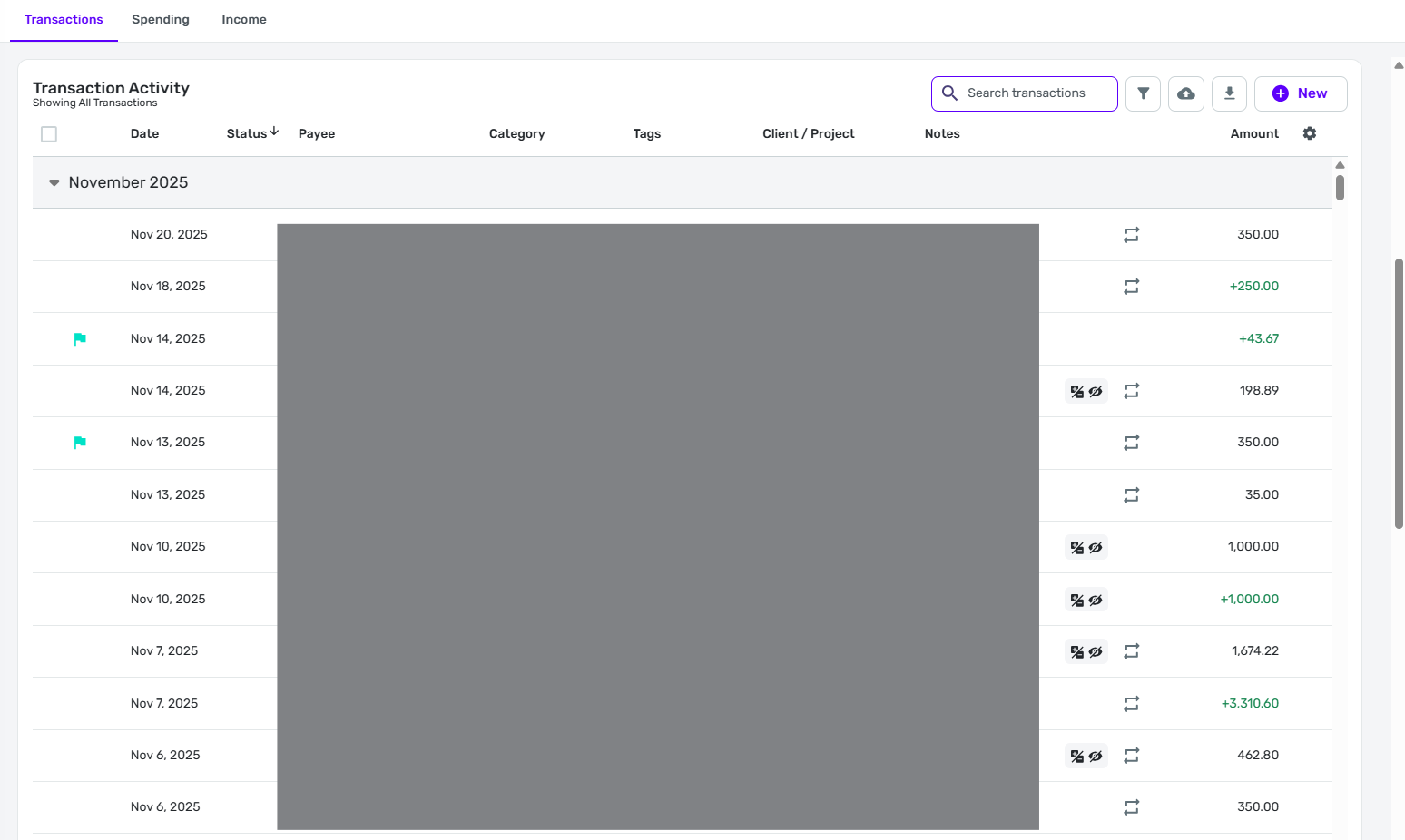
The new register is showing two Transaction Activity panels, one above the other. In the first image below, you see the register as it appears when I first click on the account:
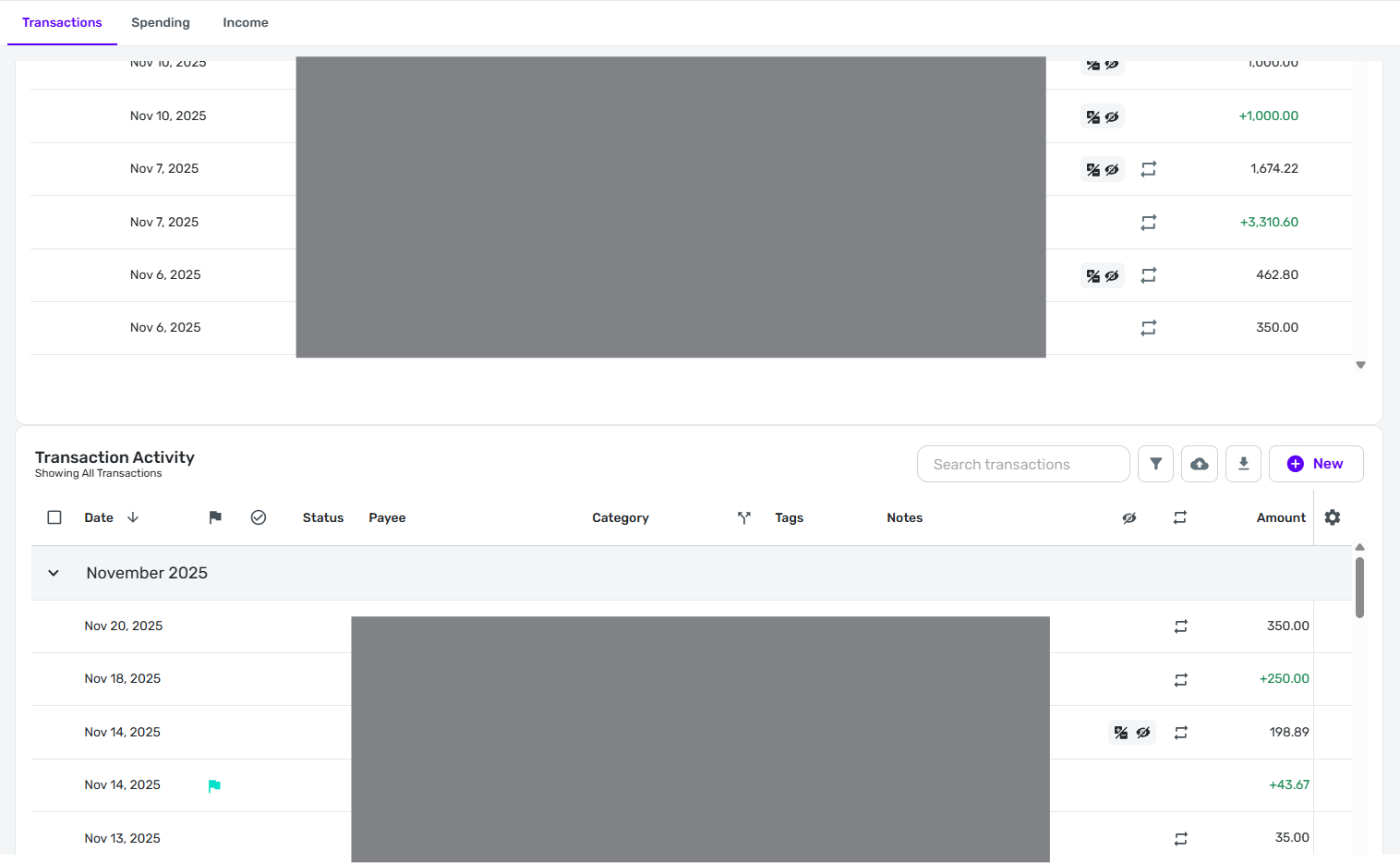
In this second image, you see what happens when I scroll down half a screen. The top part of the screen shows the bottom of the Transaction Activity panel from the first image. The bottom part of the screen shows a second Transaction Activity panel that starts over again with the first transaction. That second panel works correctly as I can scroll down through it and see older transactions as normal.
DryHeat
-Quicken Classic (1990-2020), CountAbout (2021-2024), Simplifi (2025-…)0 -
In the new register, no amount of hovering or clicking in the column header area brings up any "handles" to move or resize the columns. As a result:
—I can successfully include or exclude columns.
—I cannot move them left or right.
—I cannot change column widths.
I was previously using the new register as a "beta tester" of some sort (as were some other folks here). So I am fairly familiar with how these customizations used to work. But they abruptly quit working for me.
DryHeat
-Quicken Classic (1990-2020), CountAbout (2021-2024), Simplifi (2025-…)0 -
I have both the old register and the new register showing up in my accounts. The first register is the old one with none of the new features and the second register is the new register with the new functionalities.I just checked back and found that I now have only the new register showing…
Danny
Simplifi user since 01/22
”Budget: a mathematical confirmation of your suspicions.” ~A.A. Latimer0 -
I am not early access, and my account register no longer shows at all for any account. It's just gone!
0 -
YIKES… check it again. Or close the app and reopen to see if the register is restored.
you may already be aware of this, but if you want to participate in Early Access go to Settings> General > and turn on Early Access in the third box. Usually new features are rolled out over a short time to Early Access so you may not see a new feature right away, but you will have access earlier than the general community, and you may experience some bugs while the testing is going on.
Danny
Simplifi user since 01/22
”Budget: a mathematical confirmation of your suspicions.” ~A.A. Latimer0 -
Thanks DannyB. I tried many things over the course of a half hour, and nothing worked. Eventually, things started working again. We'll take the win and move on :).
1 -
As @DannyB says, the new register is back and this time there is only one register. That's good.
BUT… the problems I mentioned in a previous post are still there. The announcement post said we would be able to "Rearrange columns and adjust their widths," but that isn't the case so far.
Which is weird … We could do both when we were testing the new register before general release.
DryHeat
-Quicken Classic (1990-2020), CountAbout (2021-2024), Simplifi (2025-…)0 -
I can rearrange columns, I do this as follows:
Click column header and hold it till it picks it up, drag it left or right on top of another column header (the date column seems locked on the left which is fine with me). Then, I let go of the mouse button and it is repositioned.
I haven't yet tested if it 'remembers' this setting yet.
—
Rob Wilkens
2 -
It looks to me that with the rollout to Early Access, I've been rolled back to the original register for now. I'm guessing the mix up yesterday with both showing up was part of the process of realignment of all accounts to make way for the rollout of the new register and I now have the original register. Of course I'm guessing, speculating, taking shots in the dark and all that about what's going on. I suspect that at some point I will be updated to the new register in its most current form.
Danny
Simplifi user since 01/22
”Budget: a mathematical confirmation of your suspicions.” ~A.A. Latimer0 -
Click column header and hold it till it picks it up, drag it left or right
That's not working for me. No matter how long I hold the left-click down, it never "picks up" the column header. Then, when I release the mouse button, it sorts on the column I was trying to move.
Like @DannyB, I suspect that I am no longer on the version of the register that allows column rearrangement.
DryHeat
-Quicken Classic (1990-2020), CountAbout (2021-2024), Simplifi (2025-…)1 -
@DryHeat I found something surprising… or maybe not… but in the accounts/transactions page when I select either of the recently added Spending or Income tabs, I find almost all the functionality of the new transaction register on these two pages that is being rolled out to early access for the main register. The one missing item is the gear icon to select columns. It appears that the columns on the Spending and Income tabs are fixed. Changing the columns (adding or hiding) doesn't change the columns in the two tabs.
Danny
Simplifi user since 01/22
”Budget: a mathematical confirmation of your suspicions.” ~A.A. Latimer0 -
You're right… It is possible to rearrange and resize columns under the Spending/Income tabs. And you can also show/hide columns there by choosing "Manage columns" from the three-dot menu that appears at the edge of a column when you hover the mouse over it.
Unfortunately, all those changes are lost when you switch tabs or switch accounts, so whatever work you put into customizing the register is immediately lost. Just like what happens when you move from one Planned Spend Expense Series to another. All customization disappears.
For me, it's hardly worth customizing the register if I am going to have to do it over and over and over.
DryHeat
-Quicken Classic (1990-2020), CountAbout (2021-2024), Simplifi (2025-…)1 -
I regularly import downloaded transaction detail from Simplifi into Excel. However, as of 11/22/25, split transaction data is no longer included. For example, if the transaction was for $100, and I split it $50 Groceries and $50 Entertainment, none of that data is included in the export. This worked just fine until a couple of days ago. Hopefully this can be fixed!
1 -
I have played with the latest changes in the registers this morning, and I was interested in the "Flexible Width" versus "Fixed Width". I assumed that this means that when you needed more width to see the information, you get it. But that wasn't the case. So I went to "Fit to Contents".
I am still able to get the handles to widen and narrow the columns as I desire. This is nice.
But I found is that adding the check # column puts it way over to the far right past the Settings cog icon, and I haven't found a way to move it. Also no checks I have show a number in the column although they are there in the Transaction Detail.

Steve
Quicken Simplifi (Safari & iOS) Since 2021
Quicken Classic (MacOS) Since 2009
Dollars & $ense (DOS) and MS Money (Windows) 1987-20090 -
@Stickboy, thanks for letting us know about the issue with exporting splits!
Based on my testing, this issue seems unique to the new register, which is currently only available in limited Early Access. I went ahead and merged your post with the Early Access feedback thread for the new register, and I have let our product team know about this issue. They will work on getting it fixed!
In the meantime, if you need to export transactions with the split lines, you can get the old register back by disabling Early Access. Our article here explains how to get to the Early Access toggle:
-Coach Natalie
1 -
Hi all,
Thanks so much for the early usage and engagement. I am filing bugs and looking into things.
Also, I rolled out these new features in the wrong order and caused some disruption. Sorry to all for that.@SRC54 I have not seen this happen. Thanks so much for the screenshot. Mind sharing which browser/monitor you're on?
@DryHeat Sorry that you are back on 'old register.' I'll check flags. Do you want new register again?
And, all, we have work to do to remember register customization across contexts. With the help of superusers, our plan here is to remember your customizations and to have them be the same across transaction registers and the income, expense tabs (if you like them, think we should keep them). We think we should remember Spending Plan and Investments customizations separately.
Thanks, everyone for using the new register and the time you took to share your feedback. I really appreciate it.1 -
Yes, I do want the new register. Thanks.
And I agree with remembering Spending Plan and Investments layouts separately.
DryHeat
-Quicken Classic (1990-2020), CountAbout (2021-2024), Simplifi (2025-…)0 -
@Quicken Kirby Thanks a lot. I feel stupid. I was hurrying out the door to the dentist (routine cleaning) and on the way there I got to thinking, "you idiot; if you will just reset the defaults, it will fix it". I got home and did that, and now it's right as rain.
This is why one should never get in a hurry when posting stuff. I know better. For what it's worth, I use Safari and MacOS 26.1.

PS. The best part is that I don't even want to use the check category; already unchecked it. I only enabled it to test it. Laughing at myself.
Steve
Quicken Simplifi (Safari & iOS) Since 2021
Quicken Classic (MacOS) Since 2009
Dollars & $ense (DOS) and MS Money (Windows) 1987-20090 -
@SRC54 It shouldn't show up over there so I appreciate your sharing (especially with the screenshot). But, I'm also glad your register is back in a good state!
1 -
Why are only 20% of early access users given access and what determined that? I use the app every single day and have participated in the forums, yet did not receive access…
0 -
This has been a common practice for releasing new features to early access - rolling them out incrementally to a certain percentage at a time over a short period of time until all early access users receive the new feature.
As a fellow user, I don't know why, but suspect it has to do with, 1. the number of users with early access activated and, 2, So that any issues with a rollout is limited to a smaller group at any given time making it easier to retract or correct any issues… these are guesses only.
I'm not in the first 20% for this feature but was in the first 20% for the Dashboard customization rollout.
Danny
Simplifi user since 01/22
”Budget: a mathematical confirmation of your suspicions.” ~A.A. Latimer1 -
-
Couple things I notice initially.
- It would be nice for Simplifi to retain the visible columns from before the update instead of resetting them. Small, but would definitely be a a big deal with this is released to everyone.
- The improved export feature is nice. However, split transactions now only show as one line, meaning categories will not show. I know it was a big complaint that splits before did not have certain information, so maybe that's why it was done this way? But I think it would be better to still have multiple lines and to mark the split sections accordingly, as well as ensuring they have all other necessary information like date and payee. This new way that split transactions are exported will still have many complaints.
Other than that, love the ability to change to fixed or flexible width, individually filter the columns with more detail, and the appearance improvements are really good. Overall, I love it!
1 -
The improved export feature is nice. However, split transactions now only show as one line, meaning categories will not show. I know it was a big complaint that splits before did not have certain information, so maybe that's why it was done this way? But I think it would be better to still have multiple lines and to mark the split sections accordingly, as well as ensuring they have all other necessary information like date and payee. This new way that split transactions are exported will still have many complaints.
I'm not sure what you mean here about exports. I don't normally export my bank data from QS, but when I read this, I thougt I'd try it out. I have a couple of transactions I split each month routinely and other occasional split transactions. In my exported data set, each split is shown on a separate line with all categories showing - Parent:Child:Grandchild.

But, again, since I don't export so I'm probably missing or misunderstanding what you are pointing out.
Danny
Simplifi user since 01/22
”Budget: a mathematical confirmation of your suspicions.” ~A.A. Latimer0 -
@KDC1996 thanks so much for the feedback and for trying it out!
1. We did change the default columns deliberately based on feedback/screensize usage data. As we remember how you customize, I hope it's not too much work to get columns, order, and visibility set to your liking once and then we'll retain it. (We do need to remember column changes in other contexts like spending plan and investments too.)
2. We do have to resolve this export issue. We are considering a few solutions but all involve that split lines will have full information (date, account, etc).
Thanks for your interest and feedback.1 -
Hi, ever since this update I have noticed that when manually entering multiple transactions for the same day, when I have the feed sorted by date, they now all automatically re-order themselves from smallest to largest amount. Previously, all same-day transactions would retain their original order of entry.
Is it possible to revert this change to get my sorting back to by order entered? I would very much prefer chronologically ordered transactions. This has especially been causing problems on my end when I go to compare my transaction feed in Simplifi vs my bank's native online portal.
0 -
@chadallen Do you want to turn off Early Access for now or I can take you out of the EA group? We definitely intend to sort by date. I'll file this issue and let you know the timing for a fix. Thanks SO much for trying it and reporting the issue.
0 -
@Quicken Kirby Yes, if disabling early access would fix this issue for now, then that would be great. I appreciate the swift response!
And just to clarify, the order of transactions is technically correct when sorted by date since these manual entries would all be for the same day. However, the order within that day cannot be accounted for, so the desire is for transactions on the same day to be sorted by their order of entry. This is how the transaction feed used to work, but it recently changed, I believe from this update, to now just automatically sort all same-day transactions from largest to smallest amount with no way to change it.
0 -
There has been a consistent issue that I have had happen I think every single day with the new register.
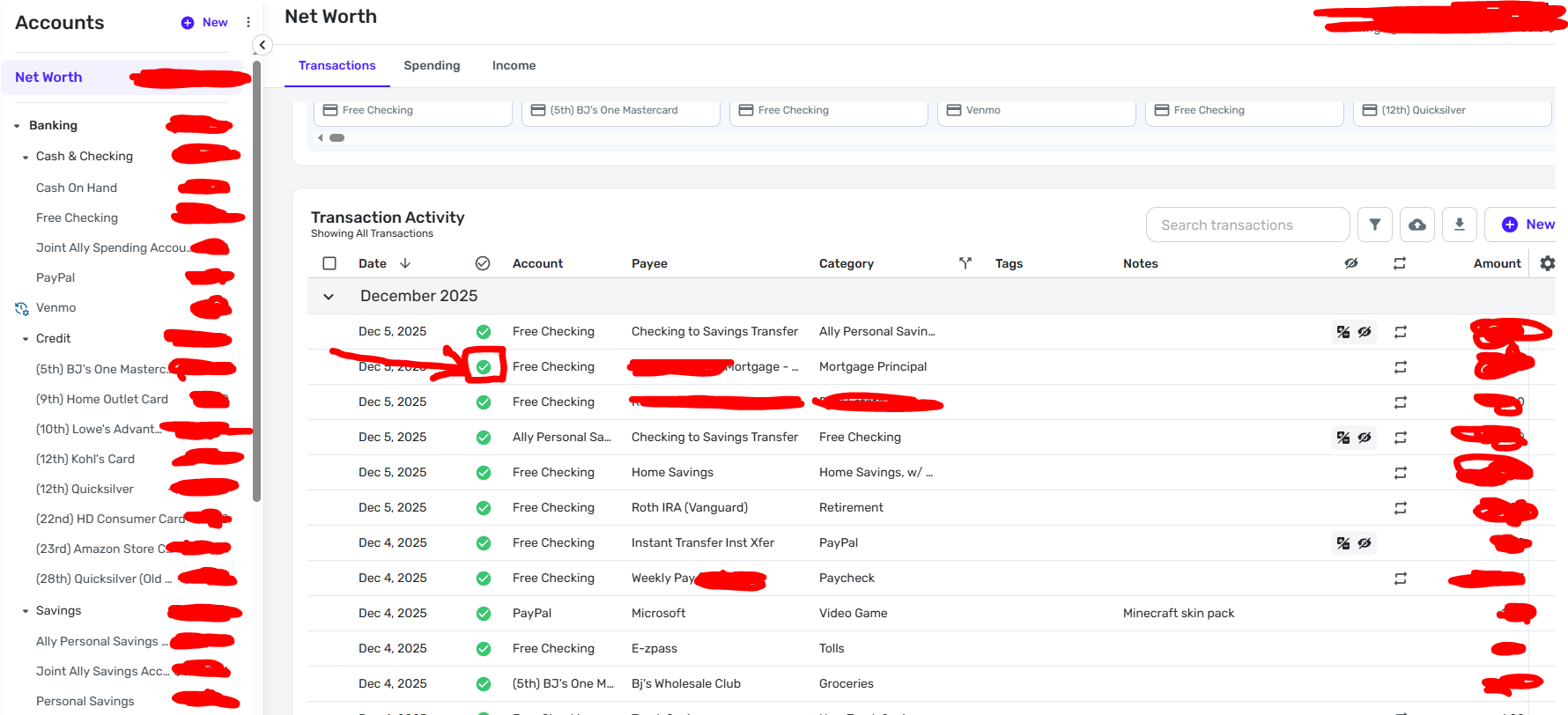
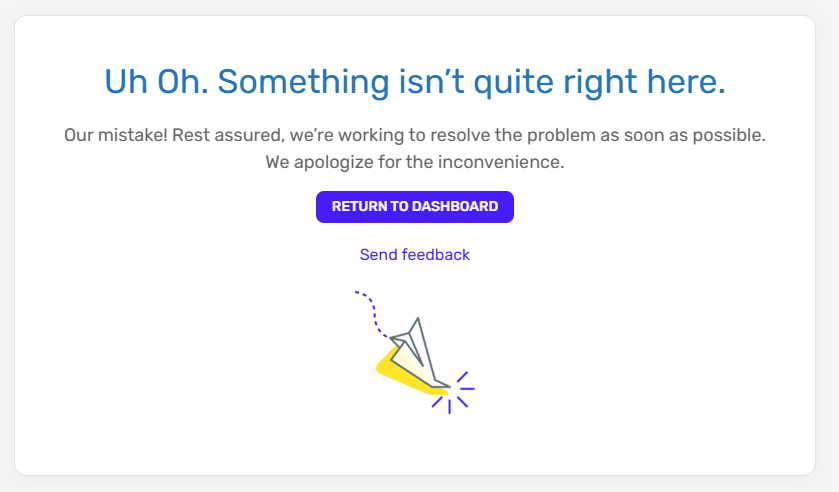
When I go through and check off transactions as "reviewed" on the overall transaction screen, at some point of me clicking (usually not right away but after a few transactions), it goes to an "Uh-Oh" error screen. See reference photos below.
Has anyone else experienced this? It has been consistent for me.
 0
0 -
I had access to the new register, and just clicked update the app, and now I don't have the new register anymore. Was it turned off for the weekend, or did I just lose access? Not a huge deal, but I wanted to see if after the update I could reproduce something someone reported, and it was immediately apparent my access to it was gone.
-Rob
—
Rob Wilkens
0




