Ability to Filter Transactions by an Amount Range (edited)

Comments
-
agree this would be helpful
0 -
Duh! It's so annoying to click to review each transaction, my husband and I decided we could just review transactions above a certain amount. Makes it less daunting at the end of the month. Please add this feature (and/or make it easier to review each transaction without it buffering for a second between each one and glitching out!)
0 -
I would love to be able to filter by, for example, "negative amounts" (charges) so when i have a promo period on a new credit card and have to spend (for example) $1500 in 90 days, I can see how close I am to that amount. (i.e. I'd filter, then select the date range and see the 'selected transaction' total).
—
Rob Wilkens
0 -
Same thing goes for the capability to search by Date or Date Ranges.
- Searching "2/3/2022" or "02/03/2022" will search for transactions dated 02/03/2022.
- Searching "Feb 02, 2022" will search for transactions dated 02/02/2022.
- Searching "Feb 02 2022" will search for transactions dated 02/02/2022.
- Searching "February 02, 2022" will search for transactions dated 02/02/2022.
- Searching "2/3/2022ish" or "02/03/2022ish" will search for transactions dated around 02/03/2022.
- Searching ">2/3/2022" or ">02/03/2022" will search for transactions on or after 02/03/2022.
- Searching "<2/3/2022" or "<02/03/2022" will search for transactions on or before 02/03/2022.
Ugh! Add all these to the Filter.
0 -
The Support page offers these options for searching for a transaction by dollar amount:
- Searches that start with a minus sign (-) or a plus sign (+) will restrict your results to expenses or income, respectively.
- Searching for a generic number, such as "23", will return results for both +23.00 and -23.00.
- Searching "-23.50" will search for -23.50 specifically (you can also use the plus sign to search for income).
- Searching "-23ish" will search for values roughly around -23.00 (you can also use the plus sign to search for income).
- Searching "~-23" will also search for values roughly around -23.00 (you can also use the plus sign to search for income).
- Searching "+>1000" will search for income transactions greater than 1000.00 (you can also use the minus sign to search for expenses).
- Searching "+<1000" will search for income transactions less than 1000.00 (you can also use the minus sign to search for expenses).
- Using a dollar sign ($) when searching for an amount will help refine the search.
Admittedly they are quite arcane and hard to remember the formatting.
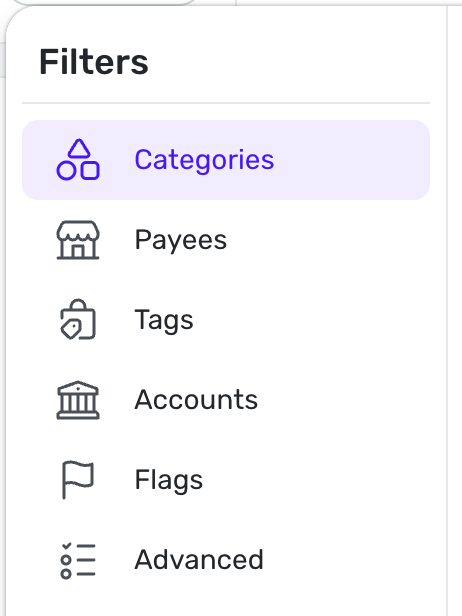
It would be much more helpful to add dollar amount searching via the Filter button.
0 -
"It would be much more helpful to add dollar amount searching via the Filter button."
100%
0 -
I assume the request is within Reports but with the added ability to use Dollar amounts as ways to create a report?
So for instance add $'s to the Filter and add ability to use greater less than and ranges? If so I'd like this too.
 0
0 -
I am trying to research and generate payee rules for subscriptions from apple and I find a lot of 9.99 and x9.99 Items on different days of month for monthly subscriptions. I would like to filter the transaction register as a range for amounts like the create rule does and also filter by a range of the day of the month like between the 7th of the month and the 9th of any month. I can then build a payee rule for that subscription. It would be nice if the recurring transactions could have similar rules.
Thanks for your consideration. Steve
Steve B
Ex Fortran, Cobol, Basic, MS Access and VBA (Visual Basic for Applications programer
Been using Simplifi since Dec 2026.
0 -
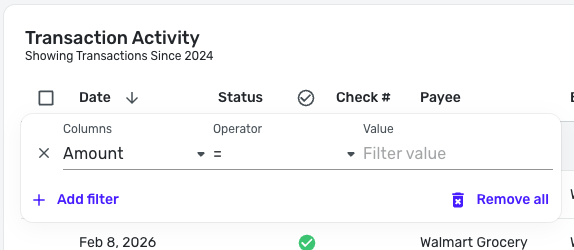
With the new Transaction List, you can filter by Amount! To do so, select the three dots at the end of a column header and use the filter box that pops up —
-Coach Natalie
0