Recent Spending includes Income categories

The Recent Spending widget on mobile app and similar Spent widget on Desktop Dashboard is including Income categories as well.
After my bank transactions downloads to Simplifi, I go in and split the paycheck deposit. I enter the gross income using "Paycheck" category (which is Income) as a positive number, leading +. Then I add other splits for Federal Tax, Medicare tax, Dental & Vision insurance premiums (all these are expenses). I also have splits which are transfer like: FSA, HSA and 401(k) contributions.
The net is a positive number, its a paycheck after all and matches the bank deposit.
But SImplifi is taking this net positive number and including it in Recent Spending widget. Why? Shouldn't it ignore all Income categories, even from splits and ONLY include the expenses to calculate this section?
Comments
-
Hi @SRC54 I just noticed you had the same issue reported more than a year back. Did you ever find a good solution for it?
0 -
But SImplifi is taking this net positive number and including it in Recent Spending widget. Why? Shouldn't it ignore all Income categories, even from splits and ONLY include the expenses to calculate this section?
Exactly, and it needs to be fixed. In effect, the card isn't recent spending but total Recent Transactions, but it should ignore income (and transfers) splits to count only expenses. Quicken Classic had the same kind of thing in one of its cards, which I pointed out, and it got fixed.
The problem here is a reluctance (if not downright refusal) on Simplifi's part to fix split transactions when you have income and expenses in the same transactions, and sometimes a transfer. With paychecks this is of course not only common but customary!
Do you have a transfer to a Retirement Account in your paycheck, because if you do, the Spending Plan will count the paycheck net amount as Transfer Income thereby doubling your net income for the month. The workaround for that is to add a custom transfer amount to the Spending Plan. But 0.00 won't work. There are a couple of us who have pointed that out too.
Good luck!
Steve
Quicken Simplifi (Safari & iOS) Since 2021
Quicken Classic (MacOS) Since 2009
MS Money (1991-2009) and Dollars & Sense (1987-1991)0 -
@simpli_struggle, thanks for posting to the Community!
When testing this in my own Quicken Simplifi, I only see the expense portion of the split transaction in the 'Spent' tile on my Dashboard. I split a paycheck transaction with some bogus amounts for State and Federal Tax to replicate the outline you provided above, and I only see the $130 expense portion on the Dashboard card:


This Dashboard card appears to be Category-driven, as I also see positive transactions using an Expense Category included here, which I would expect:

Is this what you're seeing as well? Please let us know so we can best assist!
-Coach Natalie
-Coach Natalie
1 -
@Coach Natalie I just created a 5000 paycheck with 6000 in income and 1000 in withholdings, and my card now read Spending Since Friday: +4743.42!
So I am confused as to why yours is different.
Steve
Quicken Simplifi (Safari & iOS) Since 2021
Quicken Classic (MacOS) Since 2009
MS Money (1991-2009) and Dollars & Sense (1987-1991)0 -
I wonder if there's a difference depending on whether you create this as a transaction or a spending plan item? It shouldn't matter, just trying to narrow down the issue.
Anthony Bopp
Simplifi User Since July 2022Money talks. But all my paycheck ever says is goodbye0 -
@SRC54, I'm not sure either, but I just tested with a manual transaction instead of a downloaded one and it's still working as expected. Have you tried from a different browser or anything along those lines?
-Coach Natalie
-Coach Natalie
0 -
Yes, it is the same everywhere including app. Makes no difference if downloaded then split or manually entered. It is this way every single month for 4 days.
Are we talking about the same thing. It's always been this way, and I was told it was designed this way. This is on a Mac and an iPhone.

Steve
Quicken Simplifi (Safari & iOS) Since 2021
Quicken Classic (MacOS) Since 2009
MS Money (1991-2009) and Dollars & Sense (1987-1991)0 -
@SRC54, you can see in my screenshots above how my splits look and how my dashboard card looks. Does your transaction look more or less the same where you have expense categories in an income (positive) transaction?
I know we discussed this prior, but I don't see any screenshots in the old thread to know what the 'Spent' dashboard card looked like at that time. I'd say we could most likely escalate what you're seeing now as a dataset-specific bug since I can't reproduce it. Can you send a screenshot of the Transaction Detail view for the transaction itself that includes the splits so we can see it first, though, please?
Thanks!
-Coach Natalie
-Coach Natalie
0 -

I sent it plus the one I already posted. Is your income category and income category or an expense category? I've been with this program for 3 years, and it has always been like this. Every month for almost 36 mos.
Steve
Quicken Simplifi (Safari & iOS) Since 2021
Quicken Classic (MacOS) Since 2009
MS Money (1991-2009) and Dollars & Sense (1987-1991)1 -
@SRC54, the income portion of my transaction is using an income category (Paycheck), and the splits are using expense categories. Is your "Wages" category an expense or income under Settings?
-Coach Natalie
-Coach Natalie
0 -
Yes, That is correct. Wages is an income category and the others are expense categories.
I sent a reply to this last week, but for some reason, it didn't get posted so sorry for late response.
Steve
Quicken Simplifi (Safari & iOS) Since 2021
Quicken Classic (MacOS) Since 2009
MS Money (1991-2009) and Dollars & Sense (1987-1991)0 -
@SRC54, thanks for confirming!
I'd say that we can submit a dataset-specific bug ticket for what you're seeing, especially since I can't reproduce it. To do so, please provide the following data:
- A screenshot of the "Wages" and "Withholdings" Categories under Settings > Categories & Tags so we can show that they're set up as Income and Expense.
- The browser and browser version you're accessing the Quicken Simplifi Web App from.
- The OS of the computer or device you're using to access the Quicken Simplifi Web App.
- The version and build of Quicken Simplifi you're on (we need to make sure you're up-to-date).
Please also submit your logs via the 'Send Feedback' option:
- Log into the Quicken Simplifi Web App.
- Select Profile from the left-hand navigation bar.
- With the Profile menu open, hold down the Option key for Mac or the Alt key for Windows, and then click Send Feedback.
- Leave all boxes checked, add a brief description of the issue, and then click Send.
We look forward to working on this with you!
-Coach Natalie
-Coach Natalie
0 -
Alright, I will do it, but it seems like a lot of work for me. I have the latest everything MacOS 14.4.1, Safari (also Chromium), Wages is definitely income and Withholdings are definitely expense. Pretty sure I have latest version of Simplifi (4.7.1) as well. Will send this to support. You do know I am not the only one seeing this and have been seeing it for 3 years? By the way, what happened to @Simpli_struggle? I got back involved in this to confirm his report. I was just living with it.
I will also message it to @Coach Natalie .
Steve
Quicken Simplifi (Safari & iOS) Since 2021
Quicken Classic (MacOS) Since 2009
MS Money (1991-2009) and Dollars & Sense (1987-1991)0 -
@SRC54, I believe you — I can see your screenshots! We just need to outline the issue in a ticket, and I can't reproduce it, so we need the requested data and your logs from you. Also, since other users are seeing the issue, getting it reported and fixed for you will likely fix it for them as well. However, since you're the one responding to me here, we will have to use your data to report the issue. My goal is to get this issue fixed for everyone. 🙂
Thank you!
-Coach Natalie
-Coach Natalie
0 -
@Coach Natalie OK, I have sent to support the logs that you requested. I am using Safari on MacOS 14.4.1. Simplifi updated to Version 4.8.0 this morning. I created a new dummy paycheck. Here are the screenshots of that transaction, the erroneous Recent Spending, and one verifying that Salary is Income and Federal Tax is Expense.


The good news is that version 4.8.0 seems to have fixed the Transfers Bug in the Spending Plan. I will continue testing that and post in that thread.
Steve
Quicken Simplifi (Safari & iOS) Since 2021
Quicken Classic (MacOS) Since 2009
MS Money (1991-2009) and Dollars & Sense (1987-1991)0 -
@SRC54, thank you!
I went ahead and got this issue escalated and will let you know when we hear back.
-Coach Natalie
SIMPL-20757
-Coach Natalie
1 -
@Coach Natalie I am starting this again since my last discussion has been closed. I agreed with you that the culprit here is that Spending Card (last four days) is really Recent Transactions, but when I get paid and taxes are taken out, Simplifi still counts it as negative spending.
So if I spent $500 last four days and get paid $5000 on one of those days and I have $500 taken out for taxes, then my spending should be $1000. Instead Simplifi tells me that my Recent Spending is +4000.
I strongly suggest that this gets fixed to A) either ignore the +5000 income or B) Label the Dashboard Card as "Recent Transactions". I am fine with either solution.
Thanks.
Steve
Quicken Simplifi (Safari & iOS) Since 2021
Quicken Classic (MacOS) Since 2009
MS Money (1991-2009) and Dollars & Sense (1987-1991)0 -
@SRC54, thanks for reaching out!
The original thread for this issue wasn't closed; we leave threads with open escalations open until after the issue is resolved. I merged your new post with this existing thread. As for an update, there is no news to provide at this time. As soon as we receive an update, we'll be sure to let you know.
Thanks for your patience!
-Coach Natalie
-Coach Natalie
1 -
@Coach Natalie Thanks.
I did a long, long search and couldn't find it. I found another one I had started and it is closed, but I'll look again.
I'll try bookmarking it.
Steve
Quicken Simplifi (Safari & iOS) Since 2021
Quicken Classic (MacOS) Since 2009
MS Money (1991-2009) and Dollars & Sense (1987-1991)0 -
@Coach Natalie Is there any update on this bug of paychecks with deductions showing a negative spending amount in Recent Spending Card. I now have this happening 2x a month and it will soon be 3x a month when my wife gets on Social Security and has Medicare taken out.
The easiest thing might be for Simplifi to rename the card Recent Transactions and not sum them. But it is nice to see for people who are trying to control their spending what their actual spending has been for the week. Thanks.
Steve
Quicken Simplifi (Safari & iOS) Since 2021
Quicken Classic (MacOS) Since 2009
MS Money (1991-2009) and Dollars & Sense (1987-1991)0 -
@SRC54, we will post back as soon as an update becomes available. There is no update at this time.
Thanks for your continued patience!
-Coach Natalie
-Coach Natalie
1 -
@SRC54, hello!
I'm going through old escalations and I see that the ticket for this issue is still open. Are you still seeing this issue in Quicken Simplifi? If so, I'd like to give the ticket a bump.
Let us know!
-Coach Natalie
0 -
@Coach Natalie Yes. if I have a credit to a spending category or splits in a paycheck, it shows up as Spending throwing off the recent spending a lot if it’s a paycheck.
Wish we could fix this. Thanks.
Steve
Quicken Simplifi (Safari & iOS) Since 2021
Quicken Classic (MacOS) Since 2009
MS Money (1991-2009) and Dollars & Sense (1987-1991)1 -
I wonder @SRC54, If this has anything to do with what looks like your customization of your income parent category as "Wages." Did you rename "Income" or did you create this parent category yourself?
QS comes with a default "Income" category and I used that (as apparently @Coach Natalie has) as the parent category for all my various income streams (Pension, Social Security, Room & Board, Salary/wages, etc.) I see the same result as Coach Natalie in my Recent Spending dashboard card.
Again, I don't see why this would matter but just wondering if that is something to explore.
Danny
Simplifi user since 01/22
”Budget: a mathematical confirmation of your suspicions.” ~A.A. Latimer0 -
I don't think all income categories have to be under the top-level "Income" category. In my Personal categories I have another top-level category called "Oil Income" — at the same level as "Personal Income" — and it works ok. I just set the Type as "Income" and QBP recognizes it.
DryHeat
-Quicken Classic (1990-2020), CountAbout (2021-2024), Simplifi (2025-…)1 -
I agree with you on this, and I'm not saying it should matter, I'm only throwing this into the conversation as something to look at in Steve's situation… and it's highly unlikely that this is the issue IMHO.
Danny
Simplifi user since 01/22
”Budget: a mathematical confirmation of your suspicions.” ~A.A. Latimer0 -
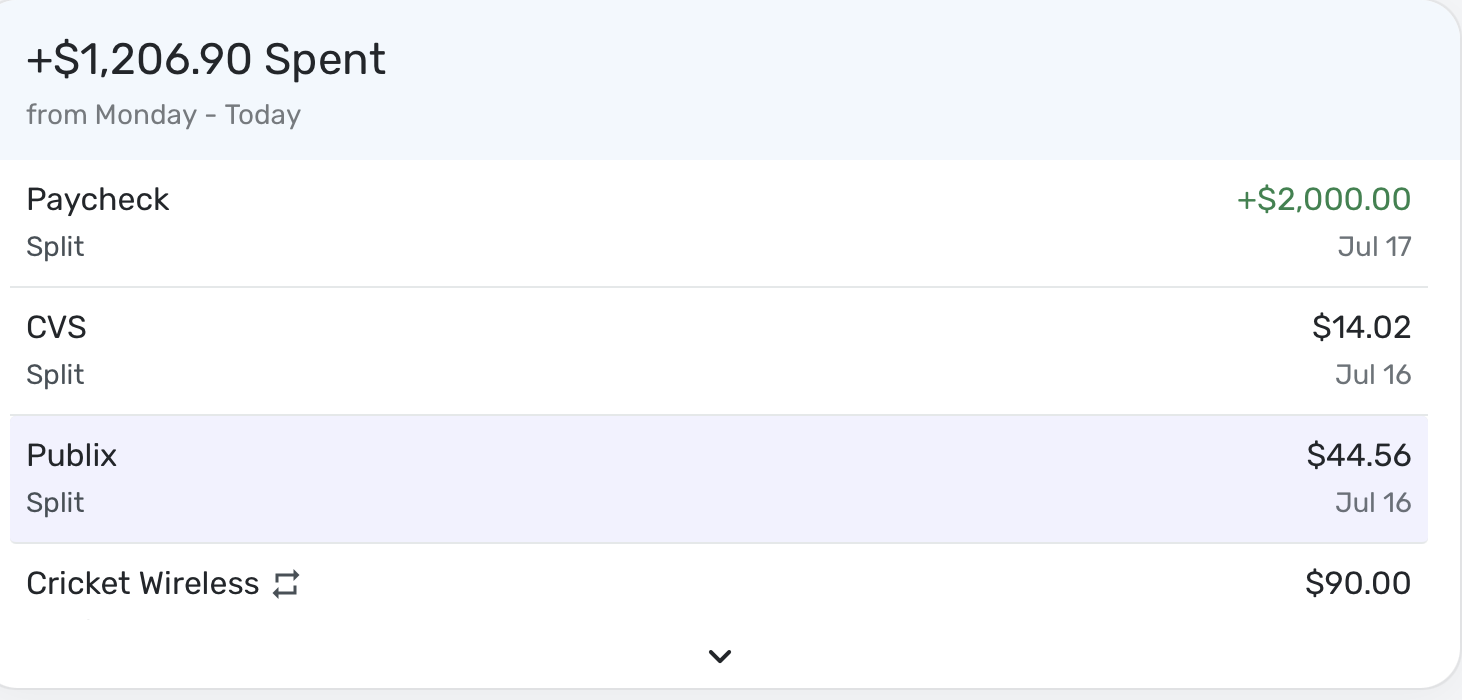
@DannyB Nah, we can name our income categories what we want. This happens because I have paycheck splits with some expense categories, i.e., taxes. Simplifi then treats the net sum of the paycheck as a negative expense, which throws off the Recent Spending Total. This happens to everyone. Do a dummy transaction today for a paycheck for $1000 and split it $900 income and $100 taxes, and you should see what I mean.
So instead of having Recent Spending at say $400, it will read something like +500.
If they did away with the summation and just said Recent Transactions, it would be right. Otherwise, they need to ignore income categories entirely when summing Recent Spending.
Steve
Quicken Simplifi (Safari & iOS) Since 2021
Quicken Classic (MacOS) Since 2009
MS Money (1991-2009) and Dollars & Sense (1987-1991)0 -
@Coach Natalie Any news on this? It still shows income categories. The fastest fix would be just to change it to say "Recent Transactions".
Steve
Quicken Simplifi (Safari & iOS) Since 2021
Quicken Classic (MacOS) Since 2009
MS Money (1991-2009) and Dollars & Sense (1987-1991)0 -
@SRC54, as soon as I have any news to share, I will post back to let you know. No updates as of yet.
Thank you for your continued patience!
-Coach Natalie
0 -
@SRC54, I just wanted to follow up here to let you know the ticket for this issue is still open and being worked on. We will continue to post back here as updates are received.
Thank you for your continued patience!
-Coach Natalie
0



