Incorrect Savings Goal Amounts

I have repeatedly had incorrect/mismatched amounts in my savings goals. This has happened with multiple goals on multiple occasions. I don't know if it's something I'm doing or a system bug. I contacted support a few months ago when it first occurred. They gathered a lot of information but never replied (possibly because it hadn't made it through the dev cycle?). I have since deleted the goal and started over as I wanted the goals to be reflected correctly. In this instance, I assumed it had something to do with using the "withdraw for something else option".
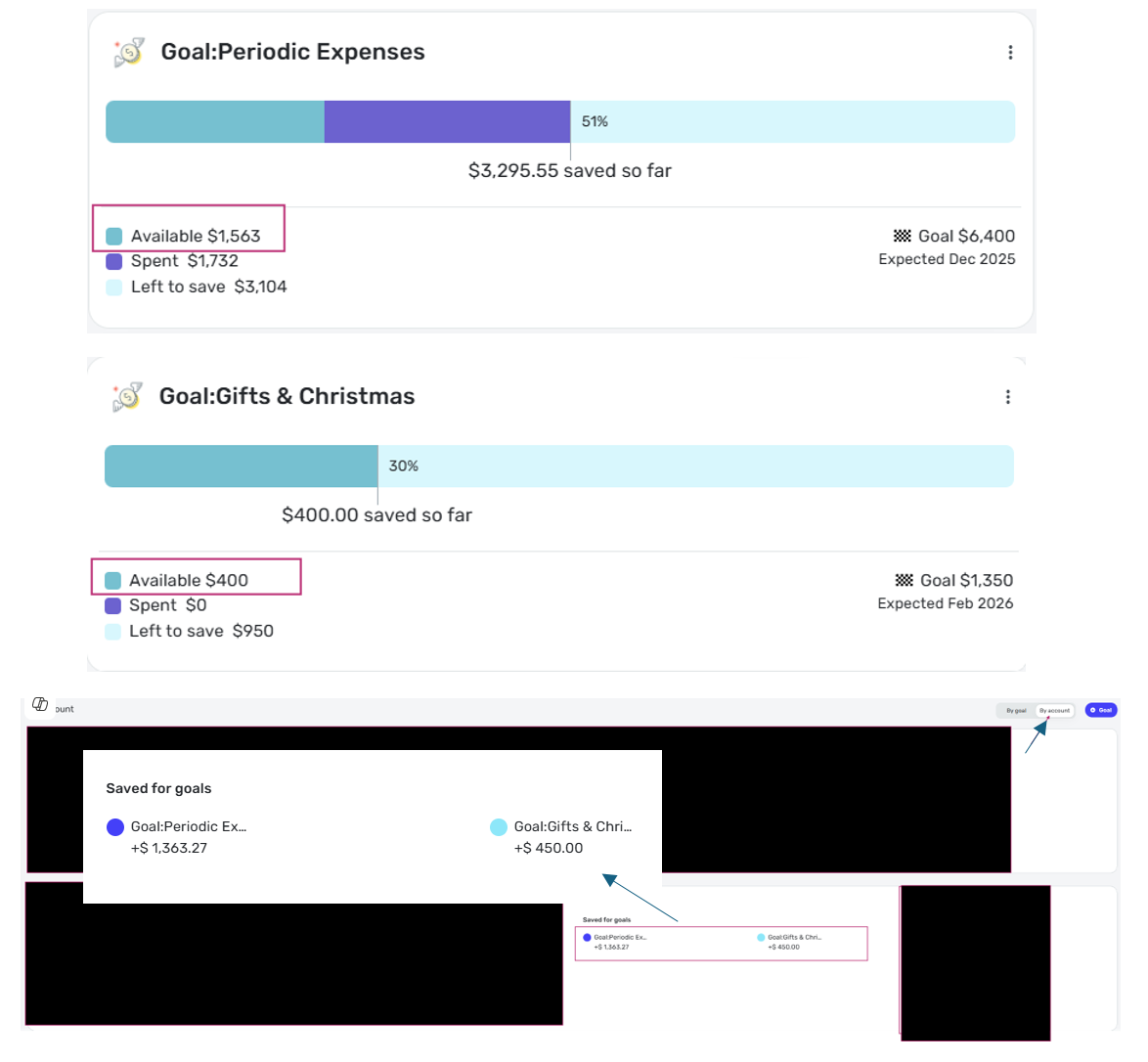
However, I'm seeing similar issues again with goals I just set up a couple weeks ago. Goal 1: On the Goals-By Goal screen, the amount available is showing $1,563 and on the Goals-By Account the amount saved/available is showing $1,363. Goal 2: On the Goals-By Goal screen, the amount available is showing $400 and on the Goals-By Account the amount saved/available is showing $450. The only thing I can think of that may have caused the issue is using the Contribute to Goal option from the savings plan.
I don't know how to prevent this from happening or how to fix it without deleting the goal and starting over…again (which then may cause issues with the tags assigned to transactions). Without a goal register/transaction history, it's also difficult to confirm which amount is correct or when it got out of balance.
Is anyone else having this issue or know how to prevent it?
Comments
-
@Jenny T, thanks for posting to the Community regarding this issue!
I haven't personally seen any issues with my Savings Goals. I think it would be helpful if you could post screenshots showing the issue so others can get a clearer picture of what's going on. I would also recommend reviewing your contribution amounts in the Spending Plan in the current and any applicable past months to see if you can gain any insight there.
Usually, deleting and recreating a problematic Savings Goal would be the fastest path to a solution. You might consider deleting and recreating the Goal this time, and then keeping a closer eye on things with the new one to see if you can identify any culprits that may be causing the behavior.
For a record of Savings Goals transactions, we do have an Idea post that would be great to have your vote and feedback on!
Let us know how it goes!
-Coach Natalie
0 -
@Coach Natalie Thanks for following up! Screen shots are provided below. The top two are from the "By goal" view and the latter is from the "By account" view.
My spending plans look like I would expect. The Periodic Expenses goes back to October and the Gifts starts in April since I had deleted and set it back up (yes, it has somehow become incorrect in less than a full month, with only one or two contributions since I set it up).
If I delete and recreate, is there a good way to update the transactions that are tagged with the current goal tag? When I deleted the Gifts one the first time, the old tag was still lingering as an Unknown tag after I deleted the old tag. If I recreate the goal with same name, will the tags resync correctly so I don't have to manually update them? I have been doing a lot of clean-up of my historical/imported transactions and don't want to undo that work.
I already had voted for the idea post on having a savings goal register/transaction history :)
0 -
I created a test goal and have not been able to "break it" yet. I feel like I have tried all of the actions I would have completed on the others - contribute to goal from spending plan, contribute from goal page, withdraw from goal for something else, withdraw from goal for custom amount, make changes while spending plan and goals are open in two different windows at the same time. The only other thing I can think of that I didn't do with the test goal is to use the tags and manual transactions to create my own register, or allow time to pass since creation.
There must be something I am doing differently to cause the same issue three times now in the few months I have been using Simplifi. I have three other goals, one with regular contributions and withdrawals, that are working as expected so far (knock on wood). It should be impossible for the amounts shown above to not match - it should be using the same source data/entry. Lack of audit trail to retrace the steps is really disappointing and frustrating. Deducting the savings goals from accounts' available balance was one of the key features I started using Simplifi for. I'm quickly losing trust in their accuracy and if this feature wasn't so important to me, I would give up on using them until they are improved.
0 -
Hello @Jenny T,
Thanks for the additional replies! I can also confirm that I am seeing no issues with Savings Goals on my side either. If creating a new test goal as you have is not causing any problems and you haven't been able to "break" it, plus you have other goals working correctly, I would see if deleting and recreating the problematic Savings Goals fixes the issue you are seeing. If you still see the same issue afterward, be sure to let us know.
-Coach Jon
-Coach Jon
0 -
@Coach Jon I technically already did delete and create a new one for the Gifts goal. The one I originally contacted support about has been deleted and the replacement goal is one of the ones included above.
0 -
Hello @Jenny T,
Thanks for the reply. I myself cannot think of a reason why they would be showing incorrect unless it was an issue specific to your Savings Goals. I would also check your contribution amounts in the Spending Plan in the current and past months to see if you can see anything suspicious there. If that provides nothing as to why these would be showing like this, then I would still suggest deleting these and recreating them, so that we have a good way to verify that if they do end up going bad again, we can reference the information already posted here if you contact us again.
-Coach Jon
-Coach Jon
0 -
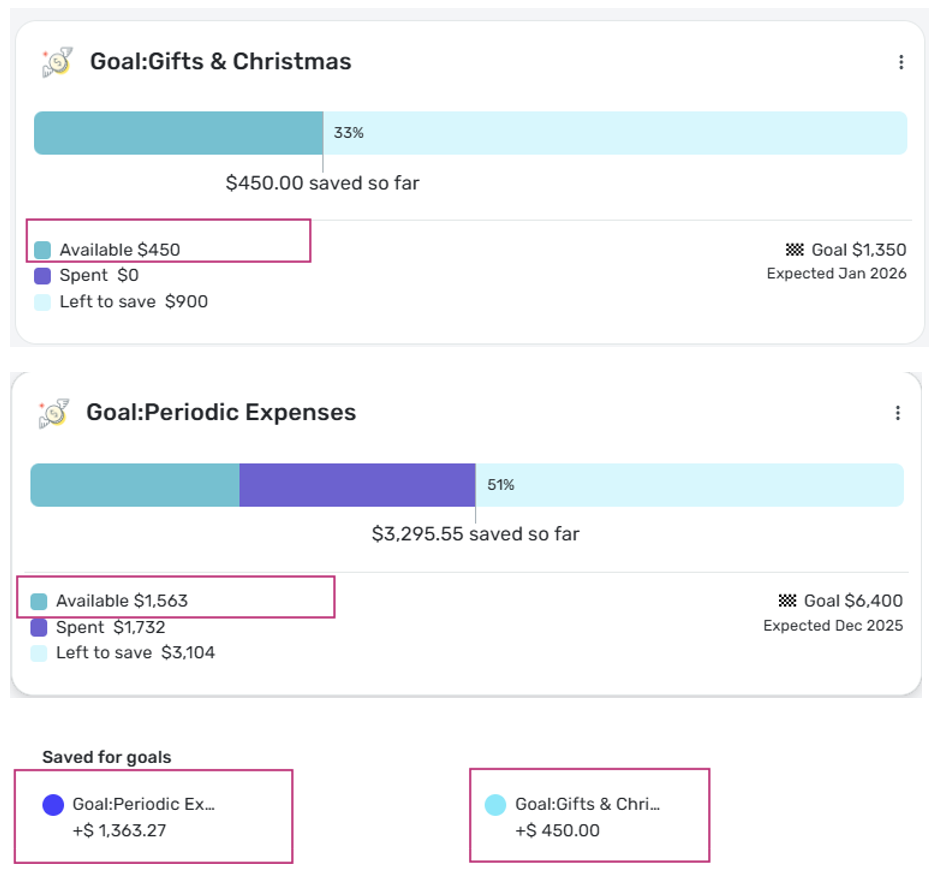
I know this is going to make it sound like I'm crazy, but I logged in this evening and the Gifts goal is now magically back in balance. (?!?!?!) I did nothing at all with any of my goals today. As shown by today's screenshots, now only one of the goals is incorrect. Was there an update last night?
0 -
Here's the updated screen shots, showing the Gifts goal matching now and the Periodic Expenses still mismatched. For the Periodic Expenses, the "by goal" view is correct and the "by account" view is incorrect (which happens to be the opposite of the original issue with Gifts).
 0
0 -
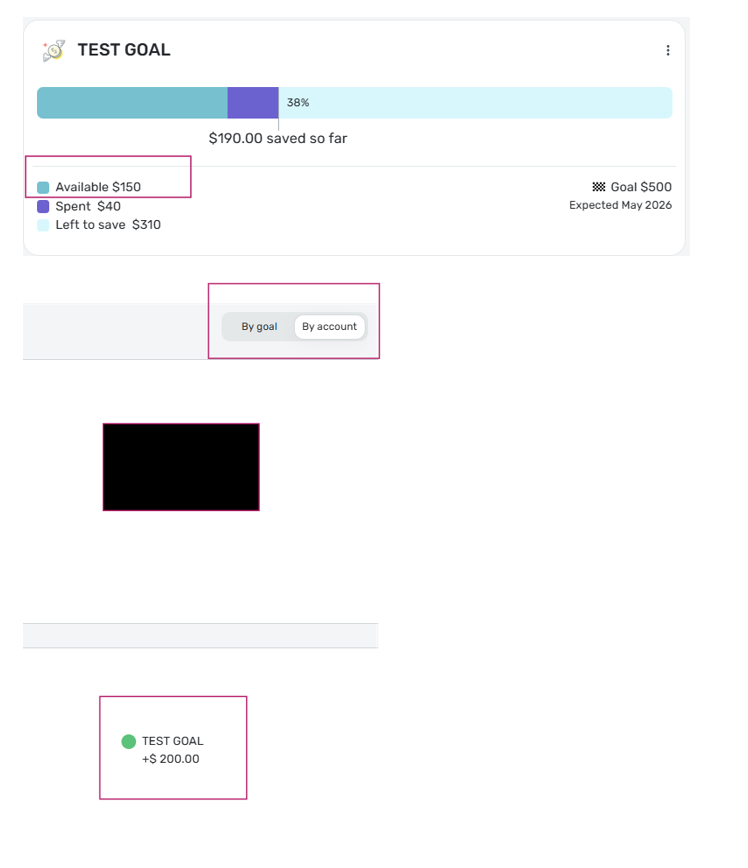
I apologize for so many separate posts, but another update! I was adjusting the Contribution on my TEST GOAL that I created yesterday so that I could use it to temporarily account for the difference on the Periodic Expenses (so that the right amount is being set aside from my checking account), and it broke!
Prior to my earlier posts, I had done another withdraw from the test goal with no issues. I then did a $50 contribution to the goal from the "by goal" view and this was the result:
 0
0 -
Hello @Jenny T,
Thanks for the updates. It sounds like your Quicken Simplifi program is playing catch-up to the work you are doing in your Savings Goals when it refreshes. Is your Periodic Expenses Goal now correct? I am glad that your Gifts Goal is correct now! I would see if signing out of the application and signing back in works to resolve the issue here, possibly.
-Coach Jon
-Coach Jon
0 -
I signed out and the Periodic Expenses is still showing correctly in the "by account" view. I'm not going to delete as of yet. I will continue making my normal contributions and withdrawals and see if it eventually resyncs. Thanks for the suggestions and feedback.
0

