Deleted recurring series keep reappearing (edited)

In some cases, I've deleted unwanted recurring series 3-4 times. Then, hours later, they reappear. Any suggestions about how to make them go away permanently are appreciated.
Note: The recurring series I'm trying to delete were created 1) in error or 2) as a test of the software. They didn't orphan transactions upon deletion and/or were not accidentally deleted.
Thank you ahead of time to anyone who might answer.
Comments
-
To anyone that might have this problem, tech support said they are aware of the "issue" and are working to resolve it now.
In the meantime, I did find a workaround by "Ending" series. While this doesn't fix the problem, it minimizes its impact by relegating unwanted series to the "Cancelled" section of the Recurring Series page…thereby keeping them from cluttering the list of active series.
0 -
Hello @spamwich,
Thanks for reaching out! I myself am not aware of a known issue at this time regarding this issue, but it may be being investigated for sure. When you delete the recurring series, are you deleting them on the mobile application or the web application? Are they reappearing after signing back in to the program, or just randomly? Let us know!
-Coach Jon
-Coach Jon
1 -
Hi @Coach Jon,
Thank you for asking for details.
I am deleting the Recurring Series via the web application. After deletion, the Recurring Series reappear without signing back in AND when signing out and back in. That is, I've seen them reappear under both conditions. I've also tried using another browser, clearing the cache, using a new session via incognito, etc. Regardless, the Recurring Series return after deletion. At this point, I've deleted some of them a dozen times. Sometimes they come back after a few minutes, other times after a few hours. I've also noticed they reappear as "active" Series when deleted as active…and reappear as "Canceled" Series when deleted as Canceled Series.
Btw, I don't even think I created all of the subject Recurrences (although I did create some of them). That is, some of them seem to have just appeared out of nowhere. Just weird. There are 12 of them in total. Fortunately, though, the number has not grown since they appeared on the scene 24-48 hours ago.
I've also looked for some common attribute that could be the culprit (vendor, category, periodicity, date of creation, etc.), but they don't seem to have any obvious, damning commonality except their stubborn persistence. None of them have any transactions belonging to them, but that's the only similarity I notice.
Also, I don't share the account with anyone. There is no evidence anyone has breached the account. The behavior happens both when "Early Access" is on and when it is not.
If the aforementioned details help theorize a possible solution (or even root cause), please let me know. Also, if you find more information regarding a development team fix (or issue acknowledgement), I'd be interested to hear that, too. Either way, thank you again for your inquiry on the matter.
0 -
I’m having a similar but different issue which @Coach Jon is assisting with. My situation involves creating a recurring series in the iOS app, when I select the series, it doesn’t remove it from other devices or the web app. In one situation, I had it duplicate the series 8 times. Sounds like they’re working on it though.
1 -
@housetr Thank you for sharing relevant information on your situation.
It does seem our issues may be similar. Like you, some of the Recurring Series I mentioned above are indeed duplicated Series (none of which, when deleted, stay deleted for long). In one instance, two are duplicates, and in another instance, four are duplicates.
I can say that moving the pesky, unwanted Recurring Series to the "Canceled" window (via "End Series") has helped improve my navigation and maintenance of the active Series by getting them out of the way. Perhaps that could help you…especially if you're having to regularly scroll over 8 duplicates.
Hopefully, the Simplifi Team will stealth fix the issue soon.
0 -
Hello @spamwich,
Thank you for confirming and providing the additional information. If you log in to the mobile application, are you able to delete the recurring series in question? If you do delete them, do they still show up on the web application? Let us know!
-Coach Jon
-Coach Jon
1 -
@Coach Jon Yes, that is exactly the issue I had as well. If I deleted the recurring series from my iPhone, it doesn’t remove them from my iPad or web app.
0 -
@Coach Jon Thank you for the above recommendation.
I logged into the mobile app about 8 hours ago and deleted the offending Recurring Series. They just reappeared in the web application. It took them a while to reappear (I checked via webapp repeatedly throughout the day). Alas, they are again resident in the Recurring Series section. :|
I will continue to tinker with them when I have new ideas about their possible nature and behavior and post any positive findings should I solve the problem.
1 -
Btw, the deleted and reappearing Recurring Series only appear on the webapp (cache and cookies cleared, incognito browser, different browsers). They (seemingly) no longer appear on the mobile app.
0 -
I spoke too soon.
The previously deleted Recurring Series are back…both on the web and mobile interfaces. They are also accumulating. That is, any series that I delete seems to return. Basically, I can't delete a Recurring Series, full stop. It also seems that any series, deleted via any platform, from any browser, with any state of cache/cookies, on any machine, at any time, returns.
No sir, I don't like it.
0 -
Thank you for the update,
To clarify, when you delete a series, are individual instances of the series returning, or is the entire series returning? Are these deleted series visible everywhere (Bills & Income, Spending Plan, etc.), or are they only reflecting in the Projected Cash Flow?
Would you please provide screenshots of the reappearing series? Please make sure to redact any personal information. If you're not comfortable posting the screenshots in this discussion, it's okay to send them via DM.
Thank you!
-Coach Kristina
1 -
Thank you for asking. :)
To clarify, when I delete a Recurring Series "entry", said Recurring Series entry reappears later. Note that I am not deleting transactions (individual instances?) linked to a Recurring Series. In fact, several of the Recurring Series entries I am deleting have no linked transactions (and never did). Note that regardless of whether the deleted Recurring Series entry had linked transactions or not when deleted, that entry will reappear—without any linked transactions associated with it. Entries simply reappear as Recurring Series with "Blank Slate!" histories.
I don't think the reappearing Recurring Series are visible in Bills & Income, Spending Plan, etc.…an interesting data point that I had not discovered. I'm not 100% certain about that, though, because I'm not familiar with those features (yet). Nor do I visit (or confidently digest) the Cash Flow feature because my balances are very high relative to the monthly transaction amounts, thereby rendering the cash flow graph a relatively useless horizontal line. All that disclosure mentioned, I don't think the deleted Recurring Series reflect as Cash Flow either.
Specifically, the struggle I am having is getting the Recurring Series to permanently delete from the list of Recurring Series on the Setting→All Recurring page. They keep returning to the list after deletion. The number of "undeletable" Series is growing—adding data pollution to the "All Recurring" page display list (in Settings).
I will try to DM you screenshots. Thank you for your willingness to review the issue. Also, I'm open to the suggestion that "the issue" is me. :D
1 -
Thank you for your reply,
When I navigate to Settings>All Recurring, I see that the recurring series I created and deleted yesterday to test the issue did indeed re-appear there overnight. I tried linking a transaction to it and deleting it again, to see if that will make it stay deleted. I'm still waiting to see if it re-appears.
To check if you can see these deleted series in Bills & Income and in the Spending Plan, you can navigate to those features from the sidebar in the web app.
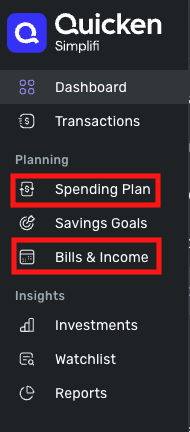
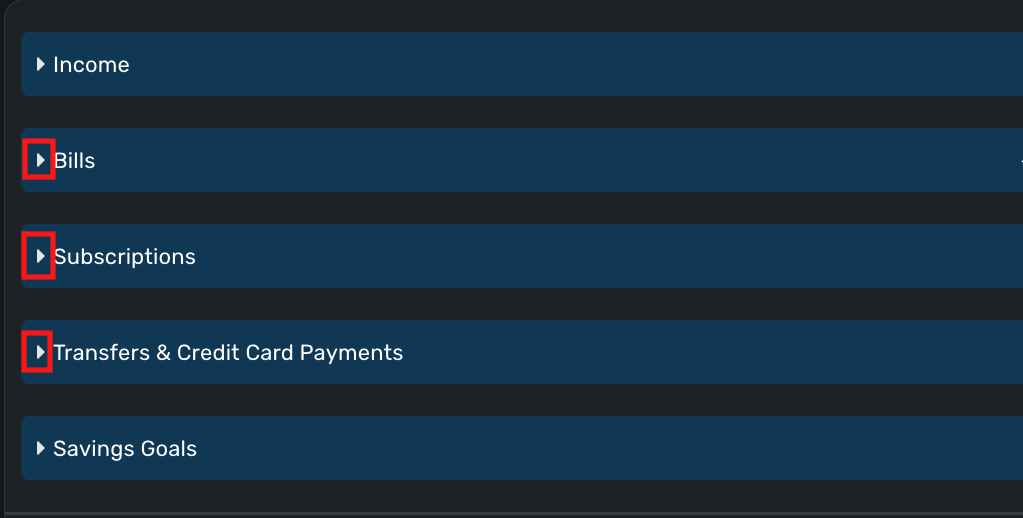
In the Savings Plan, if they reflect there, you would see the series under Bills, Subscriptions, or Transfers & Credit Card Payments, depending on how you had the reminder series set up. You can click on the little arrow to expand the appropriate section. Note - Since the Savings Plan is set up on a monthly basis and will reflect the current month by default, you may need to go back to previous months from before you ended those deleted series, to verify if they show up. For more information on the Spending Plan, see this article:
In the Bills & Income section, there are three tabs. It would be easiest to see on the All Recurring tab, since that will show all series, regardless of when the next scheduled instance would be. For more information on the Bills & Income section, see this article:

The Projected Cash Flow is a section visible at the top of each account, unless you choose to hide it.
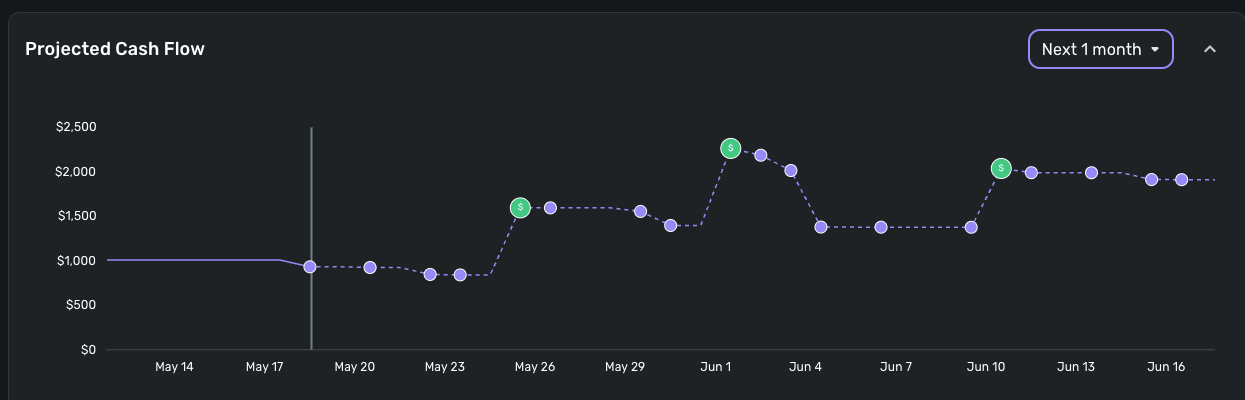
If you want to see cash flow for multiple accounts, you can do that on the Cash Flow tab in the Bills & Income section.
Thank you!
-Coach Kristina
1 -
I must say, I take great comfort in learning you were able to reproduce the issue. If a user of your caliber experienced the same issue, it isn't "operator error" on my part. :)
Also, thank you for such a thorough response! I must say, your walkthrough above has allowed me to appreciate features I hadn't yet explored. I will incorporate a review of these features into my use of Simplifi.
That said, I'm afraid I'm currently unable to verify the presence or absence of the reappearing Recurring Series. This is because, to mitigate the impact of the reappearing Series issue, I "Ended" all the offenders…relegating them to the "Canceled" section of the Settings→All Recurring page. I did this to eliminate their polluting presence in the list of "un-Canceled" Series. Alas, I suspect the Canceled status of the reappearing Series (along with their empty histories) could prevent them from impacting the Savings Plan, Cash Flow, etc. (regardless of their unpredictable nature).
Fwiw, I did just delete an "un-Canceled" Series to test accordingly. I will let you know if it does return and impacts the Savings Plan, Cash Flow, etc.
Thank you again for engaging. Going forward, I will take stock in your reproduction of the error and report back any changes in the status of my Simplifi data and the issue at hand.
1 -
SooOOoo…
The answer is "yes", reappearing Series are impacting Savings, Cash Flow, etc.
I had several deleted Series reappear this morning (including some new ones deleted days ago). Unlike most of the reappearing Series I wrestle, their statuses were active (i.e., not "Canceled"). As such, I verified their participation in future Savings and Cash Flow calculations.
For me, at this point, the compromise solution is to "End" the reappearing Series-eses. They will return (until the issue is resolved somehow), but they will neither pollute the list of active Series nor impact calculations and reports.
2 -
Hello @spamwich,
Thanks for all the great information! Per Coach Kristina's reply above, can you please supply us with screenshots of the reappearing series?
As she stated, you can feel free to send these via DM. Specifically, the series you just tried deleting would probably be best since it is the newest in this case.
-Coach Jon
-Coach Jon
1 -
@spamwich So sorry you're dealing with this issue! I am as well - attempted to delete via the web and the app, tried "editing" the series and deleting from there, tried deleting from the initial menu. Nothing seems to be working.
1 -
Hi @Coach Jon
I sent you the same screenshots I sent @Coach Kristina. Manage your expectations as I don't think there is anything particularly interesting about them (unless you can access my account and inspect the actual Series themselves).
Fwiw, the fact that Coach Kristina, and now @stacyvance, have the same issue is enough to satisfy my interest in the matter. Honestly, most of my interest was in furtherance of that satisfaction—that I wasn't misunderstanding the nature, utility, and function of Recurring Series.
In short, it seems that reappearing, deleted Series may be an issue…and the issue is probably not me. :)
I am curious about the status of a resolution. I am also curious about whether helpdesk (chat-based) reports of a fix are common knowledge. Beyond that, I am resigned to "Ending" reappearing Series to mitigate the issue until it is addressed.
NOTE:
If I had to guess, something on the server-side is sometimes either persisting a Series object (or Series List object) or retaining a reference to a Series object (or Series List object) without checking the Deleted state of the Series. I suppose it could be on the client-side, but since the issue expresses across machines and browsers, I'd guess server-side…although a client could still originate propagation of stale data to the server, I suppose.
From the app's behavior, it seems Session objects and/or their contents either 1) may not timeout (which I like), or 2) get CRUD-ed from client object data sometimes. In either case, it might create a tricky object management situation, possibly contributing to the issue users are experiencing. It could also be a persistence issue, but that would hint at an egregious coding oversight…so I'd think that's less likely.
Obviously, it could be something else entirely. The app is doing a lot, and doing it well. Sometimes wires cross.
Whatever it is, I hope the issue makes it to the backlog one day.
0 -
Hello @spamwich,
Thanks for the requested information you sent via DM! Coach Natalie was able to reproduce the same issue, and we did get the issue reported to our product team. You can follow along in the thread here for updates as we work to resolve this issue, but we would also like to get you added to the ticket to better assist us in this investigation.
If you could please submit logs to us, this would help out immensely:
- Log into the Simplifi Web App.
- Select Profile from the left-hand navigation bar.
- With the Profile menu open, hold down the Option key for Mac or the Alt key for Windows, and then click Send Feedback.
- Leave all boxes checked, add a brief description of the issue, and then click Send.
-Coach Jon
SIMPL-27148
-Coach Jon
1 -
Hi @Coach Jon,
Done.
Glad to hear the issue is reliably reproducible. That should help diagnose activities. Lemme know if any more data/context is required. I'm happy to help.
My thanks to you, the other Coaches, and community members who have participated in the thread.
I'll watch the thread for updates…and perhaps a resolution!
2 -
All, I’m having the same issues. This is a mess, no telling how many series I have set up on different devices all with different die dates, etc. Quicken really needs to fix this. It’s quite ridiculous.
2 -
Hello everyone,
We are aware of the known issue users have been experiencing regarding Recurring Series reappearing and/or duplicating. We do have an alert you can follow here for updates as we work to resolve the issue:
-Coach Jon
-Coach Jon
1 -
Hi @Coach Jon,
I just signed up with Simplifi two days ago, and I am already dealing with this issue. I am unable to resolve the numerous replications and the reappearances. It has rendered the application useless at this stage for any type of planning purposes and I am only 48 hours into using my subscription. I have spent the day deleting series and they keep reappearing only a few hours later. I have also seen duplicates appearing on pending transactions from this weekend that were linked to a reoccurring series. It was noted above at being looked at on Wednesday, but do you have any updates from development on a fix for this issue? This would seem like a critical process needing addressed ASAP.
0 -
Hello everyone,
I am just checking in to see if this issue is still occurring for you within Quicken Simplifi? Please let us know so that we can bring this information back to our product team!
-Coach Jon
-Coach Jon
1 -
I don't have this problem on QBP, but I set up my elderly sister on QS last month and it is happening to her.
Two days ago I logged on to her QS and deleted a number of recurring transactions (on the Bills & Income | All Recurring page). They all seem to have been automatically created by QS by "data mining" old transactions and creating recurring series from some of them.
Today I logged back on to check and 10 or 11 of them have reappeared. I can't be sure, but they look like the same ones that were there before.
I am going through and deleting them again. I can't leave them for you to inspect because they confuse her and make her worry about her finances — which is the opposite of what I am trying to do for her.
DryHeat
-Quicken Classic (1990-2020), CountAbout (2021-2024), Simplifi (2025-…)2 -
Hi @Coach Jon
Obviously, it's hard to prove that a sporadic, irregular event is no longer occurring. That said, I deleted a bunch of Recurring Series entries last night, and they have not reappeared (yet). I'll monitor the situation and report back if they do reappear.
Fwiw, I hadn't tried to delete any Recurring Series since @Coach Natalie posted that a fix is expected with the 4.63.0 Web Release. Since we are now using 4.61.0 (?), I didn't think the issue had been addressed.
Did the product team release a fix ahead of schedule?
0 -
Hello @spamwich,
Thanks for the reply and for letting us know! You are correct that the fix version is set for the Quicken Simplifi 4.63 Web Release. We were just checking in to see if the problem had been resolved before then. Let us know if you no longer notice the issue!
-Coach Jon
-Coach Jon
1 -
Hi @Coach Jon @Coach Kristina @Coach Natalie and Everyone,
Just a (final?) comment to say the deleted Recurring Series issue seems to have been fixed.
[Insert cheers and applause here!]
Fyi, the issue may have been resolved before the release of 4.63 (the release containing the expected fix). Either way, with 4.63 out, I think we can call it.
My thanks to all of you, the product team, and everyone who participated in/responded to the thread. The support via this thread was unprecedented (in my experience). I've been online for decades…and I don't think I've ever posted a software issue, had it acknowledged, participated in a defect definition, witnessed a resolution notice, and validated the fix. Frankly, I wouldn't even expect that level of engagement and service, but, just wow, it was really impressive and great. Ima tell my friends and family about this one.
Thank you again.
-spamwich
7



