'Release Available for Spending' option resets one of Planned Spending to 0

Hello,
When I use the 'Release Available for Spending' option for any of the existing Planned Spending, it causes to reset one of Planned Spending(for me, Groceries) to 0. Not a critical issue but it is very annoying to reset to what I want every time.
Comments
-
Hello @lsgc123,
Thanks for reaching out! I think we will need a bit more information here in order to understand your situation. Can you confirm if releasing your available funds resets your Spent amount back to $0.00, or does it change your Available funds to $0.00? If you can provide a screenshot showing the issue, this would be very helpful as well.
-Coach Jon
-Coach Jon
0 -
Hi Jon,
It changes all of future Planned Spending for a Series(Groceries) to 0 if I release any of previous months' Planned Spending.
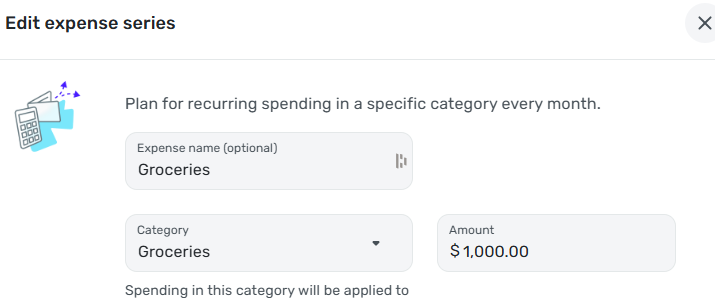
The above is my current setting for the Groceries Expense Series.
If I release any of the Previous Months' Planned Spending like below(actually, I just confirmed that not only releasing but also edit the value):


It affects the Groceries Expense Series as below:

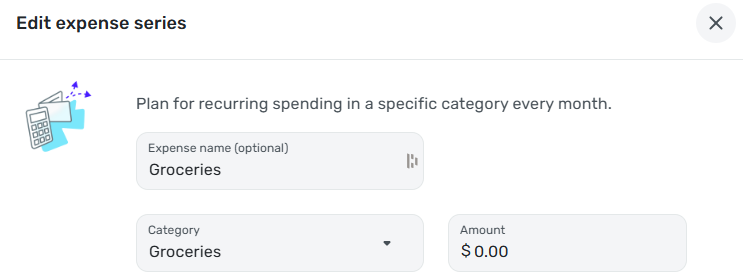 0
0 -
Hello @lsgc123,
Thanks for those requested screenshots! I can see the issue you are describing now. I was unable to replicate this issue from my side, unfortunately, so this issue may be specific to you. If you set the amount to what it needs to be and then try releasing the funds again from another web browser/incognito mode, does the issue still occur? Does this issue occur in the mobile application? Is this only affecting the Groceries Planned Spending item? Let us know!
-Coach Jon
-Coach Jon
0 -
It happens with a web browser(Chrome), so I tested with a couple of different methods:
- MS Edge: Same error
- Google Chrome with Incognito mode: Same error
- Mobile App(Android): Same error
Regardless type of methods, same error happens.
I do not remember exactly, but this change affected others before(other Planned Spending items, Rollover setting, …). However, it seems it affects only Groceries at this point.
0 -
After deleting and recreating the series, the issue has been gone.
Thank you, Jon!
1
