Credit Score - Verification Link Failed error (edited)

Hello! I just tried repeatedly to get my credit score through Simplifi. I filled out all the information fields, had a verification code sent to my phone, but the verification then fails. I did this three times around 3 a.m. today. Do you know if this feature is down, or if I'm just having trouble making it work? Thanks.
Comments
-
Hello @ThisIsTiresome,
Thanks for reaching out! I can at least verify on my side that the credit score feature is working. Can you provide a screenshot of what the failure looks like for you in Quicken Simplifi? I would also see if maybe trying from another web browser/incognito mode works here.
-Coach Jon
-Coach Jon
0 -
Thanks for the reply. The verification link arrives at my phone -- my only phone number -- but when I click on it, the attached screen pops up. If I click "resend," the cycle repeats.
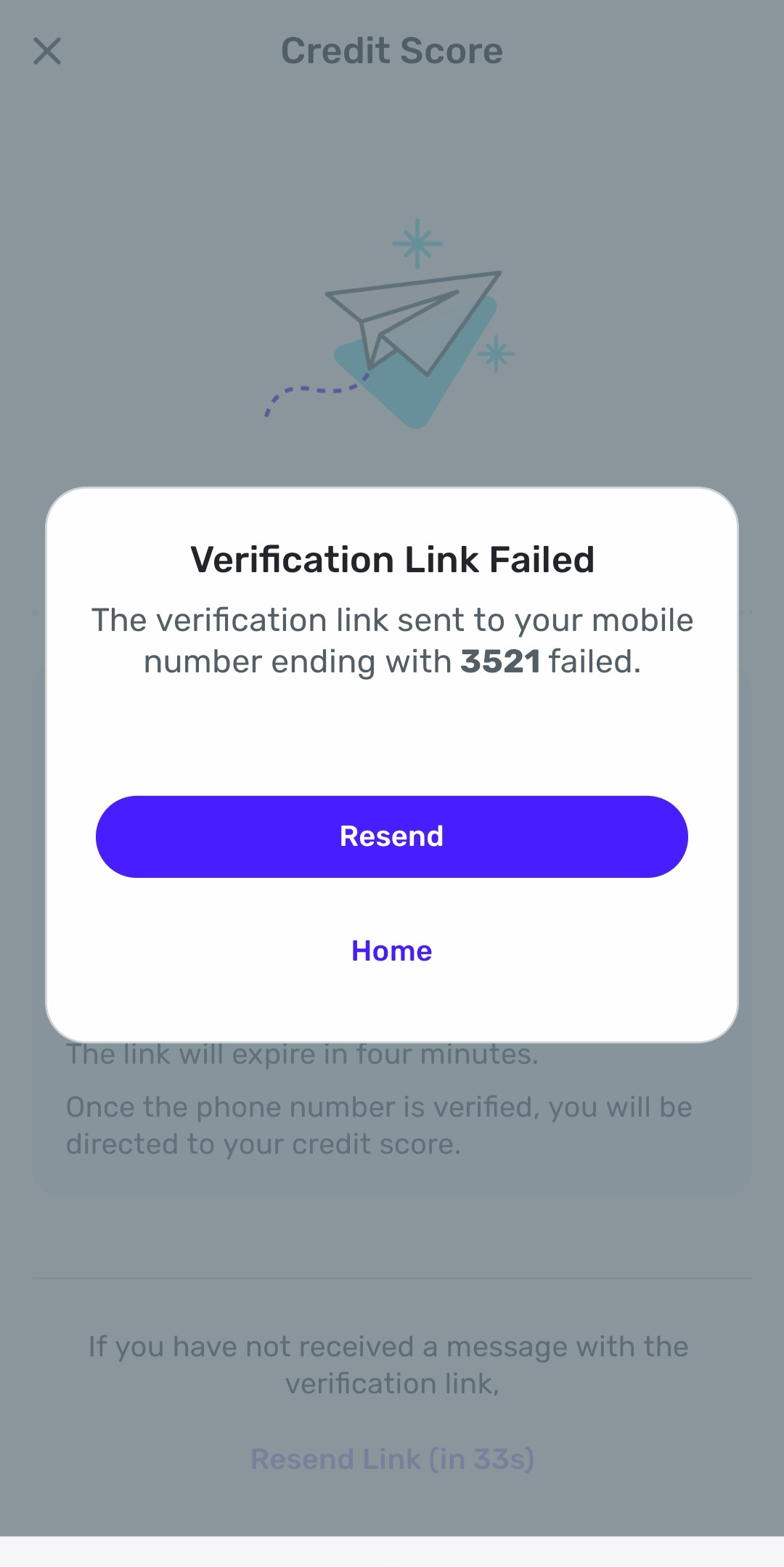
I've tried using my default browser, Duckduckgo, and Google Chrome.
0 -
Hello @ThisIsTiresome,
Thanks for the reply and screenshot. I would see if it works when trying from the mobile application:
Let us know how that goes!
-Coach Jon
-Coach Jon
0 -
Hi Coach. I was using the app when i had this problem. Is there another way to get my credit score? I don't have access to a desktop computer currently.
0 -
I tried through your website, and that didn't work either. Similar error message: "Verification failed."
0 -
Hello @ThisIsTiresome,
Thank you for the information. Instead of clicking the link directly, can you try copying and pasting the link directly into a web browser to see if this works?
-Coach Jon
-Coach Jon
0 -
I did try that, but it didn't make any difference.
0 -
Thank you for your reply,
Do you have any sort of VPN or antivirus app on your phone? If so, try pausing or temporarily disabling it prior to trying the verification link. You may also want to pause any browser extensions, especially ad blockers and pop-up blockers.
Please let me know how it goes!
-Coach Kristina
0 -
I tried disabling all anti-virus and -malware program, and I don't routinely use a VPN; I got the same result as before. (Incidentally, it would simplifi things if Simplifi would remember things like my home address so I wouldn't have to input them every time I tried something new.) Thanks.
1 -
I tried deleting and reinstalling the app, and I got the same result as in my many other tries.
0 -
Hello @ThisIsTiresome,
Thanks for the reply. It seems like at this time, this may only be affecting your dataset, unfortunately. Can you please supply the following information so that we can further investigate this issue?
- The Version and Build of Quicken Simplifi that you are using. (This can be found at the bottom of your Dashboard in Quicken Simplifi)

- The web browser and operating system you are using, along with their versions.
We will also need logs:
- Log into the Quicken Simplifi Web App.
- Select Profile from the left-hand navigation bar.
- With the Profile menu open, hold down the Option key for Mac or the Alt key for Windows, and then click Send Feedback.
- Leave all boxes checked, add a brief description of the issue, and then click Send.
-Coach Jon
-Coach Jon
0 - The Version and Build of Quicken Simplifi that you are using. (This can be found at the bottom of your Dashboard in Quicken Simplifi)
-
Hi Jon. I'm using the Android app, and there is nothing printed below the Credit Score section of the Dashboard. The app is up to date, however, because I've just deleted and reinstalled it from Google Play in the last few days, hoping to fix this issue.
0 -
I'm accessing Simplifi on the web via Duckduckgo; when I try to do so through Google Chrome, I'm redirected to the app without it asking me if I want that. I do not currently have access to a desktop computer.
0 -
The version of Simplifi I'm using on Duckduckgo is 4.63.0. The build is 32799. My phone is a Samsung Galaxy A25, Android version 14, One UI version 6.1. My version of Duckduckgo is 5.238.0.
0 -
I cannot follow your direction for generating a log because I have no Option or Alt key; I'm on my phone. If you can provide me an alternative way of sending a log, I'll follow up. Thanks.
0 -
Hello @ThisIsTiresome,
Thanks for your additional replies. Do not worry about the logs for now. Thinking about the issue at hand, I know that DuckDuckGo, as a web browser, has built-in identity-hiding settings. I am wondering if this caused the inability to verify. If you set your default web browser to Chrome and try again from the Quicken Simplifi mobile application, does it still present this problem?
-Coach Jon
-Coach Jon
0 -
I tried again with Chrome as my default browser, and I received the same failure message that I did in all prior attempts.
0 -
Hello @ThisIsTiresome,
Thanks for verifying! I did get this issue reported to our product team, and I will be sure to follow up here when we have any status updates.
-Coach Jon
SIMPL-27733
-Coach Jon
0 -
Thanks, Jon. I appreciate your help.
1 -
Hello @ThisIsTiresome,
I am back with an update for this issue from our product team. When investigating the cause, they verified that the verification is failing because there may be an issue with your PII data with Equifax. You will need to contact Equifax in order to check on this data and correct it if needed.
Thank you,
-Coach Jon
-Coach Jon
0 -
Thanks, Jon -- I'll give it a try.
1 -
I just went through a lengthy procedure with Equifax, verified that all my information is correct, and was able to obtain my credit score. It would be awesome to be able to do this more conveniently through Simplifi; the issue does appear to be on your end. You might want to check that other users of your app are able to use this feature. Thanks again, Ed
0 -
Incidentally, I tried again using Simplifi, with both Duckduckgo and Chrome, and ran into the same problem as always.
0 -
Hello @ThisIsTiresome,
Thanks for the reply. To clarify your response, after you verified that your PII information was correct with Equifax, were you able to obtain your credit score through Quicken Simplifi, or did you just obtain your credit score through Equifax? Let us know!
-Coach Jon
-Coach Jon
0 -
Only through Equifax directly; I still receive the same failure notice as always when I try using Simplifi.
0 -
Hello @ThisIsTiresome,
Thanks for confirming. We can go ahead and re-escalate this issue for you. We will just need new logs, please:
- Log into the Quicken Simplifi Web App.
- Select Profile from the left-hand navigation bar.
- With the Profile menu open, hold down the Option key for Mac or the Alt key for Windows, and then click Send Feedback.
- Leave all boxes checked, add a brief description of the issue, and then click Send.
-Coach Jon
-Coach Jon
0 -
Jon, I'm using Dimplifi on my Android phone, so even if I open the web app instead of the standalone app, I don't have a Alt key. Ed
0 -
@ThisIsTiresome, thanks for the reply!
I went ahead and reopened the ticket and asked our product team to look into the issue again. We will follow up with you upon the next update.
SIMPL-27733
-Coach Natalie
0 -
Thanks, Natalie.
1 -
I am having the same issue. Has there been a solution that works?
0


