Refund Reminder Card Displays on All Accounts

I created a refund against a transaction using the edit original transaction. The refund card then displayed on the reminders carousel tray at the top of the account page as expected.
However, it also displays on the reminder tray of every other payment account checking and credit cards.
Never happened before. See if you can duplicate the event or it is a single problem with my account instance.
Comments
-
Hello @Charles Collins,
Thank you for letting us know about this issue. I tested in my Quicken Simplifi and see the same thing that you report.
I forwarded this issue to the proper channels for further investigation and resolution. If you would like to contribute to the investigation, then please send logs by following the steps below:
- Log into the Quicken Simplifi Web App.
- Select Profile from the left-hand navigation bar.
- With the Profile menu open, hold down the Option key for Mac or the Alt key for Windows, and then click Send Feedback.
- Leave all boxes checked, add a brief description of the issue, and then click Send.
Thank you!
-Coach Kristina
0 -
Yep, same thing happens with me as well. Weird.
Steve
Quicken Simplifi (Safari & iOS) Since 2021
Quicken Classic (MacOS) Since 2009
MS Money (1991-2009) and Dollars & Sense (1987-1991)0 -
Hello - as of today in both the app and web portal, any saved transactions in Reports: Refund Tracker are showing in cash flow for all accounts, regardless of which account they're related to.
As an example, I set up three future refunds in Reports: Refund Tracker; the Y and Venmo ones are related to my checking account and the IRS one is related to my savings account. And yet, here they are as part of my car's value?
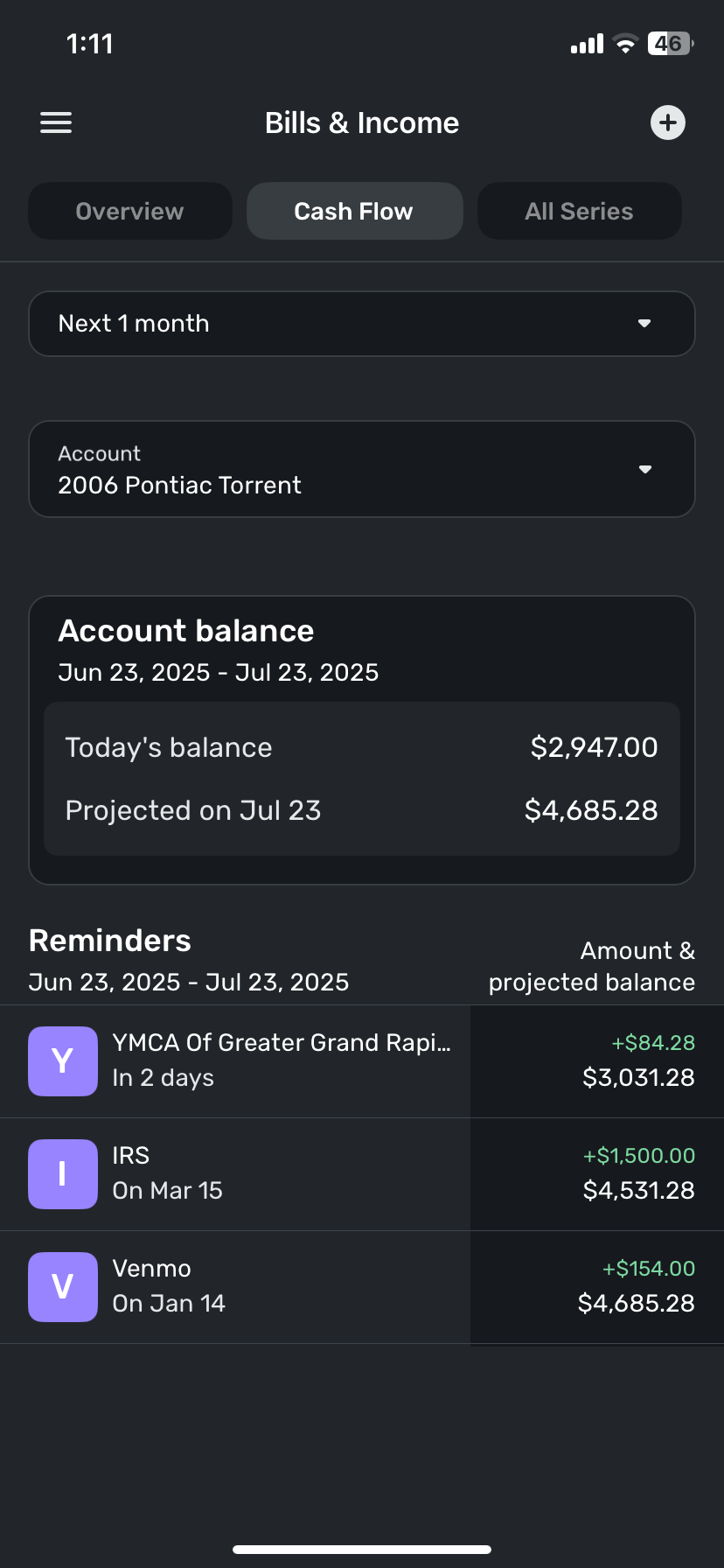
Here's an individual shot of the first of these refunds to confirm the account it's related to:
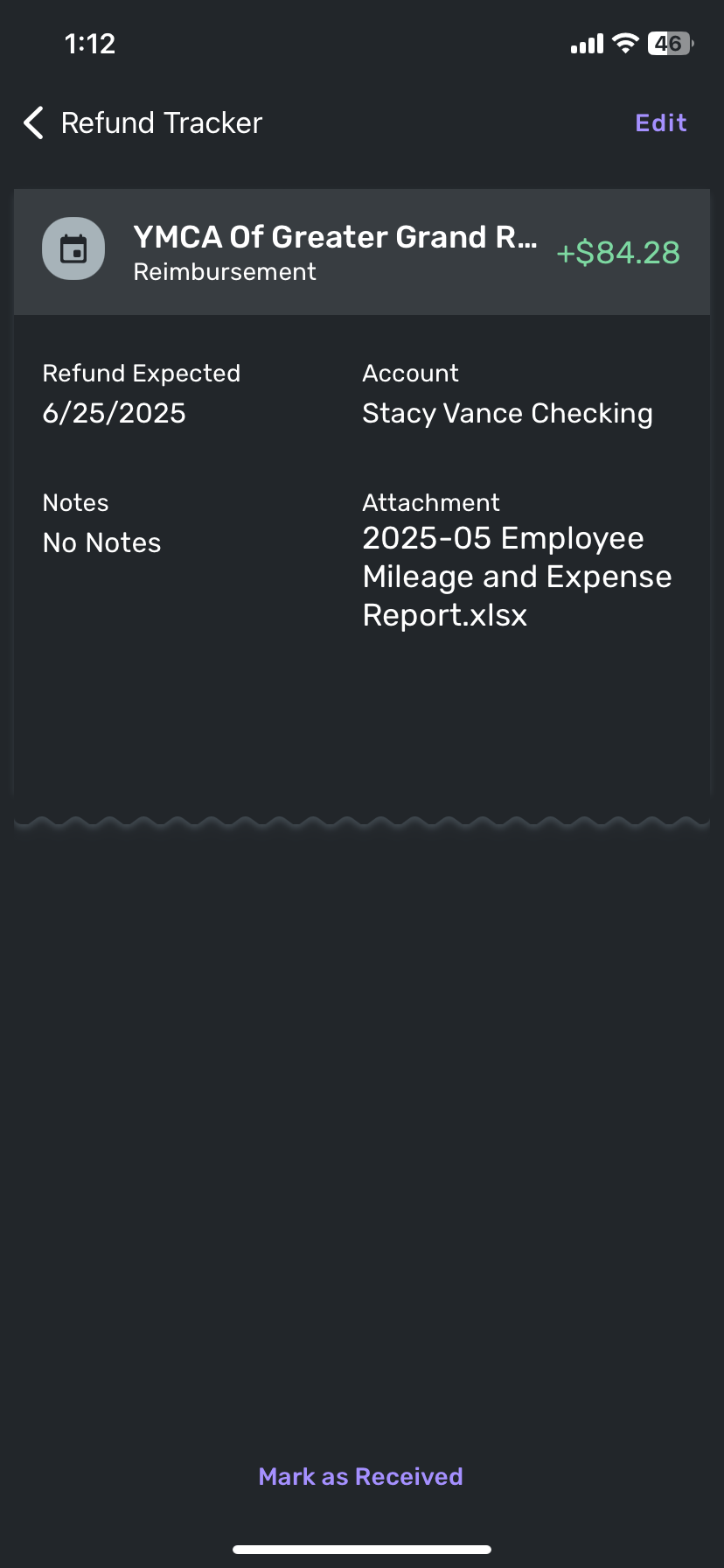
This wasn't happening previously and is creating difficulty when tracking future cash flow related to a particular account.
0 -
Hello everyone!
We were able to reproduce this bug on our side and have reported this issue to our product team. We will be sure to follow up here when we have any status updates!
@stacyvance, Thanks for also reporting this issue! We did merge your post here with the other users reporting this issue, so that you can also follow along here.
-Coach Jon
SIMPL-27798
-Coach Jon
1 -
Thanks @Coach Jon ! I am also experiencing this bug.
1 -
Projected cash flow is incorrect. I have multiple bank accounts linked to Simplifi. I added an anticipated refund to be deposited in account B. However, the anticipated refund shows up when I filter using account A for projected cash flow. This bug shows up on my PC and my Android tablet.
-Marcus0 -
@Marcus, thanks for reaching out to the Community!
To clarify, do you see the Refund Reminder in all of your accounts, or just in one account, but the wrong account? If the former, this is a known issue that has already been escalated:
Please let us know!
-Coach Natalie
0 -
The former. In QBP, in Bills & Income, the Reminder shows after unselecting all accounts. With any account that I selected, the reminder still shows.
-Marcus1 -
@Marcus, thanks for confirming! I have merged your post here so you can follow along for updates.
-Coach Natalie
1 -
I just noticed that — although Refund reminders show up in the reminder carousel for all accounts — they only affect the Projected Cash Flow for the account that the Refund is related to.
In other words, if I create a Refund reminder for a particular checking account it only affects the projected cash flow for that checking account — even though it shows up in the carousel for all accounts.
I'm not sure if this matches what was reported earlier.
DryHeat
-Quicken Classic (1990-2020), CountAbout (2021-2024), Simplifi (2025-…)0 -
I finally had a reason to use the Refund tracker tool (I.e. online clothes shopping) and have experienced what others have reported where the refunds appear on all accounts even though all refunds assigned to a single credit card account. One nuance from what I saw others discussing is that on the Web app version, it appears the duplicate refund transaction on accounts that weren’t assigned to the refund do not impact the account balance projections. However, on the Mobile app version the duplicate refund transactions do affect account balance projections.
Hope this gets fixed because the refund tracker is a nice tool but this bug makes it not worth the hassle.2 -
It is maddening. Trying to use the Refund Tracking feature is like getting cursed.
1 -
I have eschewed the Refund feature. If I have a refund coming, I just make a future dated transaction for when I expect the refund. It works. I can always adjust the date. Frankly, I usually just use today's date as refunds don't usually take long. I do the same with credit card rewards.
You can always use a one-time reminder too especially if it is going to take a while.
Like everyone else, I am puzzled why fixing the Refund reminder (which is just a variation of a reminder) has taken so long to fix.
Steve
Quicken Simplifi (Safari & iOS) Since 2021
Quicken Classic (MacOS) Since 2009
MS Money (1991-2009) and Dollars & Sense (1987-1991)1 -
I am still having the same problem… refunds showing up on all accounts as a future transaction. Can't believe this has apparently been going on for months. I'll likely do what others have said, and create a manual transaction instead of using the refund feature. Too bad…
0 -
Hello everyone,
I am back with an update on this issue! The product team has implemented a fix that should be released with Quicken Simplifi Web version 4.91.0 and Quicken Simplifi Mobile version
5.48.0. 6.4.0. Be sure to keep an eye out for when those versions are released!-Coach Jon
1 -
Great news! Thanks.
Steve
Quicken Simplifi (Safari & iOS) Since 2021
Quicken Classic (MacOS) Since 2009
MS Money (1991-2009) and Dollars & Sense (1987-1991)1 -
Hello everyone,
Quicken Simplifi Web and Mobile version 6.4.0 are both now released! Be sure to let us know if this is working correctly for you all now.
-Coach Jon
0 -
So… Simplifi Web skipped directly from v.4.91 to v.6.40?
Are there significant changes that go with such a major version shift?
DryHeat
-Quicken Classic (1990-2020), CountAbout (2021-2024), Simplifi (2025-…)0 -
Hello @DryHeat,
Thanks for the inquiry! Our product team is aligning the mobile and web versions so the same number is used with each release to avoid confusion. Nothing else has changed besides the version number; features, tools, and release notes will remain the same.
-Coach Jon
1