Bills and Income missing

After this morning's outage I had to reset the connection to my primary bank. Now, all my scheduled bills and income are missing. I don't recall this happening before. Any suggestions? That is HOURS of work to recreate.
Comments
-
Hello @LVance,
Thanks for reaching out! To better help us understand the issue, can you please let us know if you were presented with Recurring Bills and Income when reconnecting the account? Quicken Simplifi will automatically review your downloaded transactions, and you'll be presented with a list of possible recurring items. If you were, did you leave the presented items checked or unchecked? Let us know!
-Coach Jon
-Coach Jon
0 -
No I was not presented with that option when reconnecting. The potential recurring are still there. I'm talking about the ones that I entered manually (50+ per month) that help me forecast. When I click on the Calendar icon on the left-hand side, I will see a list of upcoming bills and income that also show in the Spending Plan. Those are all missing.
0 -
Hello @LVance,
Thank you for the reply. Did you check in the Overview tab of Bills & Income, or the All Recurring tab? If you did not check the All Recurring tab, I would suggest navigating to Bills & Income > All Recurring, and verifying if the manually created Recurring Series are there or missing. Let us know how this goes!
-Coach Jon
-Coach Jon
0 -
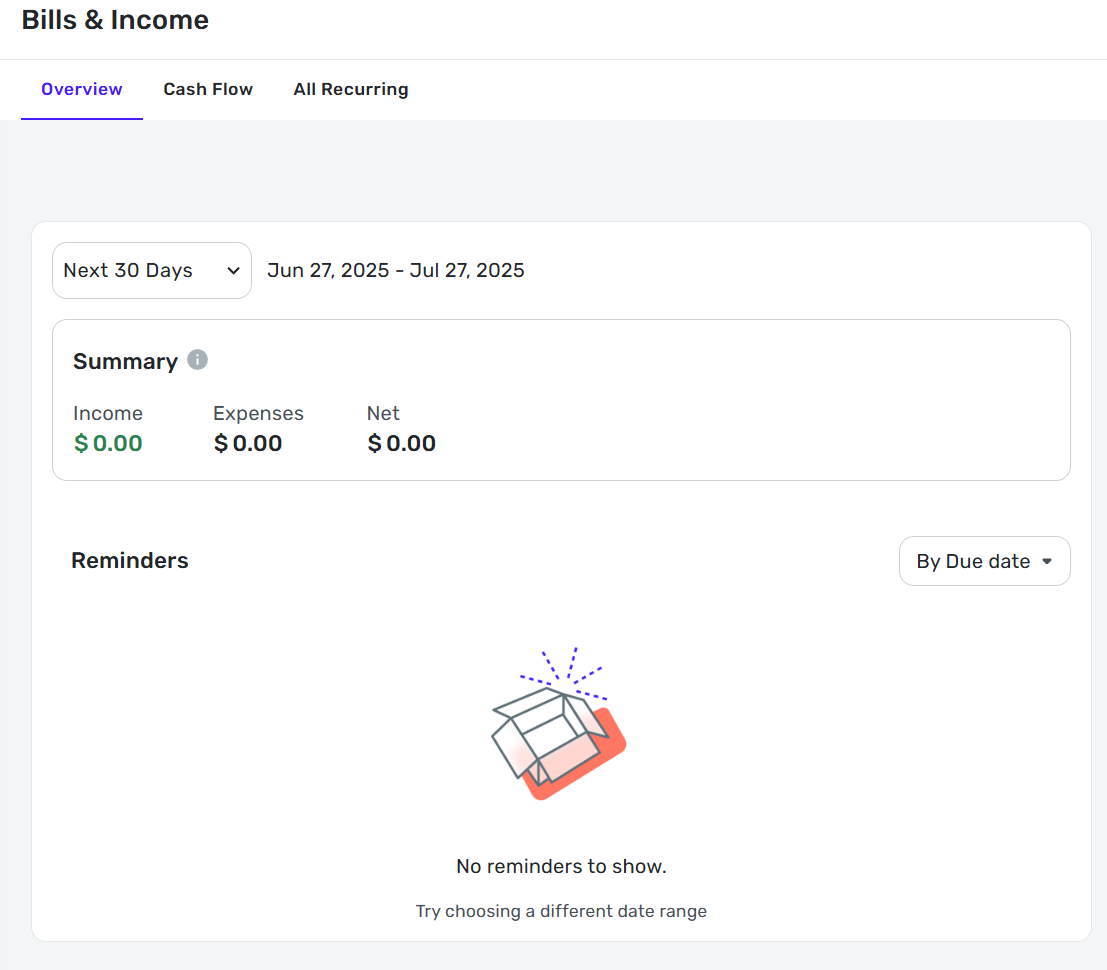
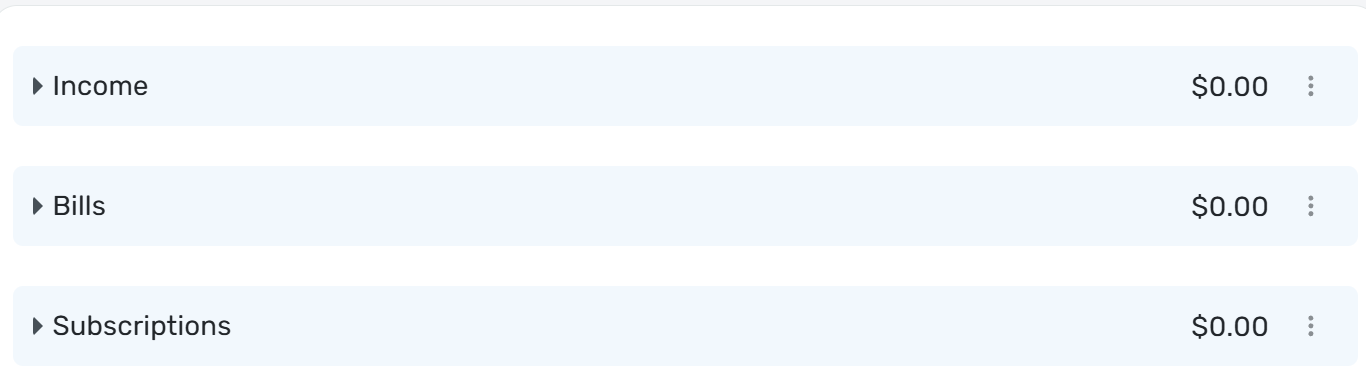
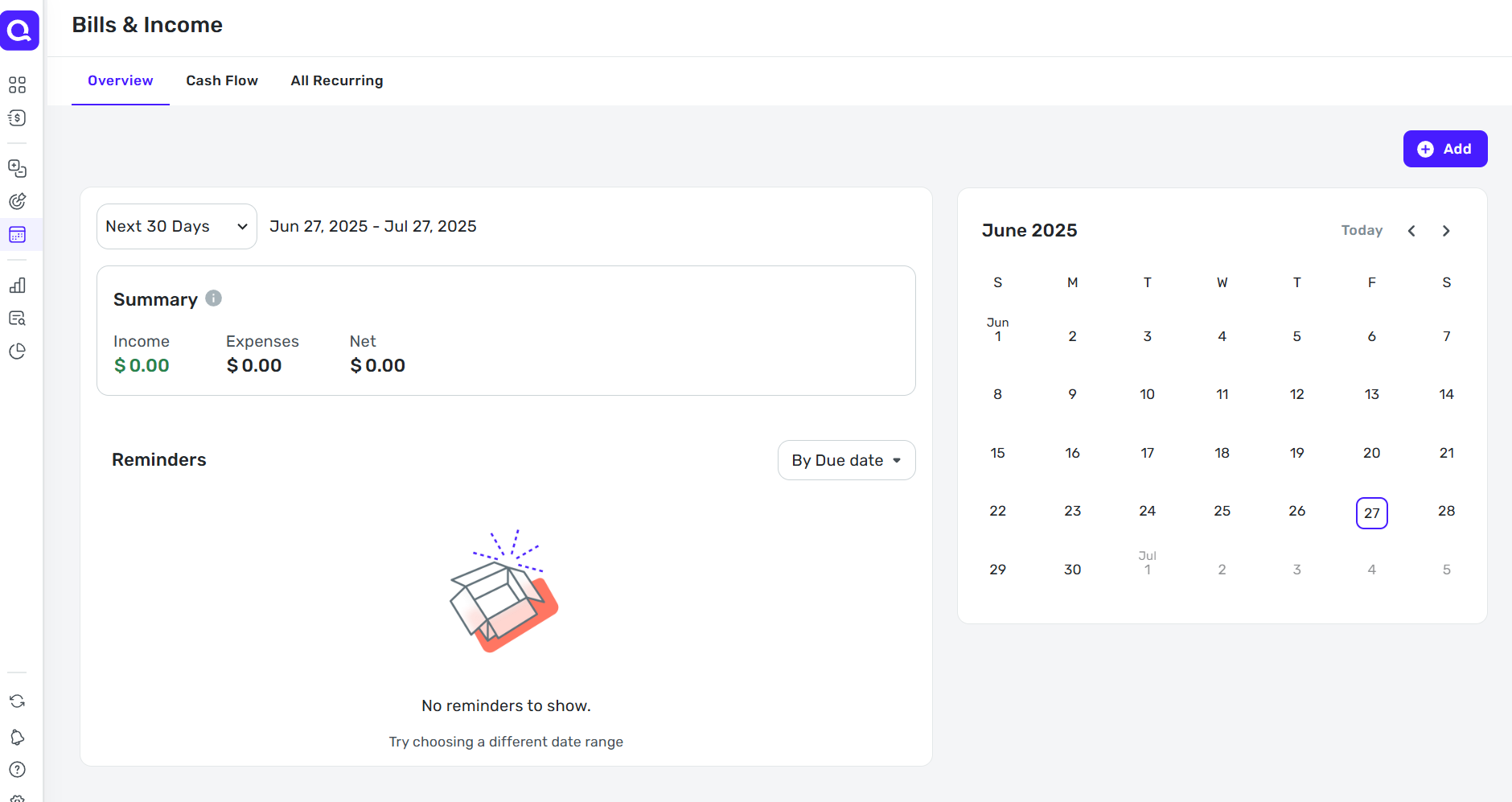
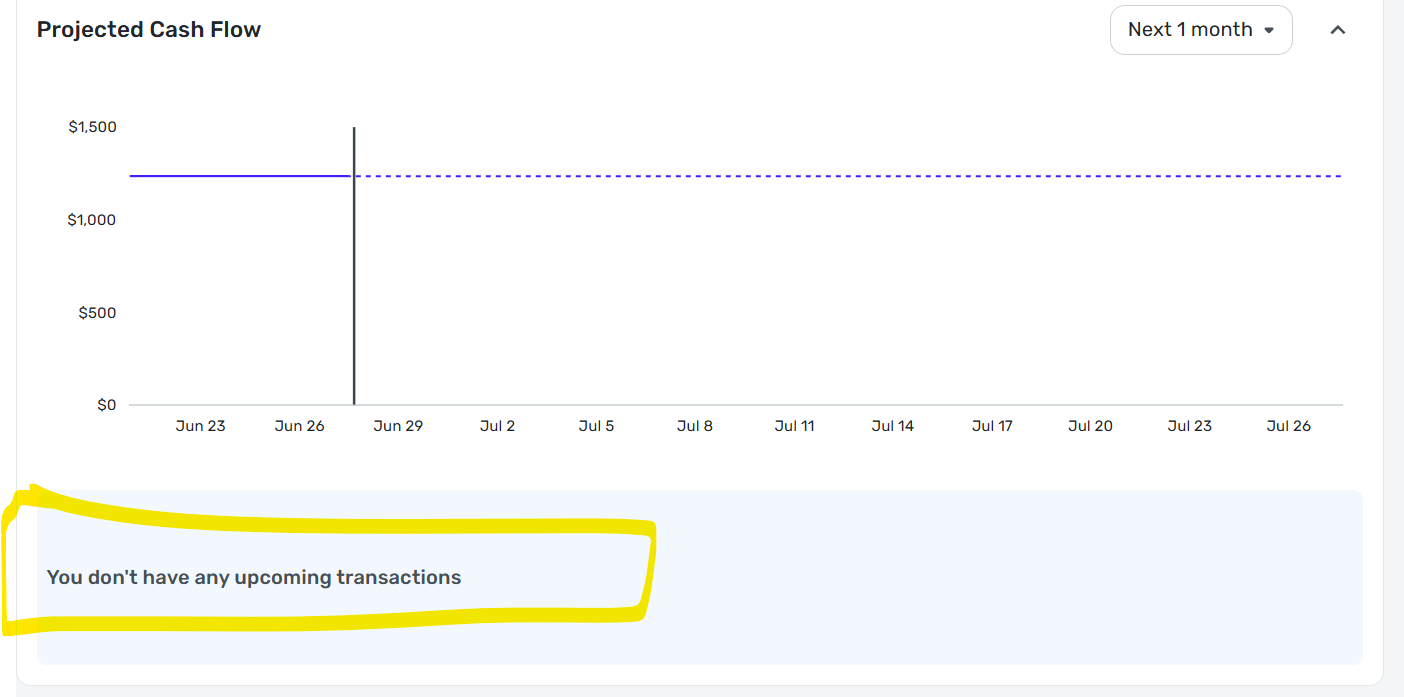
I checked both. The All Recurring have some of the correct ones, but mostly are 'suggestions' based on transactions and are not what I had in there before. They are also missing from the Bills & Income section of the Spending Plan. Perhaps these screenshots will help. Again, all the Bills and all the Income are missing and there should be close to 50 items in there each month, which is how I forecast.
 0
0 -
I hope the coaches or product team will be able to help you recover the missing Reminders.
QS provides some limited download capabilities for historical transactions, but none (that I am aware of) for the important user-entered information that goes into the Recurring Reminders. Maybe it should.
In the meantime, your report spurred me to take some protective action. I took multiple screenshots of my list of Recurring Reminders. (Like you, I have around 50 reminders). I combined those screenshots into a PDF so that, if this happens to me, I will at least have some clue as to what is missing.
DryHeat
-Quicken Classic (1990-2020), CountAbout (2021-2024), Simplifi (2025-…)1 -
Hello @LVance,
Thanks for letting us know. Are the Recurring Series that were deleted only for the primary account you mentioned? Or all accounts in this case. If you sign in to Quicken Simplifi in the mobile application or another web browser/incognito mode, do they show up there, or are they still missing?
-Coach Jon
-Coach Jon
0 -
Yes, the recurring Bills and Income are for the primary account.
They do not show up in the Windows app, the Web site, or the iPhone app.
0 -
Hello @LVance,
I think we need additional information here. Are the Reminders themselves missing, or are the Recurring Series missing? I asked previously if the All Recurring tab showed the series themselves, there. Can you provide a screenshot showing that tab within Quicken Simplifi?
As for the suggestions you mentioned, where was this located where you received these? I am not aware of any type of suggestions within the All Recurring tab that exist, so we will need to clarify what these are.
This support article we have is also very helpful when it comes to managing Recurring transactions, and how they work within the program, while additionally showing how to reach the All Recurring tab:
Let us know!
-Coach Jon
-Coach Jon
0 -
@Coach Jon I seem to recall once I made the wrong choice when I was reconnecting my primary account (no doubt in a hurry) and though I didn't lose everything, I had to get rid of some duplicates or edit them. I have no clear memory of it now.
Two questions:
So, is it that when you connect an account, Simplifi will ask if you want it to search for recurring or if you want to keep the ones you have?
But this doesn't or shouldn't happen if you are just resetting an account, right?
I recall that last year @Flopbot had a similar thing happen to him when he reconnected his primary account. We were just discussing this the other day. Not sure if this provides any clues or not.
Thanks.
Steve
Quicken Simplifi (Safari & iOS) Since 2021
Quicken Classic (MacOS) Since 2009
MS Money (1991-2009) and Dollars & Sense (1987-1991)0 -
Short answer: Both
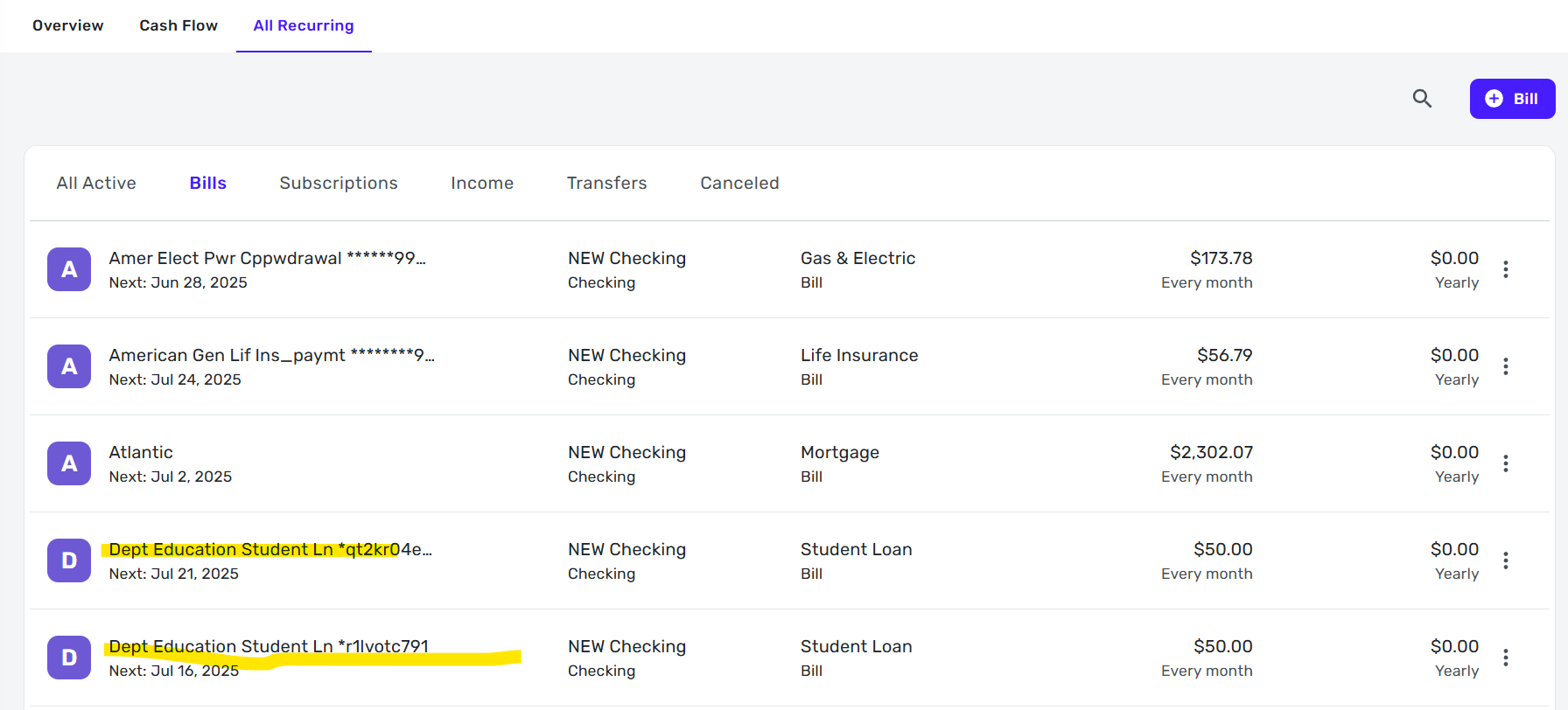
The All Recurring tab shows about 6 of my previous 20-25 recurring transactions (which I'm assuming are reminders elsewhere). The suggestions I'm referring to are highlighted in first screen shot - where it says, "hey, it looks like this is a recurring transaction, do you want to make it one?" and I've said no. Now they are popping up again. It seems as if the Bills & Income section has looked at the past month of transactions and suggested things for me rather than showing all the recurring Bills and Income that I have taken hours to enter/refine. (As if it's been reset, I hope that makes sense.) So both the recurring transactions and reminders are missing.
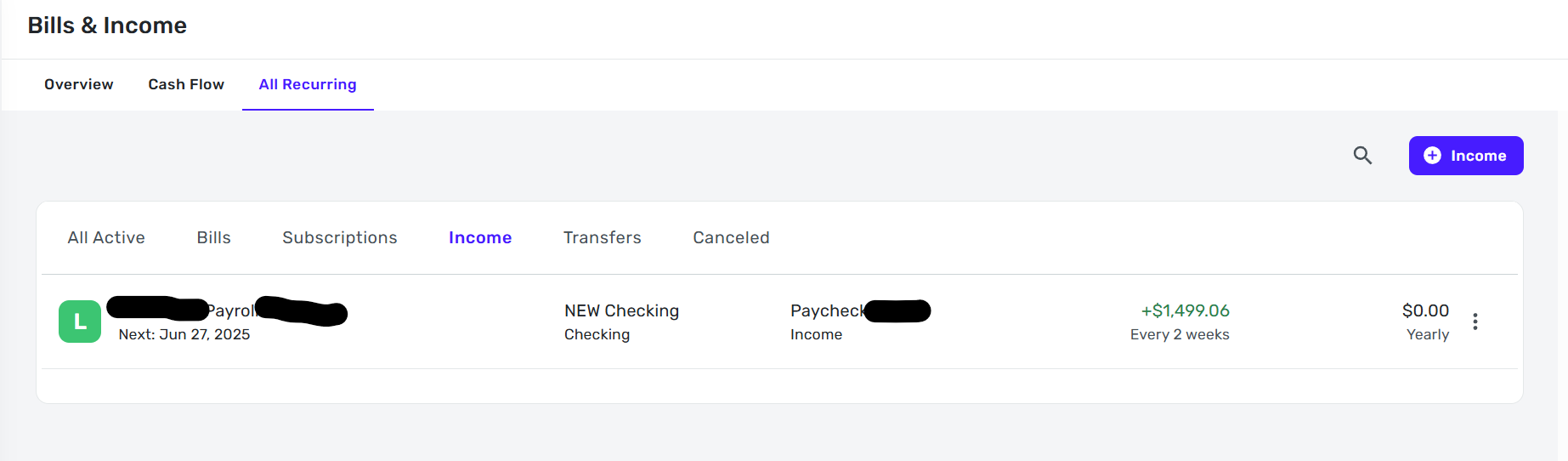
Same with Income - it has one income entry, rather than the 5 different ones that should be there (some weekly, some biweekly, some twice/month). This is the 2nd screenshot. Both the recurring income and reminders are missing.
The 3rd screenshot is where I would typically see all the bills and income - the reminders for the recurring series. And it's empty.
I glanced at the recurring transactions link - there is nothing to help in there that I can see. I'm very familiar with how they work and have created them manually, from transactions, edited timing, etc.
 0
0 -
@LVance Understood, I didn't mean to imply you had, but I wanted to get some things clear in my mind about reconnecting accounts. I have been searching through things looking for more details on how and when Simplifi asks to recreate (for want of a better word right now) recurring transactions it has found for the account.
If you delete an institution (don't do that), you definitely lose all the transactions and the accounts that go with it. You either reset the connection or you make the account to manual and then reconnect it, and I think it was while I was doing this that I ran into trouble earlier this year.
But I am so used to editing and recreating, I just did what I had to do. I think, in my case, it was my fault. Your case is different.
Steve
Quicken Simplifi (Safari & iOS) Since 2021
Quicken Classic (MacOS) Since 2009
MS Money (1991-2009) and Dollars & Sense (1987-1991)0 -
I appreciate you chiming in and trying to help! I've spent hours refining the recurring transactions and reminders so that we have an accurate cash flow and I would hate to have to recreate it all. I guess I can try resetting the connection again - nothing to lose at this point!
0 -
@LVance I fear that resetting the connection won't bring back your lost reminders. I assume that all your transactions are there so resetting won't change anything on that score.
And thanks. I sometimes fear that "chiming in" confuses things, and I hate to do it especially when the coaches are working with the customer, but I want to understand better this feature that was alluded to earlier.
Steve
Quicken Simplifi (Safari & iOS) Since 2021
Quicken Classic (MacOS) Since 2009
MS Money (1991-2009) and Dollars & Sense (1987-1991)0 -
Hello @LVance,
Thanks for the additional replies. At this point, there is unfortunately not much we can do here to restore the deleted recurring series. I would suggest recreating them at this time; however, we also have a new related alert where users are missing newly created reminders from within the Bills & Income tab and the Spending Plan.
I would advise waiting until the issue above has been resolved before recreating the new series, and in the meantime, following the alert for updates, as we will be posting status updates there as we receive them.
I apologize for not having a better solution.
-Coach Jon
-Coach Jon
1 -
OK thanks for the update and for checking into this. Also, in case it helps with troubleshooting, even the recurring transactions/reminders that are listed are not showing in Bills & Income or Upcoming Transactions in the account they are associated to.
0 -
Additionally, transactions in June (I haven't looked beyond that) are mis-categorized, i.e. I categorized them as something and now they are wrong/different.
I'm guessing this is all due to resetting the connection, which the app forced me to do, and which I've done before but without these issues.
If I start backing up every day with a CSV file (not my preference), is there a way to import it if things go awry again?
Does regular Quicken Classic perform any better?
0 -
You mention that your transactions lost the changes you had previously made to their categories. Is it possible that you created a new account in Simplifi when you reset your connection, instead of linking the bank account to the existing account in Simplifi?
I ask because I am wondering if deleting an account in Simplifi and replacing it with a new account might also delete any recurring transactions related to that account. I haven't found any support articles that say one way or the other. Perhaps one of the coaches would know.
Info on resetting:
Info on linking accounts:
DryHeat
-Quicken Classic (1990-2020), CountAbout (2021-2024), Simplifi (2025-…)0 -
Thanks for the suggestion, and that makes sense, but I'm sure I linked them to existing. I've had to reset connections before I and don't select all the accounts at this particular bank (just personal, not business) so I definitely didn't just click through.
It's disappointing, one reason I went with a cloud based service rather than traditional app was I thought I wouldn't lose things like this.
Appreciate you trying to help!
1 -
@LVance "Does regular Quicken Classic perform any better?"
Classic is a much different product and works in a completely different way. Its ledger must add up so that your transactions probably aren't going to be changed in any way by downloading though you could get duplicates downloaded (rarely). Classic doesn't download pending transactions at all. It doesn't have a Spending Plan but traditional budgeting. Once your recurring bills are entered, they are just plain transactions and not linked in the way the Simplifi does back to a Spending Plan or Bills and Income. I've given you a simple overview here.
Moreover, Classic has been around at least 35 years, is a more mature product and has a backup and restore option that is really lacking in Simplifi, and Simplifi really needs it!
And crucially, your Simplifi file cannot be moved to Classic or your Classic file to Simplifi. You have to start anew. (You can import .csv files).
Most likely you will want to hang in there with Simplifi. It's a pain to have to fix things, but maybe it won't happen again.
We really need the ability to be able to go back a few hours or a day when we lose data like this. I think there is a feature suggestion for this. I am going to go look. Here it is, and we need more votes.
Steve
Quicken Simplifi (Safari & iOS) Since 2021
Quicken Classic (MacOS) Since 2009
MS Money (1991-2009) and Dollars & Sense (1987-1991)1


