Understanding – Pending in Transaction Activity

I just want to be sure that I understand the “pending” in the transaction activity. When a transaction has been entered manually and then the bank posts to the account and is downloaded, the transaction will then be changed from pending to “cleared”. Is that the right understanding?
[Removed Personal Information]
Dick Davis
Wanting to Migrate from Quicken Classic Premier to Simplifi
Best Answers
-
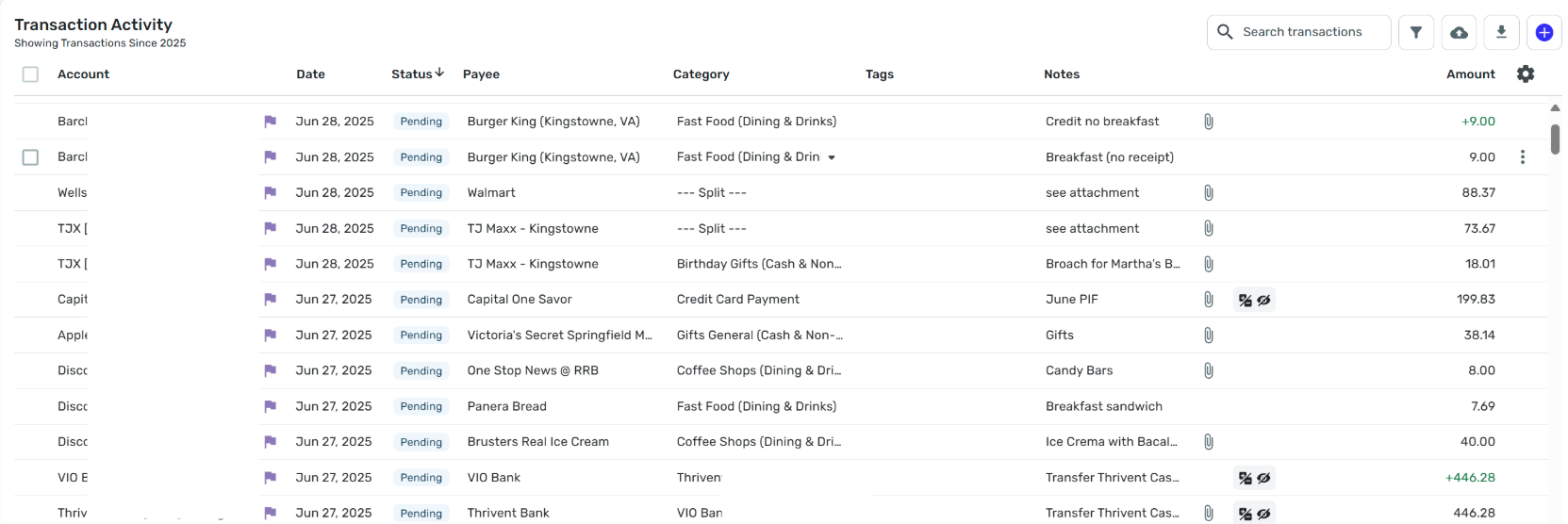
Not all "Pending" transactions are manually created. Some banks accounts and credit cards download Pending transactions and some don't. For example, my Amazon-Chase credit card downloads Pending transactions to Simplifi. If I look on the Chase website, I see that the same transactions are listed as Pending there. In Simplifi they look like manually entered transactions:

If you open the detail view for one of these you can see that they were downloaded because they show the original statement payee name:

Such pending transactions are later converted to cleared transactions both on the credit card website and in Simplifi — if all the downloading and matching goes well.
DryHeat
-Quicken Classic (1990-2020), CountAbout (2021-2024), Simplifi (2025-…)2 -
Thank you for the information and the reference.
Dick Davis
Wanting to Migrate from Quicken Classic Premier to Simplifi
1 -
@Dick_Davis I'm glad @DryHeat gave you that extra information. And just to show you more complications, there are some banks that download pending transactions twice and it often makes a duplicate! This happens with my local bank when we make Debit Card transactions. On the first day, it downloads the pending transaction with that day's date. On day 2, it downloads the pending transaction again with today's date. Then on Day 3, it clears it.
Since I tend to edit the transaction and split it, if necessary, on day 1, I end up having to delete the second downloaded pending. This doesn't hurt, because it's only the final transaction that matters. Pending transactions just help you keep up with your available balance. This can be important if you keep a small balance in an account as you don't want to overdraw.
My current policy is that I only enter manual transactions for accounts that don't download the pending transactions (Capital One, Fidelity Cash Management) but I wait for the downloads from banks that do download pending (Chase, American Express).
Once you get the hang of it, it isn't too complicated. Just be aware of your banks' peculiarities.
Steve
Quicken Simplifi (Safari & iOS) Since 2021
Quicken Classic (MacOS) Since 2009
MS Money (1991-2009) and Dollars & Sense (1987-1991)1 -
Because others are describing how they use Quicken Simplifi, let me put in my
twothree cents:(1) When I first started with Simplifi I was very hands-on. A number of things were different from software I had used previously and I wanted to make sure I understood how it worked.
(2) Now that I am more comfortable with it, I am very hands-off. I still look at it frequently to remain aware of upcoming manual payments, check categorizations, or make notes of things I need to remember. But I seldom interfere with its automatic functions.
(3) One thing that help me relax was the fact that the account balances are not based on the transactions in the registers. At first that perplexed me because it is so different from my other software, but now I see it as a kind of "failsafe." Even if you muck up the transaction list, you will still be able to know the actual balances in your accounts.
DryHeat
-Quicken Classic (1990-2020), CountAbout (2021-2024), Simplifi (2025-…)1


Answers
-
Hello @Dick_Davis,
Thank you for reaching out with this question. Your understanding is correct. In connected accounts, transactions marked as pending should be matched to the cleared transaction, once it downloads, provided that the information is the same. For more information, see this article on managing transactions:
I hope this helps!
-Coach Kristina
0 -
FWIW, and this is strictly my own practice, I don't do any (or at least very few) manual entries for my connected accounts. As pointed out above, some banks include pending transactions in their data downloads and some don't. QS has a means to handle this in the account setup dialogue screen. However, if pending transactions are not included, what benefit is there in taking the time to make manual entries when the actual transaction will download in the next day or possibly two? QS keeps your actual bank balance up to date so you know what you have available. But, again, what is the advantage compared to the extra work making manual entries and then dealing with any mismatches that may occur?
Entering manual transactions in my connected accounts seems to me to negate one of the top advantages provided by having connected accounts that download my banking transactions into QS. The one or occasional 2 or even 3 day "delay" between when a transaction occurs and when that transaction is posted and settled is not significant enough to make me want to put the extra effort into trying to make sure every day's transactions are entered at time of purchase or soon thereafter. It doesn't seem like that will make any significant difference in my actual balance until the transaction is posted. Having a transaction pending in my QS account register doesn't make much difference, or at least not enough of a difference to warrant the additional time and effort to manually enter every transaction.
When I actually used a physical checkbook and had to keep a running balance day-to-day, fine, manual entries were critical to account management. But now with almost instantaneous, or at least daily updates of transactions directly in my account and in QS, balance with pending doesn't seem to be nearly as important.
Danny
Simplifi user since 01/22
”Budget: a mathematical confirmation of your suspicions.” ~A.A. Latimer0 -
One thing I love about Simplifi is its ability to allow each of us to do whatever works for us. As I said before, I tend to wait for the pending to come in from the accounts that support pending but there are times when I manually add pending transactions.
- I pay a bill through Capital One's bill pay and I need to mark it as paid. It's a bit of a pain to enter it manually and then match it my recurring (which is why we need the ability to mark a reminder paid; it would save a lot of time).
- Entering manual pending transactions keeps my records up to date as well as my Spending Plan.
- If you have a split and a receipt, I need to enter the transaction now before I lose the receipt or forget about it. I can wait a couple of hours but waiting days isn't going to work for me.
There are also times when I mark a pending transaction cleared because the bank updates its balance earlier than it downloads the cleared transaction. I cannot mark it cleared if I haven't entered it first. This is not strictly required because I can wait a few hours and it will fix itself. But until then the balance is wrong (This happens mainly with my Capital One and Chase accounts.)
I have searched for alternatives to these banks, but as I outlined above even with the banks that do download pending transactions, there are problems with duplicates, changed dates, cleared splits, etc.
I haven't yet found Bank Nirvana so the hands off approach is not for me. BUT it all depends on your needs, how you work, how much time you have and your personal preferences. As you get more accustomed to using the app, it will be interesting to learn how you decide to Simplifi.
Steve
Quicken Simplifi (Safari & iOS) Since 2021
Quicken Classic (MacOS) Since 2009
MS Money (1991-2009) and Dollars & Sense (1987-1991)0 -
Thank you as these are my sentiments exactly. Also, I am taking Simplifi more and more to be how I like to work.
Dick Davis
Wanting to Migrate from Quicken Classic Premier to Simplifi
0 -
@DryHeat @SRC54 @Coach Kristina @DannyB - thank you all for the information provided and how you use the pending transactions. As I slowly get more and more integrated with Simplifi and leaving Quicken Classic. One of the practices that I started with Quicken was to attached file to the transactions such as receipts, depository and credit card emails, etc. I have found, not frequently that this practice has cut the "search time" drastically when a receipt, a message, a statement is needed. So, hopefully I have provided the larger portrait of my question with a different aspect.
Thank you again.
Dick Davis
Wanting to Migrate from Quicken Classic Premier to Simplifi
4

