Midland National Annuity FDP-108 error (edited)

Can't complete connection. Enter name/password and triggers code to confirm
After code, error saying can't connect but there isn't anything pending at the website.
To connect to your account, you must complete an action at the website for Midland National Annuity.
Care Code: FDP-108
Comments
-
Hello @knphoenix16,
Thanks for reaching out! This error code presents when the bank has added either a new page to its website or a pop-up window that requires user action to bypass it. Typically, these are things such as a prompt to update your personal contact information or promotional material like credit card or loan offers.
If you sign in and don't see any pop-ups, try signing in to your bank's website using a different browser or incognito. Let us know if that works for you!
-Coach Jon
-Coach Jon
1 -
Hi Coach Jon
Tried your suggestions, no pop-ups (two browsers +/- incognito).
No change in Simplifi error.
0 -
Thank you for your reply,
Does your financial institution typically require a security code or other form of Multi Factor Authentication (MFA) when you login? If so, are you also receiving a MFA prompt in Quicken Simplifi?
Also, to assist with investigating this issue, please submit log files. To do this, please follow these steps:
- Log into the Quicken Simplifi Web App.
- Select Profile from the left-hand navigation bar.
- With the Profile menu open, hold down the Option key for Mac or the Alt key for Windows, and then click Send Feedback.
- Leave all boxes checked, add a brief description of the issue, and then click Send.
I look forward to your response!
-Coach Kristina
0 -
Yes, the MFA prompt opens in Simplifi.
I have sent the log files.
1 -
Hello @knphoenix16,
Thanks for the information! We have gone ahead and escalated your issue. We will provide updates here as we receive them!
Thank you for your patience!
-Coach Jon
EWC - 11132722
-Coach Jon
0 -
Hello @knphoenix16,
Thanks for your patience! It looks like we will need more information going forward. If you could please let us know the name of the account as it appears in Quicken Simplifi as well as a screenshot showing the error in the product, that would be great! You may DM me this information if you prefer.
Thanks,
Coach Jon
-Coach Jon
0 -
Hello @knphoenix16,
Thank you for the additional information! We have escalated this issue and will post back here with any updates we receive for your issue.
-Coach Jon
CTP-10304
-Coach Jon
0 -
Is there any update on this issue? I have a very similar problem, except that I'm getting FDP-16 errors instead of FDP-108. I enter my username and password, get the prompt to send a MFA text, I receive the text and enter the code; but I just keep getting the FDP-106 errors. Have confirmed the user/pswd on the midlandsnational.com website.
0 -
Unfortunately, there has been no update or resolution.
0 -
Thanks for letting me know. Nothing on the other related threads either. :-(
0 -
Well, they fixed the FDP-106 error, but now I am getting the FDP-108 as described above. Like the original poster, I get the MFA challenge, enter the code, but get the 108 error. I can log into the midlandnational.com website just fine, no pop-ups and no notices of any change to the login procedure. (I do not get a MFA challenge on the website because it recognizes my browser.)
 0
0 -
Thank you for your reply @PJLmoney,
Since you are now seeing the FDP-108 error, please follow the troubleshooting from @Coach Jon's earlier post:
Please let me know how it goes!
-Coach Kristina
0 -
Hey everyone!
I just wanted to let you all know that the escalation for this issue is still open and ongoing. We are awaiting a fix to be implemented by our service provider. We will continue to keep you all updated here!
Thank you all for your patience!
-Coach Jon
-Coach Jon
0 -
Hello @knphoenix16,
I am back with an update from our product team. They noticed that you were no longer experiencing the FDP-108 error and that your accounts were in a disconnected state with Midland National Annuity. Can you let us know if you are still experiencing this issue? Thanks!
-Coach Jon
-Coach Jon
0 -
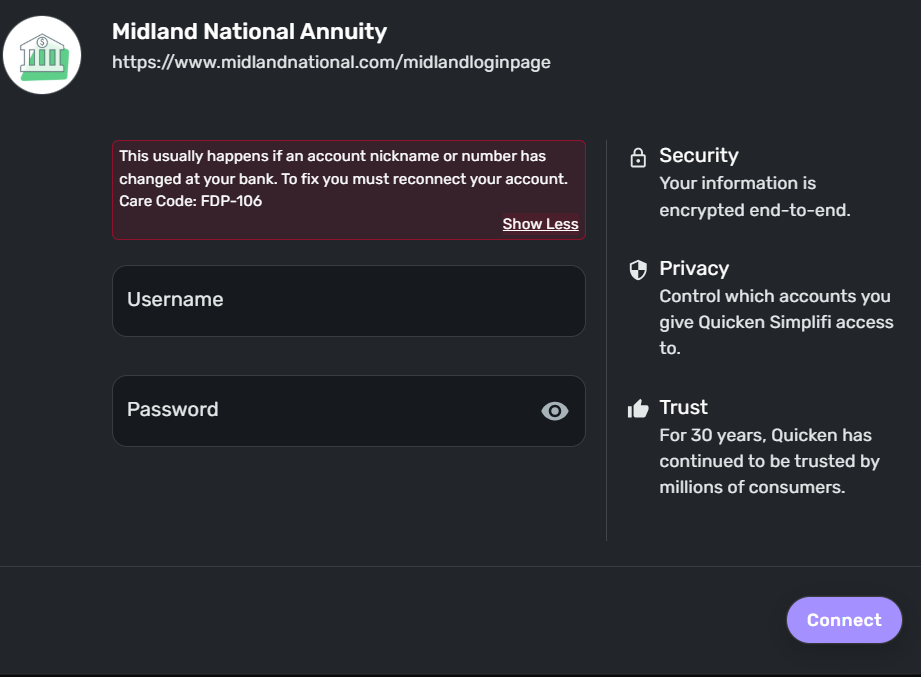
Tried again, current error:
This usually happens if an account nickname or number has changed at your bank. To fix you must reconnect your account.
Care Code: FDP-106
1 -
knphoenix16 just FYI I have been getting the FDP-106 for a while now also, it's not just you.
1 -
Hello @knphoenix16,
Thanks for the reply and update! For this new error, let's have you try establishing a fresh connection, make the account manual, and re-link to see if that fixes the current issue. The instructions to do that are:
- Make all of the accounts with the bank manual by following the steps here.
- Once you see the account(s) listed in the Manual Accounts section under Settings > Accounts, go back through the Add Account flow to reconnect to the bank.
- If the connection is successful, carefully link the account(s) found to your existing Quicken Simplifi account(s) by following the steps here.
Let us know if that works. If it does not, can you please supply a screenshot showing the new error from within the product, as well as provide new logs:
- Log into the Quicken Simplifi Web App.
- Select Profile from the left-hand navigation bar.
- With the Profile menu open, hold down the Option key for Mac or the Alt key for Windows, and then click Send Feedback.
- Leave all boxes checked, add a brief description of the issue, and then click Send.
-Coach Jon
-Coach Jon
0 -
I am not able to add an account, this solution will not work for me.
report created - reference id 489152806386913280
 0
0 -
Hello @knphoenix16,
Thank you for the requested information. I reported this back to my product team and will follow up here when we have further status updates.
-Coach Jon
-Coach Jon
0 -
Hello @knphoenix16,
I am back with an update from our product team! It looks like they resolved the issue. They would like you to try connecting again within Quicken Simplifi to see if everything is working as intended. Let us know how this goes!
-Coach Jon
-Coach Jon
0 -
No change.
1 -
Hello @knphoenix16,
Thank you for the update. If you can please supply updated logs again, I will send this information to my product team to work on it one more.
-Coach Jon
-Coach Jon
0 -
Hello @knphoenix16,
I am reaching out again to see if you have seen my previous reply regarding the updated logs? If you can get those over to us, we can continue working on this issue. Thanks!
-Coach Jon
-Coach Jon
0 -
Hello @knphoenix16,
I am following up to let you know that this ticket has been closed due to a lack of response. Let us know if/when you provide those requested logs, so that we can get the ticket reopened.
-Coach Jon
-Coach Jon
0

