Fidelity brockerage transactions are no longer categorizing

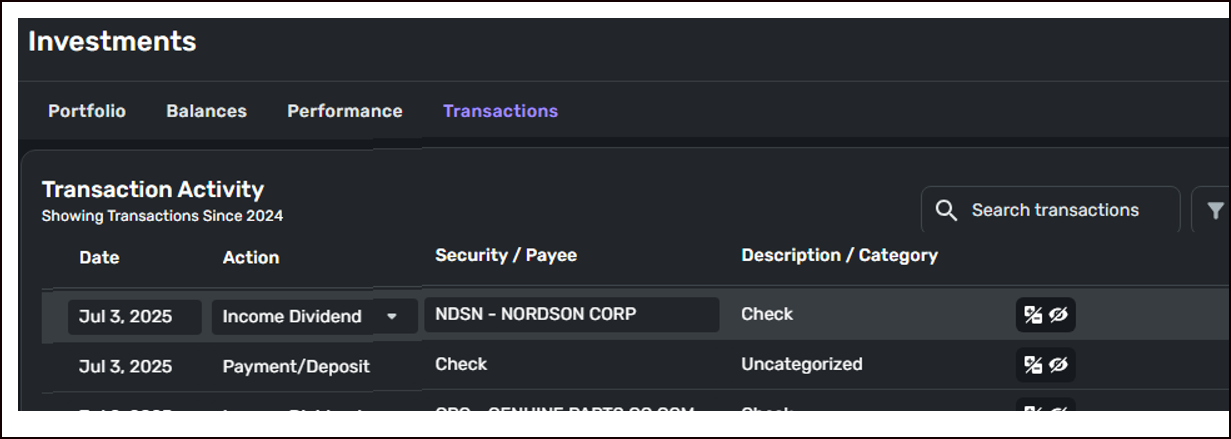
The transaction below is a dividend payout from the listed security.
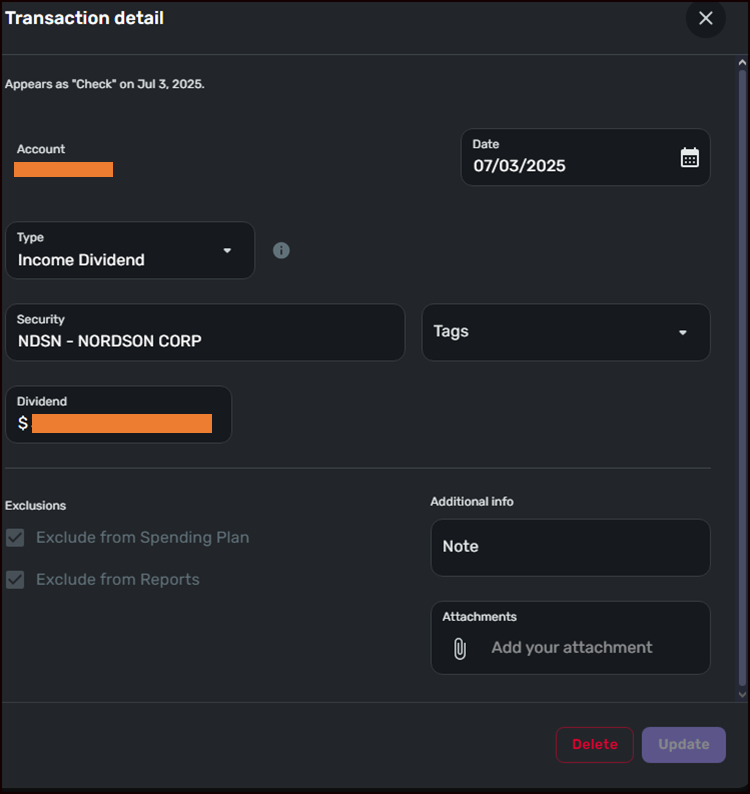
The custom category is not changeable from either the list view, or the from the transaction details view opened below where the transaction details form foesn't even list Category field.
For transactions with Action "Payment/Deposit" the custom category can be changed or even assigned automatically. For trnsactions with Action "Income Dividend" the category change option is disabled.
Also, notice how the transaction gets automatically assigned to a default category "Check" as shown in the Description/Category column, which is not one of the custom categories I set up. The transaction right before it lists "Check" as a Security/Payee. In actuality, both transactions are dividend deposit transactions from different securities. Somehow this information is not recognized, not consistently formatted by the FI or is not parsed correctly by Simplifi…
Something must have changed in Simplifi or Fidelity because until recently, about two months ago, this worked and allowed me to track my combined income from the Reports menu where I viewed them organized by Category, with income didividend a subcomponent on e.g. a pie chart. That ability is now gone due to dividend transactions not being correctly recognized as such or categorised to custom categories.
Comments
-
Hello @usrA12,
Thanks for reaching out! For transactions with the Action "Income Dividend", the category change option is disabled within Quicken Simplifi. I am not sure why the transaction that you showed in your screenshot was assigned a "Check" category, but I would have you delete the transaction and re-create it to see if it assigns that category once again, or if that was just a one-off issue. Let us know!
-Coach Jon
0
