Synchrony Bill Connect accounts all show the same due date and amount (edited)

I have three accounts with Synchrony. Amazon, Discount Tire, and Chevron/Texaco. The due dates in Simplifi all use the Amazon due date. This means the running totals due and the amount due are incorrect for all but the Amazon card. I have to manually change the amount due each month for Discount Tire and Chevron/Texaco. I have tried to disconnect and reconnect, but it still uses the same date for all statement closing periods.
Amazon Due Date - 3rd
Discount Tire Due Date - 20th
Chevron/Texaco Due Date - 26th
All of them show a Due Date of the 3rd.
Comments
-
Hello @damnedxer,
Thanks for reaching out! I think we need more information regarding your situation here. Can you please provide screenshots showing the issue within the program?
-Coach Jon
-Coach Jon
0 -
Amazon Due Date - 3rd (Correct)
Discount Tire Due Date - 20th (Incorrect)
Chevron/Texaco Due Date - 26th (Incorrect)
All of them show a Due Date of the 3rd. There is no option to change this, which leads me to believe they all default to the SYF Amazon account due date.
0 -
Hello @damnedxer,
Thanks for clarifying and providing those screenshots! The Statement Closing Date and the Due Date shown in the Bill Connect tab come directly from your bank and cannot be edited. To further clarify, are all three connected to the same bank? If they are, and that is what the bank is sending, we would not be able to change it unfortunately.
-Coach Jon
-Coach Jon
0 -
Thank you for checking into this for me. They are all connected to Synchrony.
0 -
Hello @damnedxer,
Thanks for the reply. If that is the case, then it is the bank that is sending the Due Date, and we can unfortunately not change that information. I know we have a couple of different instances for Synchrony, and even Chevron as well. Have you tried those instances available within the program to see if having different connections fixes this issue for you?
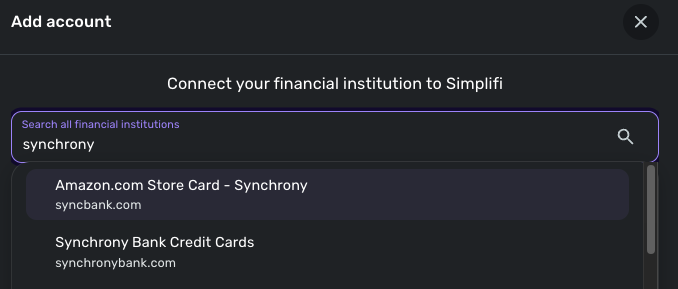
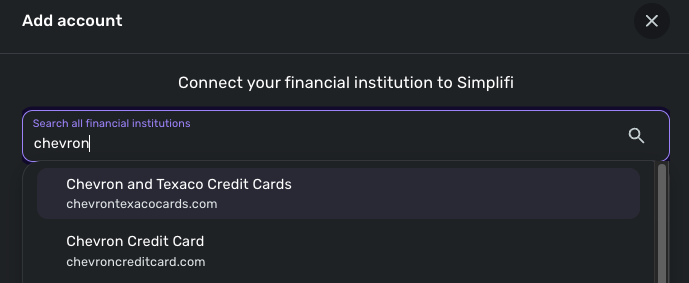
Let us know if that works!
-Coach Jon
-Coach Jon
0 -
I tried. The due date still shows up as the 3rd for all accounts. Thank you for checking into this.
0 -
Hello @damnedxer,
Thanks for the reply. To clarify, were you able to connect to the other instances from the screenshot I shared above? And if you did, do they provide the same Due Date?
-Coach Jon
-Coach Jon
0 -
Yes, I was able to connect as shown. The due date remained the same for both accounts.
0 -
Hello @damnedxer,
Thank you for the reply and clarification! Since the bank is sending this Due Date information, we unfortunately will not be able to change it within the application. You may need to verify with the bank on why the information being sent is the same.
I'm sorry that I couldn't provide a better answer.
-Coach Jon
-Coach Jon
0



