payee names cut off in the register when hovering and editing (edited)

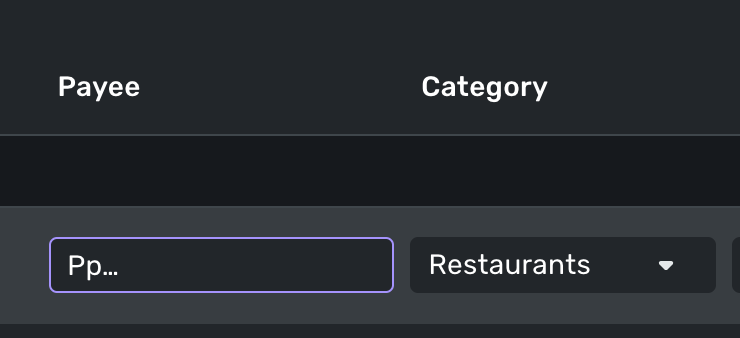
I think this is a new issue… when a Payee name is too long to display in the transaction list, I hover over it to see the full name. But now, it gets truncated to just 2-3 characters when I hover.
Screenshots before and while hovering:


Comments
-
I'm seeing the same thing on any Payee name that is too long for the column width.

DryHeat
-Quicken Classic (1990-2020), CountAbout (2021-2024), Simplifi (2025-…)2 -
Yup exactly
0 -
Yep, I usually keep my payees short but certain Fidelity Money Market funds are long, and this glitch showed up for me today.
Steve
Quicken Simplifi (Safari & iOS) Since 2021
Quicken Classic (MacOS) Since 2009
MS Money (1991-2009) and Dollars & Sense (1987-1991)0 -
It's not just hovering that's a problem, it's also editing.
When I click on one of these too-long Payees to edit it inline, the field only shows 4 letters of the Payee while I am editing. I have to figure out what is happening by looking down at the "create a new payee" dropdown. Editing in the "Transaction detail" form works correctly, but inline editing is practically useless.
(This often happens with a payees that don't get automatically renamed and that have long strings of meaningless (to me) characters at the end of the name.)
DryHeat
-Quicken Classic (1990-2020), CountAbout (2021-2024), Simplifi (2025-…)1 -
I've always found editing the Payee inline to be problematic. It's often hit or miss.
Steve
Quicken Simplifi (Safari & iOS) Since 2021
Quicken Classic (MacOS) Since 2009
MS Money (1991-2009) and Dollars & Sense (1987-1991)0 -
Hello everyone,
Thanks for reporting this issue! We were able to reproduce this issue from our side and have reported this to our product team. We will be sure to follow up here when we receive any status updates as they work on it.
-Coach Jon
SIMPL-27834
-Coach Jon
2 -
Thanks @Coach Jon
1 -
In the Transaction list display, the Payee name almost disappears when you hover your mouse over a transaction. It happens whenever the Payee name contains an elipses indicating it is too long to fit. It makes editing the name from the list view impossible, which is very annoying. This started happening with a recvent product upgrade at some point.
0 -
@Ron4266, thanks for reaching out!
I went ahead and merged your post with the existing thread for this issue. @Coach Jon has already escalated the issue, so you can now follow along here for updates.
Much appreciated!
-Coach Natalie
0 -
Hello everyone!
Our product team implemented a fix for this issue that should go live with the Quicken Simplifi Web Version
4.67.04.66.0 release. Be sure to let us know if this issue is resolved when that version rolls around!-Coach Jon
-Coach Jon
0 -
When I hover on a transaction in the Transactions part of the web application, the name only shows 2 characters. This makes it hard to interact when making updates to incorrect information about the transaction. First image is before hover. Second image is after hover.

 0
0 -
Hello @cchatham11,
Thanks for reaching out! I merged your post here, as it was already reported here. We did implement a fix for the upcoming 4.66.0 Web application release. Be sure to let us know if this issue is resolved when that version rolls around!
-Coach Jon
-Coach Jon
1 -
@Coach Jon any idea when that release will be available? I see I'm still on 4.65
0 -
Thanks
0 -
Hello everyone,
Quicken Simplifi version 4.66.0 has been released, so be sure to verify you're on the latest version and let us know if this problem is resolved for you!
-Coach Jon
-Coach Jon
0 -
Looks like it's fixed. Thank you!
3



