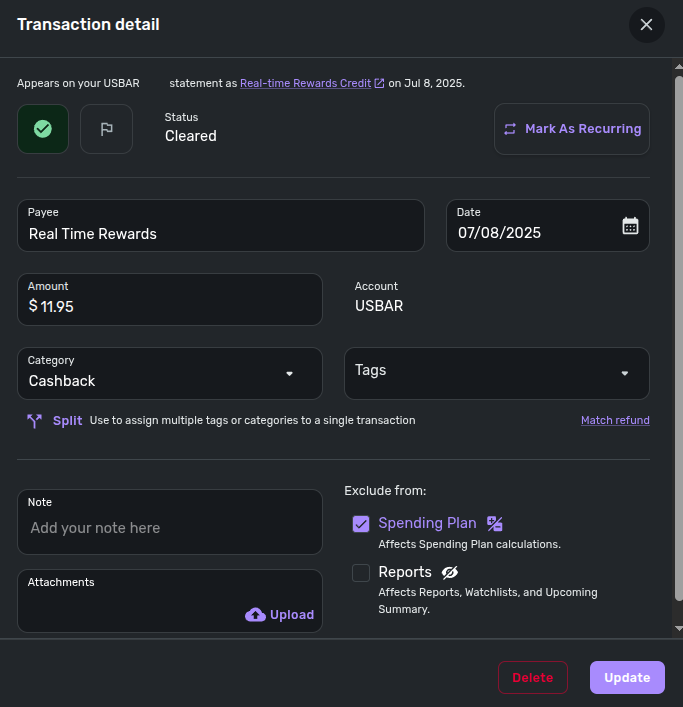
Certain transactions always come auto flagged as "exclude from spending plan" (edited)

Hello everyone.
Need help.
Simplifi has recently started to classify some credit card cashback (for which I have a rule, if description contains X change category to cashback) as "out of spending plan".
If there a way to tell Simplifi not to do that? I don't understand why the system does it, to begin with.
Thanks for any guidance.
Comments
-
Simplifi excludes transfers between accounts and balance adjustments from the spending plan by default. Also, can you share some screenshots for us to understand your question better and help you?
Simplifi User Since Nov 2023
Minter 2014-2023
Questionable Excel before 2014 to present
1 -
I agree this behavior is odd. Hope the coaches can help. I am at a loss as to why the transactions come in this way.
Simplifi User Since Nov 2023
Minter 2014-2023
Questionable Excel before 2014 to present
0 -
Hello @nrp06,
Thanks for reaching out! I agree with @UrsulaA that this is odd behavior. I believe from your screenshot, "Cashback" is a custom category. Did you assign this category, or is this how the transaction came in? Additionally, is this a subcategory of another category? I am wondering if these credits you are referring to are being categorized as a type of credit card transfer and are being excluded from the Spending Plan by default, because of this, but that would usually be excluded from Reports as well by default. Let us know!
-Coach Jon
-Coach Jon
0 -
@nrp06 Yes, curious.
Are these cashback payments a "reward" based on the amount charged to the card and not refunds for returned purchases?
Is your "Cashback" a subcategory of Income? (That may be what Coach Jon is asking.)
Based on how you phrased the questions this sounds like a new behavior. Did QS leave the exclusion options blank in past cashback transactions?
Is this set up as a recurring series?
Just trying to think of ways I would try troubleshooting this issue.
Danny
Simplifi user since 01/22
”Budget: a mathematical confirmation of your suspicions.” ~A.A. Latimer0 -
Hi, @UrsulaA, @DannyB and @Coach Jon , thank you for your replies.
Let me try to address your questions. Before I do, just a quick note: I'm happy to share more with your support team, including logs, if that would help them figure this out more quickly.- Yes, "Cashback" is a custom category under Income. I have a rule that categorizes any transaction with "real time rewards" in the description as Cashback.
- What are real time rewards? US Bank offers this feature on one of their credit cards. If you have enough points and make a purchase in a qualifying category (like Uber rides), they immediately credit your account using points. For example, I spent $11.95 on Uber, and a few minutes later US Bank credited the same amount back to my account. I prefer to track these as Income/Cashback, and that's how I’ve set it up.
- I only recently started seeing this behavior. I don’t recall it happening in the past. It seems to have started a couple of months ago.
- @DannyB , as mentioned above, these are not refunds for returned purchases. And yes, in the past, the “exclusions” fields were left blank.
- This is not part of a recurring series. It only occurs when two conditions are met: (1) I use the card for a qualifying purchase (e.g., Uber), and (2) I have enough reward points to cover the cost. For example, I could take an Uber tomorrow and not get a cashback if I don’t have enough points in my rewards balance.
Thanks again for your replies.
1 -
Hello @nrp06,
Thank you for the reply. Can you provide a screenshot showing the custom category in Settings > Categories & Tags? Does the behavior with the exclusion automatically being selected happen every time for this type of transaction, or is it random?
-Coach Jon
-Coach Jon
0 -
I'm going to keep an eye on my own transactions. When I first saw your post, it made me think that this had happened to me at least once recently. What I remember doing was to simply uncheck the exclusion and then forgot about it. If this did happen, it must have been a one off, and I haven't seen it happen again.
I'd suggest following through with @Coach Jon to troubleshoot this.
Danny
Simplifi user since 01/22
”Budget: a mathematical confirmation of your suspicions.” ~A.A. Latimer1 -
Hi @Coach Jon , lately it has been happening every time.
Screenshot is below.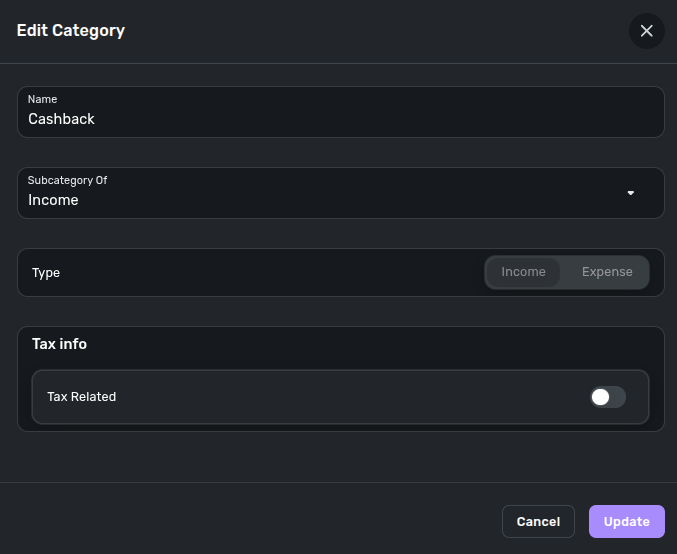 0
0 -
Hello @nrp06,
Thanks for the reply and the requested screenshot. Can you also provide a screenshot of the rule you mentioned previously? I am not sure why it would affect the exclusion settings of a transaction in this way, but it would not hurt to verify. How often do these "Cashback" transactions come in? If you remove the rule and wait for another one of these transactions to come in without being changed by the rule, does the same exclusion issue occur?
-Coach Jon
-Coach Jon
0 -
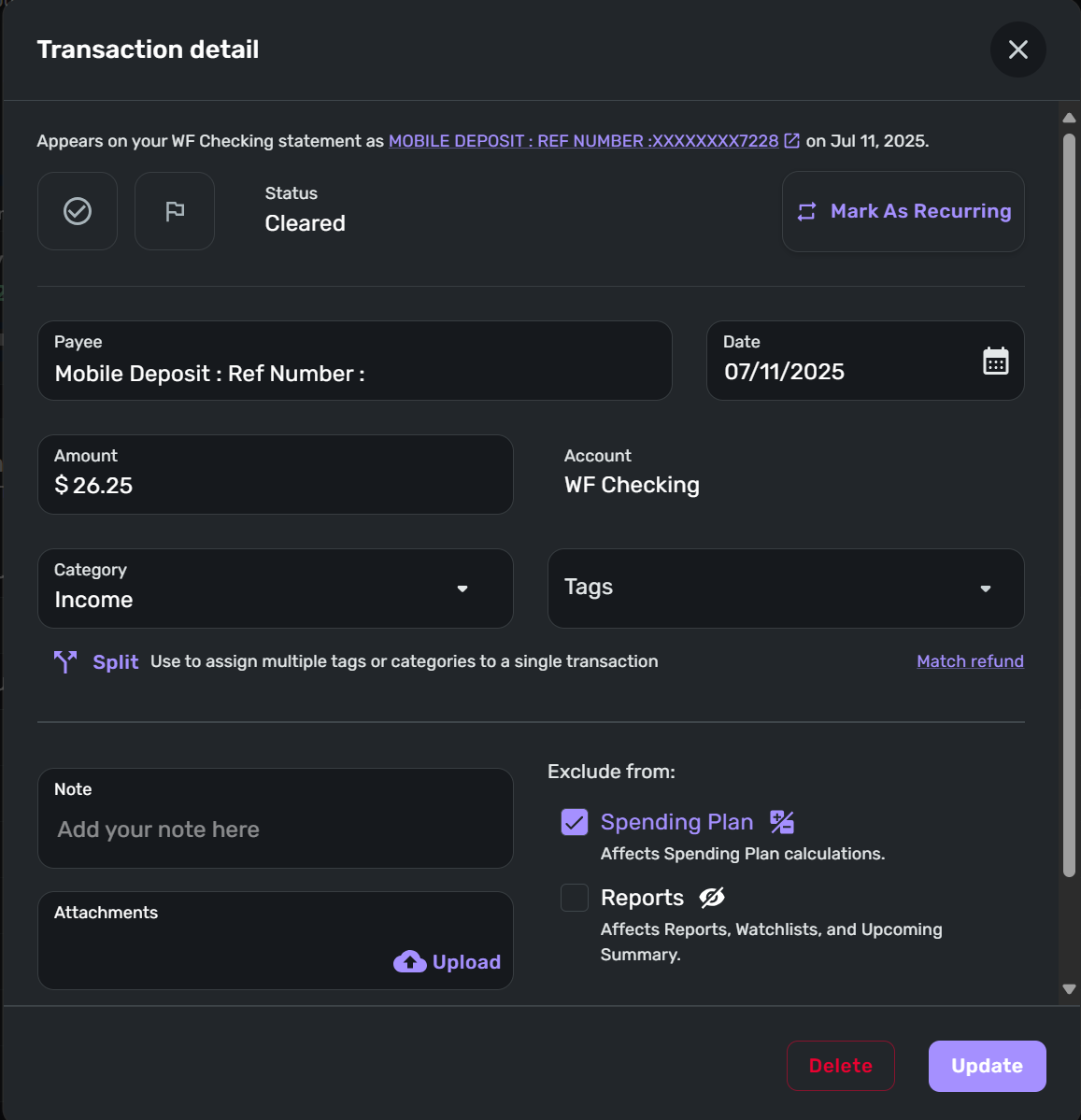
Ah ha, yes, this has happened to me also. Here is an example of a deposit to my checking account that QS marked as "Exclude from: Spending Plan."
- I made this deposit yesterday via mobile deposit through my banks mobile app.
- This is not a credit from a credit card account into my checking account.
- The deposit was processed overnight and landed in QS this morning with the "Exclude form: Spending Plan" checked.
- There is no reason for this deposit to be excluded: No rules, not recurring, no identifying data from the bank beyond "Mobile Deposit: Ref Number: xxx…"
 Danny
Danny
Simplifi user since 01/22
”Budget: a mathematical confirmation of your suspicions.” ~A.A. Latimer0 -
Hello @DannyB,
Thanks for the information. Have you noticed any other recent transactions where this issue has occurred, or is this a one-time issue? I am trying to find a link between what you shared and what the original user shared, besides the exclusion from the Spending Plan option being automatically checked.
-Coach Jon
-Coach Jon
0 -
As I mentioned above, I have a vague memory of this happening at least once before but didn't think much about it and made the correction.
The only commonality I can see is that these transactions are deposits.
I'll keep an eye out for any other incidences and pass them along.
Danny
Simplifi user since 01/22
”Budget: a mathematical confirmation of your suspicions.” ~A.A. Latimer1 -
It is happening on several deposits. Deposits like the one I showed you, but also on regular/standard deposits. Very strange.
Please see below the requested screenshot. 0
0 -
I see this same issue with deposits in June and May that I downloaded within the past week. One example.
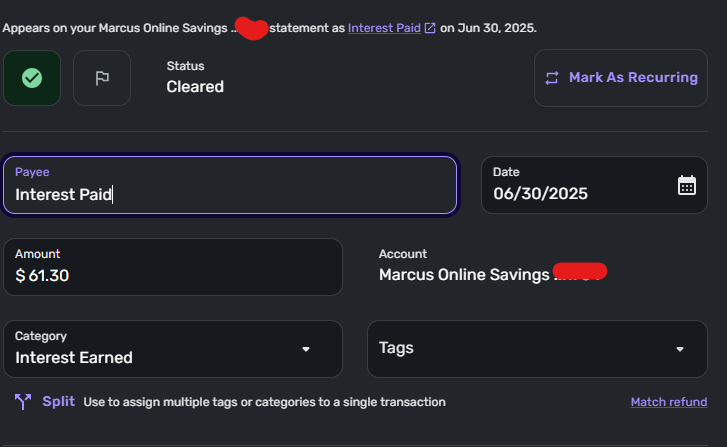
I am going to uncheck the exclusion and monitor the transaction downloads.
Simplifi User Since Nov 2023
Minter 2014-2023
Questionable Excel before 2014 to present
0 -
Hello everyone! @UrsulaA @nrp06 @DannyB,
We did verify with our product team, and they confirmed this was a recent, intentional change, and that all non-recurring income will automatically be set to exclude from the Spending Plan by default. We are working on a redesign for the Spending Plan, and this new design will have a setting so users can decide the default exclusion settings for non-recurring income.
-Coach Jon
-Coach Jon
2 -
Thanks for the clarification. This change should have been rolled out together with the new spending plan. Having income not in a series or auto matched to a series excluded makes the spending plan less useful without the rest of the changes rolled out. I will keep monitoring the transactions and including non recurring income back in the spending plan as needed.
Simplifi User Since Nov 2023
Minter 2014-2023
Questionable Excel before 2014 to present
3 -
Seems like a mistake to roll that out without notifying everyone about the change in how things work or letting it be an opt-in feature.
1 -
Good to know, thanks, @Coach Jon
Danny
Simplifi user since 01/22
”Budget: a mathematical confirmation of your suspicions.” ~A.A. Latimer0 -
This change should have been rolled out together with the new spending plan.
Speaking of which, is there any indication of when the new Spending Plan might be to users (other than new users)?
The design looks more organized and informative and I think it would benefit some of my family members who find the current design a little opaque.
DryHeat
-Quicken Classic (1990-2020), CountAbout (2021-2024), Simplifi (2025-…)0 -
I agree 100%.
0 -
I just found a transaction that I had linked to a recurring income series, but was still marked to exclude from spending plan for some reason. Is it because it didn't link to the series automatically?
0 -
Hello @EL1234,
Thanks for reaching out! I think we will need more information to determine what is happening with your situation. Can you provide screenshots showing the Transaction detail window as well as how this transaction appears in your register? Are you able to unexclude the transaction from the Spending Plan?
-Coach Jon
-Coach Jon
0 -
I was able to unexclude it. Do you still want screenshots of it? It was a split transaction if that makes a difference @Coach Jon.
0 -
Good idea, I'll be in touch if it comes up again. Thanks!
1