Connection error for Prudential FDP-102 (edited)

I continually receive an error code FDP-102 and have not been able to connect for over a month now. Is there a fix coming?
Comments
-
What a disappointment not connecting to Prudential. This contains 80% of my investments, and without data, Simplify doesn't add much value to my planning efforts. Please work with Prudential and fix the connection.
1 -
Hello @ctanenbaum an @dpk,
Thanks for reaching out. I can see from our side that you are receiving an FDP-102 error when trying to connect. Have you tried some of the other Prudential instances available in Quicken Simplifi to see if you can connect with those?
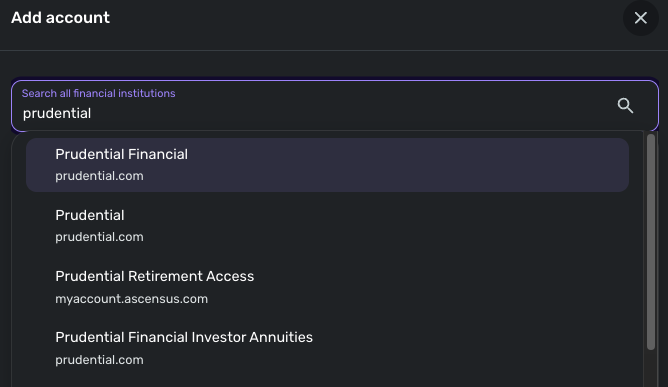
If none of these options work, could you please let us know if you are trying to add a new account to Quicken Simplifi or update an existing one? For the latter, I would try establishing a fresh connection:
- Make all of the accounts with the bank manual by following the steps here.
- Once you see the account(s) listed in the Manual Accounts section under Settings > Accounts, go back through the Add Account flow to reconnect to the bank.
- If the connection is successful, carefully link the account(s) found to your existing Quicken Simplifi account(s) by following the steps here.
Let us know!
-Coach Jon
-Coach Jon
0 -
I was trying to update an existing account. I followed the steps and still receive the same error.
0 -
I want to add that I am able to connect directly to the Prudential website. I believe that there may be some sort of security block between Pru and Quicken.
0 -
Hello @ctanenbaum,
Thanks for following up! Did you try any of the other Prudential instances available, as I mentioned above? If none of those worked as well, can you please provide a screenshot of the FDP-102 error you are receiving within Quicken Simplifi?
We will also need logs to be sent, please!
- Log into the Quicken Simplifi Web App.
- Select Profile from the left-hand navigation bar.
- With the Profile menu open, hold down the Option key for Mac or the Alt key for Windows, and then click Send Feedback.
- Leave all boxes checked, add a brief description of the issue, and then click Send.
-Coach Jon
-Coach Jon
0 -
I tried all of the Prudential instances as you suggested. None work. I just sent the logs too.
0 -
here is the screenshot
0 -
Hello @ctanenbaum,
Thank you for the requested information! I did get this reported to our service provider and will be sure to follow up here when we have a status update on this issue!
In the meantime, you can track the account manually by adding manual transactions, which will keep your records up-to-date. Here are the steps to do so: Managing Transactions in Quicken Simplifi | Quicken Simplifi Help Center
-Coach Jon
EWC - 11872079
-Coach Jon
0 -
Thank you. How do I remove Prudential from Manual and put it back to update daily?
0 -
Hello @ctanenbaum,
Thanks for the reply! To connect the account again after making it manual, you would go back through the Add Account flow to reconnect to the bank. If the connection is successful, carefully link the account(s) found to your existing Quicken Simplifi account(s) by following the steps here.
Additionally, I am back with an update from our service provider on this issue. They would like to schedule a debug session in order to do more advanced troubleshooting for this issue. Please confirm that the contact information in your Quicken profile is up to date and accurate, and please provide your general availability over the next couple of weeks.
Let us know!
-Coach Jon
-Coach Jon
0 -
My contact info is correct. Give me some dates/times and I will let you know if I am available. Thank you.
0 -
Hello @ctanenbaum,
Thanks for the reply, and for confirming your contact information is correct! We do not have specific dates to give you for scheduling, as this is done by our product team once we request the debug session. We will just need general availability over the next couple of weeks. Let us know!
-Coach Jon
-Coach Jon
0 -
Hello @ctanenbaum,
I a following up to see if you have seen my previous message? We will still need your general availability over the next couple of weeks. Let us know!
-Coach Jon
-Coach Jon
0 -
I have been traveling and will be available August 4-8th anytime.
0 -
Hello @ctanenbaum,
Thanks for getting back to me. We won't be able to schedule the session that soon. By general availability, what we are requesting is if there is a certain time you are off work every day, or what time you would generally be available over the next few weeks each day, or on specific days.
I hope this makes more sense.
-Coach Jon
-Coach Jon
0 -
I work 9 to 1 on Monday, Tuesday, and Thursday EST so I’m available after 1 on those days. Wednesday is open most of the time. Fridays are available after 1 pm.
0 -
Hello @ctanenbaum,
Thanks for letting us know! We did submit that information to out product team. Be sure to be on the lookout, as a member of our product team will reach out to contact you to schedule that debug session.
-Coach Jon
CTP-13989
-Coach Jon
0 -
Hello @ctanenbaum,
I am back with an update from our product team on this issue. It looks like they were able to resolve the issue that was reported. I am glad everything worked out. Be sure to let us know if something like this pops up again.
-Coach Jon
-Coach Jon
0 -
it’s still not working. I tried to add the account and got a new error!
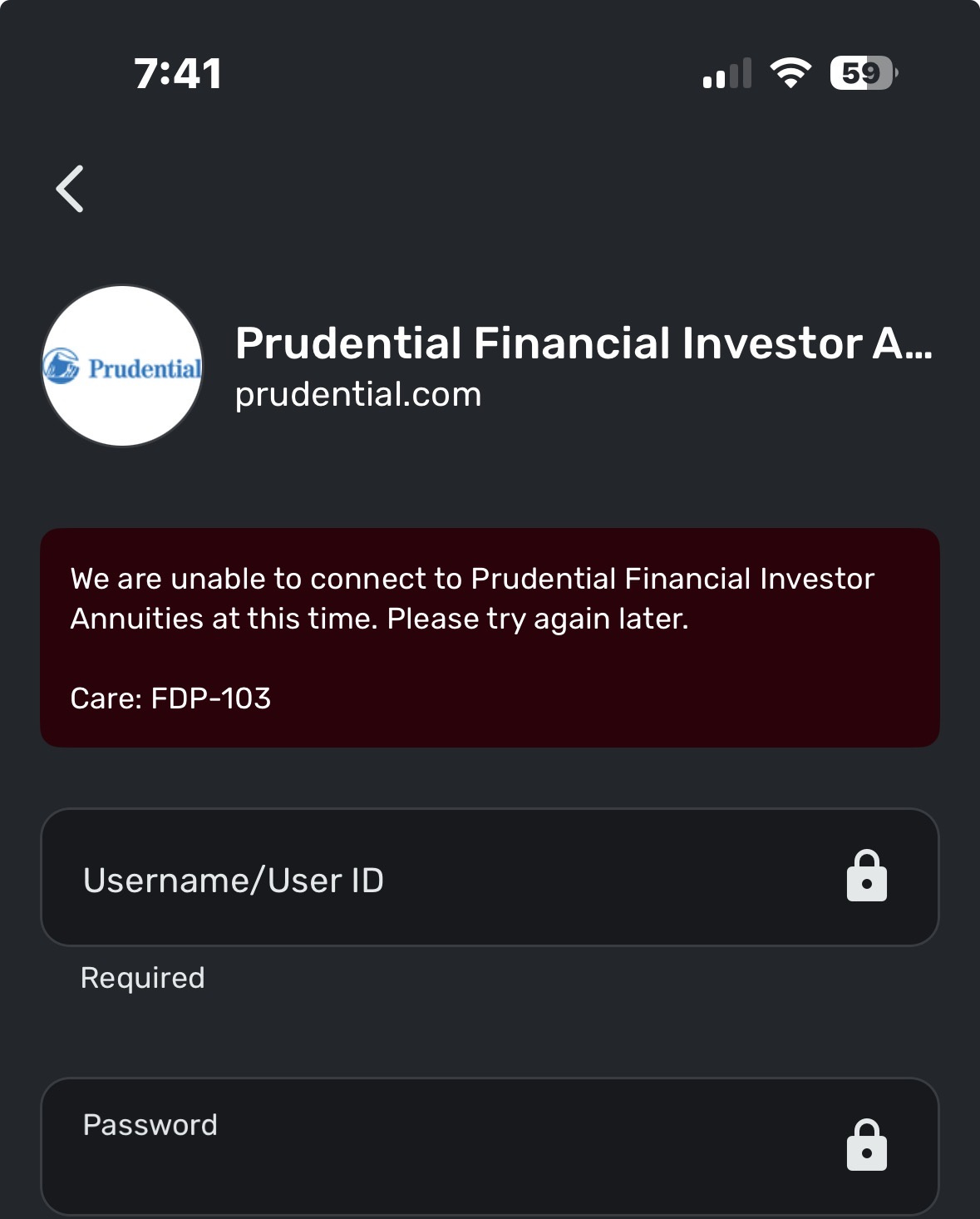 0
0 -
Hello @ctanenbaum,
Thank you for the reply. I would suggest doing the following steps to make sure the issue isn't related to the credentials being used:
- Verify your login information is correct – Type your password/PIN into a text application to ensure you don’t have any typographical errors. Then, copy and paste your login information into Quicken Simplifi to ensure accuracy.
- Verify your login at the bank’s website – Try to sign in to your bank’s website using the same login credentials to ensure you've not locked yourself out of the account and the credentials are still valid.
- Check for an app-specific password – Some banks require users to use a specific app password when connecting to a third party. Check with your bank to see if you need to use an app-specific password.
- Update your credentials – Try temporarily updating your password on your bank's website and then try again to connect to Quicken Simplifi. We recommend NOT using the following special characters: & < > / \.
Let us know if this helps!
-Coach Jon
-Coach Jon
0 -
It must of been the password! I’m in now. Thanks for your assistance!
2

