Unable to view attachments when clicking the paperclip in the register (edited)

When I have transactions that I have an attachment, these are unable to be viewed by clicking the paperclip on the transaction as listed and shown in the attachment. I get the message as shown in the attachment. If I click the orange square in the attachment, then the attached file will be opened. The attachment is a PDF file and I have the Adobe Reader, so the file type is defined as being able to be opened by Adobe Reader. This issue is repeatable for all attachments to any transaction.

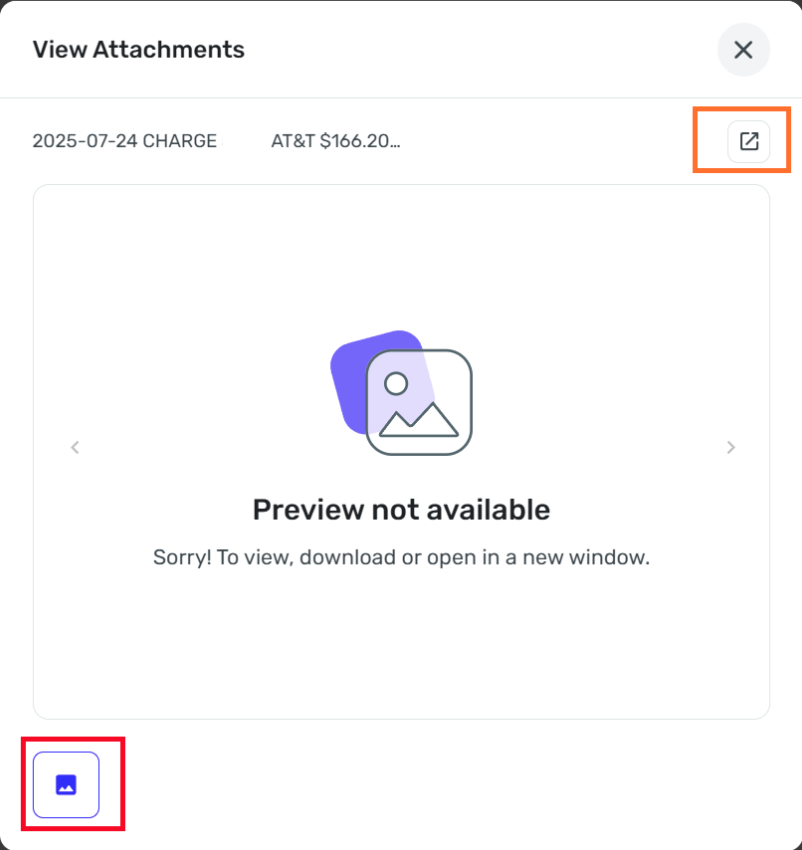
[Edited - Removed Personal Information]
Dick Davis
Wanting to Migrate from Quicken Classic Premier to Simplifi
Comments
-
Hello @Dick_Davis,
Thank you for letting us know about this issue. I see the same thing when I test in my Quicken Simplifi. I have forwarded this issue to the proper channels for further investigation and resolution.
If you would like to contribute to the investigation, please send logs. You can do that by following these steps:
- Log into the Quicken Simplifi Web App.
- Select Profile from the left-hand navigation bar.
- With the Profile menu open, hold down the Option key for Mac or the Alt key for Windows, and then click Send Feedback.
- Leave all boxes checked, add a brief description of the issue, and then click Send.
Thank you!
-Coach Kristina
1 -
@Coach Kristina, the logs have been sent as requested.
Dick Davis
Wanting to Migrate from Quicken Classic Premier to Simplifi
1 -
Hello @Dick_Davis,
Thanks for the information. I think we will need further clarification on the issue you are reporting here. To clarify, are you not able to open any attachment at all, or is this specific to just PDF files? Or can you still open the file normally via the arrow icon in the top right of the View Attachments window, and you are just reporting the lack of a preview as shown in your screenshot? Let us know!
-Coach Jon
-Coach Jon
1 -
@Coach Jon, since I attach PDF file to my transactions, that would be yes. Would you like for me to attach a different file type such as JPG or PNG? Also, if these fail to be shown, do you want the logs sent?
Dick Davis
Wanting to Migrate from Quicken Classic Premier to Simplifi
0 -
Hello @Dick_Davis,
To clarify, is it just the previews not showing for PDF files? Or can you not open the attachment at all when selecting the arrow icon in the top right of the View Attachments window?
-Coach Jon
-Coach Jon
1 -
@Coach Jon, your statement is correct. When the preview is selected, the message appears. then with the top right to View Attachment with the arrow icon, the file will open and be displayed.
Dick Davis
Wanting to Migrate from Quicken Classic Premier to Simplifi
0 -
Hello @Dick_Davis,
Thanks for clarifying. If the PDF file opens correctly when you select the mentioned arrow icon, then this would not be a bug. Previews would not necessarily show up for PDF files, since these files need to be opened with a PDF reader, or with a web browser that can read PDF files. As long as you can open the file, and it opens correctly, that is good. Image files should display previews, so let us know if this is not the case for you.
-Coach Jon
-Coach Jon
0 -
@Coach Jon . The understanding response is partially correct. When the arrow in the top on the right is selected, the file opens and is displayed as expected. When the icon in the lower left I selected, the error message as provided at the start is displayed. This either a design flaw or a portion of the program that is not working as designed and intended. I can capture a video and upload, if this file type is acceptable.
Dick Davis
Wanting to Migrate from Quicken Classic Premier to Simplifi
0 -
Hello @Dick_Davis,
Thanks for the reply. I think a screen recording showing the issue you are having would be great, as I am still not understanding the specific issue here. I do not see an error message, specifically. Let us know when you can provide that!
-Coach Jon
-Coach Jon
0 -
@Coach Jon, the video is in mp4, but that is not a valid file type. What do you recommend?
Dick Davis
Wanting to Migrate from Quicken Classic Premier to Simplifi
0 -
Hello @Dick_Davis,
If the file cannot be uploaded, I would try a different file type to see if that works better. I still do not believe this would be a bug based on the description and screenshots, but if the screen recording shows something that should not be occurring, it would be helpful here.
-Coach Jon
-Coach Jon
0 -
@Coach Jon, Do you which video type can be uploaded? Also, if you click on the lower left, the error message is presented while the name for the file is correct. Is this this be design?
Dick Davis
Wanting to Migrate from Quicken Classic Premier to Simplifi
0 -
Hello @Dick_Davis,
Thanks for the reply. I am still not sure which error message you are referencing in regard to this issue. The "Preview not available" message would not be considered an error if that is what you are indicating. As stated previously, if the PDF file opens correctly when you select the mentioned arrow icon, then this would not be a bug. Previews would not necessarily show up for PDF files, since these files need to be opened with a PDF reader, or with a web browser that can read PDF files.
I hope this makes sense!
-Coach Jon
-Coach Jon
0 -
Coach John, this makes sense, but the concern is that I am not sure you are seeing what I see. So, since we have exchanged several times on this, let us let this be silent until another quick user raises it up for investigation. Also, in the list of file types, there is no video file type. All to the file types listed are an image type.
Dick Davis
Wanting to Migrate from Quicken Classic Premier to Simplifi
0 -
Hello @Dick_Davis,
Thanks for the reply again. I wish I could see what you are seeing. Based on the screenshots and information presented, this would not be a bug at this time. As for file types, it looks like only these file types can be uploaded:

-Coach Jon
-Coach Jon
0 -
Coach Jon, that is what I saw earlier. it might be worth the suggestion to allow for videos (i.e., mp4 from the Windows Snipping Tool) to be uploaded and then our issue would have been easier.
Dick Davis
Wanting to Migrate from Quicken Classic Premier to Simplifi
0

