Remember category corrections

Every month I have to make the same category corrections. For example Mercury News shows up as Mercury with a category of car payment.
Comments
-
I was going to add a photo to show another bad categorization, but I don’t see a way to do it. I found all these small amounts, under $2, in reports under home. The erroneous category was mortgage. Frequent mortgage payments under $2? The title of all the entries was Fee. I don’t understand why these transactions titled Fee from investment accounts weren’t recognized as fees.
Also when correcting categories, I don’t see an option to change all the transactions with the same title. Many times there are too many errors to correct one by one, so I leave them incorrect and they annoy me.
0 -
@Julia58 "I don’t see an option to change all the transactions with the same title."
You can do that.
In the Transaction Activity registers you can search for transactions with a particular title. ("Search" in this case actually works like a filter, so that only matching transactions will show in the register.)
Then you can select some of the transactions by hovering over the far left of the register and clicking the box that appears on each line when you hover, or you can clicking the box at the top to select all.
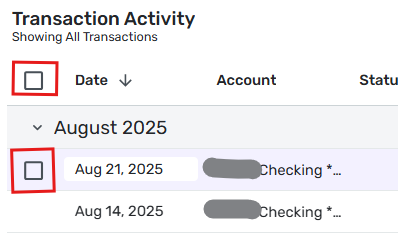
When you have one or more selected, you can click on the pencil icon (that also magically appears) at the upper right to edit all of the selected transactions at once.

DryHeat
-Quicken Classic (1990-2020), CountAbout (2021-2024), Simplifi (2025-…)0
