Make 'Transfers' its own section in the Spending Plan (edited)

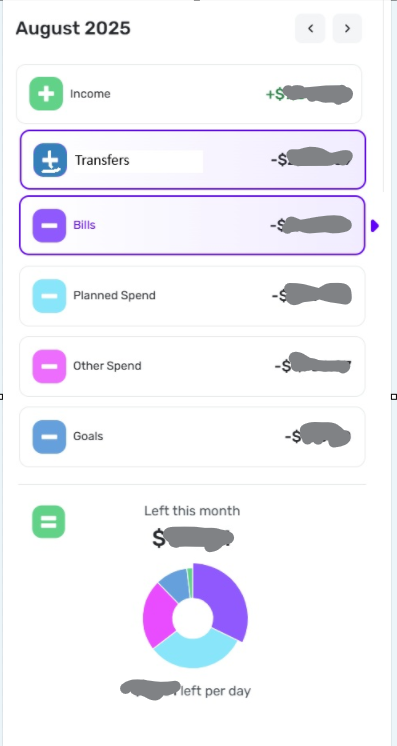
This has been suggested and discussed in the "Spending Plan Redesign" feedback thread, but there is no way to vote for it there. So I am creating a new thread.
The idea is simple: Transfers aren't really Bills, nor are they really Income. If they are included in with either of those it skews the Spending Plan by making it look like you made (or spent) more (or less) than you actually did. Keeping Transfers separate makes what is actually happening with your money clearer.
The attached image shows one possible way of doing this. A new section has been added for Transfers between Income and Bills. The icon for Transfers has a "plus-minus" sign instead of one or the other because the net effect of included transfers could either increase or decrease the amount available for the month.
(If there is a votable suggestion for this already, please merge this with that one.)
DryHeat
-Quicken Classic (1990-2020), CountAbout (2021-2024), Simplifi (2025-…)
Comments
-
I tend to agree. Here's an upvote.
Steve
Quicken Simplifi (Safari & iOS) Since 2021
Quicken Classic (MacOS) Since 2009
MS Money (1991-2009) and Dollars & Sense (1987-1991)2 -
I agree. Right now all my transfers are excluded from the Spending Plan, but I like the idea of having them listed and spelled out in their own section of the Spending Plan.
Danny
Simplifi user since 01/22
”Budget: a mathematical confirmation of your suspicions.” ~A.A. Latimer3 -
I would definitely want this!
2 -
I'm still dealing with Transfers of funds from a retirement account to my checking account showing up under the Bills section of the Spending Plan. … So I thought I would give this a bump.
These are positive amounts that are logically part of my monthly income, but they get hidden in the sea of negative amounts that make up my list of Bills. So the total for Income isn't really my total income and the total for Bills isn't really my total bills.
To make it worse, the amounts don't even get the highlighting benefit of a green font (the way they do in my Transaction Activity lists). You have to pick out the "+" sign from all the "-" signs.
DryHeat
-Quicken Classic (1990-2020), CountAbout (2021-2024), Simplifi (2025-…)0 -
To summarize my suggestion from this thread:
I think that transactions where only the Money In is not excluded - should be displayed in the Income section
Transactions where only the Money Out is not excluded - should be displayed in Bills
Transactions where both sides are excluded should be in their own section called Transfers. That is because it's not income or a bill/expense. It's just money getting transferred from place to place. Putting them in a Transfers category will make it easier to find them when we're looking for them, and to find other transactions when we're not looking for transfers.
Hope you guys can implement this!
2 -
I think it probably needs to be a separate feature request from just having a separate place for transfers.
I think of one sided transfers as either an expense or a negative expense and not true income. But I will keep an open mind. 😀
PS I upvoted to have transfers listed separately, but I don't mind them being in the bills section.
Steve
Quicken Simplifi (Safari & iOS) Since 2021
Quicken Classic (MacOS) Since 2009
MS Money (1991-2009) and Dollars & Sense (1987-1991)0 -
I hear that! I can try but it might get merged :D
Let me try and think of a concise title for the thread…
1


