Whole Foods Purchases with Chase Amazon Prime Card

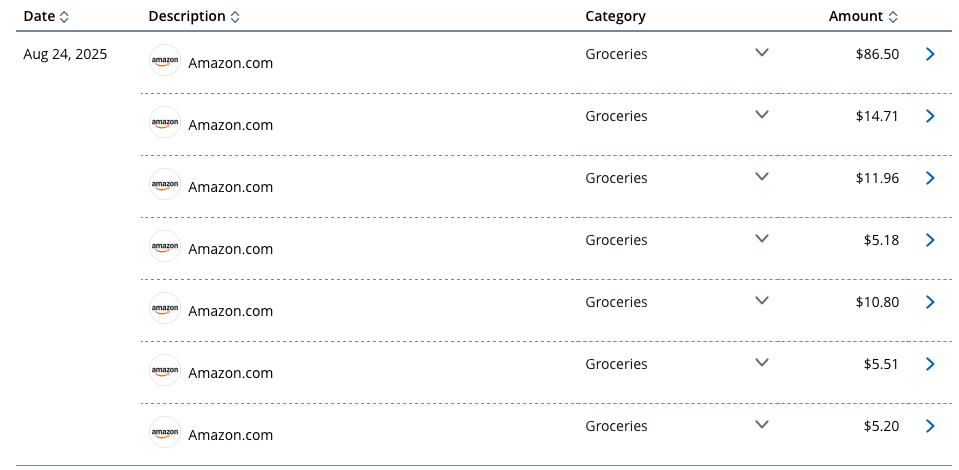
Something happened in the last month or so, but all Whole Foods pickup/delivery purchases come across as Amazon.com orders from Chase. Not only that but for some unknown reason, a single Whole Foods order is divided into multiple sub transactions. So for example a recent $139.86 order will come across as 7 separate transactions for varying amounts. How are people dealing with categorizing these? I looked at the transactions in Simplifi and there is no detail that would allow me to distinguish from a normal Amazon purchase.
As a side note - if I log into my Chase account, Chase does automatically tag the purchase correctly as groceries. Anyway to grab that info?
Attached is how a recent Whole Foods order looks on the chase site
Comments
-
Well, maybe you can find a way to create a rule to change Amazon.com to Whole Foods. I assume that Amazon.com is handling the transactions and that on the Chase site, it also says Amazon.com?
Of course, QS probably will not be able to differentiate from other Amazon orders.
I would do a bulk edit and change the payee to Whole Foods. It's not ideal but it gives you what you want.
As for the splits in the charges, Amazon is infamous for them. And it can be maddening for those of us who divide orders into categories including sales tax. At least you know they are all for groceries.
Steve
Quicken Simplifi (Safari & iOS) Since 2021
Quicken Classic (MacOS) Since 2009
MS Money (1991-2009) and Dollars & Sense (1987-1991)0
