Some Pending Transactions are being doubled in account balance (edited)

I think this started a month ago after I had to reconnect to Truist Online Banking - WC. I was connected To Truist Bank previously. I don't use checking much and I am not sure when it started. . Currently I have 4 pending transactions and 3 of the pending transactions are being double. The checking account with the problem is set to Bank Balance (default). I had the problem last month and tried setting the Balance Type in edit accounts to (balance with pending) but nothing changed after waiting for a bank update to download. When I checked balance type it had returned to Bank Balance (default). The Simplifi balance matched the bank after the pending transaction cleared at the bank and Simplifi marked them as cleared. How do I fix this? Thanks
Comments
-
I will occasionally get duplicates too, and I haven't found a fix. Sometimes they can be merged, sometimes they can't. Sometimes they resolve with the next update, sometimes they don't. If they don't resolve I just delete them after the correct one has cleared.
1 -
I'm not getting a duplicate transactions. When Simplifi updates Truist, Truist includes pending transactions in the balance. Some banks include pending transactions and some don't and Simplifi allows you to choose which way your bank works. However, I can't seem to make Simplifi switch and one pending is not being doubled in the balance. Three are being doubled.
0 -
If you could clarify how they are being doubled but not duplicated perhaps someone could help you.
0 -
I think what you are saying is that you have three transactions that appear to be counted twice each in calculating the balance. So the transactions only show up in the list once each but the balance calculation appears to count each one twice.
For example, if the three transactions are for $100, $200, and $300 the balance calculation ends up being off by $600. Is that right?
A screenshot of what you are talking about might help. (Redact private information.)
DryHeat
-Quicken Classic (1990-2020), CountAbout (2021-2024), Simplifi (2025-…)0 -
No off by $300, if the 3 pending deposits were $100, $200, and $300 Simplifi would show $300 more than the bank.
0 -
No off by $300, if the 3 pending deposits were $100, $200, and $300 Simplifi would show $300 more than the bank.
I don't understand the math here. If the three deposit transactions total $600 (100+200+300), and Simplifi is doubling those transactions (counting each one twice and thus adding another $600), why would the result be only $300 off?
By doubling the deposits, Simplifi would be treating the $600 in deposits as $1200. So shouldn't it be $600 off?
I'm pretty sure I don't understand what you are saying here. Can you be more specific?
DryHeat
-Quicken Classic (1990-2020), CountAbout (2021-2024), Simplifi (2025-…)0 -
The bank is giving the correct balance to Simplifi including pending and Simplifi is adding the sum of the pending like the Bank doesn't include pending
0 -
"if the 3 pending deposits were $100, $200, and $300 Simplifi would show $300 more"
"Simplifi is adding the sum of the pending like the Bank doesn't include pending"
I understand the idea that the bank is "adding the sum of the pending" to your bank balance.
But in your example the "sum of the pending" is $600, not $300. If the bank is really showing only $300 more then something else may be happening. That's why I asked how you came up with the number.
DryHeat
-Quicken Classic (1990-2020), CountAbout (2021-2024), Simplifi (2025-…)0 -
Yes you are correct. My Bad. The problem is fixed. The Balance Type is set in two places. I was trying to set is in Edit accounts. The first two screens shots below. If you click the 3 dots next to New on the Transaction page (see third screen shot) there is another place to set Balance Type
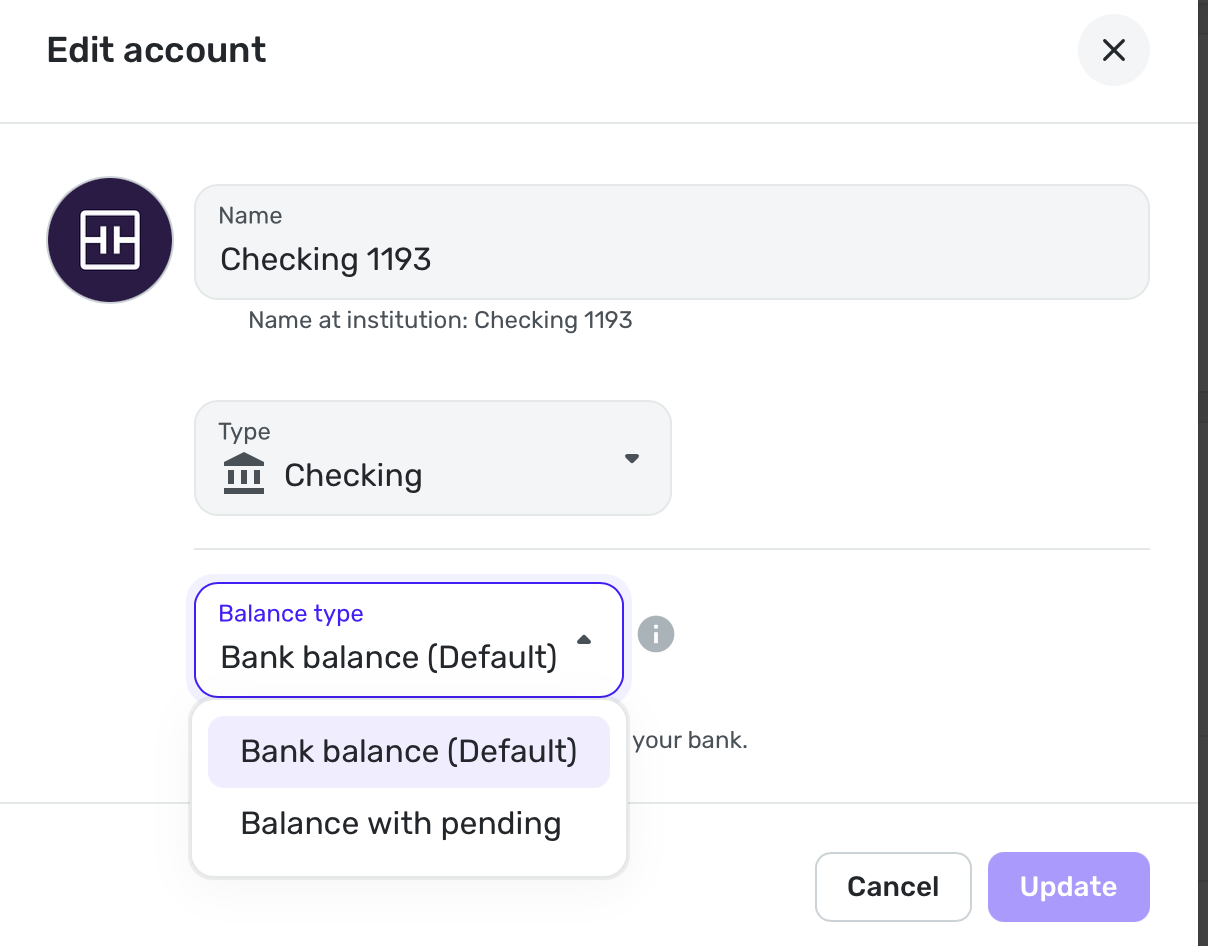
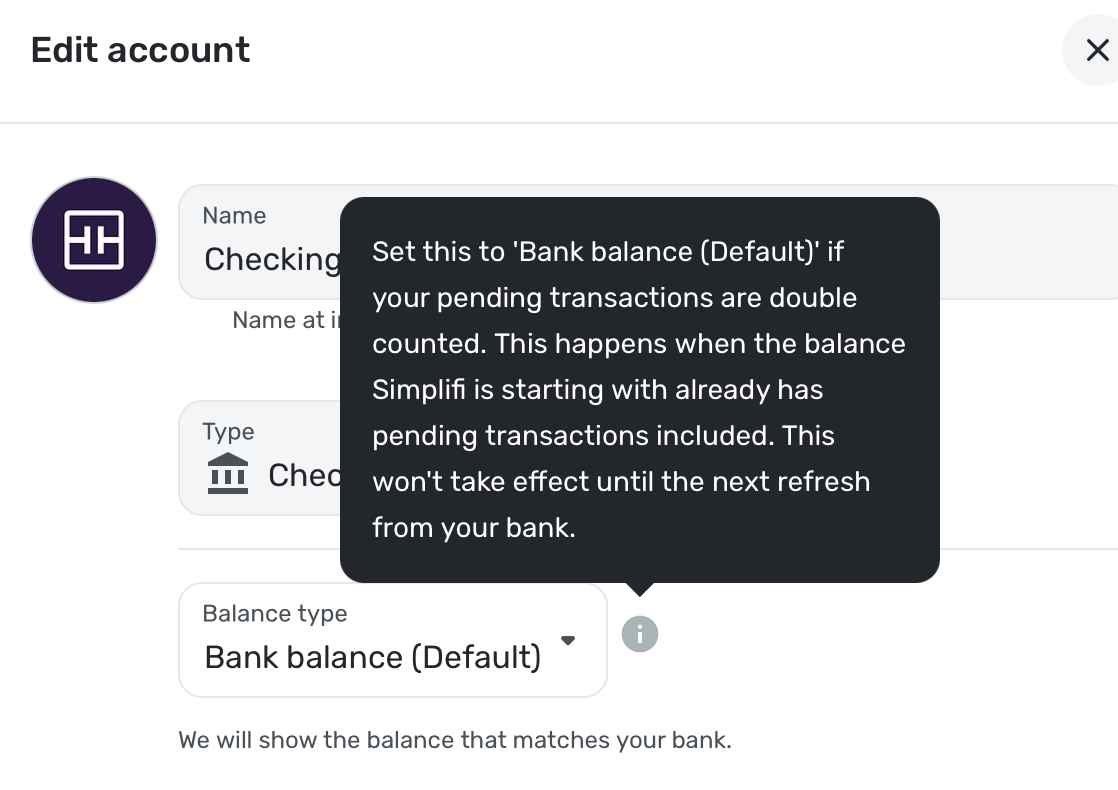
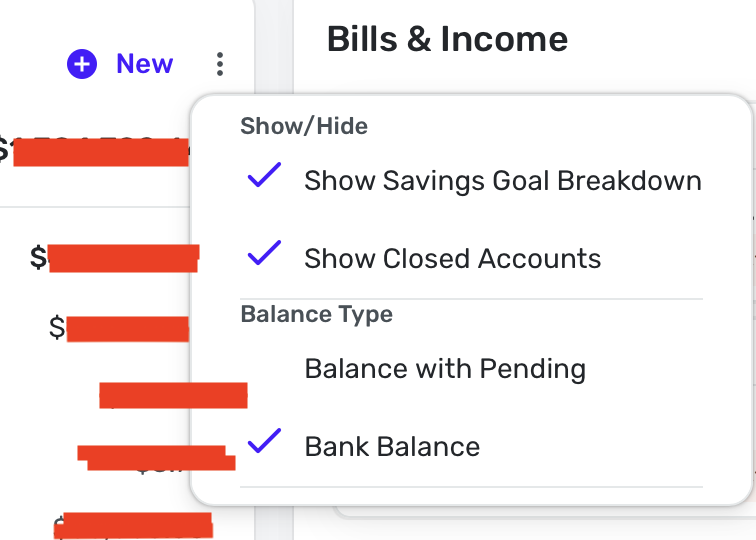
[edited images to reduce size]
1

