Empower cash accounts show a $0 balance (edited)

I have an Empower Cash account that I opened directly on my Empower 401k (not the personal strategies/dashboard). When I linked my 401k to Simplifi, it comes over great. Simpflifi finds the cash account but has a 0 for balance. Same situation for my wife but 457 account instead of 401k and her cash account also has a 0 for balance.
I can and have imported transactions manually but wondering if anyone has a solution?
Comments
-
@joda2021, thanks for reaching out to the Community!
To better understand your situation and the issue, I have some follow-up questions:
- What are these accounts classified as in Quicken Simplifi?
- If the accounts are classified as Investment Accounts, where does the cash come in? Do the accounts in question contain cash values with the financial institution? If so, where would you expect to see this cash in Quicken Simplifi (i.e., in the Investments Portfolio, as Investment Transactions, etc.)?
- What is the balance for the accounts in the Accounts List in Quicken Simplifi (this is the list of all accounts and balances on the left side of the Dashboard on the Quicken Simplifi Web App, or the list of all of your accounts when you select "Accounts" from the Quicken Simplifi Mobile App)?
- What is the balance for the accounts in the Investments Portfolio in Quicken Simplifi (you can filter the page to each account to determine this)?
- What is the balance for the accounts according to the bank's website?
- Do you have a Cash Holding when viewing the Investments Portfolio for each of the accounts in Quicken Simplifi?
Let us know!
-Coach Natalie
0 -
- What are these accounts classified as in Quicken Simplifi? "Other Investments" - well that is what I assign it after Simplifi finds it. It is actually just a high yield savings account.
- If the accounts are classified as Investment Accounts, where does the cash come in? Do the accounts in question contain cash values with the financial institution? If so, where would you expect to see this cash in Quicken Simplifi (i.e., in the Investments Portfolio, as Investment Transactions, etc.)? It is all cash with Empower (account is called Empower Personal Cash). High-yield savings account. www.empower.com/cash for info - But I would like to place it under my "Banking" section within Simplifi - though not a huge deal if it has to be under "Investments"
- What is the balance for the accounts in the Accounts List in Quicken Simplifi (this is the list of all accounts and balances on the left side of the Dashboard on the Quicken Simplifi Web App, or the list of all of your accounts when you select "Accounts" from the Quicken Simplifi Mobile App)? Sorry - not sure why you need to know all my account balances
- What is the balance for the accounts in the Investments Portfolio in Quicken Simplifi (you can filter the page to each account to determine this)?
- What is the balance for the accounts according to the bank's website?
- Do you have a Cash Holding when viewing the Investments Portfolio for each of the accounts in Quicken Simplifi?
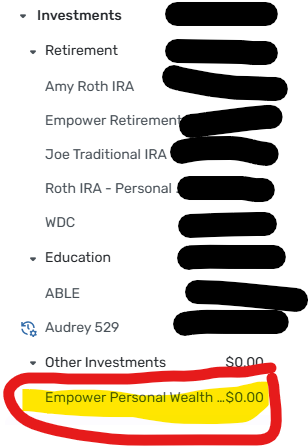
When I link my Empower 401k, Simplifi also sees the Empower Personal Cash account (labelled Empower Personal Wealth Accounts)…but has a zero balance. In actuality, it has about 5K right now. So I just create a manual portfolio and import the transactions as a workaround…but it would be nice to see it automatically update of course. This is repeated with my wifes Empower 457 account we linked to Simpfli. Couple screens shots of Simplifi below

 0
0 -
@joda2021, thanks for the reply!
To make sure I fully understand the account setup, the $0 balance issue is happening with a different account than the 401(k) and 457 accounts. Instead, you have accounts in Quicken Simplifi through Empower that are separate cash accounts, and these are the accounts with the $0 balance, correct?
To review this for escalation, we will need the following data from you. Please specify which data is for your account and which is for your wife's account:
- The names of the accounts with the issue, as they appear in Quicken Simplifi.
- A screenshot of the balance for the accounts in the Accounts List in Quicken Simplifi (this is the list of all accounts and balances on the left side of the Dashboard on the Quicken Simplifi Web App, or the list of all of your accounts when you select "Accounts" from the Quicken Simplifi Mobile App).
- A screenshot of the balance for the accounts in the Investments Portfolio in Quicken Simplifi (you'll want to filter the page to each account).
- A screenshot of the balance for the accounts as displayed on the bank's website.
- A screenshot of the holdings tables for the accounts in Quicken Simplifi (you'll want to filter the page to each account).
- A screenshot of the Accounts Summary page from the bank's website that has a wide enough scope to show the full page URL. This is the landing page after signing in, and typically lists all accounts and balances. You will want to take this from a web browser and not a mobile browser, as well as redact any private info such as account numbers. We will need this for your login, as well as your wife's.
Please also submit your logs via the 'Send Feedback' option:
- Log in to the Quicken Simplifi Web App.
- Select Profile from the left-hand navigation bar.
- With the Profile menu open, hold down the Option key for Mac or the Alt key for Windows, and then click Send Feedback.
- Leave all boxes checked, add a brief description of the issue, and then click Send.
You are welcome to DM this information for privacy. Or, if you prefer a private support interaction in general, you can contact our Chat or Phone Support Team directly:
We look forward to your reply!
-Coach Natalie
0 -
To make sure I fully understand the account setup, the $0 balance issue is happening with a different account than the 401(k) and 457 accounts. Instead, you have accounts in Quicken Simplifi through Empower that are separate cash accounts, and these are the accounts with the $0 balance, correct?
Yes, exactly. 401k/457 retirement accounts coming through perfect. I opened a high-yield savings/cash account within my Empower 401k login, and that is the account that Simplifi shows as zero balance. Simplifi does at least see the account and links it, but with a zero balance.
0 -
FYI - I receive an error message when I try to "Send Feedback" as you outline above
0 -
@joda2021, thanks for the reply!
What error are you receiving when attempting to use the 'Send Feedback' option to send your logs? Have you tried from a different browser or in incognito/private mode?
In addition to logs, you will also need to provide all of the information requested above here in the Community, either via this thread or via DM:
- The names of the accounts with the issue, as they appear in Quicken Simplifi.
- A screenshot of the balance for the accounts in the Accounts List in Quicken Simplifi (this is the list of all accounts and balances on the left side of the Dashboard on the Quicken Simplifi Web App, or the list of all of your accounts when you select "Accounts" from the Quicken Simplifi Mobile App).
- A screenshot of the balance for the accounts in the Investments Portfolio in Quicken Simplifi (you'll want to filter the page to each account).
- A screenshot of the balance for the accounts as displayed on the bank's website.
- A screenshot of the holdings tables for the accounts in Quicken Simplifi (you'll want to filter the page to each account).
- A screenshot of the Accounts Summary page from the bank's website that has a wide enough scope to show the full page URL. This is the landing page after signing in, and typically lists all accounts and balances. You will want to take this from a web browser and not a mobile browser, as well as redact any private info such as account numbers. We will need this for your login, as well as your wife's.
Let us know!
-Coach Natalie
0 -
It was giving error message on windows computer, but I just tried on my Mac and it worked to "Send Feedback"
1 -
I will try to get the other info outlined when I get a free moment or two
1 -
How do I get you the requested info below without sharing my total financials with the entire Quicken community?
- The names of the accounts with the issue, as they appear in Quicken Simplifi.
- A screenshot of the balance for the accounts in the Accounts List in Quicken Simplifi (this is the list of all accounts and balances on the left side of the Dashboard on the Quicken Simplifi Web App, or the list of all of your accounts when you select "Accounts" from the Quicken Simplifi Mobile App).
- A screenshot of the balance for the accounts in the Investments Portfolio in Quicken Simplifi (you'll want to filter the page to each account).
- A screenshot of the balance for the accounts as displayed on the bank's website.
- A screenshot of the holdings tables for the accounts in Quicken Simplifi (you'll want to filter the page to each account).
- A screenshot of the Accounts Summary page from the bank's website that has a wide enough scope to show the full page URL. This is the landing page after signing in, and typically lists all accounts and balances. You will want to take this from a web browser and not a mobile browser, as well as redact any private info such as account numbers. We will need this for your login, as well as your wife's.
0 -
@joda2021, as mentioned above, you can send the info via DM for privacy.
Otherwise, if you prefer a private support experience in general, our Chat/Phone Team is happy to assist as well:
I hope this helps!
-Coach Natalie
0 -
okay thanks! sorry I did not see that above
1 -
FYI - I sent a private DM
0 -
@joda2021, thank you for the DM!
It looks like the information provided is incomplete. For number 2, you provided a screenshot of the Accounts List with all balances redacted; instead, it looks like the information needed for number 2 was provided for number 3, meaning that number 3 is still needed:
- A screenshot of the balance for the accounts in the Investments Portfolio in Quicken Simplifi (you'll want to filter the page to each account).
It looks like number 5 is also missing for each of the accounts:
- A screenshot of the holdings tables for the accounts in Quicken Simplifi (you'll want to filter the page to each account).
Both of these items can be located by navigating to Investments > Portfolio in Quicken Simplifi. You can then use the Account Filter at the top to filter the page to each account. You can likely get a screenshot of the Market Value at the top (number 3) and the holdings table (number 5) all in one image.
Let us know if you need further assistance with locating and gathering this data!
-Coach Natalie
0 -
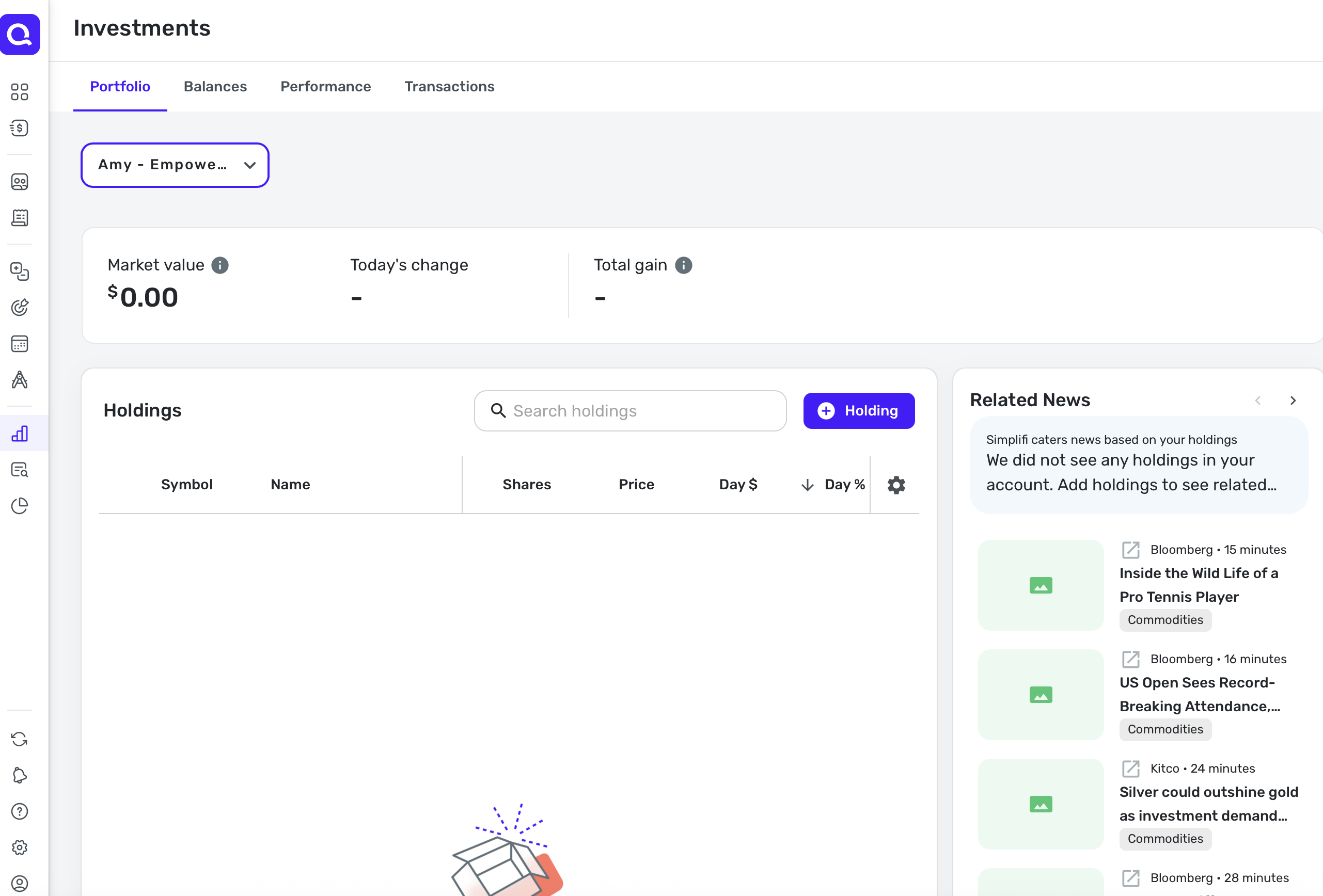
here is my wife Amy account in question
 0
0 -
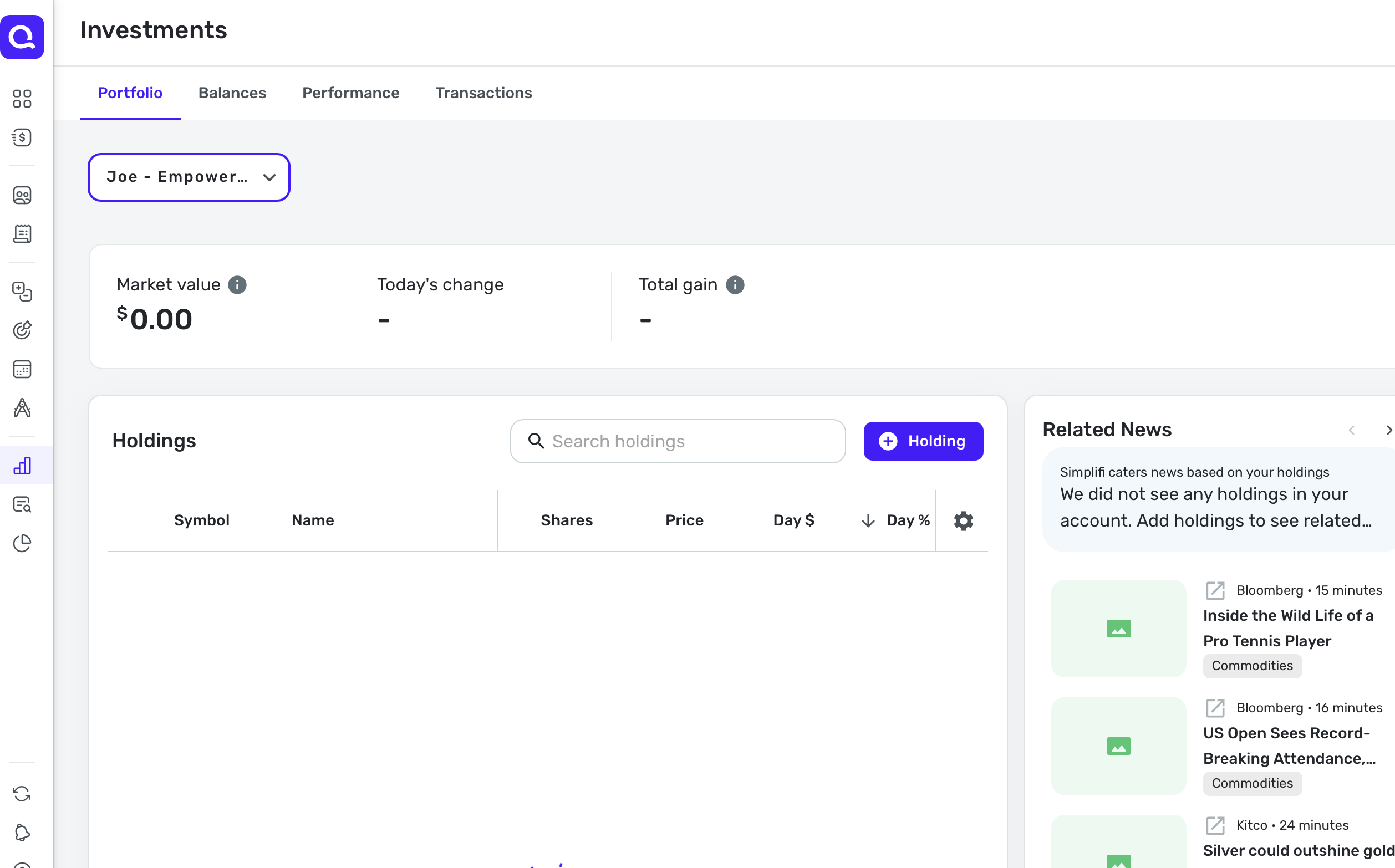
here is mine
 0
0 -
@joda2021, thank you for the additional data!
I have filed a ticket for this issue and will post back here with updates. In the meantime, you can make the accounts manual so you're able to keep them updated with the correct value via a Cash Holding. Here are our support articles that go over how to accomplish this:
CTP-14334
-Coach Natalie
0 -
@joda2021, thank you for your patience as this issue is being researched!
I heard back from our engineering team, and they'd like you to give this another try in Quicken Simplifi. You may need to establish a completely fresh connection with the bank to know for sure if the issue is fixed:
- Make all of the accounts with this bank manual by following the steps here.
- Once you see the account(s) listed in the Manual Accounts section under Settings > Accounts, go back through the Add Account flow to reconnect to the bank.
- If the connection is successful, carefully link the account(s) found to your existing Quicken Simplifi account(s) by following the steps here.
Let us know how it goes!
-Coach Natalie
0 -
@joda2021, hello again!
Did you see my last message?
We will need to hear back from you to continue working on the issue, if it's still occurring.
-Coach Natalie
0 -
I did try it but still no actual balance - says zero.
0 -
@joda2021, thank you for taking a look!
We will need to gather a fresh round of data from you, as well as new logs, to prove that the issue is still occurring. However, before we proceed with doing so, I noticed that the Amy - Empower Cash account is not connected to Empower in Quicken Simplifi. I instead see that this account is connected to Wisconsin Deferred Compensation Program. Since this issue was escalated for Empower specifically, we will need you to clear this up for us.
Please let us know!
-Coach Natalie
0 -
@joda2021, hello again!
Did you get a chance to see my previous reply?
If we don't hear back from you by the end of the week, we'll have to close the escalation ticket until you're able to provide the information needed to continue working on the issue.
Thank you!
-Coach Natalie
0 -
Just been really busy and had not had time to get this info. Plus Empower is goes through changes with their websites so things are changing again soon anyhow…so I am going to wait until these last updates happen with Empower (supposedly tomorrow)
0 -
@joda2021, thank you for the update!
I went ahead and closed the ticket for now. After the updates have been rolled out by Empower, please let us know if this issue is still occurring, and we can revisit it at that time.
-Coach Natalie
0
