Auto Release in Spending Plan Not Working

I have “auto release” funds turned on but my August Spending Plan didn’t not auto release unused funds. Any ideas what I’m doing wrong?
Comments
-
@housetr ,
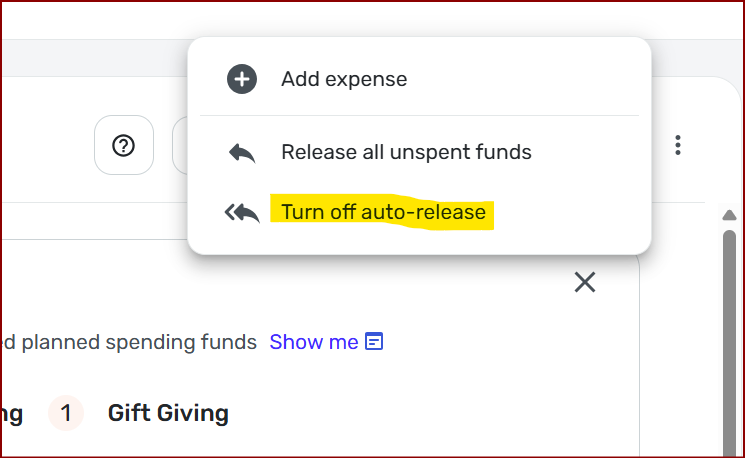
I've noticed there was a problem with this feature too. When you click Spending Plan and then click the three dots, as long as you see "Turn off auto-release" it means that you have it turned on properly.
At the end of each month, Simplifi should auto release any unused funds.
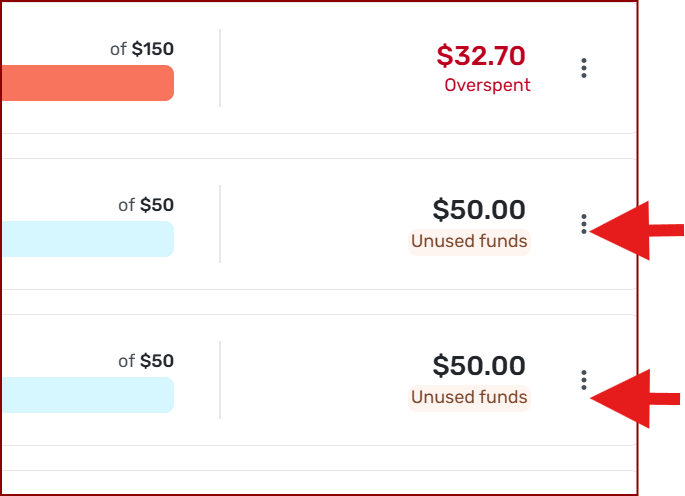
For me, as of 9/4/2025, August is still showing this. Now I don't think/know if there is a certain timeframe when this occurs in. I always assumed it occurred on the 1st.
Chris
Quicken Simplifi user since 2021.
Quicken Desktop user since 2014.
Spreadsheet user since forever.1 -
Thanks for reaching out! The auto-release feature automatically releases any unused funds from all Planned Spend categories—except those with rollover enabled—on the last day of each month. This can be found in our support article on the Spending Plan here:
I hope this helps clear up any confusion!
-Coach Jon
-Coach Jon
0 -
@Coach Jon I do not have rollover enabled and it auto release did not occur for my August spending plan.
0 -
Hello @housetr,
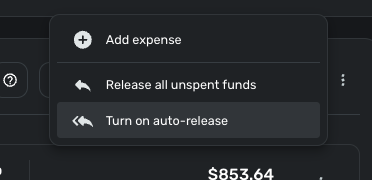
Thanks for the reply! If your auto-release option is currently on, I would see if you can release all unspent funds manually from the 3-dot menu in the top right corner of Planned Spend for August in the meantime.
Once the last day of September rolls around, be sure to let us know if the auto-release is still not working correctly for you. This way, we can establish a pattern for the issue occurring and make sure it is not just a one-time thing.
-Coach Jon
-Coach Jon
1

