Mileage Tracker for QBP: Share your feedback here!

We want your feedback on the Mileage Tracker feature for QBP! Let us know what you think by commenting below!
Here is the announcement outlining this exciting new feature:
-Coach Natalie
Comments
-
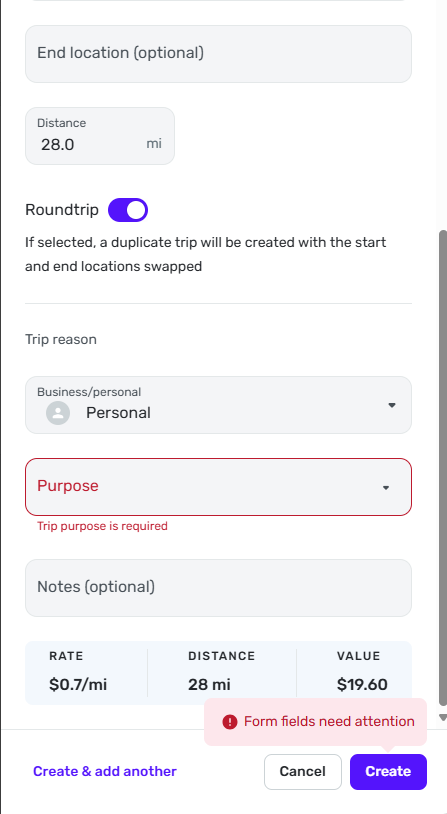
I cannot add any entries for mileage. I try to add a "Purpose" but it does not save anything to that field.
 0
0 -
@joda2021, thank you for letting us know!
It looks like you're using the Mileage Tracker on the Web App. Is that correct? I did test on both the Web and Mobile Apps in my own QBP dataset and did not experience any issues logging miles.
Can you send a screenshot of the options presented in the Purpose field, or perhaps upload a video that shows what happens when you try to select something in this field? If you are on the Web App, I would also recommend trying from a different browser or in incognito/private mode to see if the issue is perhaps related to your primary browser.
We look forward to your reply!
-Coach Natalie
0 -
I tried Chrome and Microsoft Edge with same results. Tried inprivate windwo with same results. When I click on "Purpose" there are not any option presented. It allows me to type in it but not save that info. Are there supposed to be a listed of options under the "Purpos" drop down? I will try to send a video tonight
0 -
@joda2021, thank you for the reply!
This is what I see under 'Purpose' —
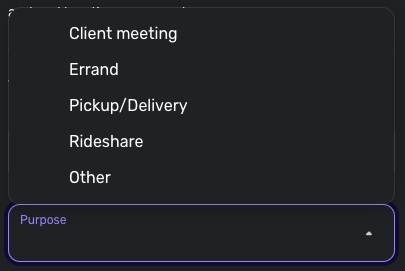
I believe these should be built-in choices, regardless of your business and personal finance setup in QBP. Yes, please send a screenshot or video when you get a chance, as this issue may be specific to you. If you go the video route, I will likely need to email you a link to our Secure File Exchange so you can upload it (the Community does not take video file formats well), so just let me know if you need this link.
Much appreciated!
-Coach Natalie
0 -
yes - please email me the link to upload video. oh, btw, I have the same issue on web and mobile version. "Purposes" shows "No purposes found"
0 -
also - is there supposed to be any options under "Vehicle"?
0 -
@joda2021, I emailed you the link and PIN, so just let me know when the video is uploaded. The link expires in 4 hours, so let me know if you need a new one by the time you see this.
Under 'Vehicle', I see this, which appears to also be built-in options —
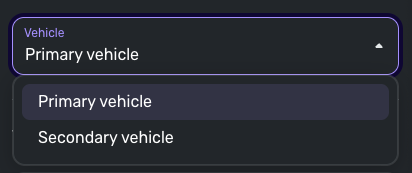
-Coach Natalie
0 -
Same for me, neither Vehicle nor Purpose pulldown populates. Same in iPhone app and browser.
What would be awesome, in the future, is to add a data link or import from MileIQ
0 -
@joda2021, thank you for the video!
@fcb, can you also upload a video, or even just share screenshots of the Purpose and Vehicle fields opened, and the error you receive when trying to click "Create", please?
Past the screenshots/videos, we will need the following data to be sent from both of you here in the Community:
- The browser and browser version you're accessing the QBP Web App from.
- The OS of the computer you're accessing the QBP Web App from.
- Confirm the version and build of the QBP Web App you are using (available at the very bottom of the Dashboard).
Please also submit your logs via the 'Send Feedback' option:
- Log in to the Quicken Simplifi Web App.
- Select Profile from the left-hand navigation bar.
- With the Profile menu open, hold down the Option key for Mac or the Alt key for Windows, and then click Send Feedback.
- Leave all boxes checked, add a brief description of the issue, and then click Send.
Once I gather all of this data, I can get a ticket filed!
-Coach Natalie
0 -
- the browser and browser version you're accessing the QBP Web App from.
Duckduckgo 1.115.0 (though same issue on Safari, Chrome, Edge)
2. The OS of the computer you're accessing the QBP Web App from.
MacOS - sequoia Version 15.6.1 (24G90)
3. Confirm the version and build of the QBP Web App you are using (available at the very bottom of the Dashboard).
Version: 4.75.0 (34863/01b0142918/v120.4.4)
0 -
-
Clicking on Vehicle, the field will highlight (outline), and a vague box shows up below. That's all. Not editable.
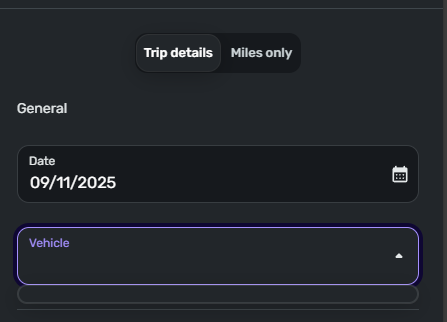
On clicking in Purposes, it says this:
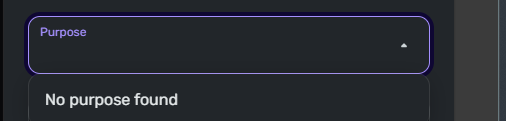
That is editable, I guess for searching thus:
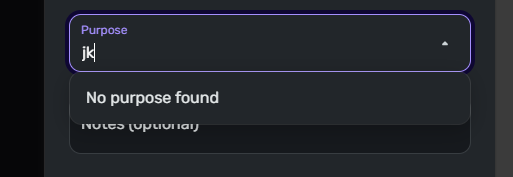
Windows 11: 24H2 26100.5074 + Windows Feature Experience Pack 1000.26100.234.0
Edge, Version 140.0.3485.54 (Official build) (64-bit)
WebApp: Version: 4.75.0 (34863/01b0142918/v120.4.4)
0 -
-
BTW, app updated just now, but issue remains.
Version: 4.75.1 (34866/8a93420ba4/120.4.4-patch)
0 -
It would be great if there was a milage tracker for personal that would track volunteer miles for Sch A.
TiggerTrainer
Quicken Simplifi user since January 2025
Quicken Classic (Premier) user since 2004 - 2025 (21 years)
1 -
-
Yes - it is working! thanks!
1 -
Confirmed that it's working for me.
Now add an option to edit/add purposes, and allow a name for the vehicles, say " Ferrari" or "Corvair", for example.
1 -
Please add the ability to then add mileage to an invoice as an expense for reimbursement. Especially being able to tag mileage to travel associated with a client and project would be extremely important.
1 -
The Mileage Tracker is now live to all users!
-Coach Natalie
0 -
Love the mileage tracking feature. It would make it much more usable if the following features were added:
- Customize the vehicle drop down so I can list specific vehicles rather than just choose from "Primary" or "Secondary" vehicles.
- Customize the Purpose drop down so I can add / modify the trip purpose to more suit my needs.
- Clone or duplicate an existing entry, or add a "trip template", so that for trips I make on a regular basis, I don't have to enter all the details from scratch every time.
Thank you for adding the feature!
3 -
yes to all of these suggestions! It would also be super helpful if the locations where connected to a map and/or we could add common places we go to be able to select them from a drop down.
This might be too specific for some, but it would also be awesome if we could connect it to invoices and/or expenses as well.
1 -
Thank you for adding this feature! I really like the “trip template” idea that @blaporte mentioned.
It would also be incredibly useful to have the ability to import mileage data from a simple CSV file, similar to how transaction imports currently work. For example, I previously used the business mileage tracker in Quicken Classic and would love to import that data directly into the app. I imagine many other users with mileage data in other platforms would benefit from an import feature as well. A standardized CSV import template would make it much easier for users to bring in their historical business mileage and keep everything integrated with other tax-related information.0 -
Let me copy one round trip to all the working days of the month! That would be a huge headache saver. Or save start and end points at least. Bless
0 -
Hi - I use an App called "Triplog" on my iPhone.
Any features to integrate with this app? or at least can I import from cvs?
1 -
Still unable to type anything in the purpose section unless it is already on the list provided. I would like to be able to type in my own purpose without needing to include an extra note to explain. My question is, can this be modified to add my own "Purpose" to the list?
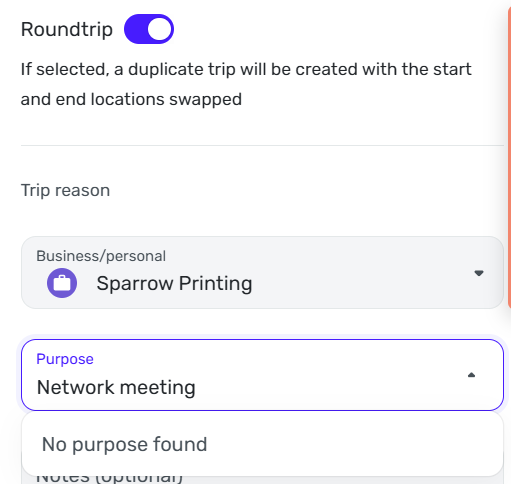 0
0 -
This also helps when I view the log list. The purpose column only shows "other" when I would like to see my purpose as "Network Meeting" or whatever I choose to put there.
1 -
@Iva, I have merged your post with the official feedback thread for Mileage Tracker.
At this time, the Purpose and Vehicle options when logging miles are not customizable. Our product team will review the feedback and use cases left in this thread, however!
Thanks for sharing your feedback!
-Coach Natalie
1 -
Mileage Tracker data is now available in the Taxes Report! 🎉
-Coach Natalie
0 -
Would really love to be able to add a name to the vehicles when tracking miles. For example, being able to change "primary vehicle" to "Nissan Truck" and/or "secondary vehicle" to "Jeep". Thanks!
2


