How do I Report on Interest Earned in a Fidelity Brokerage Account

Our savings account is a brokerage account at Fidelity. The account type in Simplifi is "Savings." When Fidelity posts interest, it is listed as "Dividend Received." I categorize the dividend received as "Interest Earned." Through May of this year I could pull a report on Interest Earned and see an amount, but starting in June Simplifi has automatically excluded all dividend received transactions from the Reports and I cannot uncheck the exclusion. The instructions at "Managing Investment Transactions do not work when the Simplifi account type is "Savings."
One of the main reasons that I use Simplifi by Quicken is that I can categorize transactions myself without restrictions, but this also includes reporting on the categorizations of choice.
How would I report on my categorizations?
Lots 1-2-3 (1984-1988)
MYM (Managing Your Money by Andrew Tobias) for DOS (1988-1994)
Quicken for Windows user since (1994-2024) (Still wanting to IMPORT!)
Simplifi by Quicken since (2023-Today)
Comments
-
Hi! I have a Cash Management account that I am able to classify as a Savings Account. I have a category called Dividends, and that's where I put them. Because actually your money is probably invested in some sort of fund. (I know that there are some CM accounts that invest the money in some sort of sweep of bank accounts, and that is probably interest.). So I don't think you should classify it as interest.
If the account is truly listed as a Savings Account in Simplifi, then you can do this as you like. If this is an Investment Account, then you can only categorize payment/deposits as you like. I spend my dividends from my Brokerage account (this is separate from the Fidelity CM account I mentioned above) so I classify them as Dividends or Tax-Free Dividends. Those are categories I created.
If they are being reinvested, then all you can do is use the built-in Dividend Action for the Dividend and a Buy for the new shares you bought through the reinvestment.
Let me know if this makes sense so I can understand better your situation.
Steve
Quicken Simplifi (Safari & iOS) Since 2021
Quicken Classic (MacOS) Since 2009
MS Money (1991-2009) and Dollars & Sense (1987-1991)0 -
Actually I think the cash in the Cash Management account is almost certainly dividends. And since you are using it as a Savings account, you will have to create a Dividends category under Income and record it that way. I haven't had my CM account but a few months so don't have much money in it, but here is a look at my register:
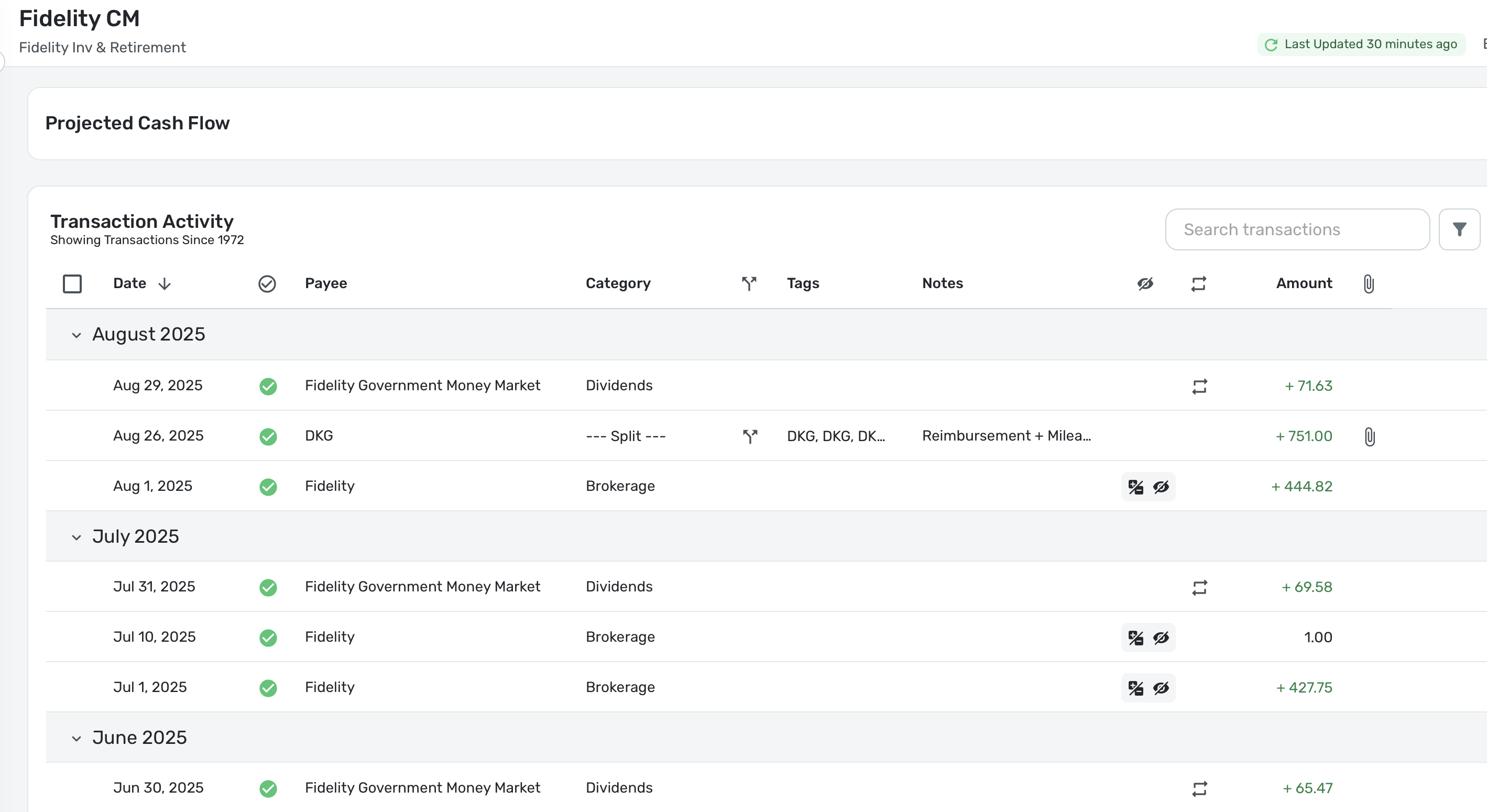
Even though you are managing it as a bank account, Fidelity still will download some funky Investment stuff into it, so you have to clean it up a bit. At least, that is my experience.
Steve
Quicken Simplifi (Safari & iOS) Since 2021
Quicken Classic (MacOS) Since 2009
MS Money (1991-2009) and Dollars & Sense (1987-1991)0 -
Thank you for the feedback, but I am still unable to find these transactions on any of the Report since the dividends are automatically excluded from all reports. When I uncheck the box Exclude From Reports, Simplifi will automatically check it again.
I can see the built in dividend action on another brokerage account, one we use as a brokerage account, so I get the concept but the account that we use as a Savings account is marked in Simplifi as a Savings account even though Fidelity calls it a brokerage account and it is this "Savings Account" where we used to be able to pull a report on the interest/dividend and this stopped working in June.
Before making basic changes to my accounts, I'd love to hold Quicken to the promise that we can categorize transactions as we want (my bank already has a report, but I use Simplifi because there is the ability to categorize as I want, not as they want.) If I cannot report on my own categorizations then I see no reason to use my own categorizations.
I believe that our Savings account is coded in Simplifi as Savings rather than Brokerage is because we could not use savings goals with brokerage accounts at one point, now that we can this might be a change that I need to make, but I'd love to know why these transactions showed on the reports before June and not after.
I use Simplifi for two things, the Savings Goals and the ability to categorize my own transactions (which implies the ability to report on these categorizations.) I am only two months into my current subscription, so I have another 10 months where I'd really like this app to work like it used to.
Lots 1-2-3 (1984-1988)
MYM (Managing Your Money by Andrew Tobias) for DOS (1988-1994)
Quicken for Windows user since (1994-2024) (Still wanting to IMPORT!)
Simplifi by Quicken since (2023-Today)0 -
Hi,
I am at a loss here. If it is a Savings account, you should be able to categorize your dividends as you like.
The only thing I can figure is that you are bringing in buys/sells into the account using the built-in investment categories and not your own created Dividend categories. If that is the case, my guess is that they probably do get marked to be ignored.
In my Fidelity CM account, I classify my dividend (that is all in a government money market) as a cash dividend using my own created category so I can see it in reports. Since I am pretending it is a bank account, all I want to know is how much interest/dividend I make each month.
Does this make sense? Perhaps you could post a picture of some of your transactions?
Steve
Quicken Simplifi (Safari & iOS) Since 2021
Quicken Classic (MacOS) Since 2009
MS Money (1991-2009) and Dollars & Sense (1987-1991)0 -
Thank you, I am also at a loss which is why I reached out.
The transaction itself is a "Dividend Received" from Fidelity. I have been successful in using my own categorization of "Interest Earned" and I can also successfully change this to Dividend Income or any other pre-existing or created category of my choosing, but no matter what I categorize it then the system automatically excludes this transaction from reports and spending plan. So, no matter what it is categorized as, how do I get the transaction to show up on reports?
I think it must be confusing Simplifi to have an account set up as Savings when it is syncing with a brokerage account. (This used to work.) The transactions changed in June where the Dividend Received is no longer showing on reports. I WOULD test this by marking the account as a brokerage account, but with the current issues with the Savings Goals tying up money in "Unknown Goals" I don't think that I should make any changes as nearly all of my savings goals on in this one "Savings" account.
Thank you for your advice.
Lots 1-2-3 (1984-1988)
MYM (Managing Your Money by Andrew Tobias) for DOS (1988-1994)
Quicken for Windows user since (1994-2024) (Still wanting to IMPORT!)
Simplifi by Quicken since (2023-Today)0 -
Hello @RiversideKid,
Thanks for the update. It sounds like the transactions are set up and being categorized as Investments. If you navigate to Settings > Accounts within Quicken Simplifi, how is the account categorized there? Can you provide a screenshot showing this screen and the Transaction Detail window for one of the transactions in question to better assist us?
-Coach Jon
-Coach Jon
0 -
Thank you, Coach Jon. The accounts are set up as follows:
Fidelity: Brokerage Account
Simplifi: Savings AccountHistorically when Fidelity posts "Dividend Received" I have categorized this as "Interest Earned." This still works. Although starting in June 2025 each transaction is automatically excluded from Simplifi's Reports and where I can uncheck the exclusion, Simplifi marks it as excluded again.
Now, my example is on the Savings Account (brokerage) but I have the same issue on the Checking account as well, which is a Checking account both in Simplifi and Fidelity. The "core account" in each is the same, SPAXX. Before June these transactions came across as "Dividend Received" but starting in June they now come across as "SPAXX" even though the detail transactions still show "Dividend Received"
Should I reclassify both of these accounts in Simplifi to look like brokerage accounts to get the reporting correct?
Related: If I reclassify the Savings account, will this impact the Savings Goals that are associated with the account?
How do I report on the categorizations that I enter? (The ability to categorize with my own is the #1 reason that I use a third party financial application. Reporting on these categorizations is a key component of this. The flexible Savings Goals is my #2 reason that I use Simplifi. I don't want to do testing in my account until the "unknown goals" are fixed.)
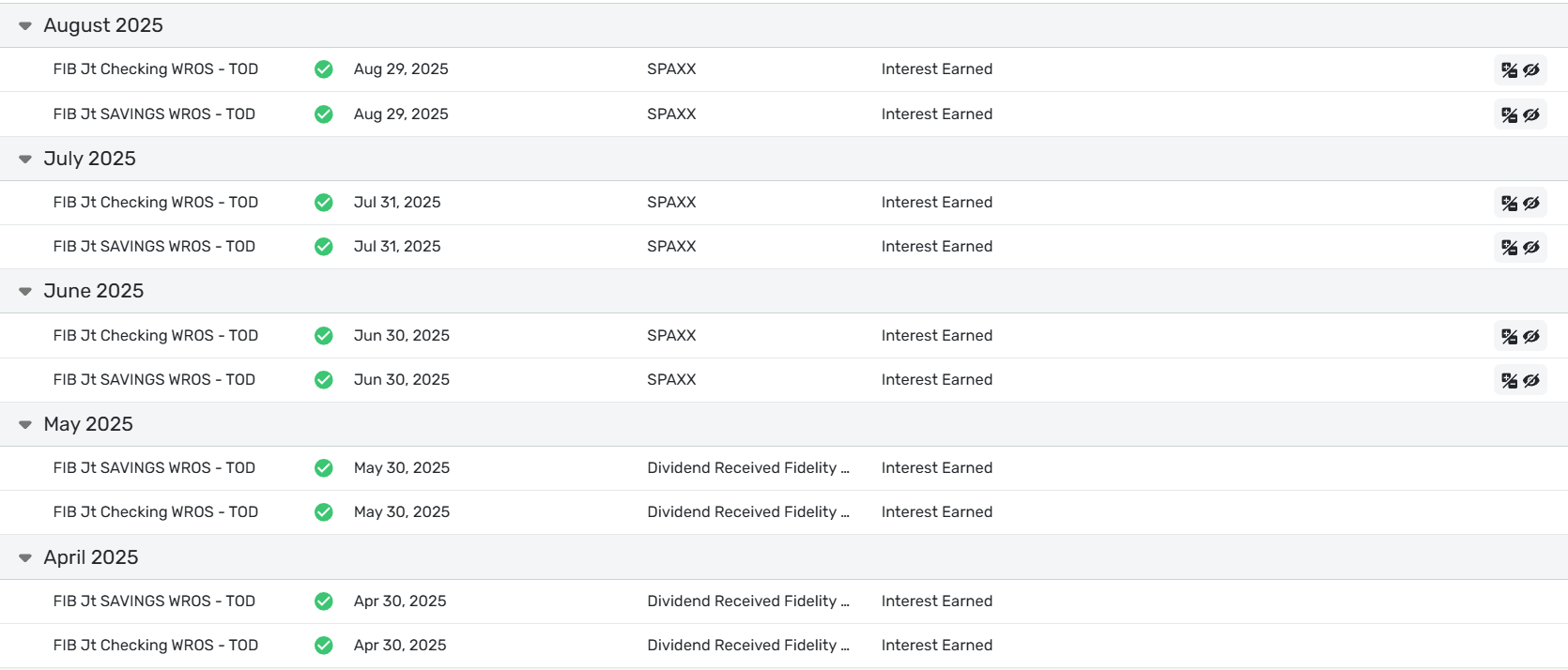
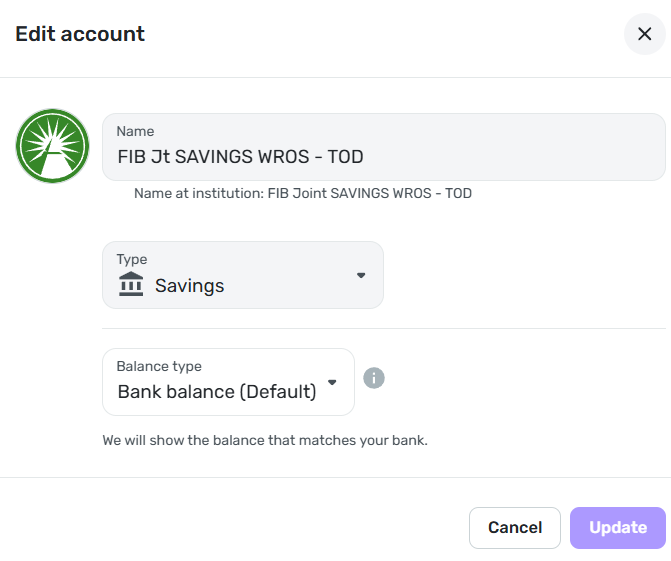
Lots 1-2-3 (1984-1988)
MYM (Managing Your Money by Andrew Tobias) for DOS (1988-1994)
Quicken for Windows user since (1994-2024) (Still wanting to IMPORT!)
Simplifi by Quicken since (2023-Today)0 -
You want to treat this as a cash account but you may be downloading reinvestments. You have to make sure all those SPAXX are deposits and give it a new Payee Name. I have SPAXX too but I reclassify it as dividends and call it Fidelity Government Money Market. They should be set up as a dividend but interest is ok too as long as it is your category and not the built-in investment category.
Open the transaction and see how it looks for your SPAXX transaction. Here is mine:
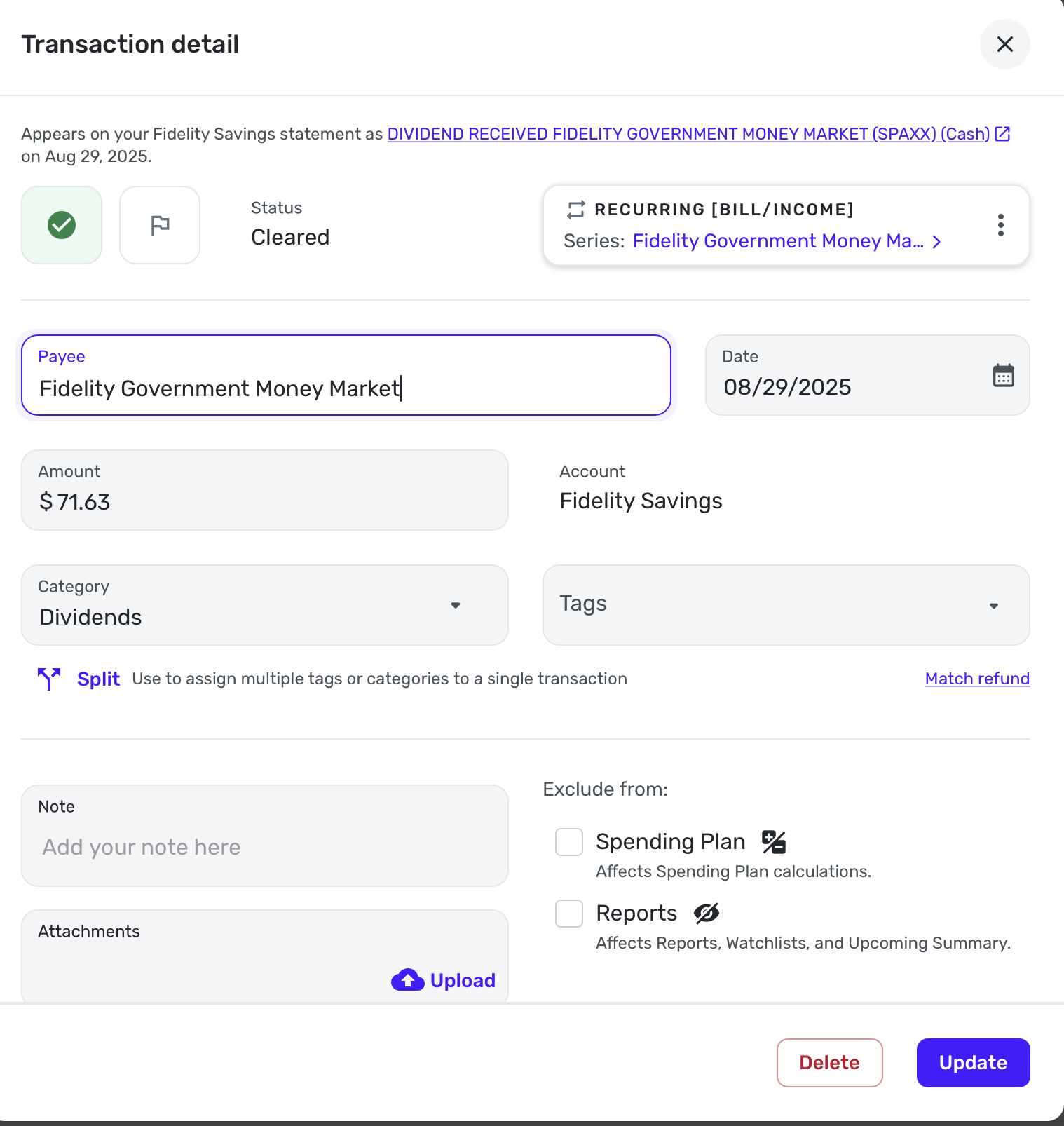
Steve
Quicken Simplifi (Safari & iOS) Since 2021
Quicken Classic (MacOS) Since 2009
MS Money (1991-2009) and Dollars & Sense (1987-1991)0 -
Also make sure in Settings:Accounts that the account hasn't been set to ignore.
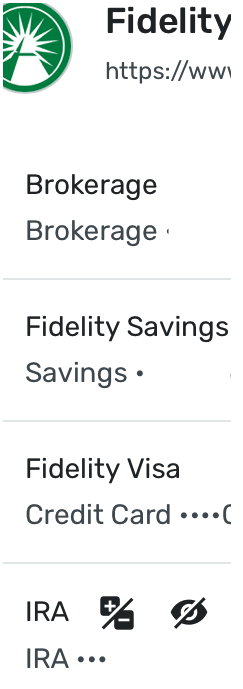
[Edited - Removed partial account numbers]
Steve
Quicken Simplifi (Safari & iOS) Since 2021
Quicken Classic (MacOS) Since 2009
MS Money (1991-2009) and Dollars & Sense (1987-1991)0 -
Thank you Steve. I appreciate the suggestions but still cannot get transactions on the report.
Funny thing about changing the Payee Name; I have opened up the transaction and changed the Payee and clicked "Update" several times, but when I reopen the transaction the Payee is always back to the original Payee as if my change is not saving or Simplifi changes it back just like the click the Exclude from Reports each time I update. I have not been able to change the Payee name.
The Payee on the listed transactions automatically shows SPAXX even though the Payee Name on the transaction detail is "Dividend Received." I have attempted to change this multiple times to all sorts of things and the change does not save when I update.
Excluded Accounts: These accounts are NOT excluded from Spending Plan nor Reports. Other transactions in these accounts show up on the reports just fine. The only accounts I have excluded are the retirement accounts.
I am open to other ideas. I've had my own ideas, but I just renewed! 😉
Lots 1-2-3 (1984-1988)
MYM (Managing Your Money by Andrew Tobias) for DOS (1988-1994)
Quicken for Windows user since (1994-2024) (Still wanting to IMPORT!)
Simplifi by Quicken since (2023-Today)0 -
Hello @RiversideKid,
Thank you for your responses. If you can open up one of the transactions mentioned and provide a screenshot showing the Transaction Detail window to better assist us, this would be excellent. In addition, can you clarify what occurs if you override the exclusion setting in one of these transactions by unchecking the "Exclude from" boxes? Does the transaction then show up in the report?
-Coach Jon
-Coach Jon
0 -
Thank you Jon.
When I uncheck either or both of the checkboxes "Exclude from" "Spending Plan" and/or "Reports" and click on Submit the transaction saves and after about one second, the Excluded from SP and Reports icons show up in the transaction list and these transactions do not show on reports.
I have cleared the checkbox "Exclude from Reports" individually, cleared it at the same time that I clear the exclude from SP, it does not matter if I clear these in one submit or individually, Simplifi will always re-check these after a second or so. I have attempted this a few dozen times, nothing works.
I have changed the Payee name several times as well, but after clicking on Submit, the payee goes back to the original name with SPAXX in the transaction list and "Dividend Received" in the transaction detail. (I do not have a rule on this.)
Note: I did clear the amount from the screenshot, but all other fields are original.
Is there a way to get the transaction to show up on the report?
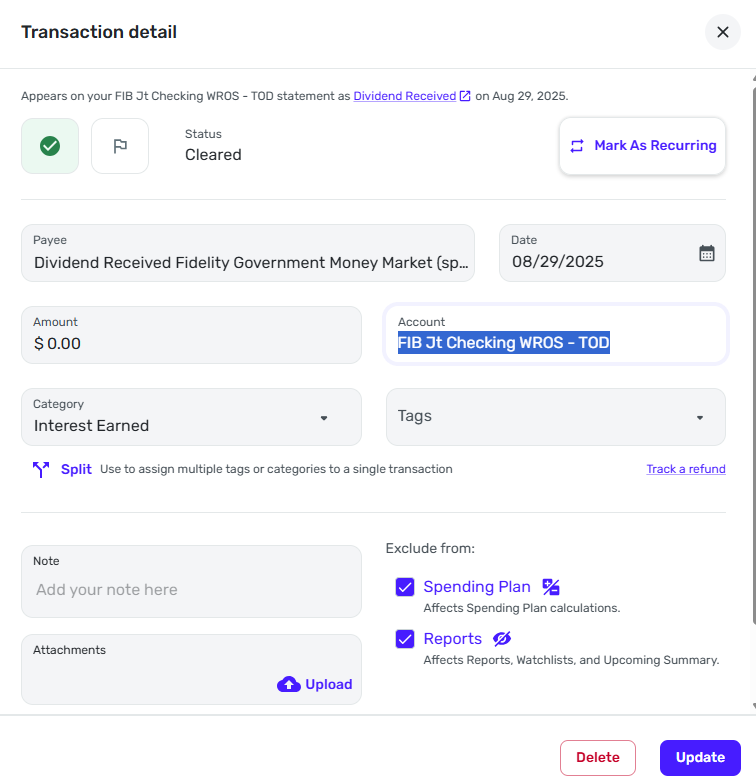
The transactions are excluded from reports no matter what I do.

Lots 1-2-3 (1984-1988)
MYM (Managing Your Money by Andrew Tobias) for DOS (1988-1994)
Quicken for Windows user since (1994-2024) (Still wanting to IMPORT!)
Simplifi by Quicken since (2023-Today)0 -
I don't see anything you are doing wrong. This is a brokerage account that you are using as a checking account. I assume you are only investing in the SPAXX and you want to count the income from it as interest. This is not officially a cash management account, but it doesn't make any difference as long as you have it defined as a checking account in Simplifi. The difference is that you are getting around Fidelity's desire that this be classified as a brokerage account. Do I have all of this right?
If I do, then my GUESS is that somehow this is still somehow partially locked as an investment account in Simplifi and it won't let you have full control. If I were you, I would disconnect this account from Fidelity and make it a manual account, and then I would fix the transactions. Assuming it lets you, and it should, I would then re-add the account by selecting add an account at the big + New sign at the top of the Accounts column. Then when Fidelity finds this account, I would carefully link the new account to your now manual account that is still classified as checking.
This is what I would do, but certainly you may want to see what else coach Jon suggests.
Steve
Quicken Simplifi (Safari & iOS) Since 2021
Quicken Classic (MacOS) Since 2009
MS Money (1991-2009) and Dollars & Sense (1987-1991)0 -
Hello @RiversideKid,
Thank you for the response. I agree with @SRC54 here. The account is most likely classified as a brokerage account on the financial institution's side. Which would mean that the best way for you to control things the specific way you want to would be to set the account to manual and track it manually. How to Make an Account 'Manual' | Quicken Simplifi Help Center
-Coach Jon
-Coach Jon
0 -
There are two impacted accounts, our Checking and a brokerage account. (Apologies if it was not clear from the beginning that one is indeed a Brokerage account with Fidelity, but I did try to disclose this from the get go.)
The Checking account is officially a Cash Management Account (CMA) at Fidelity and a Checking account in Simplifi.
The Brokerage account is in Simplifi as a "Savings Account" because this is how we use this particular brokerage account.
@Coach Jon Are you suggesting that Simplifi by Quicken does not work with the Fidelity Checking (CMA) and Brokerage accounts in such a way to report on the transactions to the extent that these accounts should be manually tracked? (Keep in mind this is our primary checking and savings accounts with nearly all of our transactions that we track with financial software where we want the reporting and savings goals. This would render Simplifi useless for us entirely.)
Is there no supported way to report on the transactions on the Fidelity Checking (CMA) and Brokerage accounts in an accurate manner as connected accounts?
Lots 1-2-3 (1984-1988)
MYM (Managing Your Money by Andrew Tobias) for DOS (1988-1994)
Quicken for Windows user since (1994-2024) (Still wanting to IMPORT!)
Simplifi by Quicken since (2023-Today)0 -
@RiversideKid I have exactly the same two accounts.
The Brokerage Account, especially if you have lots of monthly dividends and reinvestments is probably best handled as an Investment Account.
I have my CMA account set up as a Savings Account, though I could easily say it was checking too. I just get one monthly dividend from SPAXX. I have no problem using it that way but I have to do a monthly clean-up when I get the dividend to recategorize it using my Dividends category.
I see no reason why you cannot set them up as you like as long as you realize that there will be some clean-up.
So you are not having trouble with the CMA set up as a checking account? Or is it both accounts that are giving you problems?
If you want the brokerage set up as a Savings Account, I still think you will need to make it manual and try to reconnect it after you get it fixed with the same caveat above that if there is a lot of monthly activity, it might be best to use it as a brokerage account.
Steve
Quicken Simplifi (Safari & iOS) Since 2021
Quicken Classic (MacOS) Since 2009
MS Money (1991-2009) and Dollars & Sense (1987-1991)0 -
@SRC54 , Thank you for the suggestions.
@Coach Jon I am most concerned with your comment that I would need to mark these accounts as "Manual" in order to show these transactions as categorized. Does Simplifi not support categorizing transactions as I want and then show these categorizations on reports?
To clarify: The trouble described is happening on both the checking account (CMA) AND the brokerage account.
I never wanted the Brokerage classified as Savings, but when I signed up this was the only way to make the funds available to the Savings Goals. If I Edit the account and change the Type to Brokerage, will this have any impact on the Savings Goals saved in the account? (Will the current issue with Unknown Goals be impacted with a change like this?)
How would I report on my categorizations?
Lots 1-2-3 (1984-1988)
MYM (Managing Your Money by Andrew Tobias) for DOS (1988-1994)
Quicken for Windows user since (1994-2024) (Still wanting to IMPORT!)
Simplifi by Quicken since (2023-Today)0 -
Hello @RiversideKid,
Thanks for the reply. Quicken Simplifi does allow you to categorize transactions how you want; however, Investment transactions outside of "cash flow" transactions are automatically excluded from Reports and the Spending Plan.
If the financial institution categorizes the account as an investment account, then that is the way I would suggest tracking it in Quicken Simplifi.
-Coach Jon
-Coach Jon
0 -
@Coach Jon Thank you for these details. These transactions are also excluded on my Checking account; Is this by design as well? (The Checking is a Checking on both Fidelity and Simplifi.) These transactions showed on the reports when I signed up in 2023 through May of 2025, so why the change?
If I change the account type to Brokerage from Savings, will this impact my Savings Goals in this account? Do I need to change the Type on the Checking account as well?
Thank you.
Lots 1-2-3 (1984-1988)
MYM (Managing Your Money by Andrew Tobias) for DOS (1988-1994)
Quicken for Windows user since (1994-2024) (Still wanting to IMPORT!)
Simplifi by Quicken since (2023-Today)0 -
Hello @RiversideKid,
Changing the account type should not impact your Savings Goals for that account. If you decide to change your checking account type to an investment account within Quicken Simplifi, it will allow you to change the transaction types that are currently excluded into cash flow transactions, which are included in reports.
-Coach Jon
-Coach Jon
0 -
@RiversideKid You are welcome. I am not sure my suggestions have helped much.
If you have a lot of splits in your CM account, and you change it to an investment account, you will no longer be able to do splits or to link transactions to recurring reminders. How much this will affect you just depends on how much you use the debit card and/or write checks.
Good luck whatever you decide.
Steve
Quicken Simplifi (Safari & iOS) Since 2021
Quicken Classic (MacOS) Since 2009
MS Money (1991-2009) and Dollars & Sense (1987-1991)0 -
@Coach Jon and @SRC54
Thank you both for the helpful insight! I had no idea that there was no way to categorize splits or link to recurring reminders in a brokerage account, that really makes me think twice.
I will change the type on the 'savings' account to brokerage and play now that I know that the Savings Goals are not impacted! (We have a BUNCH of Savings Goals!) 😎
Lots 1-2-3 (1984-1988)
MYM (Managing Your Money by Andrew Tobias) for DOS (1988-1994)
Quicken for Windows user since (1994-2024) (Still wanting to IMPORT!)
Simplifi by Quicken since (2023-Today)0 -
@RiversideKid You CAN put the recurring manually in the Spending Plan for the Brokerage as a reminder to yourself, which is what I do with my Brokerage account, but you cannot link them. After the transactions comes in, I dismiss that month's reminder. But there might not are a reason to do it. I do it because my dividends in my brokerage are paid out as deposits and I spend them as income. Once they come in as income and I've made sure they are tied to my own dividend category, they automatically show up in the Spending Plan.
You might try to go manual with the cash management account to fix it the way you want and try to reconnect later using the technique that @franks suggested and I put that in an earlier message.
But don't let me pressure you; you have to do what you feel comfortable with and what suits your needs.
Steve
Quicken Simplifi (Safari & iOS) Since 2021
Quicken Classic (MacOS) Since 2009
MS Money (1991-2009) and Dollars & Sense (1987-1991)0 -
@SRC54 I edited the "Savings Account" in Simplifi to show that it is a brokerage account to match the account type at Fidelity. The difference is huge and immediate. Since all my deposits go into the brokerage account I no longer have any income showing in Simplifi! I see what you are saying that I can manually reclassify each transaction manually, which is now my only option to show any transactions on a Report.
Changing the Type of account as Brokerage does not solve the initial issue that I was having. What I call "interest earned" is now forced classified as "Income Dividend" and the Income Dividend is automatically excluded from both Spending Plan and Reports. I see where I can look at the transactions and filter on "Income Dividend" but the desire was to provide a report on all income sources and that I still cannot figure out in Simplifi. So the original question remains: How do I Report on Interest Earned in a Fidelity Brokerage Account?
@Coach Jon : I am noticing that my Checking Account (CMA) at Fidelity is having similar issues. Transactions that are indeed expenses are excluded from Reports and each time I un-check the "exclude from reports" check box, Simplifi will automatically check the box again a few seconds later. I do NOT have any rules that would automatically exclude from reports and the account is NOT excluded from reports. A few recent transactions ARE exposed to reports like the power bill, so I know that the account is not excluded from reports.
For example,
An ATM withdrawal for example is excluded from Spending Plan and Reports and each time that I un-click the checks to exclude from Spending Plan and/or Reports, Simplifi will re-check these boxes to exclude from SP and Reports. Now an ATM withdrawal is an actual expense so this really needs to be listed on the report of expenses.
An ACH debit from my county came out and it is excluded from Reports and I have no way to show it on reports.
I would like an accurate way to show all categorized transactions on reports. I have used the reports to accurately show all expenses to determine my retirement date and I am certainly hoping that the information is accurate and yet now I am seriously doubting that the reports actually include known expenses. How do I accurately report on transactions when the transactions automatically exclude themselves from reports?
Lots 1-2-3 (1984-1988)
MYM (Managing Your Money by Andrew Tobias) for DOS (1988-1994)
Quicken for Windows user since (1994-2024) (Still wanting to IMPORT!)
Simplifi by Quicken since (2023-Today)0 -
@RiversideKid I think they will all be dividends and you'll have to set up your own category for this and use a payment/deposit. I will DM you some screenshots of what I do.
So you now have your CM account as brokerage?
Steve
Quicken Simplifi (Safari & iOS) Since 2021
Quicken Classic (MacOS) Since 2009
MS Money (1991-2009) and Dollars & Sense (1987-1991)0 -
Steve, It looks like your screenshots remain in the transaction log held within the account. How do I get these transactions to show up on the Report with other accounts showing all income and expenses in the same Report when Simplifi automatically excludes transactions from Reports?
Categorizing transactions daily is worthless if we cannot pull reports that accurately depict the totals of those categorizations. What I am seeing is both expenses and income that are automatically excluded when the account is not excluded and I do everything that I can to include these transactions on reports.
So the question remains; How can I get all our income and expenses to show up on Reports in Simplifi?
Lots 1-2-3 (1984-1988)
MYM (Managing Your Money by Andrew Tobias) for DOS (1988-1994)
Quicken for Windows user since (1994-2024) (Still wanting to IMPORT!)
Simplifi by Quicken since (2023-Today)0 -
@RiversideKid OK, all of my dividends in my Brokerage do show up in my reports since I have them as payment/deposits. I use my own created category. I thought you were using your own category: interest earned.
In my IRA where the dividends, buys and sells are reinvested, none of them show up in reports and I cannot change them. I also have the IRA excluded from reports in the Settings:Accounts. (But it doesn't seem to make any difference that I do this because it won't show anything but payment/deposits anyhow and I have to tell it to show those.)
As I originally understood your predicament, for some reason your account was letting you do this. Is that still correct. Did you make the account manual? You can try reconnecting it later.
Steve
Quicken Simplifi (Safari & iOS) Since 2021
Quicken Classic (MacOS) Since 2009
MS Money (1991-2009) and Dollars & Sense (1987-1991)0 -
@SRC54 Thank you for the points here.
Yes, I have made these accounts manual and then reconnected again. I have changed the type of account on the brokerage account to brokerage to match the account type at Fidelity.
The problematic accounts are NOT retirement accounts. Only our retirement accounts are excluded from reports, the Checking/Savings/Brokerage accounts are NOT excluded from reports, so I would assume that the income and expense transactions in these accounts would show up on the reports, but some transactions are automatically excluded and I cannot change this.
Where I am happy that your dividends in the brokerage accounts show up in reports (and this shows on the screenshot in the DM) but every time I try to uncheck the excluded from reports checkbox, Simplifi automatically checks excluded from reports for me. I apparently have no control over this.
The issue goes beyond dividends, I have expenses in the Checking/CMA account that are excluded from reports as well and these transactions also automatically exclude from reports every time I try to uncheck the box.
I have followed every suggestion from both yourself and @Coach Jon and yet both expenses and income are excluded from reports and un-checking the excluded box does nothing.
How can I get all our income and expenses to show up on Reports in Simplifi?
Lots 1-2-3 (1984-1988)
MYM (Managing Your Money by Andrew Tobias) for DOS (1988-1994)
Quicken for Windows user since (1994-2024) (Still wanting to IMPORT!)
Simplifi by Quicken since (2023-Today)0 -
@RiversideKid And when you made the accounts manual, you could fix things before reconnecting?
Just to test, make a new manual account (call it test account, set it as a brokerage) and then put in some test transactions to see if you can record the interest and payments the way you like.
I assume you are doing this in web app, correct?
What reports are you using? Income or Income & Expense? My dividends show up there if they are payment/deposits.
I learned one thing I should have known. Having my retirement accounts marked in settings as excluded from both spending plan and reports doesn't do anything since they are automatically excluded except when I change them, which I don't. So I did away with that setting. (This has nothing to do with your predicament since yours aren't retirement accounts.)
Steve
Quicken Simplifi (Safari & iOS) Since 2021
Quicken Classic (MacOS) Since 2009
MS Money (1991-2009) and Dollars & Sense (1987-1991)0 -
@RiversideKid Just to reiterate, your brokerage is now working as expected, but your checking (aka cash management), which is set up as a checking account will allow you to modify the transaction but then revert soon thereafter.
If this is true, then this is some sort of bug or corruption in the account. So I think you have to make the account manual and fix it, if it will let you. If not, your only recourse is probably going to be to create a new account from scratch.
I'm sorry I have no other suggestions at this point. Good luck.
Steve
Quicken Simplifi (Safari & iOS) Since 2021
Quicken Classic (MacOS) Since 2009
MS Money (1991-2009) and Dollars & Sense (1987-1991)0

