Fidelity investment dividend transactions (most of them) still don't get assigned custom categories

So this started happening a few months ago but worked fine before then. A reply was posted and a discussion closed for reason unknown, because clearly something stopped working suddenly, and no explanation as for why, and obviously it cannot be a feature because it breaks the Income reporting and charting:
Thanks for reaching out! For transactions with the Action "Income Dividend", the category change option is disabled within Quicken Simplifi. I am not sure why the transaction that you showed in your screenshot was assigned a "Check" category, but I would have you delete the transaction and re-create it to see if it assigns that category once again, or if that was just a one-off issue. Let us know!
Attached is a screenshot with a few dividend transactions, of which only got correctly categorized according to custom defined rules:

I cannot tell why some of these transactions' Action column is set to "Income Dividend" and others to "Payment/Deposit", because they are verbatim containing the same description format "DIVIDEND RECEIVED from XYZ"
How is "Description/Category" column of any use? Is it a description, or a category? The reports and charts are based on categories, so if transactions are not getting categorized correctly they don't get included in the reports, so I had no visibility of almost all of my dividend income on my Income report.
Again, this worked fine until about three months ago. Now it looks like the transactions are not being parsed correctly so "DIVIDEND RECEIVED …" field gets saved into "Description/Category" column instead of "Security/Payee"
Comments
-
Hello @usrA12,
On the Community, discussions are closed after about a month of inactivity, even if the issue is not resolved. That is why your previous discussion was closed.
Was the issue with the Check category being assigned a one-off, or does it keep happening?
For the transaction that is showing as Payment/Deposit, have you checked the transaction detail, to view how the Payee information is showing on the statement? That may explain why the custom rule(s) wasn't able to correct that one.
I look forward to your response!
-Coach Kristina
0 -
Below are two recent consecutive transactions, each one being a dividend payout through Fidelity. From two different securities but with descriptions uniformally formatted as "DIVIDEND RECEIVED SECURITY XYZ (Symbol)(Cash)"

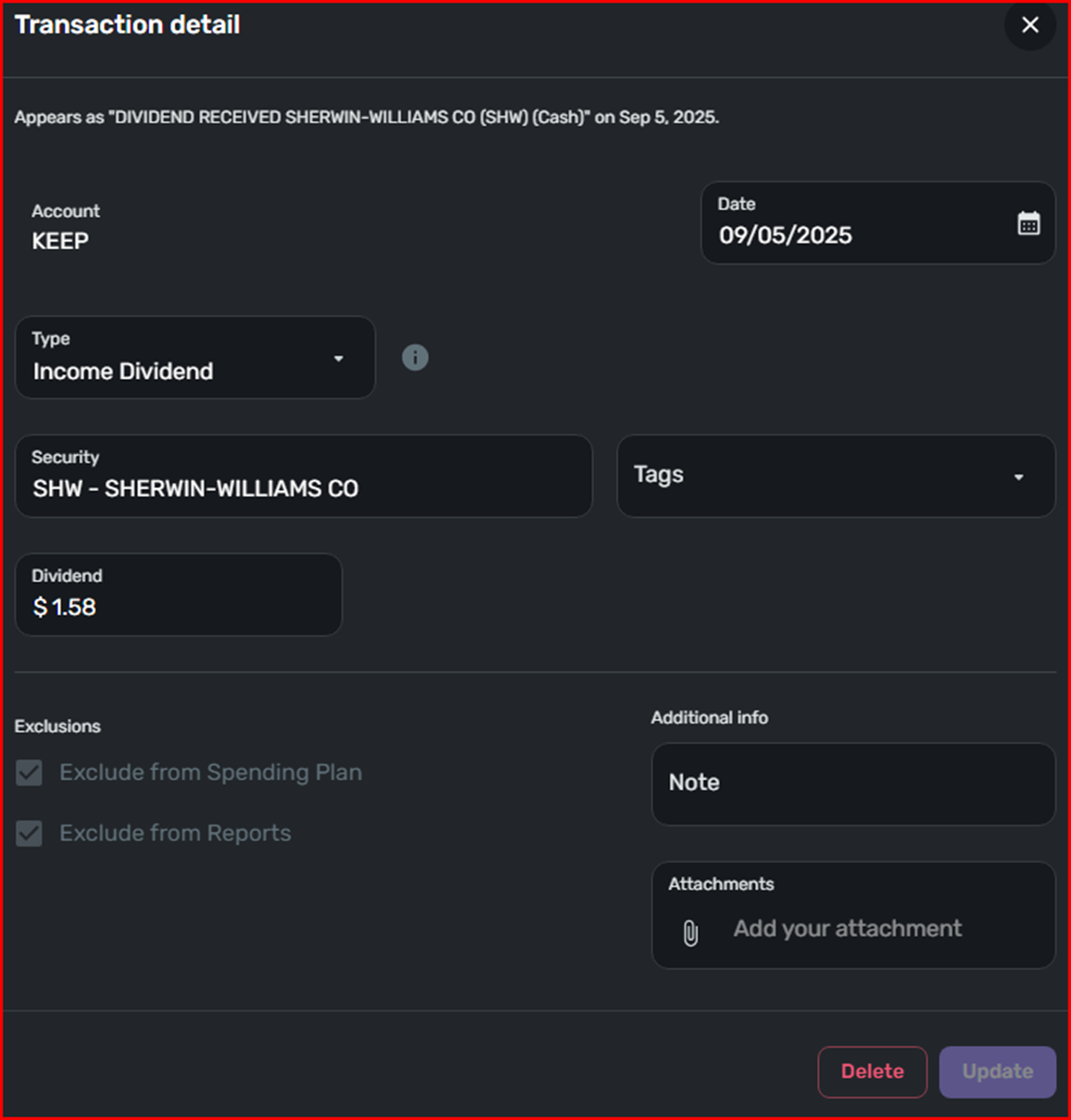

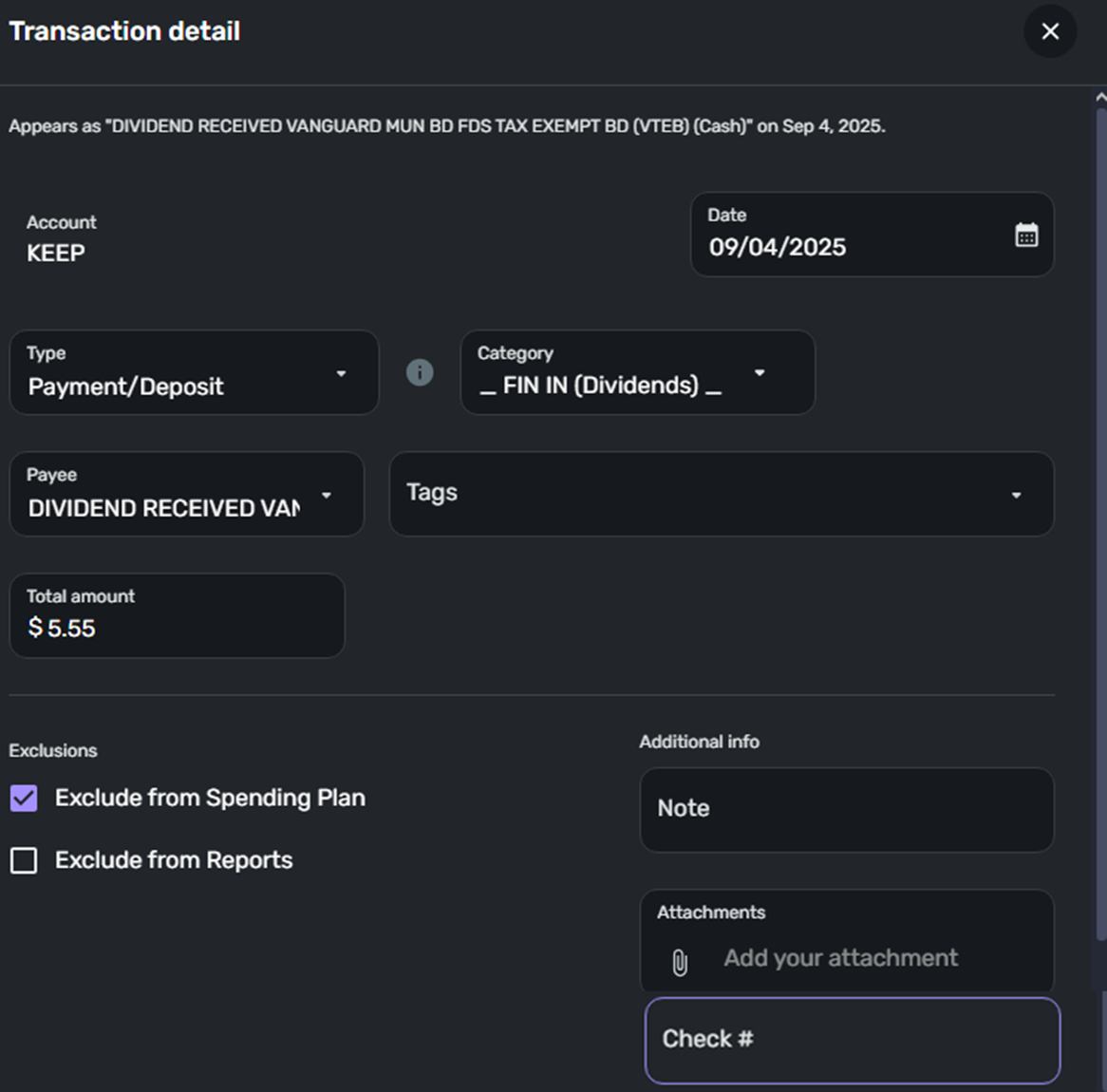
For reasons unknown one was assigned type "Income Dividend", and the other "Payment/Deposit" (with the check number blank).
The one which is "Payment/Deposit" also got mapped to a custom defined category "_FIN IN (Dividends) _", which I am able to see being represented on the Income report and chart.
The one which is "Income Dividend" ignored custom category rules, has not been mapped to a category and thus is not visible on the Income report. As far as I am concernd it only exists in the Transaction Activity log page.
Until recently I used to use custom categories to aggregate different sources of income on the Income report (which is based on categories), but after something was changed in how the investments transactions are processed by Simplifi most of the dividend transactions are no longer included in that report.
0 -
Hello @usrA12,
Thanks for the reply! Can you please provide a screenshot showing how these transactions appear on your financial institution's website for comparison? If they are appearing this way most of the time within Quicken Simplifi, they may be being downloaded this way from the financial institution. Let us know!
-Coach Jon
-Coach Jon
0 -

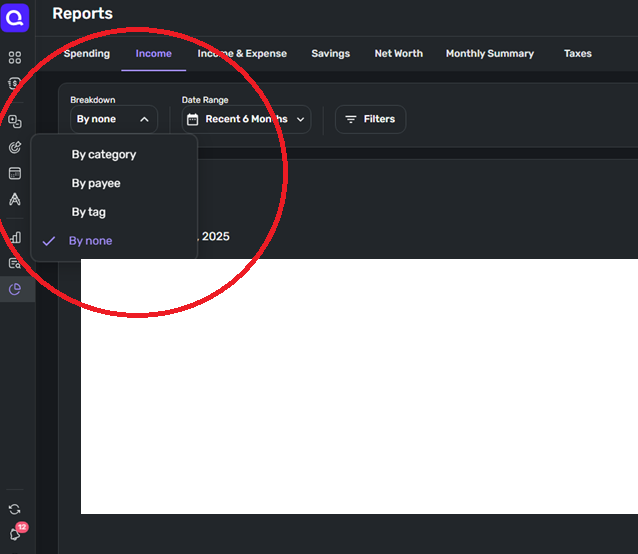
My main concern is that the dividend transactions with the Action type "Dividend Received" are not included in the Reports, namely the Income report, which is based on categories. It used to work fine, all credit transactions with the description containing "dividend" were being assigned to a custom category and were being displayed as stacked column format on the Income report along the job income and other income streams.
 0
0 -
Hello @usrA12,
Thanks for the reply. Based on feedback, Investment accounts have both of the exclude flags set by default. As a result, all transactions for those accounts will be excluded from the Spending Plan and Reports automatically.
If there are specific "cash flow" type Investment Transactions in your investment accounts (such as payments and deposits) that you may want to count, you can override the default exclude setting by un-selecting Exclude from Reports and/or Exclude from Spending Plan from the transaction directly. All other Investment Transaction types (such as buys and sells) cannot be included at this time, and you will not have the option to change the exclude settings for these types of transactions.
I am not sure why the mentioned transaction was assigned as a Payment/Deposit, but if the other transactions are Income Dividend type transactions, and that is the way the financial institution is sending them, then there would not be a way to unexclude them from reports unless you changed the type to Payment/Deposit.
-Coach Jon
-Coach Jon
0 -
Hello Jon,
Ok that's a fair enough explanation. So is there a way at this point to run reports on dividend income? Because yes, all of the dividend received transactions get Action type "Dividend Income" assigned and are permanently exluded from Income reports, and there is no way to override this behavior in settings.
I guess I understand what is happening, but don't understand why. Are there plans to change this behavior of the app? By setting up a custom rule to automatically change Action type "Dividend Income" to "Payment/Deposit" for example?
0 -
Hello @usrA12,
I would not be sure if there are any current plans for changing how investments work in Quicken Simplifi at this time. However, we do have an idea post that you may be interested in, which you can vote for and follow for updates here:
I hope this helps!
-Coach Jon
-Coach Jon
0 -
Thank you, will definitely keep an eye on the progress of this feature. Looks like it was requested two years ago already! Strangely the reporting worked for me just a few months ago, maybe because Fidelity was returning the dividend transactions as different type? But since "the issue got corrected" the transactions disappeared from the Income report.
Without this how am I supposed to see, visually, at a glance, what my combined dividend income from different accounts is?
0 -
Hello @usrA12,
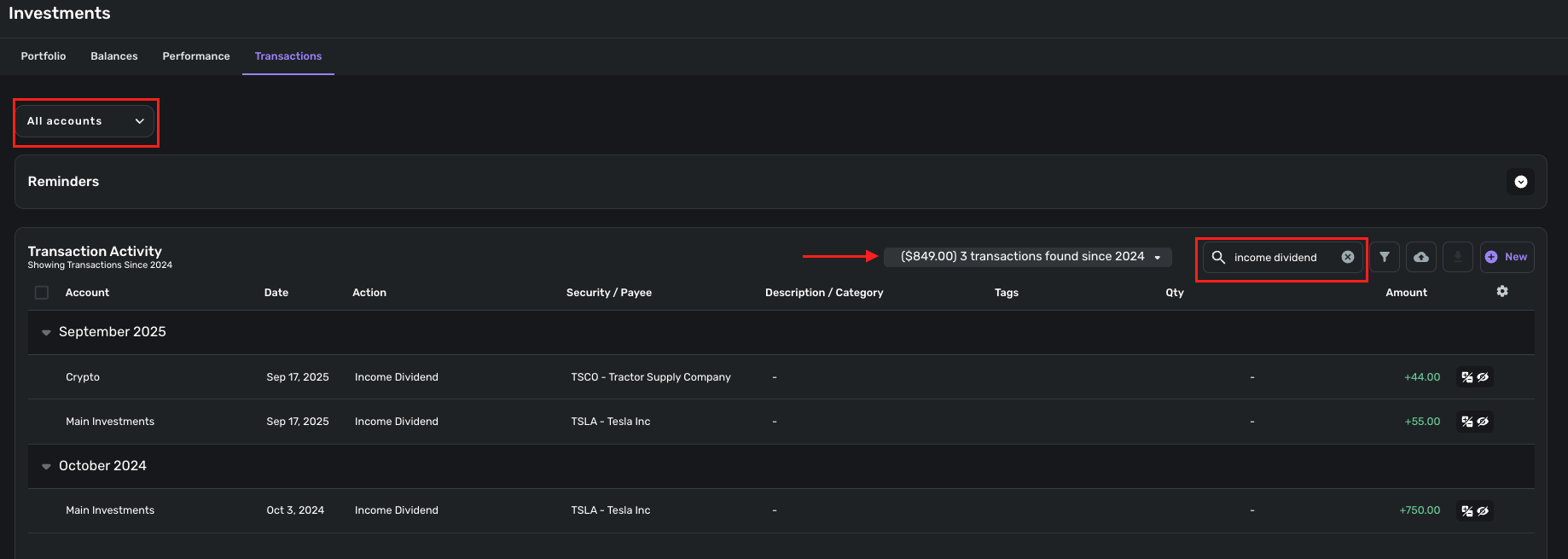
One way you can see how many income dividend transactions you have, as well as the combined amount, is to navigate to Investments > Transactions and search for "Income Dividend" within the Transaction Activity search field. This will show the total amount of the transactions found.
-Coach Jon
-Coach Jon
0 -
Hi Jon,
My take away from this is that Simplifi Investments doesn't want to smoothly integrate with the rest of Simplifi. The transactions received through brokerage account are treated separately from transactions from other accounts. To that, Investments doesn't have its own reporting and charting feature, so while it's possible get a total for a selected time range like you suggested, comparing totals or establishing a trend line would require me now do what, use a spreadsheet?
Which is regretful because the fix appears to be rather simple to implement technically. How? Once a dividend transaction gets its type changed, manually, from Income Dividend to Payment/Deposit it gets included in the Income report, alongside other types of income. Inconceivably, Investments activity log doesn't allow to bulk change multiple selected transactions. So each has to be selected one at a time, then Action has to be changed from the drop down list, then the entire list has to refresh.
I feel like Simplifi could be handling this busy manual work automatically, or automatically assign actions Payment/Deposit to dividend transactions as I, as the end user of the app, want it, according to custom rules, or at least allow editing multiple selected transactions with a single click instead of having to spend half hour clicking updating transactions one a time.
Is there a recent feature request already for the above so I could keep an eye on progress of resolution? The one referenced earlier is nearly two years old and apparently hasn't been updated? Although something must have changed, because what was working, for me at least, suddenly stopped working, and I'm strongly convinced that the current behavior is not correct, and is either a missing feature or a bug.
0 -
Hello @usrA12,
Thank you for your reply. We can certainly understand the frustration you may have with how investments are handled within Quicken Simplifi. The idea post I shared regarding the ability to include investment transactions in reports and the spending plan is the one you would want to vote for, if you want this ability.
It may be 2 years old, but there are recent comments within the idea post, and our product team does look at these idea posts when planning what features to implement.
We also have another idea post you may be interested in as well, since you mentioned you would like the ability to bulk edit investment transactions.
I hope this information helps!
-Coach Jon
-Coach Jon
0

