Sub categories will not display on iPad web browser (edited)

When trying to edit a transaction my categories will display but the subcategories do not. This just started a week or so ago and I am not sure what to do to solve this issue. It has been working fine for the last two years

Comments
-
Hello @TommyS,
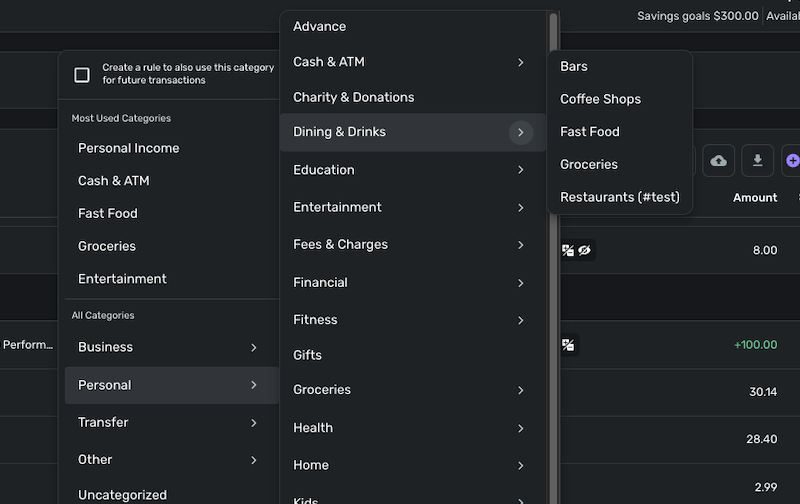
Thanks for reaching out! To clarify your issue further, do you mean the subcategories will not display when you hover over the arrows shown in your screenshot? Does another list appear showing your subcategories when you hover over the arrows, as shown below?
Let us know!
-Coach Jon
-Coach Jon
0 -
That is correct. If I hover or click on the arrows the subcategories do not display. As your example I would not get Bars, Coffee Shops, etc. I do not have two levels of subcategories. Only categories and subcategories.
0 -
Hello @TommyS,
Thank you for clarifying. If the subcategories are not appearing when you hover, this may be a browser-related issue. Can you please open Quicken Simplifi in another web browser/incognito mode to see if the subcategories show there? Additionally, if you go to Settings > Categories & Tags, do your subcategories appear there?
-Coach Jon
-Coach Jon
0 -
The subcategories do appear in my setting. I tried a different browser and they still do not show up.
0 -
I changed to my laptop and everything works fine there so there must be something that is messing with the iPad. Hopefully with the next update it will be fine. However I do have some transactions missing from my spending plan. I will document and start another discussion
thanks for all your help0
