Investments widget shows an incorrect daily change due to rounding wrong (edited)

Hello -
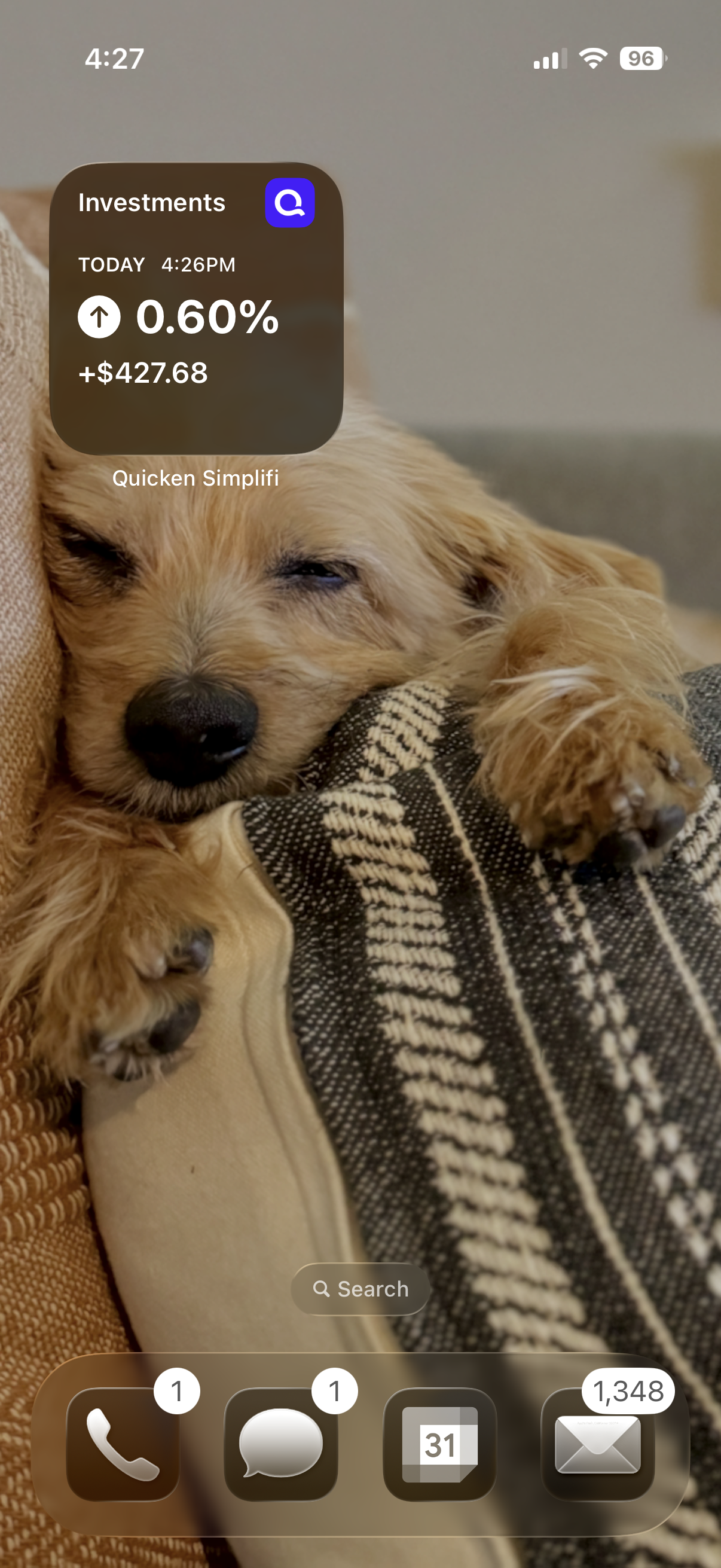
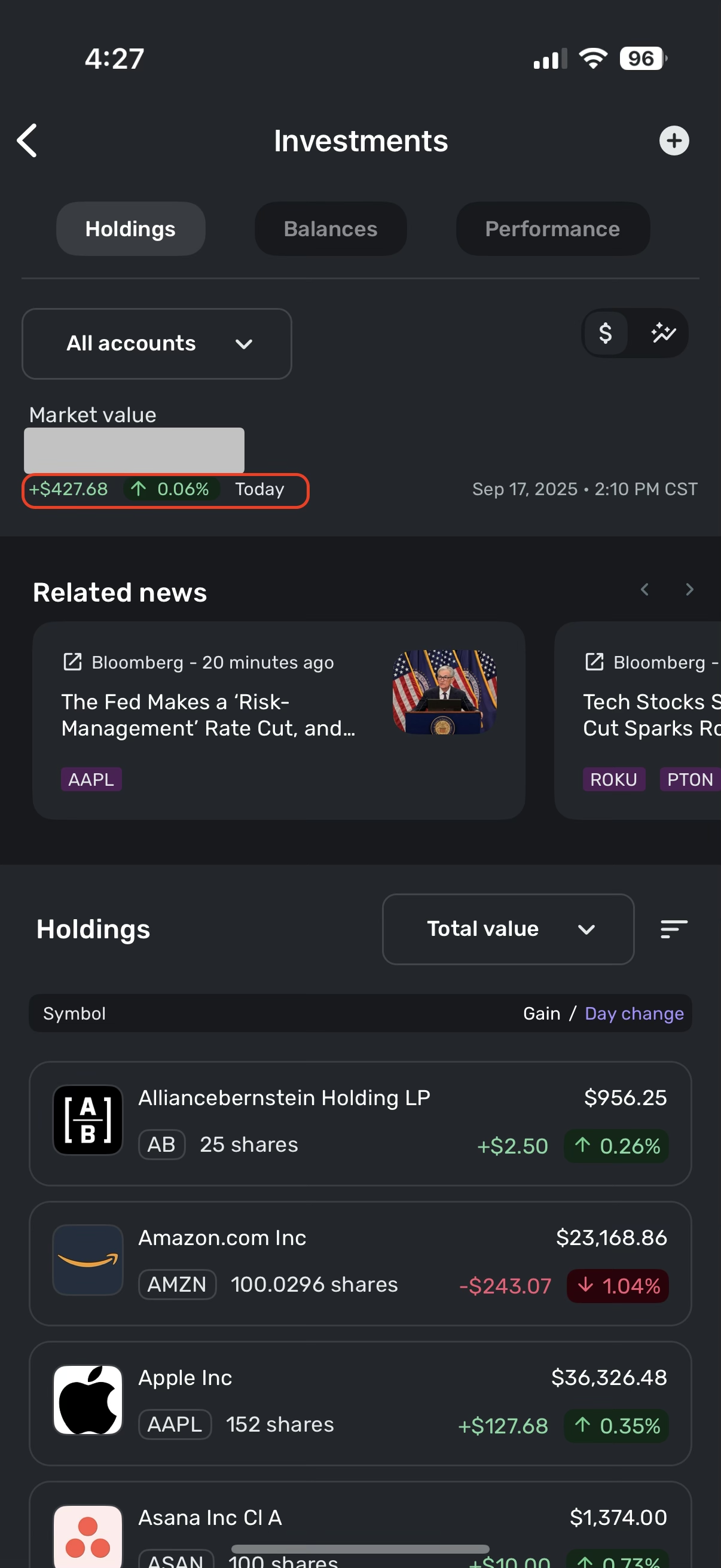
I just added the Quicken Simplifi investments daily change widget to my notification center on Mac OS Tahoe 26 and it's incorrect. The app shows me that my daily change is -0.05% but the widget is showing -0.50% which is wrong. Seems to be a rounding issue. Can you please fix this?
Comments
-
Hello @timmy5685,
Thanks for reaching out! I would see if removing the widget and re-adding it works to resolve the issue you are seeing here. Let us know afterward if the issue is persisting!
-Coach Jon
-Coach Jon
0 -
Hi Coach Jon. I actually tried that first (and did it a few times) but no luck.
0 -
Hello @timmy5685,
Thanks for the reply! I suggest removing the widget, uninstalling, and reinstalling the Quicken Simplifi application itself in this case. Afterward, go ahead and re-add the widget to see if it works correctly.
-Coach Jon
-Coach Jon
0 -
I just removed the widget, uninstalled the app, reinstalled, and added the widget again. It's still showing the rounding issue.
0 -
Hello @timmy5685,
I believe we will need to clarify some information here regarding your situation. Are you installing the application and widget on your Mac device? I am not aware of Quicken Simplifi supporting widgets for macOS. Or is the widget being installed on your phone? I ask because it looks like you provided screenshots from the Quicken Simplifi mobile application. Please let us know!
-Coach Jon
-Coach Jon
0 -
Tahoe 26 lets you add widgets from your iphone. In any case - its an issue with the iOS widget. The widget shows the same rounding issue on my iphone.
0 -
Hello @timmy5685,
Thanks for clearing that up! We can definitely troubleshoot the widget side of things regarding the mobile application. Can you let us know if you are adding the widget directly to your Mac, or if you are adding it to your phone first and then adding the widget to your Mac? We will definitely want you to add the widget the official way, which would be the latter way via the phone. We want to focus on getting the widget to work on the mobile phone specifically.
I would also verify if clearing the application cache and data, and then uninstalling and reinstalling the app and re-adding the widget to your phone, works to resolve the issue as well.
-Coach Jon
-Coach Jon
0 -
Correct. I am adding the widget on my phone and it's incorrect there. IMO - you can ignore the mac part and just focus on the widget on iOS 26. Tahoe 26 just displays the iOS widget.
0 -
Hello @timmy5685,
Thanks for the reply. Please try clearing the application cache and data, and then uninstalling and reinstalling the app and re-adding the widget to your phone, to see if this works to resolve the issue.
Let us know how this goes!
-Coach Jon
-Coach Jon
0 -
How do I clear the application cache and data?
0 -
Never mind - I figured it out. It didn't resolve the issue.
 0
0 -
Hello @timmy5685,
Thank you for verifying. Can you please provide logs to help us get this issue reported?
- Log into the Quicken Simplifi Web App.
- Select Profile from the left-hand navigation bar.
- With the Profile menu open, hold down the Option key for Mac or the Alt key for Windows, and then click Send Feedback.
- Leave all boxes checked, add a brief description of the issue, and then click Send.
We will also need to know the device specifications for the device you are using. Make, Model, and OS. As well as the version and build of the mobile application you are using, which can be found by selecting the profile icon in the top right of the application.
-Coach Jon
-Coach Jon
0 -
I just sent the logs following the instructions you provided. I am on an Apple iPhone 16 Pro on iOS 26. I am using app version 5.39.1
0 -
Hello @timmy5685,
Thanks for the information! I did get this issue reported to my product team and will be sure to follow up with any status updates going forward!
-Coach Jon
SIMPL-29424
-Coach Jon
1 -
Hello @timmy5685,
I am back with an update from our product team. A fix has been implemented that should be released with Simplifi Mobile Version 5.41.0. Once that version rolls out, let us know if the issue is fixed for you!
-Coach Jon
-Coach Jon
1 -
thanks for the update! Just checked and everything is now working correctly! Appreciate the support!
0 -
Hello @timmy5685,
Thank you for letting us know! We are glad to hear that the issue is now resolved!
-Coach Jon
-Coach Jon
0
