How is Bill Connect supposed to handle the next (not current) credit card payment?

I recently followed the advice to delete and recreate a credit card recurring payment that wasn't working correctly. I put in a placeholder amount for the amount of the payment, knowing it would be changed by Bill Connect.
I waited through a couple of update cycles, with the following results:
- The upcoming payment correctly reflects the last statement amount due
- The following payment shows the placeholder amount
Previously, when the Bill Connect system was working correctly with this credit card, I had the following results:
- The upcoming payment correctly reflected the last statement amount due
- The following payment showed the amount charged since the last statement
What is Bill Connect supposed to do? Should the next payment show the placeholder amount or the amount charged since the last statement? Or does it depend on which one is larger? Or whether there has been a new charge since the last download? Or something else?
(To be absolutely clear, I am not yet asking for suggestions on how to fix this. I am asking what Bill Connect is supposed to do when working as designed so I can determine if there is a problem.)
DryHeat
-Quicken Classic (1990-2020), CountAbout (2021-2024), Simplifi (2025-…)
Comments
-
@DryHeat, thanks for reaching out to the Community!
What you described sounds like the issue I recently escalated, and has since been fixed, from the feedback post for the Bill Connect for Credit Cards feature:
Since the fix does not work for existing reminders, you will need to regenerate your reminders for this series. The best way to ensure you have completely fresh data would be to delete and re-create the series, but I believe you can also do the following to regenerate your reminders:
- Skip the next reminder instance
- Edit the series to re-establish the next reminder instance and the subsequent reminder instances
Regardless of which path you take, your next reminder should start updating with the upcoming estimated payment after 24 hours. Quicken Simplifi estimates the upcoming payment amount by using the amount of the series and your spending in the current statement period, which should stay pretty close to the account's balance.
I, myself, just deleted two of my recurring credit card series and re-set up Bill Connect for them to test the fix. I am hoping to see accurately updated reminders for my next payment as of tomorrow!
Let us know how things go for you!
-Coach Natalie
1 -
Quicken Simplifi estimates the upcoming payment amount by using the amount of the series and your spending in the current statement period, which should stay pretty close to the account's balance.
Thanks for responding. I will be happy to try the fix again.
But my post was a question about how the system is supposed to work.
In particular, I want to understand how Simplifi is supposed to use "the amount of the series and your spending in the current statement period" to estimate the upcoming payment amount.
Previously, when the system was working, it seemed to me that:
- the upcoming payment (meaning the one for the statement period just closed) was equal to the last statement amount, and
- the following payment (meaning the one after the upcoming payment) was equal to the spending after the last statement closed.
So, how does the amount of the series figure in the calculations?
(Note: I take "amount of the series" to refer to the Recurring Amount in the series definition, like in the image below. Are you using it to mean something else?)
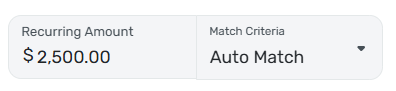
DryHeat
-Quicken Classic (1990-2020), CountAbout (2021-2024), Simplifi (2025-…)1 -
@DryHeat, thanks for the reply!
We're not privy to design specs here in the Community, so I don't have any further information on the calculation other than the amount of the series and your spending in the current statement period are used to estimate the upcoming payment amount. Yes, the amount of the series is the amount used within the Recurring Series itself.
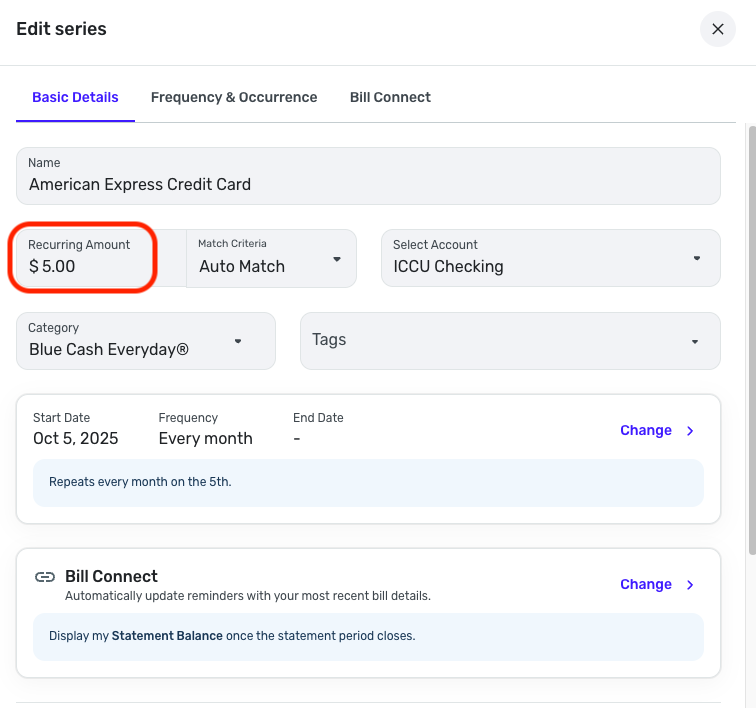
Once the statement closes, the amount and due date can/will update based on how you have Bill Connect set up.
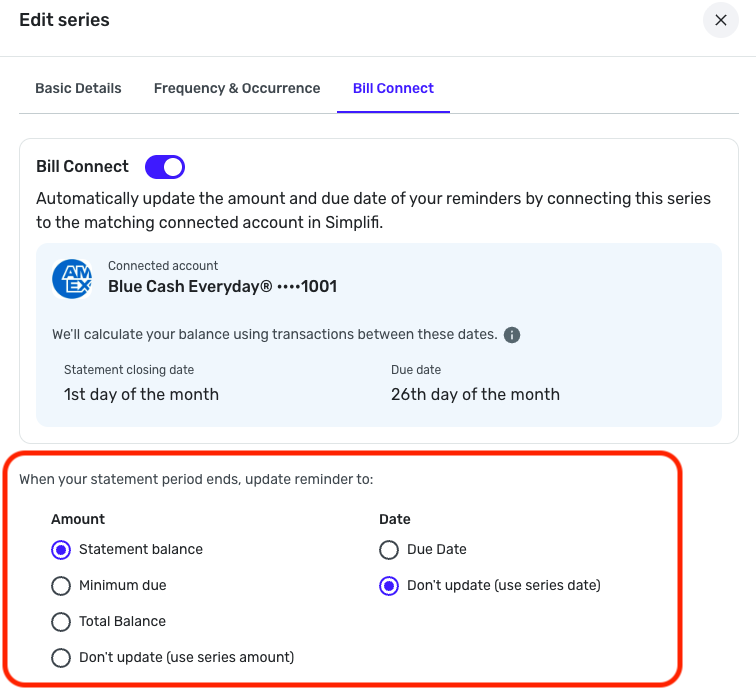
However, there is a 3-day buffer, as outlined in our support article here:
I hope this better answers your question!
-Coach Natalie
1 -
I don't have any further information on the calculation other than the amount of the series and your spending in the current statement period are used to estimate the upcoming payment amount.
Ok. It's hard to tell if the feature it is working correctly if there is no information available about what it is actually supposed to do. But I guess I'll just watch it and see what happens.
Right now the upcoming payment is just showing as the amount of the series (which I have set at an average payment amount). Charges so far have had no effect. Perhaps if the charges exceed the series amount the upcoming payment will increase. That would be a good design.
DryHeat
-Quicken Classic (1990-2020), CountAbout (2021-2024), Simplifi (2025-…)2 -
You mentioned that you hoped to have your Bill Connect credit card series working by today.
It would help me understand how the system sets the upcoming payment if you could share your experience.
In particular:
- Is the Recurring Amount in your series greater than or less than the charges that have accrued since the last statement?
- Is the amount showing on the upcoming payment equal to (a) the Recurring Amount, (b) the accrued charges, or (c ) something else?
Thanks…
DryHeat
-Quicken Classic (1990-2020), CountAbout (2021-2024), Simplifi (2025-…)1 -
@DryHeat, sadly, the reminders have not yet updated. I still just see the "connected" icon and the series amount. I'm going to allow some more time.
Feel free to check back in next week!
-Coach Natalie
0 -
As advised, last Wednesday or Thursday I deleted CC reminders, and then rebuilt them. Early last week, I paid down my BofA Visa that I had used while on vacation. I didn't pay it off because it has made the reminder go bonkers when the next statement came out. The correct balance on this CC is currently $781.97 (and this is what is reflected in Simplifi) and there are no pending charges. My reminder in Simplifi shows a balance due of $1891.06 for the October payment. My new statement came today (e-mail) and it shows a statement balance of $1891.06. I bring all this here so you can see that Simplifi is simply mirroring what the bank records indicate, not the actual balance. HTH
ETA - my statement ending date is 9/17/25 and the payment I made was on the 18th, but Simplifi has not make the adjustment to the reminder to reflect this.
0 -
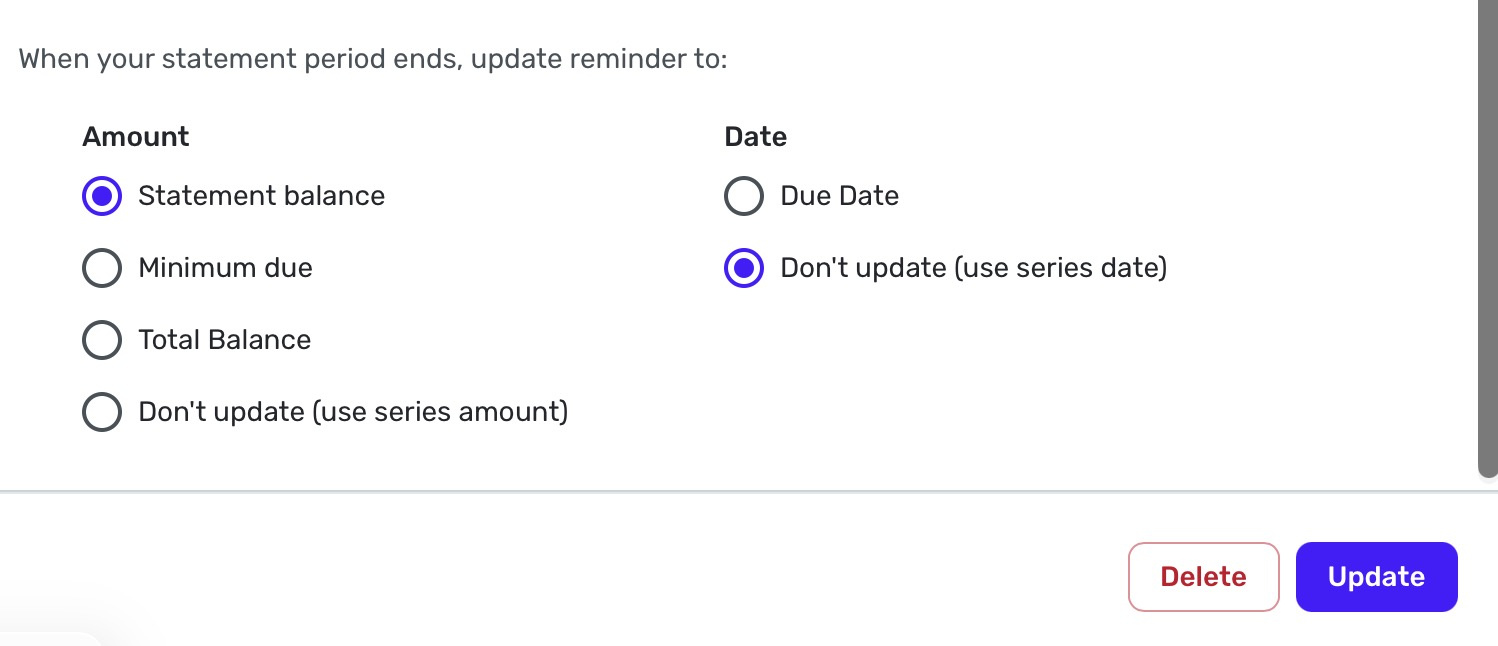
The upcoming payment reminder probably won't change based on your recent payment, assuming you have set the reminder to show the "statement balance" like this:
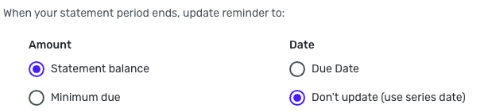
What does the following payment reminder say? (The one after the upcoming one.) Does it reflect:
- the amount of charges you have made since the statement closing date?
- the amount you plugged in as the "Recurring amount" in the series"?
- or something else?
DryHeat
-Quicken Classic (1990-2020), CountAbout (2021-2024), Simplifi (2025-…)0 -
I have the recurring amount set at $0.00 and this is what the following (November) reminder shows.
And here is a screen shot like yours.
 0
0 -
Ok. So that $0.00 could be just reflecting the "Recurring amount."
BUT… Have you made any charges since the statement period closed? If not, the $0.00 could just be there because there are no charges.
DryHeat
-Quicken Classic (1990-2020), CountAbout (2021-2024), Simplifi (2025-…)0 -
Yes, three charges and 2 payments all dated the 18th, which is first day of a new statement period.
0 -
I guess we wait a couple of days and see if the following (November) reminder changes. It's confusing because of the combination of charges and payments in your new statement period. If Simplifi is looking at the total of transactions in the new statement period (not just the total of charges) it will probably see a negative number.
Previously, on my credit cards, the following payment always showed the total of charges so far in the new statement period. This was true even though I had a Recurring amount of $0.00, as you do.
When I deleted and recreated my series, I used a larger Recurring amount so that future payments that show up in the cash flow would more closely resemble what is actually going to happen. And now the following payment (and all after that) show that Recurring amount, not the total of charges so far.
I'm ok with it working like that, if that's what is supposed to happen. It's kind of disconcerting that no one seems to know what the system is supposed to do, though.
DryHeat
-Quicken Classic (1990-2020), CountAbout (2021-2024), Simplifi (2025-…)1 -
My bank doesn't process anything on weekends, so I would guess by the middle of next week I'll see something. If not, maybe next month it will catch up to itself.
1 -
@DryHeat, now I'm not buying the "amount of the series and your spending in the current statement period are used to estimate the upcoming payment amount" so much. My default amount for the Series is only $5, but my next reminder is showing an amount that matches the spending that has taken place since the most recent statement closed. I would think if it used "a combination", the amount would not equal my exact spending, and would factor in the $5 used for the series.
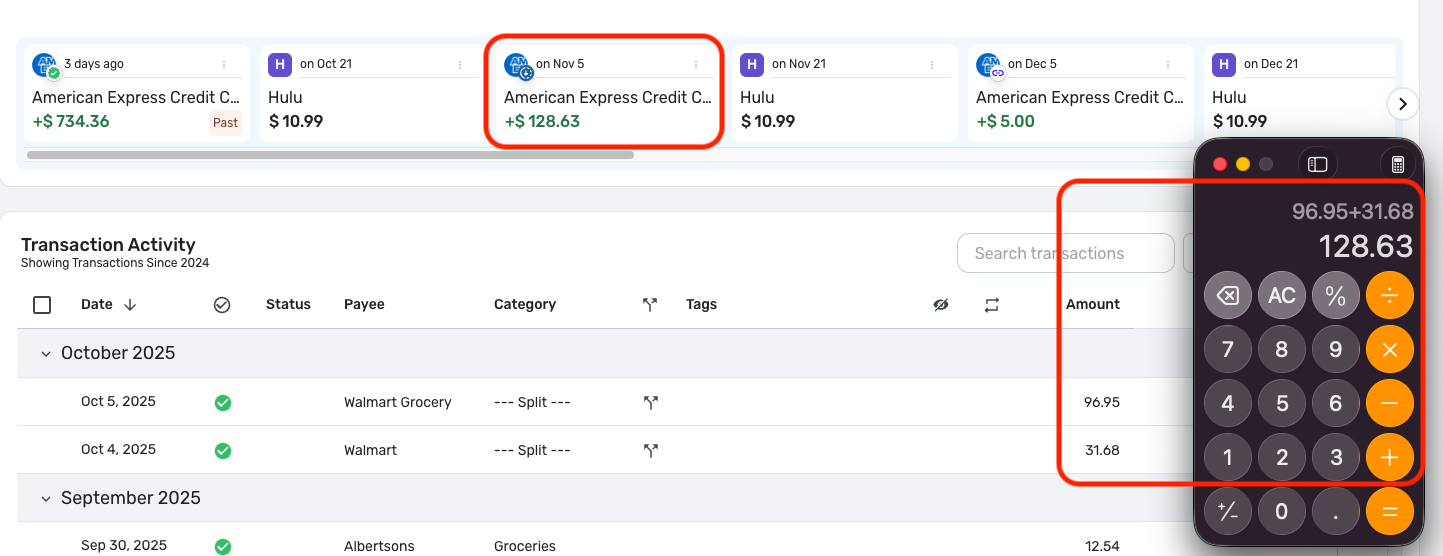
But hey, at least it's updating properly now!
-Coach Natalie
0 -
I can't tell for sure yet, but…
It looks to me like the next reminder shows the greater of (1) the amount of spending since the last statement, or (2) the default amount.
I think that because (1) my lesser-used credit cards that have a zero default amount are showing the amount of spending since the statement, while (2) my main credit card that has a substantial default amount is still showing the default (because actual spending has not yet reached the default amount).
When my actual spending exceeds the default on my main credit card I will know for sure if it works like that.
If it does, it will work well for me because it allows me to estimate a likely statement amount for the main credit card and use that to project cash flow earlier in the monthly cycle. (Instead of using just the charges so far, which would inflate the projected checking balance.)
DryHeat
-Quicken Classic (1990-2020), CountAbout (2021-2024), Simplifi (2025-…)1 -
If you pay the balance off early, will Simplifi factor that into the cash flow?
For example, Nov 28 is the due date and has a statement balance of $1,000. You pay off the balance of $1,000 on Nov 15. You then incur spending of $500. Will Simplifi show the $500 charge as an estimated payment for the December 28 statement in cash flow?
TiggerTrainer
Quicken Simplifi user since January 2025
Quicken Classic (Premier) user since 2004 - 2025 (21 years)
0 -
@TiggerTrainer, when you pay doesn't matter, as long as it's after the statement has closed. The "closed" reminder in Quicken Simplifi will be updated with the statement balance (or however you have the amount set up in Quicken Simplifi) after a 3-day buffer, and the "next" reminder will start updating with new charges.
I hope this helps to clarify!
-Coach Natalie
0 -
Thank you @Coach Natalie. I read through the overview at:
Using Bill Connect to Track Your Bills | Quicken Simplifi Help Center
It does not seem clear what the difference is between the "Statement Balance" and the "Total Balance", both state that they are as of the statement cutoff. Can you please provide some clarity of what the difference is between the two?
TiggerTrainer
Quicken Simplifi user since January 2025
Quicken Classic (Premier) user since 2004 - 2025 (21 years)
0 -
@TiggerTrainer, I asked Google and was provided with this information —
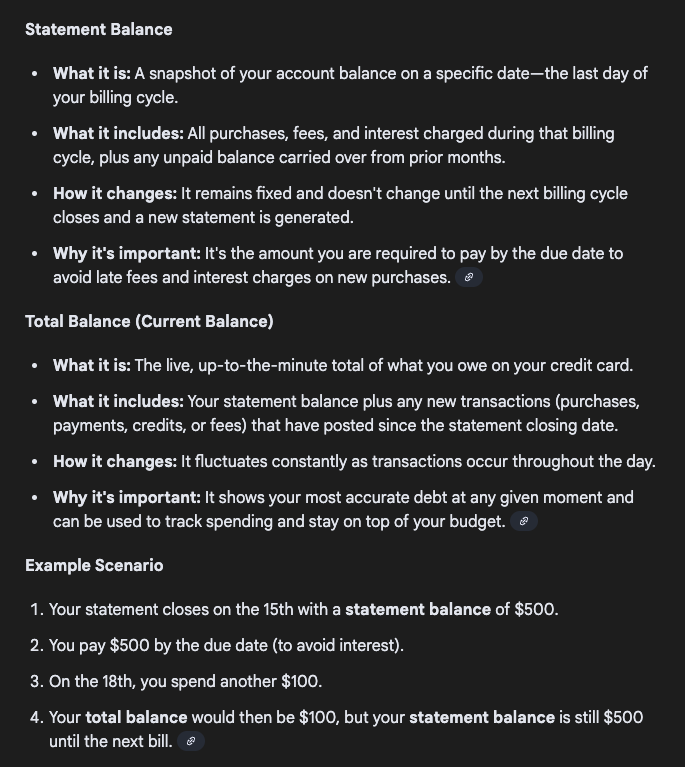
If you'd like to see how the different amount options work for your particular cards in Quicken Simplifi, I would recommend giving them a try. It appears that you can change this setting at any time.
-Coach Natalie
0 -
I agree with you that the description of "Total Balance" in the support doc (quoted below, emphasis mine) doesn't seem to make sense. It's hard to see how it would be different from the "Statement Balance"
Total Balance: Updates the reminder amount to the total balance when the statement period closes.
I don't use "Total Balance," but my best guess is that what it really does is continue to update from day to day even after the statement period has closed. That would perhaps make it useful for those who want to completely pay off the indebtedness on the card each time they make a payment.
Like @Coach Natalie, I suggest that you give it a try and see what it does. That's probably easier than going back and forth in a discussion. [ETA] And it will give you a definative answer.
DryHeat
-Quicken Classic (1990-2020), CountAbout (2021-2024), Simplifi (2025-…)1


