Merrill Lynch UNABLE TO CONNECT Care Code: FDP-105

I suppose the ML connectivity issues have returned. I haven't been able to connect for weeks now. Any ETA on a fix? I've tried everything on my end to no avail, and I even see the 3rd party access granted on the ML website.
Comments
-
Hello @Bay Area Savers,
Thank you for letting us know you're encountering this issue. To help troubleshoot this issue, I checked our internal tools, and it looks like you've been encountering this issue since the 20th of August.
Please provide more information about what is happening on your end. Are you able to login to Merrill Lynch's website directly? Is this issue happening when you're trying to add Merrill Lynch accounts in your Quicken Simplifi, reconnect Merrill Lynch accounts, or update accounts that are already connected? If you are seeing this error when trying to add/reconnect Merrill Lynch accounts, at what point in the process are you encountering the error?
If possible, please also provide a screenshot of the exact error message you are seeing.
I look forward to your reply!
-Coach Kristina
0 -
Yes, I'm able to login to the ML website. As stated, I can see they granted Quicken with 3rd party access to my data
The problem occurred several times when the accounts were already connected. It also occurs after I reconnect and re-add the accounts.
After I delete all the accounts, to add new ones, I get the modal/window to select the accounts I want to connect. I click accept, and then it takes me back to the Quicken window and after a few minutes, I get the 105 error.
Not sure how a screenshot will help with this issue, all we get are codes.
0 -
Yes, I'm able to log into the ML website, that's never been an issue as I can see they have granted access to Quicken.
Yes, when I tried adding ML accounts.
Yes when I tried to reconnect ML account.
Yes, when I tried to update an already connected account.
I've tried every scenario with the same outcome.
When resetting/reconnecting, I get all the way to selecting the accounts on the 3rd party modal and when it sends me back to Quickent it errors out.
Error message is typically 105, and you should be able to see all the errors on your logs.
0 -
Hello @Bay Area Savers,
Can you please let us know whether these accounts are new accounts being added into Quicken Simplifi, or existing accounts already within Quicken Simplifi? If it is happening with existing accounts, I would suggest trying the following steps. This might be caused by a user token that has expired. This can happen after having the account connected for more than 90 days. To gain a new token, you will have to revoke Quicken from accessing your bank's website, then reconnect your accounts.
- Navigate to the bank's website, sign in, and then remove Quicken's access from the bank's third-party linked apps.
- Navigate back to Quicken Simplifi and make all of the accounts with the bank manual by following the steps here.
- Once you see the account(s) listed in the Manual Accounts section under Settings > Accounts, go back through the Add Account flow to reconnect to the bank.
- If the connection is successful, carefully link the account(s) found to your existing Quicken Simplifi account(s) by following the steps here.
-Coach Jon
-Coach Jon
0 -
I tried that to no avail. I get the same experience and error.
It appears Quicken acknowledged there's an issue.
"Merrill Lynch Investments is reporting connection issues. The associated accounts can't update right now. We are investigating the issue.
We'll wait for a BE fix to be deployed.
0 -
Hello @Bay Area Savers,
Thank you for the reply. I can also see that banner during the Add Account flow for Merril Lynch.
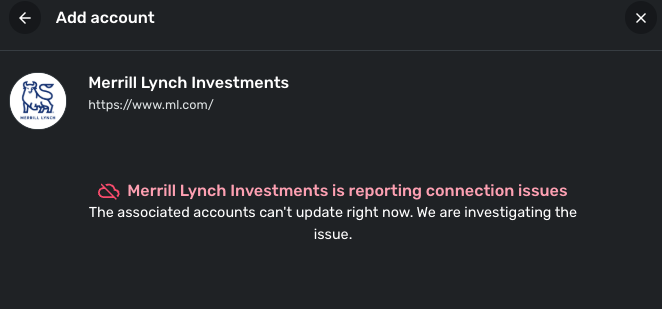
In this case, I would suggest keeping an eye out for when the banner disappears and trying to connect every once in a while.
In the meantime, you can track the account manually by adding manual transactions, which will keep your records up-to-date. Here are the steps to do so: Managing Transactions in Quicken Simplifi | Quicken Simplifi Help Center
If the account is an investment account, the manual tracking steps are a little different:
- Make the account manual so you can add and edit Holdings: How to Make an Account 'Manual' | Quicken Simplifi Help Center
- Add/edit your Holdings to keep accurate records: Tracking Investments in Quicken Simplifi | Quicken Simplifi Help Center and Tracking Investments in Quicken Simplifi | Quicken Simplifi Help Center
-Coach Jon
-Coach Jon
0 -
Still not working. I'm out of luck and can't do a manual transaction since I deleted the account, thinking a complete fresh start/wipe would somhow remedy the problem. Is there an ETA on the backend fix?
0 -
Hello @Bay Area Savers,
Thanks for the update! Can you please provide the following information to better assist us?
- The name of the account, as it appears in Quicken Simplifi.
- The name of the account, as it appears on the bank's website.
- Has there been any activity in the account in the last 90 days?
- A screenshot of the Accounts Summary page from the bank's website that lists all accounts and balances (feel free to redact any personal info) and has a wide enough scope to show the page URL (this must be taken from a web browser and not a mobile browser).
We will also need logs:
- Log in to the Quicken Simplifi Web App.
- Select Profile from the left-hand navigation bar.
- With the Profile menu open, hold down the Option key for Mac or the Alt key for Windows, and then click Send Feedback.
- Leave all boxes checked, add a brief description of the issue, and then click Send.
-Coach Jon
-Coach Jon
0 -
No ETA in sight to fix the backend issue with ML? Am I the only one on the platform who uses ML and is facing this issue? It's been months since I have been unable to access my ML accounts. Getting frustrated.
0 -
Thank you for your reply,
For us to better assist you, please provide the information @Coach Jon requested earlier:
Thank you!
-Coach Kristina
0 -
I just figured out the problem. Some context, there are two ML entities, one for Benefits (Corp 401k accounts) and Normal Investment accounts. For years, I connected with two separate login IDs and passwords. And every so often, the connection would break, and I'd have to reset it. A few months ago we received a communication regarding changes to the way ML was connecting to Quicken. After the change was made, I managed to link all of my Investment and benefit accounts using one of the ML credentials. It worked fine for months and I thought all this access mess was behind me until a month ago.
On a whim today, I logged in with the two ML credentials and was able to add the accounts for each of the credentials. So instead of having all the accounts listed under ML. They are now broken up into ML Benefits and ML Investments as they were before the big change.
Now I know how to troubleshoot this if it breaks again.
Hope this can help other ML users.
1

