Manual Account Balance doesn’t add up with transaction

I have a manual account with a starting balance and transactions in and out over the years. The problem is that the reported balance does not equal the simple sum of all of these transactions.
Computed both by hand and if I do a CSV export of the account transactions, adding up all the positive and negative transactions does add up to the correct balance, but Simplifi is showing an incorrect balance.
FWIW, the balance is off by the same amount as one of the transactions. I have tried removing and adding the offended transaction but the sum is still incorrect.
Comments
-
Hello @everydave,
Thanks for reaching out. For manual accounts, Quicken Simplifi calculates the balance based on the sum of all entered transactions. Since there are only 18 transactions, are you able to navigate to Transaction Activity for this account and select the "Select all visible transactions" checkbox? The sum of all the selected transactions should then display to the left of the "Search transactions" field. Does the number there match your account balance?
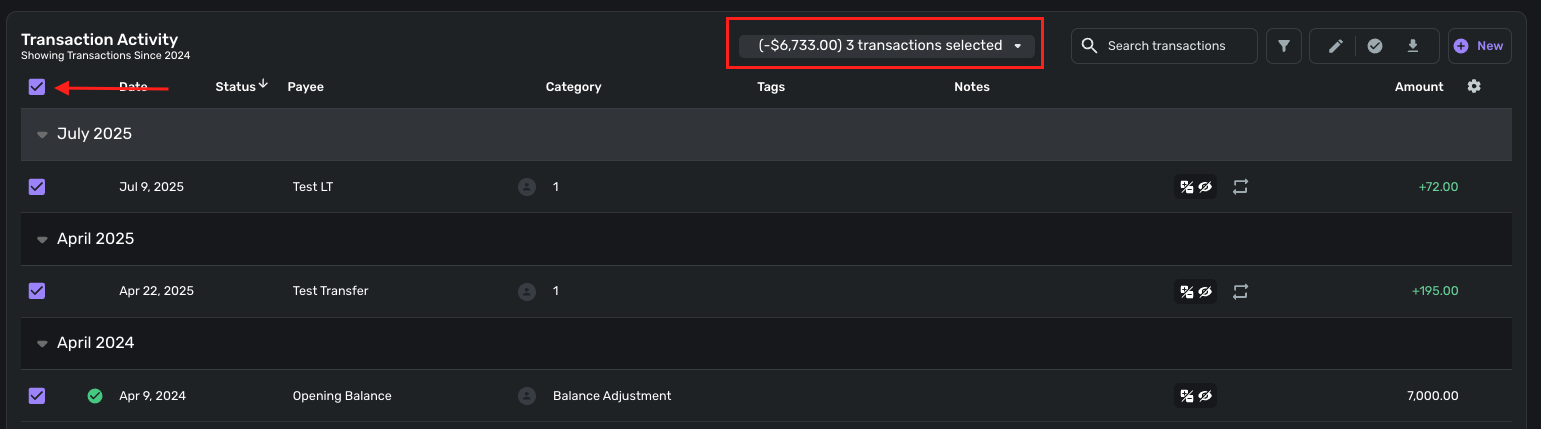
If it does not, can you provide a screenshot showing the difference in balance? Let us know!
-Coach Jon
-Coach Jon
0 -
Because you have "transactions in and out over the years" you probably have more than 18 transactions. But the method Coach Jon suggested will still work.
However… you will need to make sure that all of the transactions in the account are visible when you check the select all checkbox. Often, the monthly sections for older transactions will be collapsed and those transactions will not be selected when you check the box.
You can go through and expand all the sections manually, or you can sort on Payee (or anything other than Date). When you do that, there are no monthly sections and all transactions can be selected with one click.
DryHeat
-Quicken Classic (1990-2020), CountAbout (2021-2024), Simplifi (2025-…)0 -
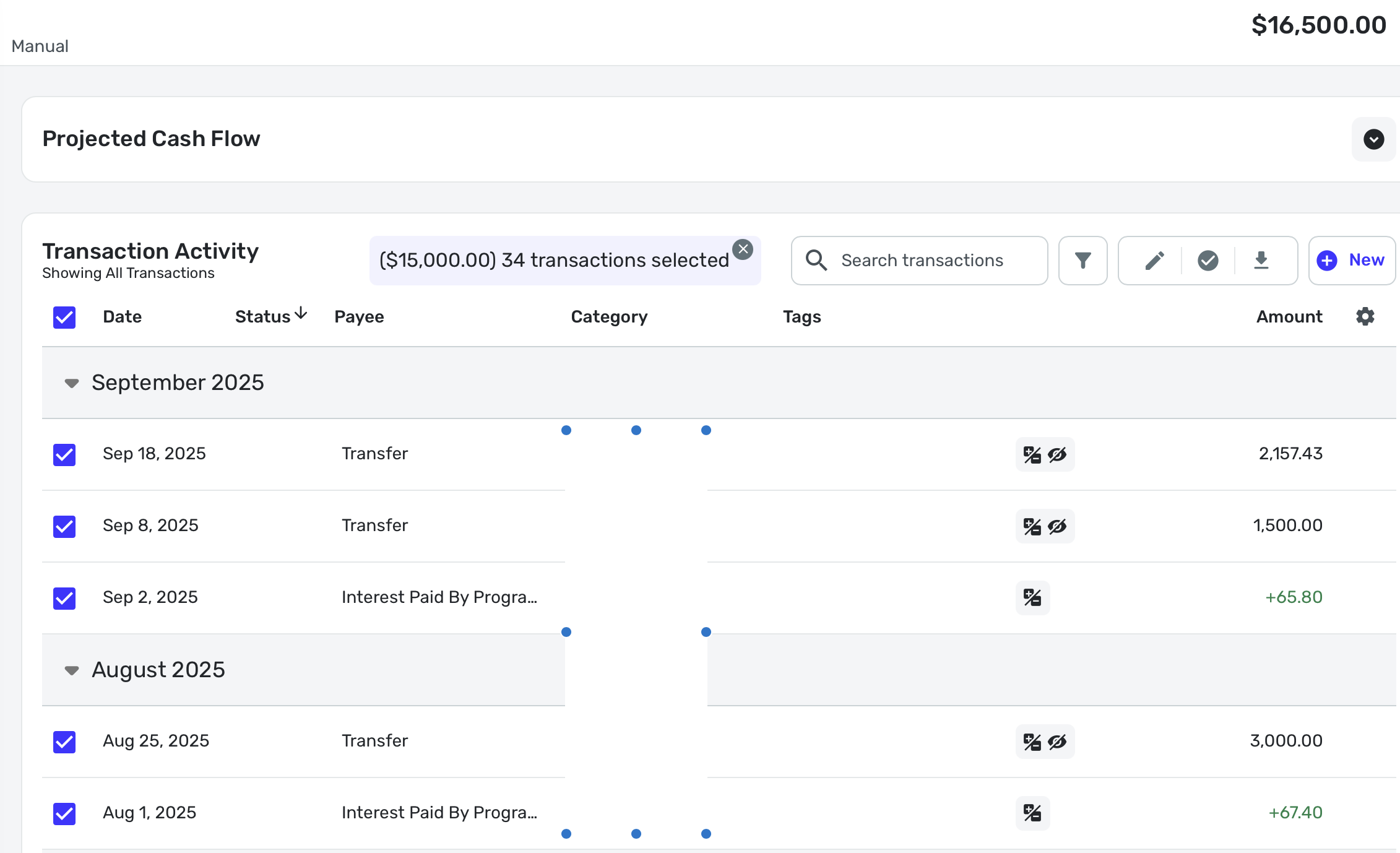
@Coach Jon Here's a screenshot showing all the transactions selected, showing the selected sum and the balance being off by $1,500. I've obscured account and transactions names, but if those are needed let me know and I'll send to you directly.
EDIT: to be clear the balance should be $15,000.
 0
0 -
Hello @everydave,
Thanks for the reply. This is certainly strange. I would have you sign out and sign back in to Quicken Simplifi to see if the balance is still showing as incorrect afterward. If it is, please try signing in to Quicken Simplifi in another web browser/incognito mode to see if the correct balance shows up there. I would also have you check if the balance is also incorrect in the mobile application.
Let us know how this goes!
-Coach Jon
-Coach Jon
0 -
@Coach Jon I've done the following:
- tried clearing all simplifi.quicken.com settings including cache, cookies, local storage, etc
- tried in incognito
- tried in different browser
- tried on mobile app
In all cases it shows the 16500 balance, while also showing the 15000 sum when selecting all transactions on the web apps, I couldn't find a way to select and show sum on iPad app.0 -
Hello @everydave,
Thanks for the update. I am wondering if there is some sort of delay with the manual account updating your balance. We did have another user recently experience the same issue, and it did clear up after waiting. I would have you wait 24 hours, and if the issue clears up or persists, please let us know.
-Coach Jon
-Coach Jon
0 -
@Coach Jon The balance is now correct. It's so very very weird that they have a delay like that. Putting on my architecture hat I guess having a delayed/stored compute on balance as opposed to doing real time can save resources, especially compared to the scale of users Simplifi must have. But the fact that that compute IS being done when selecting all transactions as we did seems like a waste to not utilize that to update the balance in that moment, especially since having the discrepancy cost me real time in troubleshooting it.
Regardless. I guess add this to the list of bugs and if your devs need me to do anything else to troubleshoot, please let me know.
1 -
Hello @everydave,
Thanks for letting us know. I am glad the balance is now correct. I am not sure if the delay is something that is ongoing or if it was just a one-time thing in your case, however. For the time being, there is no reason to troubleshoot, as the issue is now resolved, but please let us know if you see this issue again soon.
-Coach Jon
-Coach Jon
0 -
Hello @everydave,
I know you stated the issue was resolved, but just in case the issue appears again, we do now have an alert that you and others can follow for this reported issue:
-Coach Jon
-Coach Jon
0 -
Is it possible one of the transactions was linked to another account, and the date was updated on the other account (to posted date) when sync'd? If so, I'm seeing the same thing, and it seems related to the date being updated to the posted date on the opposite side of the transaction. What seems to be happening, is that the changed date causes the transaction to be counted -twice- —- and perhaps after the next daily recalculation (or sync?) it corrects itself.
—
Rob Wilkens
0


