X1 card still giving FDP-187 error

I have been unable to connect my X1 credit card since subscribing Simplifi in January. I reported the issue and have been following it for updates. They finally posted yesterday that it was resolved in this thread:
https://community.simplifimoney.com/discussion/comment/59793
However, when I went to connect my card, I still get the FDP-187 error.
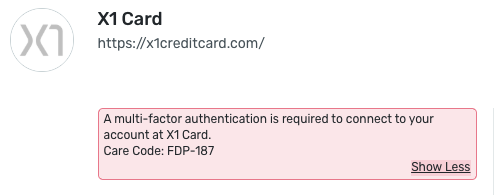
Can you please resolve this issue? I need to connect this card in order to accurately track my finances and spending. Thank you.
Comments
-
Hello @Julia11,
Thanks for reaching out! I can see the FDP-187 you are receiving from our side. I can also see the escalated ticket you created with our chat support team previously for this issue. Have you reached back out via chat to let them know that the issue is still occurring for you? This might be the best way to continue since troubleshooting originally started on that side.
Otherwise, we can continue with troubleshooting here, but we will need to start from the beginning. If you do wish to continue troubleshooting here within the community, please provide the answers to the following questions:
- Is Quicken Simplifi asking you to complete MFA?
- Are you receiving the code?
- What method are you using (SMS, call, etc.)?
Let us know!
-Coach Jon
-Coach Jon
0 -
I have not reached back out via chat because they told me in August that the issue was still ongoing and the support team was working on it. Since it was mark resolved in the Community, I thought I should respond here to indicate it is still not working for me.
- Yes, it is asking me to complete MFA
- Yes, I am receiving the code
- I am using SMS
After I enter the code, I get the error in the screenshot above. This is the same error I have been getting since January, and it is the same error code that was marked "resolved" in the thread I linked to.
Thank you for any help you can provide!
0 -
Hello @Julia11,
Thanks for the reply and the requested information. To better assist you, can you let us know if you are trying to add a new account to Quicken Simplifi or update an existing account already within the application?
For the latter, did you try establishing a fresh connection by making the account manual and re-linking to see if that fixes the current issue? The instructions to do that are:
- Make all of the accounts with the bank manual by following the steps here.
- Once you see the account(s) listed in the Manual Accounts section under Settings > Accounts, go back through the Add Account flow to reconnect to the bank.
- If the connection is successful, carefully link the account(s) found to your existing Quicken Simplifi account(s) by following the steps here.
-Coach Jon
-Coach Jon
0 -
I am trying to add a new account. I have never been able to successfully add my X1 credit card account.
0 -
Hello @Julia11,
Thanks for the update. If you navigate to the bank's website, are you able to temporarily disable MFA on that side? If you can, please try connecting again in Quicken Simplifi to see if that works. Then you can turn MFA back on if it does afterward.
-Coach Jon
-Coach Jon
0 -
X1 doesn’t have a website. They only have a mobile app. I just use my phone number to login and it sends me a code via text. I do not have a password. So it is different from most other banking sites. However I was able to connect with Mint when I was using that, and X1 states that they work with Simplifi.
0 -
No, I cannot disable it.
Someone from your team posted yesterday that the issue was resolved. Could you please pass this along to the people that were working on the issue? They may have knowledge of what could be going wrong. I don’t want to start all over again and do the same troubleshooting if they had been working it and supposedly fixed it.0 -
Hello @Julia11,
Thanks for the response. As I mentioned previously, if you would like to continue where you left off with your previous escalated chat, you will want to reach out via chat once again. Since the community here is a new avenue where the problem is being reported, we would need to do these troubleshooting steps in order to continue.
I hope this makes sense.
-Coach Jon
-Coach Jon
0 -
Ok I will respond to that chat.
0
