Help with counting transfers as income (edited)

So confused 3 years after using Simplifi , While i do like certain features I never really took the time to master it. I have a situation I would like to resolve moving forward. My current situation to change in a few months but currently I have a Money Market Account that I once has a very robust balance in I use this account to perform and auto transfer of a specific amount each month to my spend account (checking) the amount of the transfer is my working monthly budget allocation each month ! I would like to have this transfer categorized in reports an spending plan as income , concerns are it MAY render net worth and some other reports useless/very inaccurate ! My specific goals as this juncture are two fold 1) This monthly transfer show on spending plan as income it already credits as + to my checking but i does not categorize as income for spending plan or in reports ! 2) I set a custom income amount that shows in my spending plan I have attempted to remove or change it but cannot find a way to do so. I would like to remove it or replace it with the amount coming into my spending account from my Money Market account I can not confirm as I am writing this but I believe my reporting is hosed as both the custom amount and the transferred amount are being used to determine spending plan and monthly reports. Can anyone tell me how I can delete or change this custom income amount ? Hope I articulated this ok ? Thanks in advance to all who respond ! 😁 Note I exclusively use the web app never fired up the mobile app as I really don't have a need !
Comments
-
Hello @z1r,
Thanks for reaching out! Since money is only being moved between accounts, transfers do not qualify as income or an expense. As such, Quicken Simplifi does not automatically include these transactions in the Spending Plan or Reports by default. We do have a great support article that explains how to include transfers in the Spending Plan here:
We also have an idea post you may be interested in voting for here that requests transfers to have their own section in the Spending Plan:
For your second inquiry, I think we will need more information to properly answer. Can you provide a screenshot showing this custom income amount you mentioned to better assist us?
I hope this information helps!
-Coach Jon
-Coach Jon
0 -
JON Thanks for the response , I believe I have come to a point of acceptance on my unique usage case - Disregarding the transfer scenario as looking at history it appears to h.vae not impacted my spending pmd or reports I needMy second inquiry I have determined will satisfy my needs , I have added a screen shot per your request please be aware that this screen shot is taken from the upcoming month of November
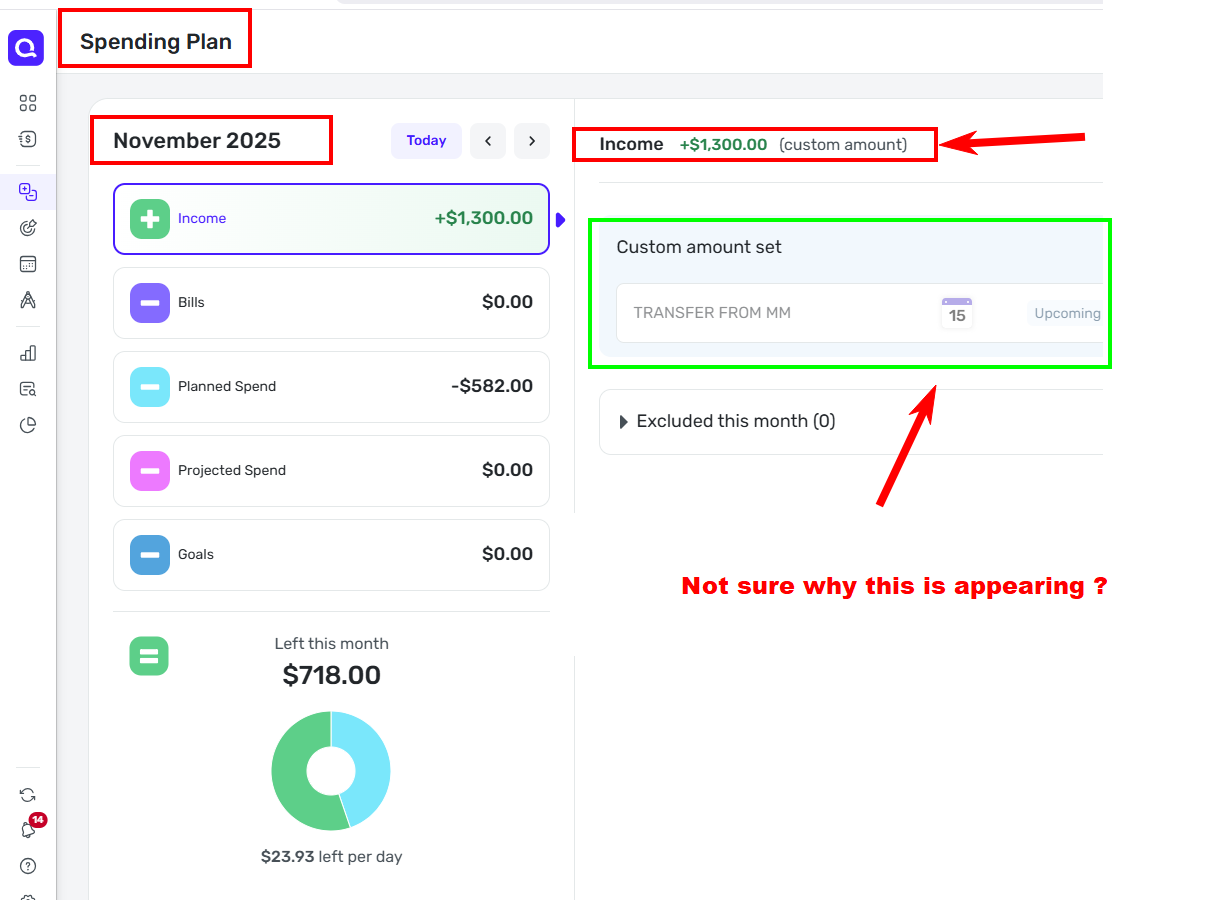
2025 ! as I have made some changes to planned spending moving forward for monthly bills that are reasonably predictable.
In the sreen shot at the top with a box around it and and arrow, highlights the custom income I somehow set but can not for the life of me determine how , this the CUSTOM INCOME amount I need to be able to modify as needed , as I have some upcoming changes pension etc that will require me updating this amount as it is what my Spending Planreferences as income at this juncture and I have advanced the dates vewing through October 2026 the last date the web app would permit and the Custom Income carried over each month :) This leaves two rather rather simple questions to be address- How do I change the Custom Income Amount shown ib the screenshot as needed ?
- Can I be assured that this custom Income amount after changing will be carried over to future months without manual requiring my manual intervention each month ?
I hope this is much clearer than my intial inquiry ! I DO BELIVE THE SCREEN SHOT CARRIES THE WEIGHT OF THE TIMLESS ANOLGY A PICTURE IS WORTH A THOUSAND WORDS ! THANKS, Z1R😐️
0 -
If you just want a transfer to show up as Income, you might get some help from the comment linked below and the surrounding discussion.
Note that, to make it work, you have to break the transfer into two separate transactions so it isn't really a "Transfer" category anymore. To represent the transfer, you create one transaction that removes money from your Money Market Account and a separate transaction that adds money to your Checking Account.
DryHeat
-Quicken Classic (1990-2020), CountAbout (2021-2024), Simplifi (2025-…)0 -
Hello @z1r,
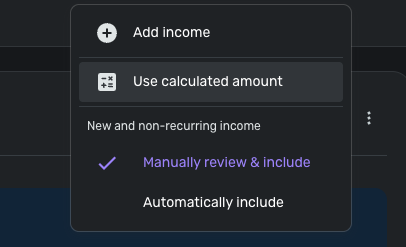
I understand what happened now from your screenshot, thanks for that! It looks like you set a custom income amount via the 3-dot menu to the right of the Income tab in the Spending Plan. This allows users to set custom amounts for their income instead of using the calculated amount.

You should be able to select the 3-dot menu again and select "use calculated amount" to revert from using the custom amount you set if you wish.
I hope this helps!
-Coach Jon
-Coach Jon
1 -
Jon, Thanks. I had figured that much out. However this reminds me of how I originally set the $1300.00 Custom Income. The dilemma I am faced with at this and future junctures is how do I delete the $1300.00 value and replace it with a different value ? I am soon entering retirement and will need to change the custom $$$ amount to reflect $$$$ in my monthly allocated budget. Hope this makes sense ! Thanks again 😏
0 -
Assuming you have done as @Coach Jon suggested and clicked on "Use calculated amount," just click on "Set custom amount" again and type in a different number. That's all there is to it.
DryHeat
-Quicken Classic (1990-2020), CountAbout (2021-2024), Simplifi (2025-…)0

